Sponsored

Setting up gearguard drivecam with new usb drive

Cortles

Active Member
First Name
Corey
Joined
Feb 4, 2024
Threads
3
Messages
27
Reaction score
35
Location
New Jersey
Vehicles
Rivian R1S
Occupation
Analyst
I’ve been unable to setup a new usb drive to record gear guard drivecam but the car does not recognize any usb-c memory drive. I’ve followed the instructions that many have posted online (format fat32, create gear guard folder etc) and bought multiple different branded 256gb usb drives but the car doesn’t register when I plug it in. Does anyone else have this problem? What’s the solution?
Sponsored

 

coney129

Well-Known Member
First Name
John
Joined
Jun 16, 2024
Threads
10
Messages
49
Reaction score
40
Location
Philadelphia
Vehicles
2025 Rivian R1S
Which model vehicle. There’s been a patern of similar posts with a software bug on gen 2. Myself having the same issue. I’ve placed a service ticket.
 
OP
OP
Cortles

Cortles

Active Member
First Name
Corey
Joined
Feb 4, 2024
Threads
3
Messages
27
Reaction score
35
Location
New Jersey
Vehicles
Rivian R1S
Occupation
Analyst
Which model vehicle. There’s been a patern of similar posts with a software bug on gen 2. Myself having the same issue. I’ve placed a service ticket.
It’s Gen 1. I message them but they’ve requested I call them so will do that this week. Just wondered if there was an easy fix.
 

coney129

Well-Known Member
First Name
John
Joined
Jun 16, 2024
Threads
10
Messages
49
Reaction score
40
Location
Philadelphia
Vehicles
2025 Rivian R1S
Curious if the charger works when you plug a usb-c in? Not sure if you checked that. Mine won’t charge either when the drive cam won’t work
 

Milo

Active Member
Joined
Nov 18, 2022
Threads
5
Messages
29
Reaction score
51
Location
California
Vehicles
R1T
I’ve been unable to setup a new usb drive to record gear guard drivecam but the car does not recognize any usb-c memory drive. I’ve followed the instructions that many have posted online (format fat32, create gear guard folder etc) and bought multiple different branded 256gb usb drives but the car doesn’t register when I plug it in. Does anyone else have this problem? What’s the solution?
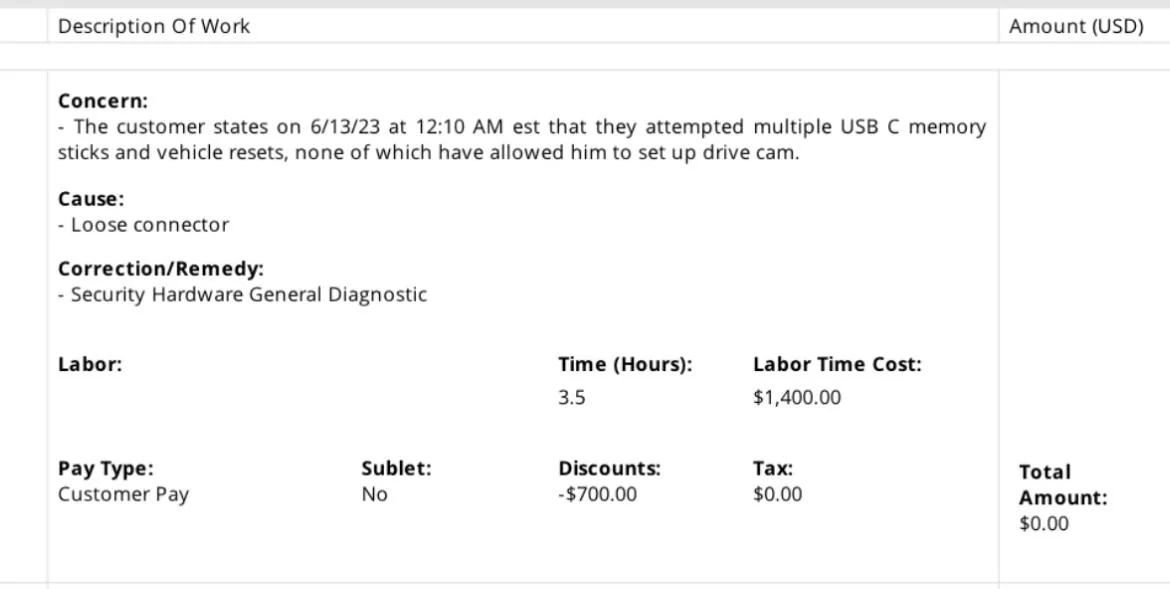
You have to submit a service request, I had the same issues, tried multiple USB, format to FAT32, screen reset and hard reset, to no avail. The Technician found a loose connector, no issues ever since.

Rivian R1T R1S Setting up gearguard drivecam with new usb drive IMG_5363
 

Sponsored

André

Well-Known Member
First Name
André
Joined
Oct 25, 2021
Threads
9
Messages
339
Reaction score
461
Location
Quebec, Canada
Vehicles
Tesla Model Y Long Range, RIVIAN R1T Quad 2024
Occupation
Finances
Do the screens reset and it should work after reboot.
 
OP
OP
Cortles

Cortles

Active Member
First Name
Corey
Joined
Feb 4, 2024
Threads
3
Messages
27
Reaction score
35
Location
New Jersey
Vehicles
Rivian R1S
Occupation
Analyst
Curious if the charger works when you plug a usb-c in? Not sure if you checked that. Mine won’t charge either when the drive cam won’t work
The charger does work as I have a MagSafe plugged into it. I’ve also reset the system to no avail.
 

mpshizzle

Well-Known Member
Joined
Jun 16, 2024
Threads
76
Messages
1,307
Reaction score
2,179
Location
Utah
Vehicles
2025 R1S Dual Max (Baymax)
You have to submit a service request, I had the same issues, tried multiple USB, format to FAT32, screen reset and hard reset, to no avail. The Technician found a loose connector, no issues ever since.

IMG_5363.jpeg
Well good thing this was a warranty repair for you. I sincerely hope that they wouldn't charge $1400 to plug in a connector for an out of warranty vehicle.
 

Sagesq

Well-Known Member
First Name
Stacey
Joined
Feb 13, 2024
Threads
1
Messages
46
Reaction score
22
Location
South Florida
Vehicles
R1S
Occupation
Attorney
Clubs
 
Make sure that you have a compatible drive. The Samsung T9 works perfectly. At first I try to drive that would much smaller, you should have at least a terabyte if not more. Also, make sure that the cable works, and not some offbrand nonsense. Also do a soft reboot.
 

Mljmam

Active Member
First Name
Mark
Joined
Dec 23, 2023
Threads
0
Messages
26
Reaction score
27
Location
Opelika, AL
Vehicles
R1S
Occupation
Retired
I wasted a couple hundred dollars trying to find a workable usb drive. I finally consulted my geek brother for guidance. He informed me that only flash drives with a certain processing speed would be compatible. He also explained that some solid state drives would work, but be destroyed by the way they have to process the files to play them back. Here is what I bought per his specs. It connected, formatted, and worked the first time, and has been great and fast so far. Rivian should have included this equipment, or provided much more guidance, as it is too technical for an average customer. I bought an angular plug and an adapter with a short cable as well, so it can lay out of the way. Good luck. It is a nice feature when you get it working.

Limited-time deal: MOVE SPEED 1TB USB C Flash Drive, 1000MB/s Read Write Speed, USB 3.2 Gen2+Type C Dual Interface SSD USB Drive with Keychain Leather Case Thumb Drive for iPhone 15 Series/MacBook/Android Phone etc https://a.co/d/059f07sC

USB 4 Extension Cable 240W 1FT, Right Angle Thunderbolt 4/3 & USB C Male to Female Cable, PD 3.1 Fast Charging 40Gbps 8K@60Hz Video, Type C Extender Cord, for MacBook,iPad Pro/Air,Galaxy S24 S23 https://a.co/d/0aj677B3
 

Sponsored

Laserboy1054

Well-Known Member
Joined
May 5, 2024
Threads
32
Messages
399
Reaction score
809
Location
Hamel, IL
Vehicles
Rivian R1T
Clubs
 
I had an issue (that I "solved" by ignoring it) that might apply here: when I installed the drive in the center console, I had my phone (Android) plugged into the other USB-C port in the console. The truck couldn't write to the drive. But when I removed the phone, everything was peachy! I _think_ the system cannot handle two writeable entities hooked up simultaneously. So I just charge me phone using a different USB port. I _think_ (haven't tried it yet, but it's on the list) that I can connect something that just uses the USB for power while the disk is hooked up to the other port in the console, but it can only handle the one item that uses the USB for data.

Do you have something plugged in to the other USB in the console while you're trying to set up the drive?
 

Spork8

Well-Known Member
First Name
Trevor
Joined
Feb 18, 2022
Threads
1
Messages
134
Reaction score
148
Location
KZoo
Vehicles
2022 R1T
Occupation
Engineer
Clubs
 
Rivian should have included this equipment, or provided much more guidance, as it is too technical for an average customer
It's on page 311 and 312 of the manual.
I have a $20 USB drive that works great over the past 2 years.

For OP - it would help to test if plugging a regular USB-C cable in and see if it works for charging a phone. If so, it sounds like the charging pins are connected and the data pins are not. Try in both USB ports in the console. Either way, should open a service ticket to have them repair the connector(s).
 

SwampNut

Well-Known Member
First Name
Carlos
Joined
Apr 22, 2024
Threads
50
Messages
3,383
Reaction score
3,594
Location
Peoria AZ
Vehicles
2022 R1T Launch Edition
Occupation
Geek
Clubs
 
This is what I'm using, but I also had tried a smaller one that worked too.

Samsung Type-C™ USB Flash Drive,... https://www.amazon.com/dp/B09WB2NL8W?ref=ppx_pop_mob_ap_share

Stupid question, but...you're using the in-console ports and not the rear of console ports? Also this should NOT matter but try flipping the drive over. Are you using a cable or adapter? Is it a native USB-C drive? With USB-A to C cables direction often matters because it's a shitty cable.
 
OP
OP
Cortles

Cortles

Active Member
First Name
Corey
Joined
Feb 4, 2024
Threads
3
Messages
27
Reaction score
35
Location
New Jersey
Vehicles
Rivian R1S
Occupation
Analyst
This is what I'm using, but I also had tried a smaller one that worked too.

Samsung Type-C™ USB Flash Drive,... https://www.amazon.com/dp/B09WB2NL8W?ref=ppx_pop_mob_ap_share

Stupid question, but...you're using the in-console ports and not the rear of console ports? Also this should NOT matter but try flipping the drive over. Are you using a cable or adapter? Is it a native USB-C drive? With USB-A to C cables direction often matters because it's a shitty cable.
That is the exact drive I bought the second time. I plugged it directly into the left port inside the center console. I also tried the right port too. No cables were used/harmed in this. Sounds like I’ve got a defect that I’m going to have to call them on.
 

SwampNut

Well-Known Member
First Name
Carlos
Joined
Apr 22, 2024
Threads
50
Messages
3,383
Reaction score
3,594
Location
Peoria AZ
Vehicles
2022 R1T Launch Edition
Occupation
Geek
Clubs
 
That is the exact drive I bought the second time. I plugged it directly into the left port inside the center console. I also tried the right port too. No cables were used/harmed in this. Sounds like I’ve got a defect that I’m going to have to call them on.
Does sound like your truck is broken, unfortunately.
Sponsored


Top