Sponsored

superfluid

Well-Known Member
Joined
Mar 29, 2021
Threads
20
Messages
290
Reaction score
923
Location
Austin, TX
Vehicles
Rivian R1S, Kia Telluride
Occupation
Tech and data
Clubs
 
This is the fourth in a series of posts about how to improve how your Rivian’s audio system sounds. Find the other three here:
  1. Gen 1 R1S Elevation 2024.27.01 and 35.00
  2. Gen 1 R1S Elevation Pre-2024.27.01
  3. Gen 1 R1T Meridian Pre-2024.27.01
? If this or any of my other posts improves your sound, please consider buying me a cup of sake. Kanpai!

TLDR:
  1. Flatten your EQ by using the “Default” setting or the reset icon.
  2. Set 3D Surround Sound to Off.
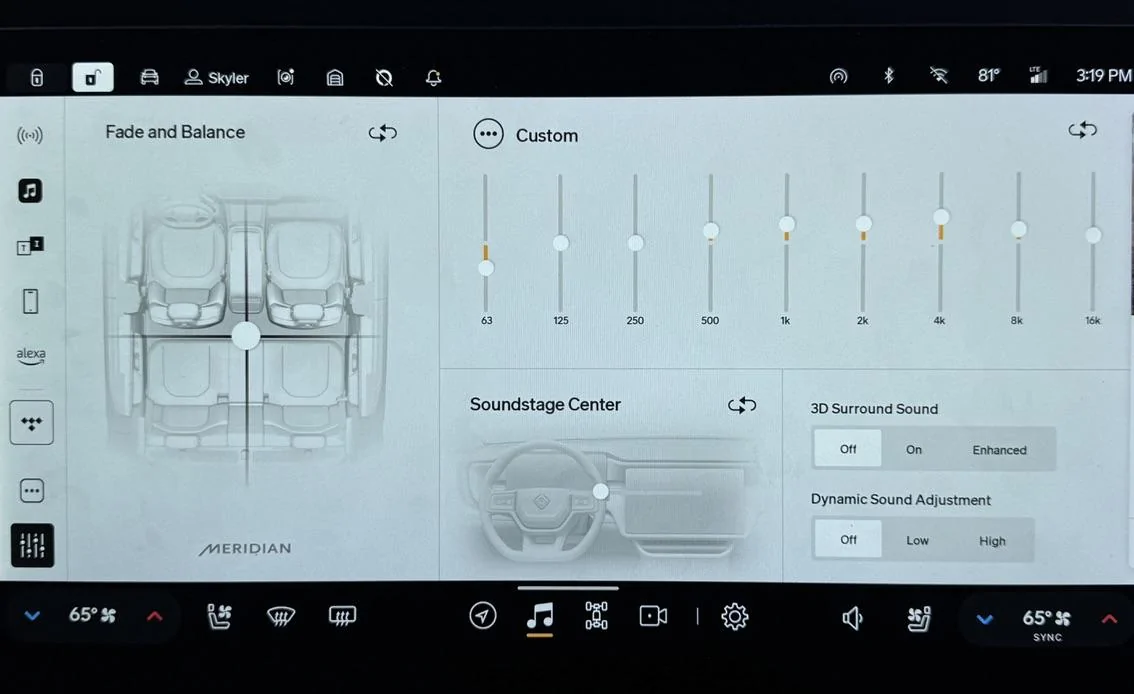
  3. For stereo tracks, use these EQ settings: 63 Hz -4, 125 Hz 0, 250 Hz 0, 500 Hz +2, 1 kHz +3, 2 kHz +3, 4 kHz +4, 8 kHz +2, 16 kHz +1.
  4. For Dolby Atmos tracks, use these EQ settings (see note* below): 63 Hz -2, 125 Hz 0, 250 Hz 0, 500 Hz +2, 1 kHz +3, 2 kHz +2, 4 kHz +2, 8 kHz +1, 16 kHz +1.
  5. Use Tidal, Apple Music, or Spotify set to the highest streaming bitrate. Avoid Bluetooth for music playback.
  6. Start with your volume set to 10.
  7. Listen to a song you know well.
  8. Adjust EQ to taste.
If you try these settings, let me know how they sound.

Tip: Listen to the new setting for a while using familiar songs at low volume and higher-than-average volume. Your ears/brain may take a bit to get accustomed to the new balance. What should happen is that you hear instruments/sounds more clearly because overtly emphasized frequency ranges aren't drawing attention away from others. Then tweak to taste.

Rivian R1T R1S How to Improve a Gen 1 Rivian R1S’s Meridian Sound System After Update 2024.27.01/35.00 With Simple EQ Changes 8022C75B-5F94-42C5-B0A7-A8B2E6AADA35_1_105_c


I measured @skyote 's Gen 1 R1S Meridian system with OTA 2024.35.00. Its release notes don't mention changes that affect sound quality so I expect it to behave the same as 2024.27.01 when Rivian implemented Atmos in all vehicle models aside from Gen 2 Standard. See my previous Gen 1 R1S post to understand the sound-quality-related changes that 2024.27.01 brought. This post focuses on improving the sound quality of the Gen 1 R1S Meridian system with OTA 2024.27.01/2024.35.00.

Objectives, Methodology, and Tests

Objectives


I ran tests to answer these questions:
  1. Is the system louder after the 2024.27.01/35.00 update and is it a good thing?
  2. What EQ settings improve sound quality after the update?
Why wasn't testing Atmos an objective? I forgot to listen to Atmos music. I haven't made it a habit yet—none of the music I listen to daily has an Atmos mix. Therefore, my Atmos EQ recommendation is a guess based on what I heard in my Gen 1 R1S Elevation after OTA 2024.27.01 when Atmos got a lot of attention. I intend to make Atmos a regular part of my testing by creating a reference playlist with only Atmos-mixed music. If you find my Atmos EQ recommendation way off in your Gen 1 R1S Meridian, let me know and I'll see about doing another listening test.

Why didn't I test with Apple Music? Because I don't use it. TIDAL has consistently provided the highest playback quality in all the Rivians I've listened to. That may not be the case anymore. More on that below.

Methodology
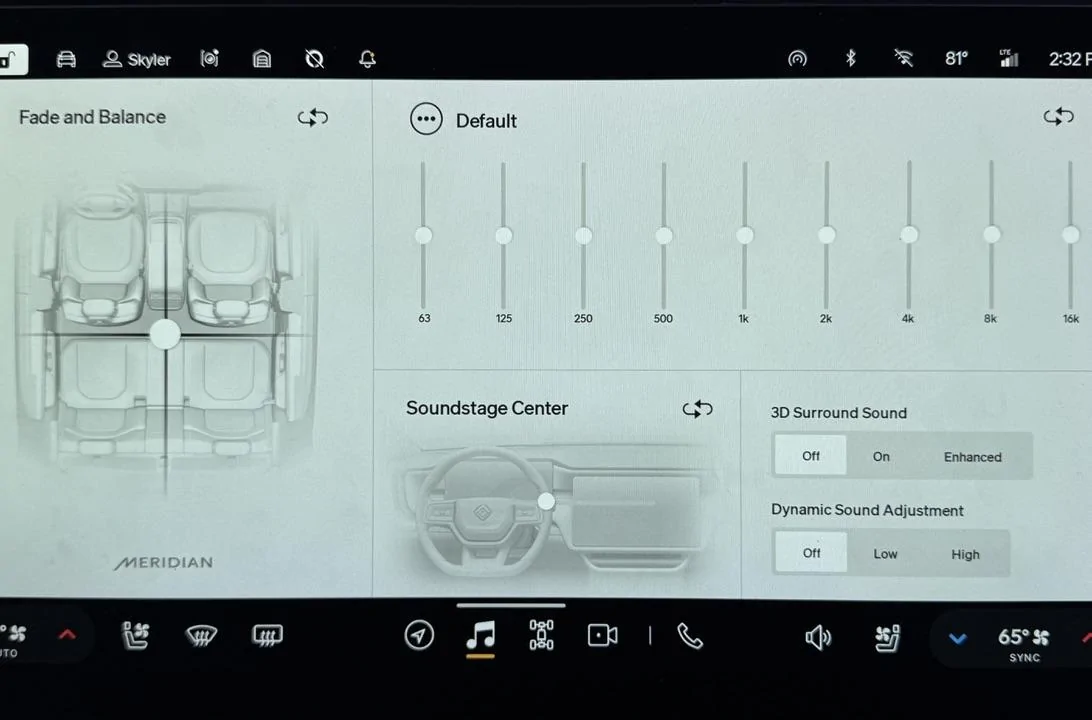
  • Flattened the EQ using the Default setting.
  • Turned off 3D Surround Sound and Dynamic Sound Adjustment.
  • Set Fade and Balance and Soundstage Center to default.
  • Turned off climate control to reduce in-cabin noise as much as possible.
  • Put a calibrated UMIK-1 microphone roughly where my ears would be in the driver’s seat.
  • Connected my MacBook Pro to the Rivian Audio system via Bluetooth. This connection method had meaningful downsides—namely data and resolution loss—but there's no other way to make the vehicle a target audio device. USB doesn’t work.
  • Set the Rivian’s volume to 10. I originally set it to 15 to give me 75 dB of pink noise, C-weighted—a standard level for taking measurements—but 15 kept clipping the input because the bass was too hot. I backed the volume off to 10 to complete measuring.
  • Playback using TIDAL on Master Quality streaming setting.
Rivian R1T R1S How to Improve a Gen 1 Rivian R1S’s Meridian Sound System After Update 2024.27.01/35.00 With Simple EQ Changes E8F75D31-CEC8-4152-B624-95C0CEAD4FB6_1_105_c


Tests

As mentioned, I ran sweeps from 10 Hz to 20 kHz with the microphone in a fixed position where the average person's head would be (in front of the headrest) and RTA with full-bandwidth pink noise while moving the microphone in 3D space. I explain in detail why we take frequency response measurements and how it influences EQ changes here.

Results, Analysis, and Recommendations

We’ll answer each question one by one.

Q: Is the system louder after the 2024.27.01/35.00 update and is it a good thing?

A: It's likely louder and that's a good thing.


Low volume was a big complaint before the 2024.27.01 update. 2024.27.01 boosted volume (likely via DAC output) considerably, improving sound quality significantly. (A detailed explanation of why here.) However, I couldn't accurately measure the difference in volume of Syler's R1S before 2024.27.01 and after because of the clipping issue I mentioned earlier. What I did record, however, was that I reached listening levels in his vehicle at volume 16 prior to 2024.27.01 but at 12 after 2024.35.00. That leads me to conclude that the update boosted the volume. I'd wager an increase in DAC output was the cause.

Q: What EQ settings improve sound quality after the update?

A1: For stereo tracks: 63 Hz -4, 125 Hz 0, 250 Hz 0, 500 Hz +2, 1 kHz +3, 2 kHz +3, 4 kHz +4, 8 kHz +2, 16 kHz +1

A2: For Atmos tracks: 63 Hz -2, 125 Hz 0, 250 Hz 0, 500 Hz +2, 1 kHz +3, 2 kHz +2, 4 kHz +2, 8 kHz +1, 16 kHz +1 (A guess. See note above in Objectives, Methodology, and Tests.)


Listening Tests

Using a listening volume of 12:

- Flat EQ -

Rivian R1T R1S How to Improve a Gen 1 Rivian R1S’s Meridian Sound System After Update 2024.27.01/35.00 With Simple EQ Changes 1728010798879-4g


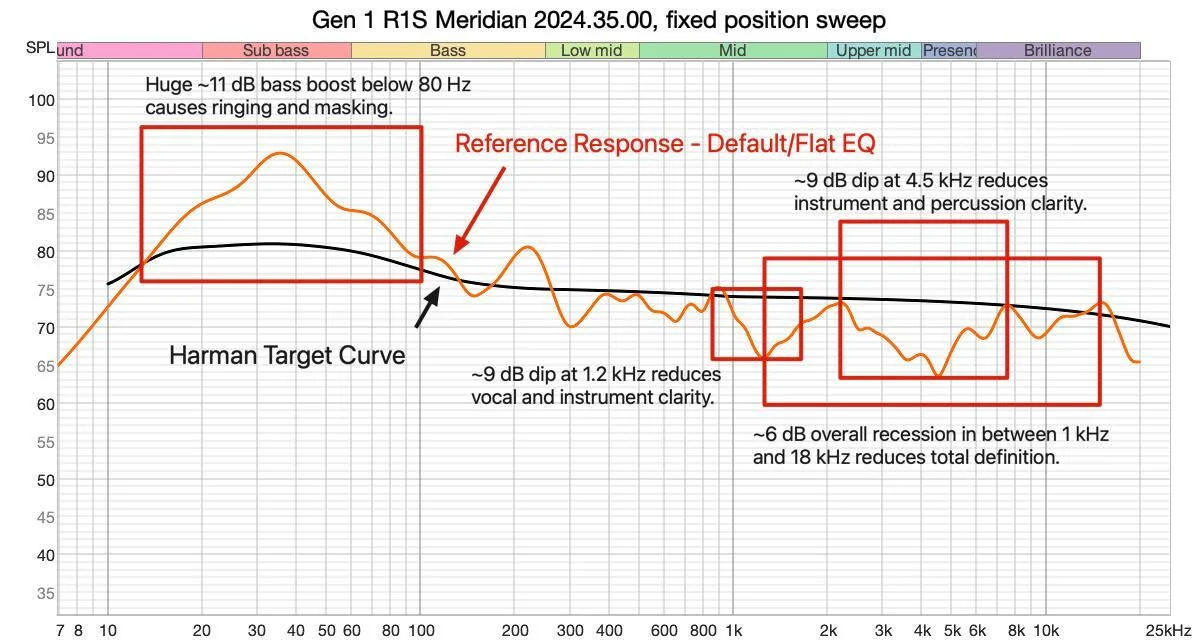
The first thing that jumped out at me was that the bass was too hot, confirming the cause of the clipping issue I had earlier. I'm a bass head but it boomed, rang, and overpowered the rest of the music.

Listening to Send My Love by Adele, vocals were muddy. The kick drum rang. The snap of the acoustic guitar strings lacked definition.

Listening to Lost Cause by Billie Eilish, vocals were similarly muddy. The slap bass rang and lacked definition in its attack.

Those results conformed with the recessed region between 1 kHz and 18 kHz I saw in my measurements.

Honestly, I was a bit puzzled by this result. I remember the Gen 1 Meridian system measuring and sounding much better than this. But auditory memory is notoriously unreliable. What mattered was how much I could improve it.

After making numerous EQ tweaks and listening to many more tracks spanning genres, I arrived at the following settings.

- EQ # 3 -

(Why didn't I post EQ attempts #1 or #2? Because they lengthen the post and people care about the "best" settings, anyway.)

63 Hz -4, 125 Hz 0, 250 Hz 0, 500 Hz +2, 1 kHz +3, 2 kHz +3, 4 kHz +4, 8 kHz +2, 16 kHz +1

These settings addressed the boomy bass and recessed mids and high regions.

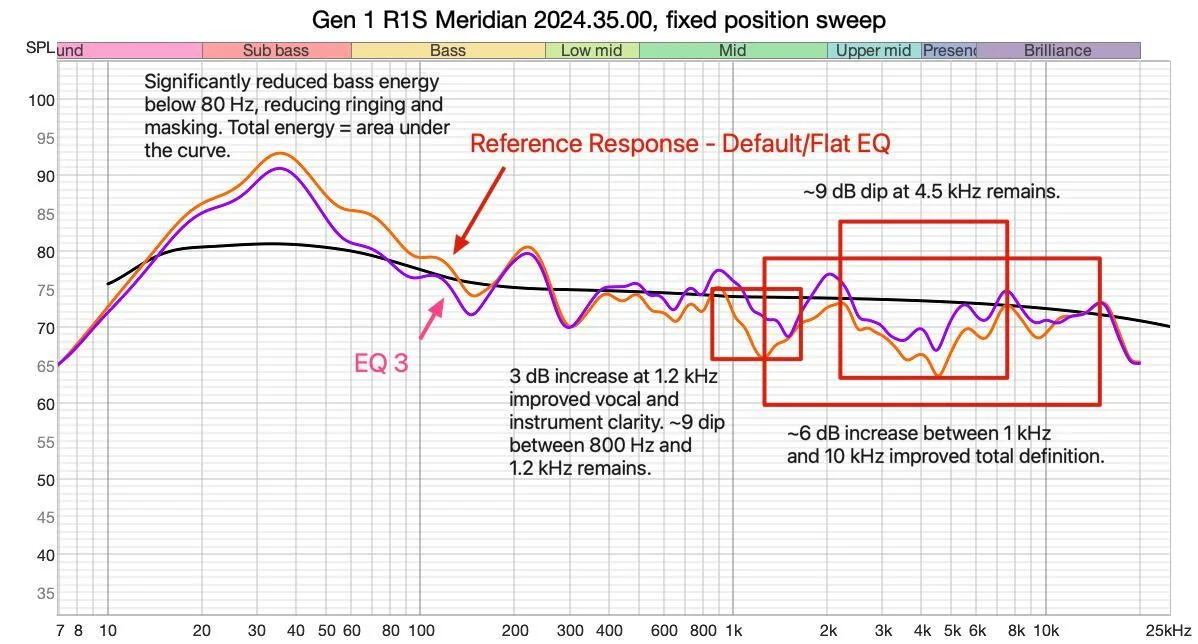
The purple line is the response curve after applying EQ 3. The orange line is the Flat EQ response curved used for reference.

Rivian R1T R1S How to Improve a Gen 1 Rivian R1S’s Meridian Sound System After Update 2024.27.01/35.00 With Simple EQ Changes 1728013839294-a2


Listening to Send My Love by Adele, vocals were much clearer, though still lacking the sharp definition I expected from the Meridian system. The kick drum tightened up. The acoustic guitar's definition improved but, again, not as sharply as I expected it to given how much I boosted it.

Listening to Lost Cause by Billie Eilish, vocal clarity improved. The slap bass thumped more solidly, though still rang. Cutting 500 Hz reduced ringing but left bass guitars and kick drums sounding hollow.

Listening to Crush (Live at Radio City Music Hall) by Dave Matthews, his vocals were chesty and clear. Tim Reynold's acoustic guitar was reverberant. That said, both lacked the resolution I was expecting to hear.

This was the best I got it to sound during the time I had with Skyler's vehicle.

The Meridian system's lack of apparent resolution puzzled me. My working theory is that TIDAL streamed at a lower bit rate than it should have—320 kpbs instead of at CD+ quality (44.1 kHz, 16-bit), even when using the Master Quality setting. So while these EQ settings improved the frequency response balance to my ears, I didn't hear the detail from my reference tracks I was accustomed to hearing. Apple Music might have given a different result, but I didn't think about it since I don't have a subscription to it and don't use it. I don't use Spotify for listening tests because it streams at 320 kpbs.

If you're curious, I currently think the Gen 1 Elevation system sounds better than the Gen 1 Meridian system when using TIDAL as a source. I find this particularly ironic since I bought my Rivian expecting to get the Meridian system and—like many—got upset when Rivian switched it out for the Elevation. Now I'm less upset. What a difference software can make. Let's see what the next update brings.

Thanks to Skyler for allowing me to measure his R1S—and for the eggs!

If you found this post beneficial, please consider buying me a cup of sake. I'd appreciate it. Kanpai!


Rivian R1T R1S How to Improve a Gen 1 Rivian R1S’s Meridian Sound System After Update 2024.27.01/35.00 With Simple EQ Changes 1728013872428-7h
Sponsored

 
Last edited:

Chewy734

Well-Known Member
First Name
Ashu
Joined
Nov 8, 2020
Threads
27
Messages
1,319
Reaction score
2,732
Location
Los Angeles
Vehicles
BMW, Ford, Rivian
Clubs
 
How do you propose adjusting the EQ for every track depending on whether it’s Atmos or not? Seems like it’s a cumbersome solution.
 
OP
OP
superfluid

superfluid

Well-Known Member
Joined
Mar 29, 2021
Threads
20
Messages
290
Reaction score
923
Location
Austin, TX
Vehicles
Rivian R1S, Kia Telluride
Occupation
Tech and data
Clubs
 
Thank you! Are you going to do a Meridian R1T 2024.35.00 or would the R1S settings above also work?
Based on the Gen 1 R1S Meridian and Gen 1 R1T Meridian measurements I did way back, the two systems seem similar. I’d guess the R1S settings above would translate to the R1T, but I couldn’t give a definitive because the software updates seem to change sound system performance significantly from version to version. I’d say it’s worth a shot, though.
 
OP
OP
superfluid

superfluid

Well-Known Member
Joined
Mar 29, 2021
Threads
20
Messages
290
Reaction score
923
Location
Austin, TX
Vehicles
Rivian R1S, Kia Telluride
Occupation
Tech and data
Clubs
 
How do you propose adjusting the EQ for every track depending on whether it’s Atmos or not? Seems like it’s a cumbersome solution.
Yeah, I personally don’t think that’s worth doing. I set mine for stereo and leave it because I rarely listen to Atmos in the car. If you mostly listen to Atmos, I’d leave it set to that. I hope Rivian implements auto-switching EQ in the future.
 

Sponsored

Chewy734

Well-Known Member
First Name
Ashu
Joined
Nov 8, 2020
Threads
27
Messages
1,319
Reaction score
2,732
Location
Los Angeles
Vehicles
BMW, Ford, Rivian
Clubs
 
Yeah, I personally don’t think that’s worth doing. I set mine for stereo and leave it because I rarely listen to Atmos in the car. If you mostly listen to Atmos, I’d leave it set to that. I hope Rivian implements auto-switching EQ in the future.
Sounds good. Thanks for the write up… this is great work!
 

johnnylawson

Well-Known Member
First Name
John
Joined
Sep 6, 2020
Threads
22
Messages
219
Reaction score
453
Location
Cincinnati
Vehicles
2022 LE LG Rivian R1S, 2024 Volvo XC40 Recharge
Occupation
Director, Technical Architecture / Developer
Clubs
 
Just to note - I gave an @uber ride to an audio engineer. He currently works on mixing songs for @Dolby Atmos for several labels. His jaw dropped when I fired up some Dolby Atmos songs in the @Rivian R1S with the @MeridianAudio.
 

KnightRider

Member
Joined
Jan 21, 2024
Threads
0
Messages
9
Reaction score
10
Location
Chicago
Vehicles
R1S, Audi TTS
This is the fourth in a series of posts about how to improve how your Rivian’s audio system sounds. Find the other three here:
  1. Gen 1 R1S Elevation 2024.27.01 and 35.00
  2. Gen 1 R1S Elevation Pre-2024.27.01
  3. Gen 1 R1T Meridian Pre-2024.27.01
? If this or any of my other posts improves your sound, please consider buying me a cup of sake. Kanpai!

TLDR:
  1. Flatten your EQ by using the “Default” setting or the reset icon.
  2. Set 3D Surround Sound to Off.
  3. For stereo tracks, use these EQ settings: 63 Hz -4, 125 Hz 0, 250 Hz 0, 500 Hz +2, 1 kHz +3, 2 kHz +3, 4 kHz +4, 8 kHz +2, 16 kHz +1.
  4. For Dolby Atmos tracks, use these EQ settings (see note* below): 63 Hz -2, 125 Hz 0, 250 Hz 0, 500 Hz +2, 1 kHz +3, 2 kHz +2, 4 kHz +2, 8 kHz +1, 16 kHz +1.
  5. Use Tidal, Apple Music, or Spotify set to the highest streaming bitrate. Avoid Bluetooth for music playback.
  6. Start with your volume set to 10.
  7. Listen to a song you know well.
  8. Adjust EQ to taste.
If you try these settings, let me know how they sound.

Tip: Listen to the new setting for a while using familiar songs at low volume and higher-than-average volume. Your ears/brain may take a bit to get accustomed to the new balance. What should happen is that you hear instruments/sounds more clearly because overtly emphasized frequency ranges aren't drawing attention away from others. Then tweak to taste.
8022C75B-5F94-42C5-B0A7-A8B2E6AADA35_1_105_c.jpeg


I measured @skyote 's Gen 1 R1S Meridian system with OTA 2024.35.00. Its release notes don't mention changes that affect sound quality so I expect it to behave the same as 2024.27.01 when Rivian implemented Atmos in all vehicle models aside from Gen 2 Standard. See my previous Gen 1 R1S post to understand the sound-quality-related changes that 2024.27.01 brought. This post focuses on improving the sound quality of the Gen 1 R1S Meridian system with OTA 2024.27.01/2024.35.00.

Objectives, Methodology, and Tests

Objectives


I ran tests to answer these questions:
  1. Is the system louder after the 2024.27.01/35.00 update and is it a good thing?
  2. What EQ settings improve sound quality after the update?
Why wasn't testing Atmos an objective? I forgot to listen to Atmos music. I haven't made it a habit yet—none of the music I listen to daily has an Atmos mix. Therefore, my Atmos EQ recommendation is a guess based on what I heard in my Gen 1 R1S Elevation after OTA 2024.27.01 when Atmos got a lot of attention. I intend to make Atmos a regular part of my testing by creating a reference playlist with only Atmos-mixed music. If you find my Atmos EQ recommendation way off in your Gen 1 R1S Meridian, let me know and I'll see about doing another listening test.

Why didn't I test with Apple Music? Because I don't use it. TIDAL has consistently provided the highest playback quality in all the Rivians I've listened to. That may not be the case anymore. More on that below.

Methodology
  • Flattened the EQ using the Default setting.
  • Turned off 3D Surround Sound and Dynamic Sound Adjustment.
  • Set Fade and Balance and Soundstage Center to default.
  • Turned off climate control to reduce in-cabin noise as much as possible.
  • Put a calibrated UMIK-1 microphone roughly where my ears would be in the driver’s seat.
  • Connected my MacBook Pro to the Rivian Audio system via Bluetooth. This connection method had meaningful downsides—namely data and resolution loss—but there's no other way to make the vehicle a target audio device. USB doesn’t work.
  • Set the Rivian’s volume to 10. I originally set it to 15 to give me 75 dB of pink noise, C-weighted—a standard level for taking measurements—but 15 kept clipping the input because the bass was too hot. I backed the volume off to 10 to complete measuring.
  • Playback using TIDAL on Master Quality streaming setting.
E8F75D31-CEC8-4152-B624-95C0CEAD4FB6_1_105_c.jpeg


Tests

As mentioned, I ran sweeps from 10 Hz to 20 kHz with the microphone in a fixed position where the average person's head would be (in front of the headrest) and RTA with full-bandwidth pink noise while moving the microphone in 3D space. I explain in detail why we take frequency response measurements and how it influences EQ changes here.

Results, Analysis, and Recommendations

We’ll answer each question one by one.

Q: Is the system louder after the 2024.27.01/35.00 update and is it a good thing?

A: It's likely louder and that's a good thing.


Low volume was a big complaint before the 2024.27.01 update. 2024.27.01 boosted volume (likely via DAC output) considerably, improving sound quality significantly. (A detailed explanation of why here.) However, I couldn't accurately measure the difference in volume of Syler's R1S before 2024.27.01 and after because of the clipping issue I mentioned earlier. What I did record, however, was that I reached listening levels in his vehicle at volume 16 prior to 2024.27.01 but at 12 after 2024.35.00. That leads me to conclude that the update boosted the volume. I'd wager an increase in DAC output was the cause.

Q: What EQ settings improve sound quality after the update?

A1: For stereo tracks: 63 Hz -4, 125 Hz 0, 250 Hz 0, 500 Hz +2, 1 kHz +3, 2 kHz +3, 4 kHz +4, 8 kHz +2, 16 kHz +1

A2: For Atmos tracks: 63 Hz -2, 125 Hz 0, 250 Hz 0, 500 Hz +2, 1 kHz +3, 2 kHz +2, 4 kHz +2, 8 kHz +1, 16 kHz +1 (A guess. See note above in Objectives, Methodology, and Tests.)


Listening Tests

Using a listening volume of 12:

- Flat EQ -
1728010798879-4g.jpg


The first thing that jumped out at me was that the bass was too hot, confirming the cause of the clipping issue I had earlier. I'm a bass head but it boomed, rang, and overpowered the rest of the music.

Listening to Send My Love by Adele, vocals were muddy. The kick drum rang. The snap of the acoustic guitar strings lacked definition.

Listening to Lost Cause by Billie Eilish, vocals were similarly muddy. The slap bass rang and lacked definition in its attack.

Those results conformed with the recessed region between 1 kHz and 18 kHz I saw in my measurements.

Honestly, I was a bit puzzled by this result. I remember the Gen 1 Meridian system measuring and sounding much better than this. But auditory memory is notoriously unreliable. What mattered was how much I could improve it.

After making numerous EQ tweaks and listening to many more tracks spanning genres, I arrived at the following settings.

- EQ # 3 -

(Why didn't I post EQ attempts #1 or #2? Because they lengthen the post and people care about the "best" settings, anyway.)

63 Hz -4, 125 Hz 0, 250 Hz 0, 500 Hz +2, 1 kHz +3, 2 kHz +3, 4 kHz +4, 8 kHz +2, 16 kHz +1

These settings addressed the boomy bass and recessed mids and high regions.

The purple line is the response curve after applying EQ 3. The orange line is the Flat EQ response curved used for reference.
1728013839294-a2.jpg


Listening to Send My Love by Adele, vocals were much clearer, though still lacking the sharp definition I expected from the Meridian system. The kick drum tightened up. The acoustic guitar's definition improved but, again, not as sharply as I expected it to given how much I boosted it.

Listening to Lost Cause by Billie Eilish, vocal clarity improved. The slap bass thumped more solidly, though still rang. Cutting 500 Hz reduced ringing but left bass guitars and kick drums sounding hollow.

Listening to Crush (Live at Radio City Music Hall) by Dave Matthews, his vocals were chesty and clear. Tim Reynold's acoustic guitar was reverberant. That said, both lacked the resolution I was expecting to hear.

This was the best I got it to sound during the time I had with Skyler's vehicle.

The Meridian system's lack of apparent resolution puzzled me. My working theory is that TIDAL streamed at a lower bit rate than it should have—320 kpbs instead of at CD+ quality (44.1 kHz, 16-bit), even when using the Master Quality setting. So while these EQ settings improved the frequency response balance to my ears, I didn't hear the detail from my reference tracks I was accustomed to hearing. Apple Music might have given a different result, but I didn't think about it since I don't have a subscription to it and don't use it. I don't use Spotify for listening tests because it streams at 320 kpbs.

If you're curious, I currently think the Gen 1 Elevation system sounds better than the Gen 1 Meridian system when using TIDAL as a source. I find this particularly ironic since I bought my Rivian expecting to get the Meridian system and—like many—got upset when Rivian switched it out for the Elevation. Now I'm less upset. What a difference software can make. Let's see what the next update brings.

Thanks to Skyler for allowing me to measure his R1S—and for the eggs!

If you found this post beneficial, please consider buying me a cup of sake. I'd appreciate it. Kanpai!



1728013872428-7h.jpg
You are such an asset to this community. I literally wait for your post with updated settings after every Rivian update because you change the audio game in the car with your post ??
 
OP
OP
superfluid

superfluid

Well-Known Member
Joined
Mar 29, 2021
Threads
20
Messages
290
Reaction score
923
Location
Austin, TX
Vehicles
Rivian R1S, Kia Telluride
Occupation
Tech and data
Clubs
 
You are such an asset to this community. I literally wait for your post with updated settings after every Rivian update because you change the audio game in the car with your post ??
I appreciate it ? Hope the recs helped!
 

KnightRider

Member
Joined
Jan 21, 2024
Threads
0
Messages
9
Reaction score
10
Location
Chicago
Vehicles
R1S, Audi TTS
I appreciate it ? Hope the recs helped!
Totally helped! Even the passengers could appreciate the positive change in audio output quality. While you have “guessed” about Dolby Atmos EQ settings for this update, my observation has been, your stereo settings work great even for Dolby Atmos encoded songs.
 

Sponsored

OP
OP
superfluid

superfluid

Well-Known Member
Joined
Mar 29, 2021
Threads
20
Messages
290
Reaction score
923
Location
Austin, TX
Vehicles
Rivian R1S, Kia Telluride
Occupation
Tech and data
Clubs
 
Totally helped! Even the passengers could appreciate the positive change in audio output quality. While you have “guessed” about Dolby Atmos EQ settings for this update, my observation has been, your stereo settings work great even for Dolby Atmos encoded songs.
Great to hear. Please consider sending a cup of sake if you’re able!
 

CharonPDX

Well-Known Member
First Name
Charon
Joined
Jul 12, 2021
Threads
31
Messages
2,500
Reaction score
4,173
Location
Cascadia
Vehicles
'22 R1T LE, '16 Model S, '19 Arcimoto FUV
Occupation
InfoSec Geek
Clubs
 
Thanks, these helped greatly!

Now I just need Rivian to adjust the volume scale a bit. Apple Music listening to Dolby Atmos tracks are just too loud. Some times I'm wanting to actually "listen to the music" - and volume 14-15 is *MORE* than enough, even on a loud freeway.

Other times I'm just wanting "background music" while paying attention to other things (driving in the forest with the windows down, being able to have conversations with passengers while still having some background music,) and volume 1 is too quiet, while volume 2 is too loud!

Heck, I was at a BBQ a few weeks ago, and volume 18, with the windows open but doors closed, was still plenty loud for us 30 feet away to not be able to talk to each other without yelling. I don't think I have *EVER* turned it up to 20+.
 

ta2

Member
Joined
May 21, 2024
Threads
1
Messages
10
Reaction score
0
Location
Vancouver
Vehicles
22 R1S LE & 22 Model Y
I have a R1S Launch Edition with Meridian Audio. I just got it recently, and it had 2024.31 installed. The audio sounded awful. I even posted a thread about it here: https://www.rivianforums.com/forum/...tion-w-meridian-audio-defect-or-normal.33426/

---

2024.31
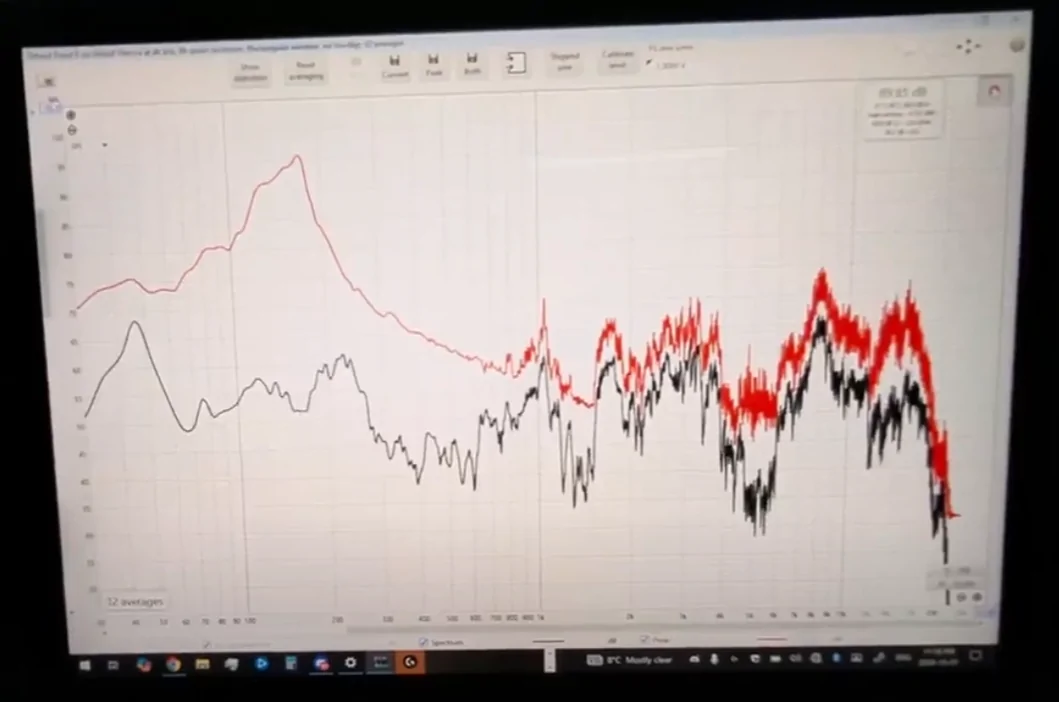
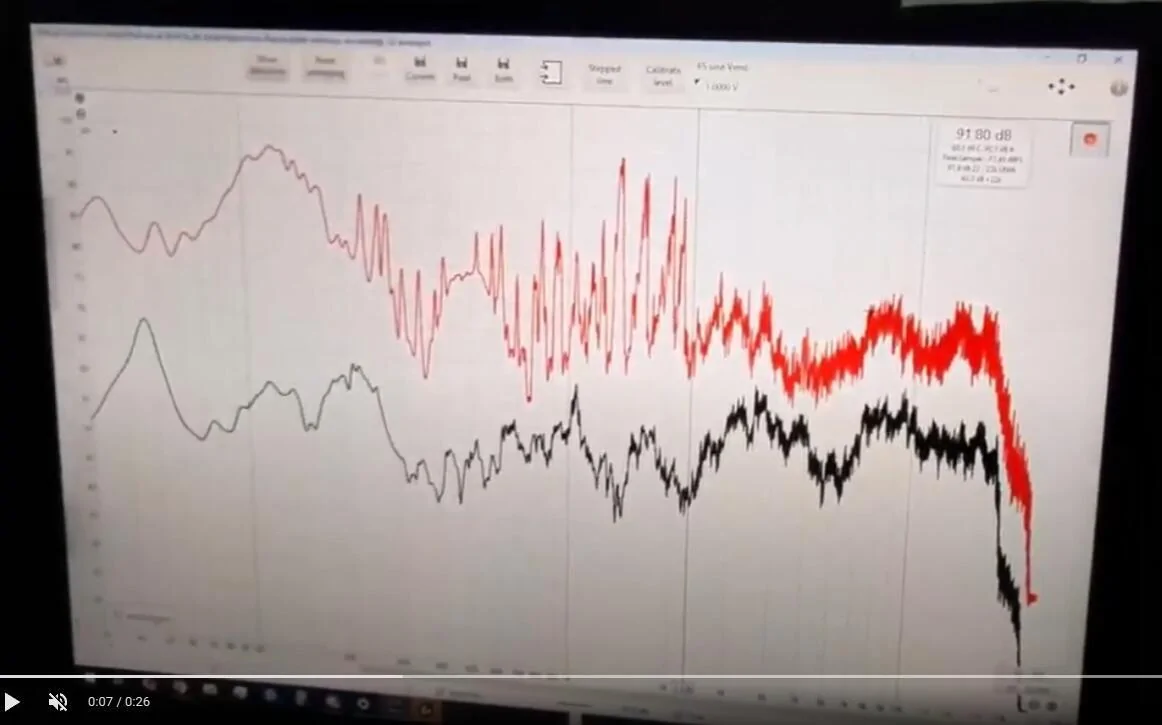
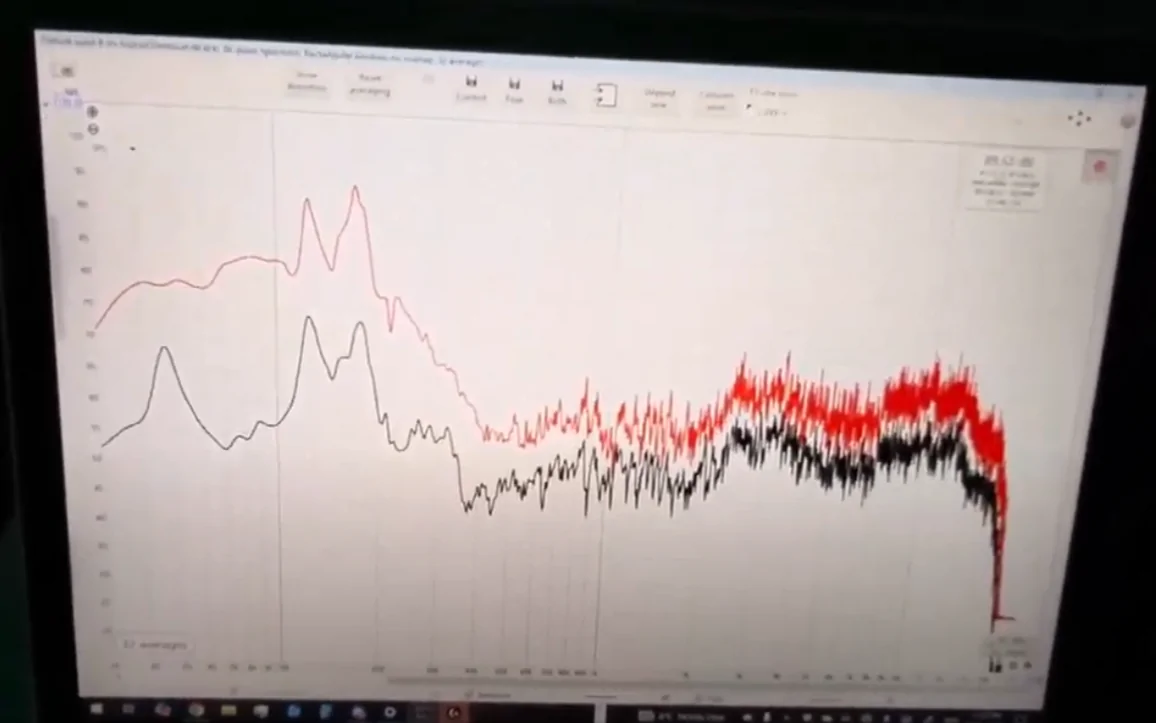
Pretty much only the front center speaker was outputting any sound. The bass sound was insanely high. You can see the ridiculous dip at 4-6K and the ridiculous peak at 8K - leading to pretty much any song losing all clarity at the normal vocal and instrumental ranges.

I applied MAJOR EQ adjustments which helped a bit, but the sound was still awful.

2024.35
Instantly noticeable how the sound is SO much better. The ceiling speakers now actually work, instead of being completely dead. The pillar speakers are the appropriate volume. You can't tell the direction the sound is coming from, it's coming from all around.

I applied a few minor EQ adjustments (mostly only 1-2 notches) to tighten things up, these are also included in the picture below.

---

Honestly, I was thinking of selling the R1S I just bought, because of how bad the audio was on 2024.31. Now I can actually keep it.

Check out the graphs below, it's very obvious what's good and what's not (Tesla still has better audio, but not by much, and the much smaller cabin size is a huge advantage for the Tesla).

2022 R1S LE w/Meridian - 2024.31
Rivian R1T R1S How to Improve a Gen 1 Rivian R1S’s Meridian Sound System After Update 2024.27.01/35.00 With Simple EQ Changes 1728093948232-pq


2022 R1S LE w/Meridian - 2024.35
Rivian R1T R1S How to Improve a Gen 1 Rivian R1S’s Meridian Sound System After Update 2024.27.01/35.00 With Simple EQ Changes 1728094154713-p6


2022 Tesla Model Y LR for reference:
Rivian R1T R1S How to Improve a Gen 1 Rivian R1S’s Meridian Sound System After Update 2024.27.01/35.00 With Simple EQ Changes 1728094040432-jj


Edit: Note that all of the above EQ readings are of white noise generation, not of any specific audio track.
 

BrayBay

Well-Known Member
First Name
Paul
Joined
Aug 22, 2021
Threads
29
Messages
339
Reaction score
625
Location
Texas
Vehicles
Launch Edition R1S - Forest Green/Forest Edge
Clubs
 
Thanks a lot for all the analysis and testing. I'll try out your settings, and see how it goes for a few days. I know it personally takes me some time to adjust and hear a difference.
 

JRock

Well-Known Member
First Name
Joseph
Joined
Jan 24, 2024
Threads
13
Messages
196
Reaction score
283
Location
Lake Barrington, IL
Vehicles
Rivian R1S Volvo XC90 T8 Recharge 1938 Packard Victoria
Occupation
Balderdash and other verities
This is the fourth in a series of posts about how to improve how your Rivian’s audio system sounds. Find the other three here:
  1. Gen 1 R1S Elevation 2024.27.01 and 35.00
  2. Gen 1 R1S Elevation Pre-2024.27.01
  3. Gen 1 R1T Meridian Pre-2024.27.01
? If this or any of my other posts improves your sound, please consider buying me a cup of sake. Kanpai!

TLDR:
  1. Flatten your EQ by using the “Default” setting or the reset icon.
  2. Set 3D Surround Sound to Off.
  3. For stereo tracks, use these EQ settings: 63 Hz -4, 125 Hz 0, 250 Hz 0, 500 Hz +2, 1 kHz +3, 2 kHz +3, 4 kHz +4, 8 kHz +2, 16 kHz +1.
  4. For Dolby Atmos tracks, use these EQ settings (see note* below): 63 Hz -2, 125 Hz 0, 250 Hz 0, 500 Hz +2, 1 kHz +3, 2 kHz +2, 4 kHz +2, 8 kHz +1, 16 kHz +1.
  5. Use Tidal, Apple Music, or Spotify set to the highest streaming bitrate. Avoid Bluetooth for music playback.
  6. Start with your volume set to 10.
  7. Listen to a song you know well.
  8. Adjust EQ to taste.
If you try these settings, let me know how they sound.

Tip: Listen to the new setting for a while using familiar songs at low volume and higher-than-average volume. Your ears/brain may take a bit to get accustomed to the new balance. What should happen is that you hear instruments/sounds more clearly because overtly emphasized frequency ranges aren't drawing attention away from others. Then tweak to taste.

8022C75B-5F94-42C5-B0A7-A8B2E6AADA35_1_105_c.jpeg


I measured @skyote 's Gen 1 R1S Meridian system with OTA 2024.35.00. Its release notes don't mention changes that affect sound quality so I expect it to behave the same as 2024.27.01 when Rivian implemented Atmos in all vehicle models aside from Gen 2 Standard. See my previous Gen 1 R1S post to understand the sound-quality-related changes that 2024.27.01 brought. This post focuses on improving the sound quality of the Gen 1 R1S Meridian system with OTA 2024.27.01/2024.35.00.

Objectives, Methodology, and Tests

Objectives


I ran tests to answer these questions:
  1. Is the system louder after the 2024.27.01/35.00 update and is it a good thing?
  2. What EQ settings improve sound quality after the update?
Why wasn't testing Atmos an objective? I forgot to listen to Atmos music. I haven't made it a habit yet—none of the music I listen to daily has an Atmos mix. Therefore, my Atmos EQ recommendation is a guess based on what I heard in my Gen 1 R1S Elevation after OTA 2024.27.01 when Atmos got a lot of attention. I intend to make Atmos a regular part of my testing by creating a reference playlist with only Atmos-mixed music. If you find my Atmos EQ recommendation way off in your Gen 1 R1S Meridian, let me know and I'll see about doing another listening test.

Why didn't I test with Apple Music? Because I don't use it. TIDAL has consistently provided the highest playback quality in all the Rivians I've listened to. That may not be the case anymore. More on that below.

Methodology
  • Flattened the EQ using the Default setting.
  • Turned off 3D Surround Sound and Dynamic Sound Adjustment.
  • Set Fade and Balance and Soundstage Center to default.
  • Turned off climate control to reduce in-cabin noise as much as possible.
  • Put a calibrated UMIK-1 microphone roughly where my ears would be in the driver’s seat.
  • Connected my MacBook Pro to the Rivian Audio system via Bluetooth. This connection method had meaningful downsides—namely data and resolution loss—but there's no other way to make the vehicle a target audio device. USB doesn’t work.
  • Set the Rivian’s volume to 10. I originally set it to 15 to give me 75 dB of pink noise, C-weighted—a standard level for taking measurements—but 15 kept clipping the input because the bass was too hot. I backed the volume off to 10 to complete measuring.
  • Playback using TIDAL on Master Quality streaming setting.
E8F75D31-CEC8-4152-B624-95C0CEAD4FB6_1_105_c.jpeg


Tests

As mentioned, I ran sweeps from 10 Hz to 20 kHz with the microphone in a fixed position where the average person's head would be (in front of the headrest) and RTA with full-bandwidth pink noise while moving the microphone in 3D space. I explain in detail why we take frequency response measurements and how it influences EQ changes here.

Results, Analysis, and Recommendations

We’ll answer each question one by one.

Q: Is the system louder after the 2024.27.01/35.00 update and is it a good thing?

A: It's likely louder and that's a good thing.


Low volume was a big complaint before the 2024.27.01 update. 2024.27.01 boosted volume (likely via DAC output) considerably, improving sound quality significantly. (A detailed explanation of why here.) However, I couldn't accurately measure the difference in volume of Syler's R1S before 2024.27.01 and after because of the clipping issue I mentioned earlier. What I did record, however, was that I reached listening levels in his vehicle at volume 16 prior to 2024.27.01 but at 12 after 2024.35.00. That leads me to conclude that the update boosted the volume. I'd wager an increase in DAC output was the cause.

Q: What EQ settings improve sound quality after the update?

A1: For stereo tracks: 63 Hz -4, 125 Hz 0, 250 Hz 0, 500 Hz +2, 1 kHz +3, 2 kHz +3, 4 kHz +4, 8 kHz +2, 16 kHz +1

A2: For Atmos tracks: 63 Hz -2, 125 Hz 0, 250 Hz 0, 500 Hz +2, 1 kHz +3, 2 kHz +2, 4 kHz +2, 8 kHz +1, 16 kHz +1 (A guess. See note above in Objectives, Methodology, and Tests.)


Listening Tests

Using a listening volume of 12:

- Flat EQ -

1728010798879-4g.jpg


The first thing that jumped out at me was that the bass was too hot, confirming the cause of the clipping issue I had earlier. I'm a bass head but it boomed, rang, and overpowered the rest of the music.

Listening to Send My Love by Adele, vocals were muddy. The kick drum rang. The snap of the acoustic guitar strings lacked definition.

Listening to Lost Cause by Billie Eilish, vocals were similarly muddy. The slap bass rang and lacked definition in its attack.

Those results conformed with the recessed region between 1 kHz and 18 kHz I saw in my measurements.

Honestly, I was a bit puzzled by this result. I remember the Gen 1 Meridian system measuring and sounding much better than this. But auditory memory is notoriously unreliable. What mattered was how much I could improve it.

After making numerous EQ tweaks and listening to many more tracks spanning genres, I arrived at the following settings.

- EQ # 3 -

(Why didn't I post EQ attempts #1 or #2? Because they lengthen the post and people care about the "best" settings, anyway.)

63 Hz -4, 125 Hz 0, 250 Hz 0, 500 Hz +2, 1 kHz +3, 2 kHz +3, 4 kHz +4, 8 kHz +2, 16 kHz +1

These settings addressed the boomy bass and recessed mids and high regions.

The purple line is the response curve after applying EQ 3. The orange line is the Flat EQ response curved used for reference.

1728013839294-a2.jpg


Listening to Send My Love by Adele, vocals were much clearer, though still lacking the sharp definition I expected from the Meridian system. The kick drum tightened up. The acoustic guitar's definition improved but, again, not as sharply as I expected it to given how much I boosted it.

Listening to Lost Cause by Billie Eilish, vocal clarity improved. The slap bass thumped more solidly, though still rang. Cutting 500 Hz reduced ringing but left bass guitars and kick drums sounding hollow.

Listening to Crush (Live at Radio City Music Hall) by Dave Matthews, his vocals were chesty and clear. Tim Reynold's acoustic guitar was reverberant. That said, both lacked the resolution I was expecting to hear.

This was the best I got it to sound during the time I had with Skyler's vehicle.

The Meridian system's lack of apparent resolution puzzled me. My working theory is that TIDAL streamed at a lower bit rate than it should have—320 kpbs instead of at CD+ quality (44.1 kHz, 16-bit), even when using the Master Quality setting. So while these EQ settings improved the frequency response balance to my ears, I didn't hear the detail from my reference tracks I was accustomed to hearing. Apple Music might have given a different result, but I didn't think about it since I don't have a subscription to it and don't use it. I don't use Spotify for listening tests because it streams at 320 kpbs.

If you're curious, I currently think the Gen 1 Elevation system sounds better than the Gen 1 Meridian system when using TIDAL as a source. I find this particularly ironic since I bought my Rivian expecting to get the Meridian system and—like many—got upset when Rivian switched it out for the Elevation. Now I'm less upset. What a difference software can make. Let's see what the next update brings.

Thanks to Skyler for allowing me to measure his R1S—and for the eggs!

If you found this post beneficial, please consider buying me a cup of sake. I'd appreciate it. Kanpai!


1728013872428-7h.jpg
I’ve always found that the classic “V” configuration in my equalizer settings gives me the elevated bass, treble and lowered midrange that suits my ear. And while this migh5 be considered wrong by audiophiles, it suits my ear. To each their own.
Sponsored


Top