Sponsored

How can I reduce phantom drain?

jJerry-r1s

Member
Joined
Apr 12, 2025
Threads
1
Messages
10
Reaction score
6
Location
California
Vehicles
R1S
Hi,

I have a 2025 R1S parked in my garage. My office is above the garage. Often I come down to the garage a day after driving the car and find the lights are on, and I have lost considerable range. I assume this is phantom drain caused by having the app on my phone. Is this correct?

I am careful to exit the app on my iPhone when not driving. But the drain still occurs. On a recent day, it ate about 8% of my battery in a 12-hour period. I never had this issue with my Tesla X or 3.

So what am I doing wrong? Perhaps I need to get a fob I can leave further away from the car. Or is there some setting I need to set?
Sponsored
 

mudito

Well-Known Member
First Name
Aldo
Joined
Jul 30, 2024
Threads
18
Messages
1,011
Reaction score
1,414
Location
Texas
Vehicles
Rivian R1T
Hi,

I have a 2025 R1S parked in my garage. My office is above the garage. Often I come down to the garage a day after driving the car and find the lights are on, and I have lost considerable range. I assume this is phantom drain caused by having the app on my phone. Is this correct?

I am careful to exit the app on my iPhone when not driving. But the drain still occurs. On a recent day, it ate about 8% of my battery in a 12-hour period. I never had this issue with my Tesla X or 3.

So what am I doing wrong? Perhaps I need to get a fob I can leave further away from the car. Or is there some setting I need to set?
Ok, let's start with saying that 8% in a day IT'S A LOT and above Rivian's Maximum acceptable range loss. Having said this, there are a few things you can do right away to reduce that.

First thing first. Even if you EXIT the app, The Rivian will still detect your phone nearby and unlock/lock itself when you're within range. To stop that, there's an option in the system to avoid automatic Lock/unlock while at home, start there.

Even with that setting on, your Rivian will still detect your phone nearby and keep your truck "awake". So EVEN if you turn off proximity lock/unlock completely everywhere and not only at home, the vehicle will still wake when you're close-by.

The only way to avoid the car detecting your phone's proximity is to disable bluetooth. You can do this from your phone controls (of course) or in an app-by-app basis (You go to settings/Rivian app, and turn off Bluetooth for that application only.) This will effectively allow your car to sleep when you're close by BUT, it will disable the Phone-as-a-Key (PaaK) functionality.

So here is your choice of what functionality you want to hamper versus how much % of battery drain are you willing to tolerate.

If you would like to experiment and validate what I just wrote (and assuming you don't require Bluetooth on your phone while on your office), you can just disable bluetooth on your phone completely for a full day and monitor your Phantom Drain that said day.

Keep me posted on how it goes :)
 

mudito

Well-Known Member
First Name
Aldo
Joined
Jul 30, 2024
Threads
18
Messages
1,011
Reaction score
1,414
Location
Texas
Vehicles
Rivian R1T
oh... PS: In my case, I work from home and the truck was waking up itself all the time because I'm wondering around the house, so I disabled Bluetooth for the APP and use the KeyFob as a normal key. So I gave up in a little-tiny bit of functionality to avoid wake/sleep cycles. And for what its worth, my wife's Tesla Model 3 has like 0.3% drain per day even with us both having the PaaK enabled the entire time. It's definitely a design miss from Rivian here :)
 

iamnid

Well-Known Member
Joined
Aug 10, 2023
Threads
7
Messages
616
Reaction score
765
Location
California
Vehicles
Mercedes EQE, Rivian R1S
I'm confused as to how you have it set. I have mine set so that it does not lock/unlock when the vehicle is at home. My 2025 R1S goes to sleep shortly after arriving home and I haven't noticed ANY phantom drain in the 6 months I've owned it.

Now, when I go to our condo, because there isn't an option to disable the lock/unlock at any location other than home, it's constantly locking, unlocking, waking up as I walk around. I too disabled bluetooth to stop this from happening -- and it seems to have worked for me. I HAVE noticed that my phone has a tendency to turn bluetooth back on though after an extended period.

Maybe try disabling proximity altogether and removing your phone as a key since you have a fob. Turn off proximity for the key fob as well and see if that fixes the issue.
 
OP
OP

jJerry-r1s

Member
Joined
Apr 12, 2025
Threads
1
Messages
10
Reaction score
6
Location
California
Vehicles
R1S
Ok, let's start with saying that 8% in a day IT'S A LOT and above Rivian's Maximum acceptable range loss. Having said this, there are a few things you can do right away to reduce that.

First thing first. Even if you EXIT the app, The Rivian will still detect your phone nearby and unlock/lock itself when you're within range. To stop that, there's an option in the system to avoid automatic Lock/unlock while at home, start there.

Even with that setting on, your Rivian will still detect your phone nearby and keep your truck "awake". So EVEN if you turn off proximity lock/unlock completely everywhere and not only at home, the vehicle will still wake when you're close-by.

The only way to avoid the car detecting your phone's proximity is to disable bluetooth. You can do this from your phone controls (of course) or in an app-by-app basis (You go to settings/Rivian app, and turn off Bluetooth for that application only.) This will effectively allow your car to sleep when you're close by BUT, it will disable the Phone-as-a-Key (PaaK) functionality.

So here is your choice of what functionality you want to hamper versus how much % of battery drain are you willing to tolerate.

If you would like to experiment and validate what I just wrote (and assuming you don't require Bluetooth on your phone while on your office), you can just disable bluetooth on your phone completely for a full day and monitor your Phantom Drain that said day.

Keep me posted on how it goes :)
Thanks all. I will try these out. I might go with disabling the BT on the phone app and get a key fob I can store in our key drawer which is a little further away from the vehicle. Does anyone know how sensitive the car and fob combo are?
 

Sponsored

mudito

Well-Known Member
First Name
Aldo
Joined
Jul 30, 2024
Threads
18
Messages
1,011
Reaction score
1,414
Location
Texas
Vehicles
Rivian R1T
I'm confused as to how you have it set. I have mine set so that it does not lock/unlock when the vehicle is at home. My 2025 R1S goes to sleep shortly after arriving home and I haven't noticed ANY phantom drain in the 6 months I've owned it.
Do you have an https://electrafi.com/ account? You might not seeing wake/sleep but it might be doing it.

Still, OP stated 8% in a day that even with Lock/Unlock it's A LOT, hence why I prefaced my post like I did.

I would expect ~3% with Home Proximity disabled as a maxiumum. Mine does a bit less than 1% a day in normal conditions when at home w/o Phone Bluetooth
 

mudito

Well-Known Member
First Name
Aldo
Joined
Jul 30, 2024
Threads
18
Messages
1,011
Reaction score
1,414
Location
Texas
Vehicles
Rivian R1T
Thanks. I will try these out. I might go with disabling the BT on the phone app and get a key fob I can store in our key drawer which is a little further away from the vehicle. Does anyone know how sensitive the car and fob combo are?
Works like a normal car I would say. My key fob stays in the kitchen which is ~20-25 ft from the car through a single wall. It doesn't wake until I grab the Fob with me
 

James Worden

Active Member
First Name
James
Joined
Feb 26, 2025
Threads
1
Messages
30
Reaction score
21
Location
North Andover, MA
Vehicles
R1T Adventure Trim
Occupation
Engineer/Entrepreneur
Wow, that amount of drain is totally insane. I have been horrified by 1kWh drain per day when my M3 is way less with all the same basic remote iPhone functionallity. Setting the truck in "Shipping" mode, turning off the Rivian app seems to have gotten drain down to about 0.75kWh/day, a little better but still terrible in my mind when Tesla, Ford Lightning and other EVs have far less drain per day. Others have suggested methods using 12V battery tenders or a solar panel connected to the 12V system through the OBD2 port in the cab to reduce drain by keeping 12V battery charged so truck doesn't have to wake up all its systems to charge the 12V battery from the HV traction battery, however, I am holding out that Rivian will do an OTQ update to reduce the drain at lease 2-3x where I'll be happy and not have to do a "hack".
 

slillie

Well-Known Member
First Name
Stephen
Joined
Oct 3, 2024
Threads
11
Messages
142
Reaction score
144
Location
Seattle
Vehicles
Rivian R1T Forest Green (Dual Motor w/Max Pack). Toyota Highlander Hybrid
Clubs
 
Turn off Gear Guard. It uses considerable energy when on.
 

E_Monkey

Well-Known Member
Joined
Oct 15, 2021
Threads
6
Messages
72
Reaction score
40
Location
WA
Vehicles
R1T
Hi,

I have a 2025 R1S parked in my garage. My office is above the garage. Often I come down to the garage a day after driving the car and find the lights are on, and I have lost considerable range. I assume this is phantom drain caused by having the app on my phone. Is this correct?

I am careful to exit the app on my iPhone when not driving. But the drain still occurs. On a recent day, it ate about 8% of my battery in a 12-hour period. I never had this issue with my Tesla X or 3.

So what am I doing wrong? Perhaps I need to get a fob I can leave further away from the car. Or is there some setting I need to set?
I lose less than 1% a day with the below.
I leave WiFi off. Other than updates it’s not needed. I turn off motion detection but I do have all other Gear Guard on. I turn off hotspot. That’s it.

My phone and go. Are far enough away it doesn’t turn on and off often or ever unless I mean to drive. I only use the phone and keep the key card in my wallet. My fob is in a drawer. The phones range seems to be about 15 feet.
 

Sponsored

NY_Rob

Well-Known Member
First Name
Rob
Joined
Feb 9, 2022
Threads
23
Messages
5,400
Reaction score
7,975
Location
long island
Vehicles
Model 3 LR AWD, BMW i3 REX, 2024 Rubicon 4xe
Occupation
IT
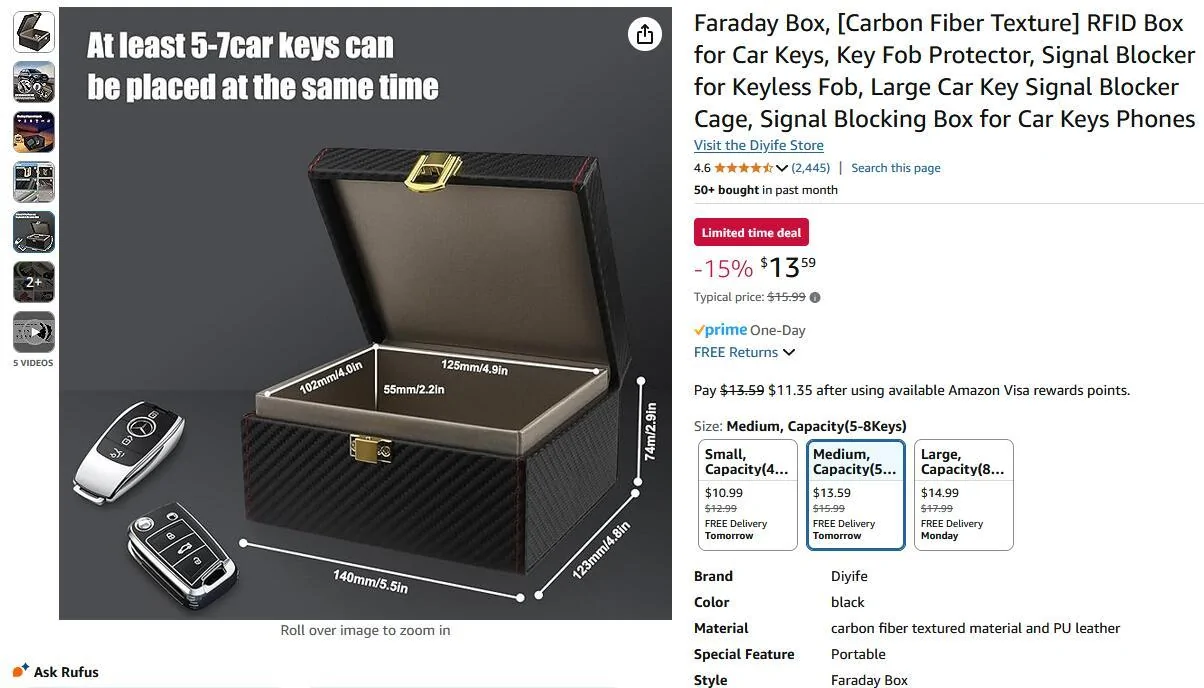
FYI, you can purchase a Faraday Box for under $20 in which you can store your fobs and keys. It blocks the radio signals between your fobs/keys and your vehicle. It's main function is to prevent relay style fob/key cloning by thieves from outside your home, but it also prevents your vehicle from seeing your fob/key which will let the vehicle sleep.

I've been using one of these for several years now, and they work great, it's also an excellent way to know where all your vehicle fobs and keys are all the time. You can test it's signal blocking by placing your fob inside and holding the box right up to your vehicle's driver door handle. If the box is blocking the signal, your vehicle won't "see" your fob even though it's held right up against the door handle. I've tested the box on our Rivian, Model Y, Model 3, i3 and Jeep.. none of the vehicles detected it's fob even though it was held right up to the driver door handle.

Mine is similar to this one..

Rivian R1T R1S How can I reduce phantom drain? 1746723991107-26
 
OP
OP

jJerry-r1s

Member
Joined
Apr 12, 2025
Threads
1
Messages
10
Reaction score
6
Location
California
Vehicles
R1S
The Faradoay box/cage would prevent me from recei
FYI, you can purchase a Faraday Box for under $20 in which you can store your fobs and keys. It blocks the radio signals between your fobs/keys and your vehicle. It's main function is to prevent relay style fob/key cloning by thieves from outside your home, but it also prevents your vehicle from seeing your fob/key which will let the vehicle sleep.

I've been using one of these for several years now, and they work great, it's also an excellent way to know where all your vehicle fobs and keys are all the time. You can test it's signal blocking by placing your fob inside and holding the box right up to your vehicle's driver door handle. If the box is blocking the signal, your vehicle won't "see" your fob even though it's held right up against the door handle. I've tested the box on our Rivian, Model Y, Model 3, i3 and Jeep.. none of the vehicles detected it's fob even though it was held right up to the driver door handle.

Mine is similar to this one..

1746723991107-26.webp
Thanks.
Leaning toward a fob and deactivating the phone. The fob would be in a drawer 15 feet or so away from car, except when I pulled it out to drive the car. Hopefully, that would be far enough. And if it is not I can always get the Faraday box you mentioned.
 
Last edited:

mudito

Well-Known Member
First Name
Aldo
Joined
Jul 30, 2024
Threads
18
Messages
1,011
Reaction score
1,414
Location
Texas
Vehicles
Rivian R1T
The Faradoay box/cage would prevent me from recei

Thanks. But the Faraday box/cage would prevent me from making or receiving calls on my phone which is a requirement for my work in the office above the garage

Leaning toward a fob and deactivating the phone. The fob would be in a drawer 15 feet or so away from car except when I pulled it out to drive the car.
Have you tried from yesterday until today to disable bluetooth and see if that removes the vast majority of your drain?

I'm curious if this is the main issue or other factors are at play here :)
 
OP
OP

jJerry-r1s

Member
Joined
Apr 12, 2025
Threads
1
Messages
10
Reaction score
6
Location
California
Vehicles
R1S
Have you tried from yesterday until today to disable bluetooth and see if that removes the vast majority of your drain?

I'm curious if this is the main issue or other factors are at play here :)
I disabled the app and BT on my phone and the car is no longer running when I walk into the garage. Which is good. But I then need to enable them to drive the car.

I wish I could get a fob, but those are still out of stock on the Rivian site.
 

mudito

Well-Known Member
First Name
Aldo
Joined
Jul 30, 2024
Threads
18
Messages
1,011
Reaction score
1,414
Location
Texas
Vehicles
Rivian R1T
The Faradoay box/cage would prevent me from recei

Thanks. But the Faraday box/cage would prevent me from making or receiving calls on my phone which is a requirement for my work in the office above the garage

Leaning toward a fob and deactivating the phone. The fob would be in a drawer 15 feet or so away from car except when I pulled it out to drive the car.
I disabled the app and BT on my phone and the car is no longer running when I walk into the garage. Which is good. But I then need to enable them to drive the car.

I wish I could get a fob, but those are still out of stock on the Rivian site.
That's a good start. But starting with an 8% drain, I imagine you should've seen already dropping less than that :)

I think there are a few out there who have alerts on when items are in-stock at the Rivian Shop (I think José at RivianTrackr on twitter alerts people every now and then)
Sponsored


Top