
2kwik4u
Well-Known Member
- First Name
- Michael
- Joined
- Jan 8, 2025
- Threads
- 11
- Messages
- 841
- Reaction score
- 1,097
- Location
- Western NY State
- Vehicles
- 2024 Rivian R1T ; 2018 Nissan Rogue
- Thread starter
- #1
Got caught in a rain delay this weekend. Weathered the storm in the truck, and it was the first real opportunity to use the streaming services. They worked OK, but have a few questions.
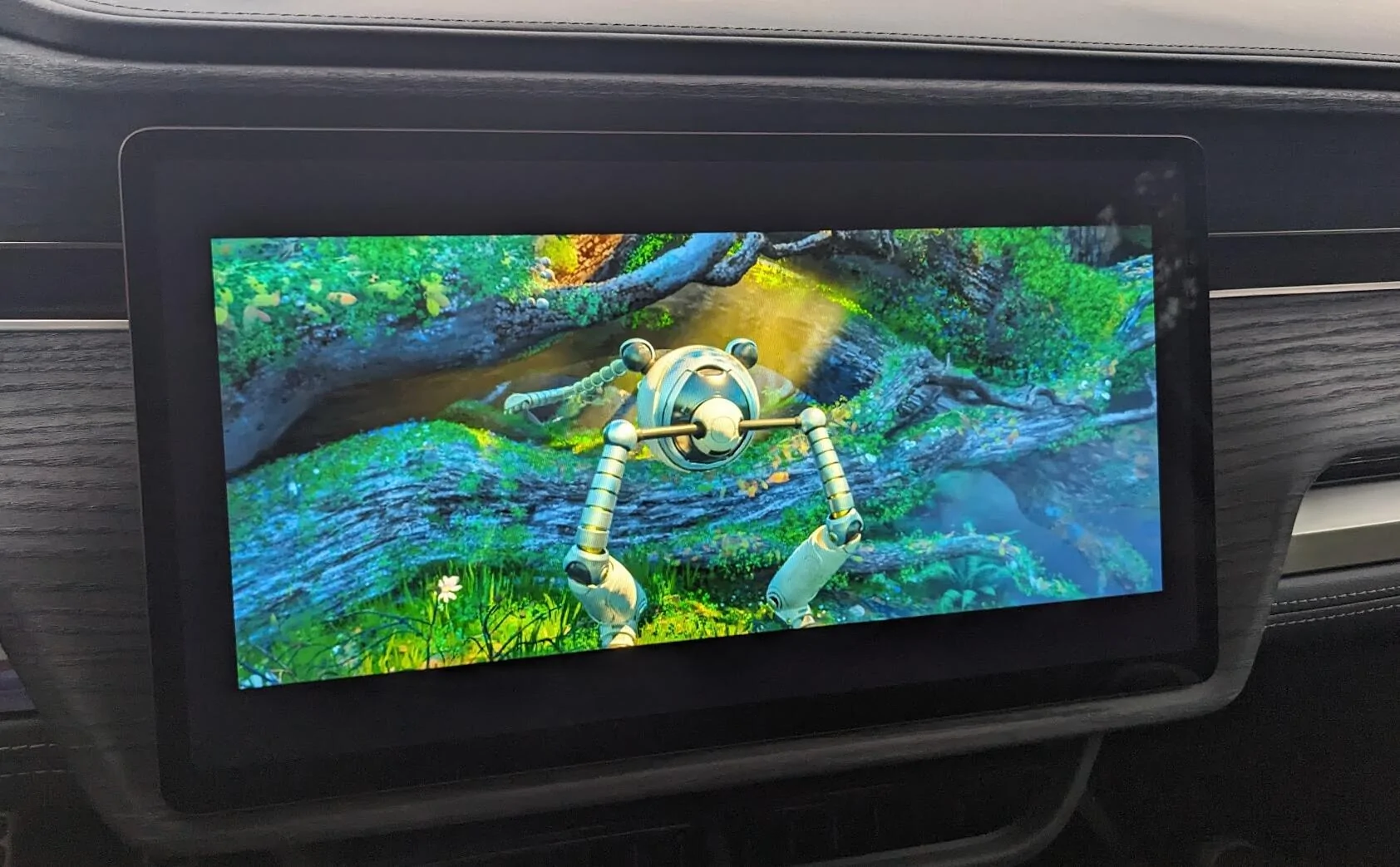
First......How do I get YouTube to actually use the whole screen? We were watching "The Wild Robot" through our YouTube purchased collection, and I couldn't get the movie to show any larger than this on the screen. Looked for a few minutes for settings, but didn't see anything. Something seems awry, but I have no idea how to adjust it.
Look at all the wasted space around the video on the screen. What's up with that?

Second question...….After the weather passed, we had another game. Youngest (7yr old) wanted to sit in the truck and finish the movie, while wife, 14yr old, and I went to the eldest's game. I would start the movie, get him set, then when I closed the door; the streaming would stop. He was sitting on the edge of the back seat in the center of the truck. I tried putting a cooler in the front seat and buckling the seat belt, but no help there. Thought was that the truck needed something in the seat to confirm occupancy. Closing the door stopped streaming. Key fob was sitting in the console (I have PAAK disabled), so I don't think they truck thought I was leaving. Only way I could keep the stream going was to leave the passenger front door slightly ajar. If the wind, or anything pulled the door closed, streaming stopped. Am I missing something here?
First time I've used this feature on the truck. Worked OK in terms of quality of video/audio, as well as "stream quality". Sync'd with my YouTube account quickly and accurately. The little details seem about half baked though. Not sure if that's just the way it is, or if it's something I'm doing wrong.
First......How do I get YouTube to actually use the whole screen? We were watching "The Wild Robot" through our YouTube purchased collection, and I couldn't get the movie to show any larger than this on the screen. Looked for a few minutes for settings, but didn't see anything. Something seems awry, but I have no idea how to adjust it.
Look at all the wasted space around the video on the screen. What's up with that?
Second question...….After the weather passed, we had another game. Youngest (7yr old) wanted to sit in the truck and finish the movie, while wife, 14yr old, and I went to the eldest's game. I would start the movie, get him set, then when I closed the door; the streaming would stop. He was sitting on the edge of the back seat in the center of the truck. I tried putting a cooler in the front seat and buckling the seat belt, but no help there. Thought was that the truck needed something in the seat to confirm occupancy. Closing the door stopped streaming. Key fob was sitting in the console (I have PAAK disabled), so I don't think they truck thought I was leaving. Only way I could keep the stream going was to leave the passenger front door slightly ajar. If the wind, or anything pulled the door closed, streaming stopped. Am I missing something here?
First time I've used this feature on the truck. Worked OK in terms of quality of video/audio, as well as "stream quality". Sync'd with my YouTube account quickly and accurately. The little details seem about half baked though. Not sure if that's just the way it is, or if it's something I'm doing wrong.
Sponsored


