Sponsored

Do You Have Auto High Beams?

U100

Well-Known Member
Joined
May 28, 2020
Threads
9
Messages
199
Reaction score
446
Location
Oklahoma
Vehicles
Rivian R1T
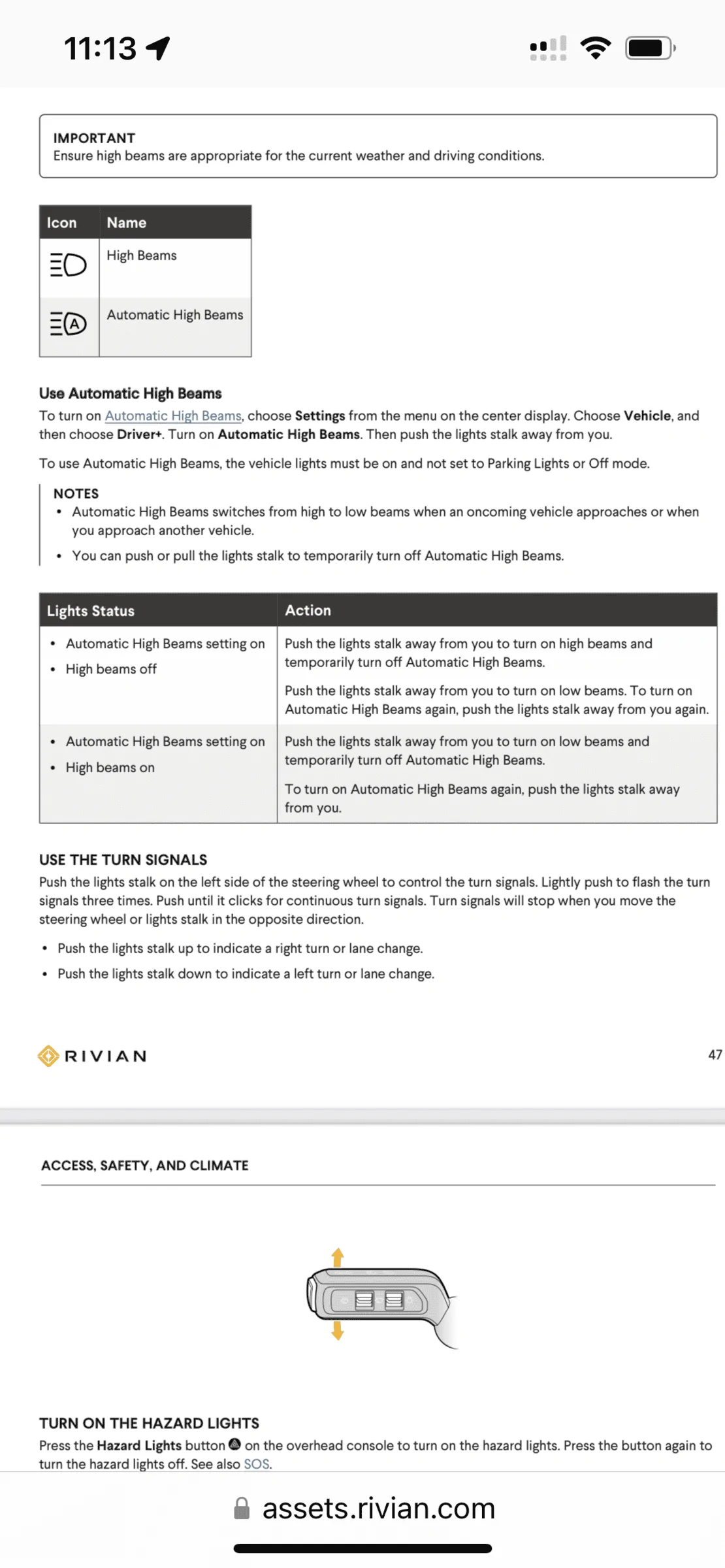
I don’t. The manual says to go to Settings —>Vehicle—>Driver+ and enable it there - but no such option appears on my truck.
Rivian R1T R1S Do You Have Auto High Beams? 78A69A6F-3F5E-4085-AD1E-6B3AEAA26D4B
Sponsored


omamatt

Well-Known Member
First Name
Matt
Joined
Dec 28, 2021
Threads
1
Messages
176
Reaction score
252
Location
Nebraska
Vehicles
2022 Rivian R1T Adventure; 2020 BMW X5
Part of the 2022.15.x update
 

godfodder0901

Well-Known Member
First Name
Jared
Joined
Mar 12, 2019
Threads
27
Messages
5,756
Reaction score
10,141
Location
Washington
Vehicles
2022 Rivian R1T LE
I don’t. The manual says to go to Settings —>Vehicle—>Driver+ and enable it there - but no such option appears on my truck.
78A69A6F-3F5E-4085-AD1E-6B3AEAA26D4B.webp
That is on the newest software, which hasn't been pushed. On the older software, you still have it. Push the left stalk forward and hold it for a few seconds while going above the activation speed.
 

timesinks

Well-Known Member
Joined
Sep 20, 2020
Threads
6
Messages
570
Reaction score
1,851
Location
Seattle
Vehicles
R1T, ID.4, Sprinter
I think the change in the most recent version is to have an option for them to be "always auto".

We definitely have auto high beams on 2022.11.2. You press and hold the stalk forward until the dash indicator shows the highbeam icon with an A in it.

 
OP
OP

U100

Well-Known Member
Joined
May 28, 2020
Threads
9
Messages
199
Reaction score
446
Location
Oklahoma
Vehicles
Rivian R1T
Ah, OK - I haven’t received the .15 update yet. Although I did get the 2022.11.2 update again this afternoon (I was already on 2022.11.2).
Sponsored


Top