Sponsored

FM radio disconnected / odd media player icons

PappaBolt

Well-Known Member
First Name
Don
Joined
Aug 20, 2022
Threads
44
Messages
1,165
Reaction score
1,681
Location
Bainbridge Island, WA
Vehicles
R1S, Corvette, 911
Occupation
Tech
Clubs
 
I keep seeing “Amazon Music” from posters as a music service in the truck. Is there supposed to be a dedicated Amazon Music app on the interface? I certainly don’t have one if there is. I have Radio (inoperative), TuneIn (intermittently displaying portions), Spotify (I don’t have an account) and my iPhone (which I stream from).

Are people who are using Amazon music, streaming that from their phones?
So… why no Amazon Music app? Or for that matter: XM, Text, Waze, etc? If we’re not going to get CarPlay, give us an alternative.
Sponsored


DaveA

Well-Known Member
First Name
David
Joined
Nov 17, 2020
Threads
15
Messages
2,551
Reaction score
4,698
Location
Texas
Vehicles
Rivian R1T
So… why no Amazon Music app? Or for that matter: XM, Text, Waze, etc? If we’re not going to get CarPlay, give us an alternative.
Its on the roadmap, they say....
 

TucsonST

Well-Known Member
First Name
Scott
Joined
Aug 13, 2022
Threads
0
Messages
51
Reaction score
53
Location
Tucson, AZ
Vehicles
Rivian R1T Launch Edition
Occupation
Engineer
I had a similar issue recently. Had been playing Spotify and paused it. Got in the next day and went to the music screen to turn on FM radio and saw the tuner image without numbers etc. Couldn't get it to turn on. Told Alexa to "Listen to radio" and got the FM radio disconnected reply as others have noted. Then tried to use Tune-In and it would not let me select any stations or playlists. Went back to the pop-out player dialog and hit play there (it was still on pause) and Tune-In started working. Went back to FM radio and it was also working.
Not sure if it will solve anyone else's problem, but thought I'd throw it out there just in case it helps anyone.
 

DaveA

Well-Known Member
First Name
David
Joined
Nov 17, 2020
Threads
15
Messages
2,551
Reaction score
4,698
Location
Texas
Vehicles
Rivian R1T
I had a similar issue recently. Had been playing Spotify and paused it. Got in the next day and went to the music screen to turn on FM radio and saw the tuner image without numbers etc. Couldn't get it to turn on. Told Alexa to "Listen to radio" and got the FM radio disconnected reply as others have noted. Then tried to use Tune-In and it would not let me select any stations or playlists. Went back to the pop-out player dialog and hit play there (it was still on pause) and Tune-In started working. Went back to FM radio and it was also working.
Not sure if it will solve anyone else's problem, but thought I'd throw it out there just in case it helps anyone.
Got my hopes up! But no dice. Glad you found a way to make it work though!
 

Karen

Well-Known Member
Joined
Mar 2, 2022
Threads
4
Messages
46
Reaction score
61
Location
FL
Vehicles
64c.impala, 75mgb, 93D.Dakota, 00Jeep,14 QX70,22R1
Clubs
 
My FM tuner stopped playing about 3 weeks ago, before new update. Have a service apt in December at NY service center. With the new update got all the new icons; key pad, on/off button. Never tested the steering wheel controls prior to failure. When I go to turn on FM radio it says it's trying to reconnect and fails. Have tried several times and did soft reconnects. No success. After the update, NOW my key cards do not work. Anyone else?
 

Sponsored

OP
OP

jemkewl

Well-Known Member
Joined
Jul 16, 2022
Threads
13
Messages
359
Reaction score
393
Location
PA
Vehicles
Rivian R1T
Haven't tested any cards. Guess I should.

The same/similar FM issue persists after the Halloween update. Another case was opened since the error is different with the new FM feature. A new picture of the new error message was shared as well. Rivian Support called and a diagnostic was captured per their request:
Pressed the FM power button, error message produced after "reconnecting..." message fails, held the 4-way/hazard button for 6 seconds (until the diagnostic captured pop-up message appears).

I'm inclined to think that the FM module has actually failed at this point.
 
OP
OP

jemkewl

Well-Known Member
Joined
Jul 16, 2022
Threads
13
Messages
359
Reaction score
393
Location
PA
Vehicles
Rivian R1T
Just tested key cards - no issues here with those.
 

DaveA

Well-Known Member
First Name
David
Joined
Nov 17, 2020
Threads
15
Messages
2,551
Reaction score
4,698
Location
Texas
Vehicles
Rivian R1T
Haven't tested any cards. Guess I should.

The same/similar FM issue persists after the Halloween update. Another case was opened since the error is different with the new FM feature. A new picture of the new error message was shared as well. Rivian Support called and a diagnostic was captured per their request:
Pressed the FM power button, error message produced after "reconnecting..." message fails, held the 4-way/hazard button for 6 seconds (until the diagnostic captured pop-up message appears).

I'm inclined to think that the FM module has actually failed at this point.
My FM module was replaced yesterday and tech had to send a small update to truck and now all is well.
 

Underwhirled

Well-Known Member
Joined
Oct 9, 2021
Threads
5
Messages
233
Reaction score
297
Location
Arkansas
Vehicles
Audi Q5, RIT
Occupation
Architect
Where is the FM module located? Do you know what they have to disassemble to get to the bad unit?
 

DaveA

Well-Known Member
First Name
David
Joined
Nov 17, 2020
Threads
15
Messages
2,551
Reaction score
4,698
Location
Texas
Vehicles
Rivian R1T
Where is the FM module located? Do you know what they have to disassemble to get to the bad unit?
The only thing I saw the tech take apart was the interior A-pillar cover with the silver speaker grille. I thought it was under the dash area where a glove box would normally be.
 

Sponsored

Underwhirled

Well-Known Member
Joined
Oct 9, 2021
Threads
5
Messages
233
Reaction score
297
Location
Arkansas
Vehicles
Audi Q5, RIT
Occupation
Architect
Interesting. Maybe it is stacked in the pillar like the batteries are tucked in the frame of an e-bike?
 

Deleted member 7086

Guest
My FM module was replaced this past week. Solved my problem. It apparently was not related to the software update.
 

DaveA

Well-Known Member
First Name
David
Joined
Nov 17, 2020
Threads
15
Messages
2,551
Reaction score
4,698
Location
Texas
Vehicles
Rivian R1T
Anyone else hearing crackling in the satellite speakers in the headliner when audio enhancement is on?
 
OP
OP

jemkewl

Well-Known Member
Joined
Jul 16, 2022
Threads
13
Messages
359
Reaction score
393
Location
PA
Vehicles
Rivian R1T
FM module was replaced today and the radio works well. I thought that would fix the issue I was experiencing.
However, I still have the odd UI issue with the Amazon music app and radio.

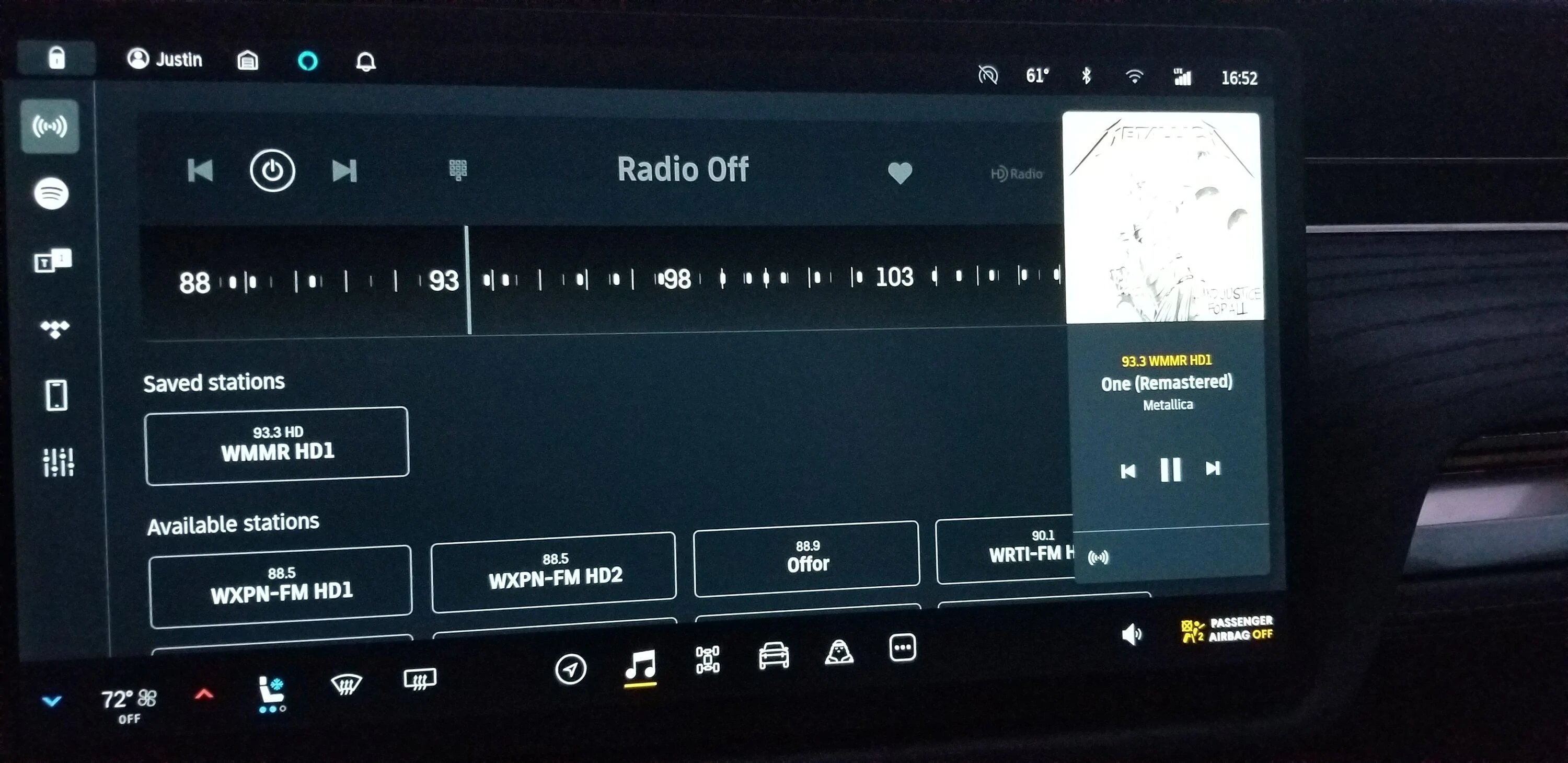
This is a screen shot of Amazon music playing - album cover art with a radio station overlay in the album cover (hard to see with this album cover), no bar for time elapsed/remaining, shows 93.3 radio station text, and shows the radio icon. Radio is clearly off
Rivian R1T R1S FM radio disconnected / odd media player icons 20230104_165231


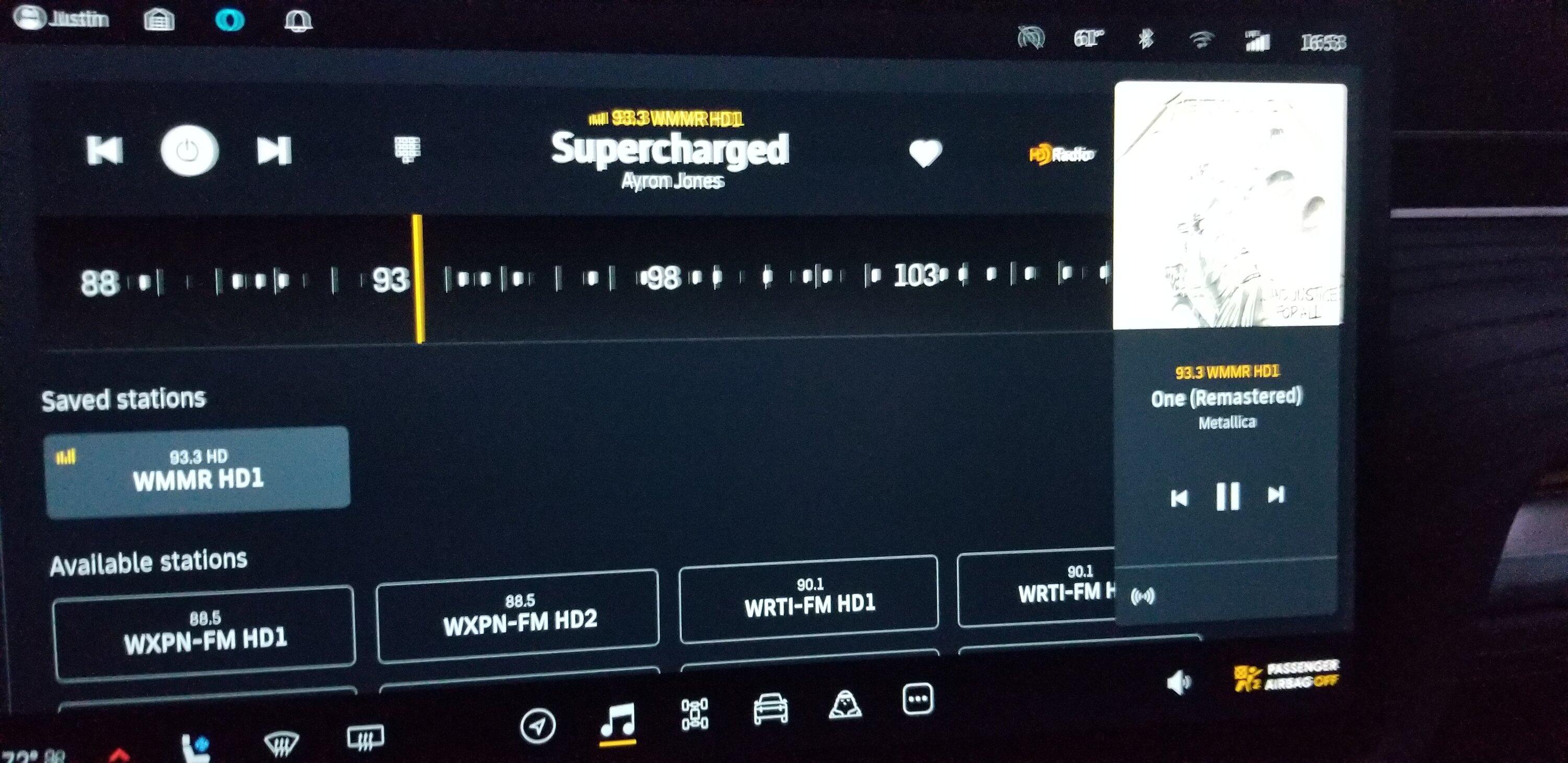
Now I turn the radio on - still shows Amazon album art and song details which don't match. Turning off the radio doesn't change anything.
Rivian R1T R1S FM radio disconnected / odd media player icons 20230104_165354


If I launch another music service, and then go back to the Amazon music player, it kinda fixes itself until the car sleeps. Fix = right icon, time bar returns, but the yellow 93.3 wmmr text still remains. After awaking from sleep, right back to the same worse issue again.

Anyone else experiencing this?
 

DaveA

Well-Known Member
First Name
David
Joined
Nov 17, 2020
Threads
15
Messages
2,551
Reaction score
4,698
Location
Texas
Vehicles
Rivian R1T
FM module was replaced today and the radio works well. I thought that would fix the issue I was experiencing.
However, I still have the odd UI issue with the Amazon music app and radio.

This is a screen shot of Amazon music playing - album cover art with a radio station overlay in the album cover (hard to see with this album cover), no bar for time elapsed/remaining, shows 93.3 radio station text, and shows the radio icon. Radio is clearly off
20230104_165231.webp


Now I turn the radio on - still shows Amazon album art and song details which don't match. Turning off the radio doesn't change anything.
20230104_165354.jpg


If I launch another music service, and then go back to the Amazon music player, it kinda fixes itself until the car sleeps. Fix = right icon, time bar returns, but the yellow 93.3 wmmr text still remains. After awaking from sleep, right back to the same worse issue again.

Anyone else experiencing this?
Yes, same for a while…I would probably mention it to service and also the UX Rivian guy on Reddit. I will do the same. Just bugs we need squashed.
Sponsored


Top