
Sponsored
SolartoEV
Well-Known Member
- Joined
- Dec 30, 2021
- Threads
- 17
- Messages
- 593
- Reaction score
- 1,184
- Location
- Western NY
- Vehicles
- R1T VIN 269*, 2019 RAV4 Hybrid, 1999 Ford F-250
Depends on the charger but usually that company has an app and you can view it through that.

the_mace
Well-Known Member
- First Name
- Rob
- Joined
- Apr 8, 2022
- Threads
- 11
- Messages
- 414
- Reaction score
- 343
- Location
- Boston, MA
- Vehicles
- Tesla Model S75D, Ford F350 Diesel, Mercedes GLC30
- Occupation
- CTO
I'd try something along these lines.Is there a way to programmatically read the status of specific public chargers?
Code:
"query ChargerDetails($ids: [String!]!) { chargerByIds(ids: $ids) { id name location { addressComponents { type shortName longName } formattedAddress coordinate { latitude longitude } navCoordinate { latitude longitude } } distance driveDetails { driveDistance driveDuration detourDistance detourDuration } chargingStation { network networkId maxKw note chargers { locationId pluginDependency connectors { id evseId evseUid name level maxKw chargingPrice { level description amount currency lastUpdateTime symbol type unit } type free vend state } } } } }"https://rivian-api.kaedenb.org/app/charging
Last edited:
poldim
Active Member
- Thread starter
- #5
Thanks!I'd try something along these lines.
For a bunch of charger related APIs from Rivian, see:Code:"query ChargerDetails($ids: [String!]!) { chargerByIds(ids: $ids) { id name location { addressComponents { type shortName longName } formattedAddress coordinate { latitude longitude } navCoordinate { latitude longitude } } distance driveDetails { driveDistance driveDuration detourDistance detourDuration } chargingStation { network networkId maxKw note chargers { locationId pluginDependency connectors { id evseId evseUid name level maxKw chargingPrice { level description amount currency lastUpdateTime symbol type unit } type free vend state } } } } }"
https://rivian-api.kaedenb.org/app/charging
Is there a way to query the available charger IDs? Or is it just the name that shows up in their app (ie US-A5S-4SV-1A)?
Sponsored
the_mace
Well-Known Member
- First Name
- Rob
- Joined
- Apr 8, 2022
- Threads
- 11
- Messages
- 414
- Reaction score
- 343
- Location
- Boston, MA
- Vehicles
- Tesla Model S75D, Ford F350 Diesel, Mercedes GLC30
- Occupation
- CTO
I haven’t found that yet. It may only come out of the trip routing api call. So you plan a trip then get charger ids then query them.Thanks!
Is there a way to query the available charger IDs? Or is it just the name that shows up in their app (ie US-A5S-4SV-1A)?
I’d guess all this will change with ABRP integration expanding.
For more open charge info you could try a non rivian source like https://openchargemap.org/site
poldim
Active Member
- Thread starter
- #7
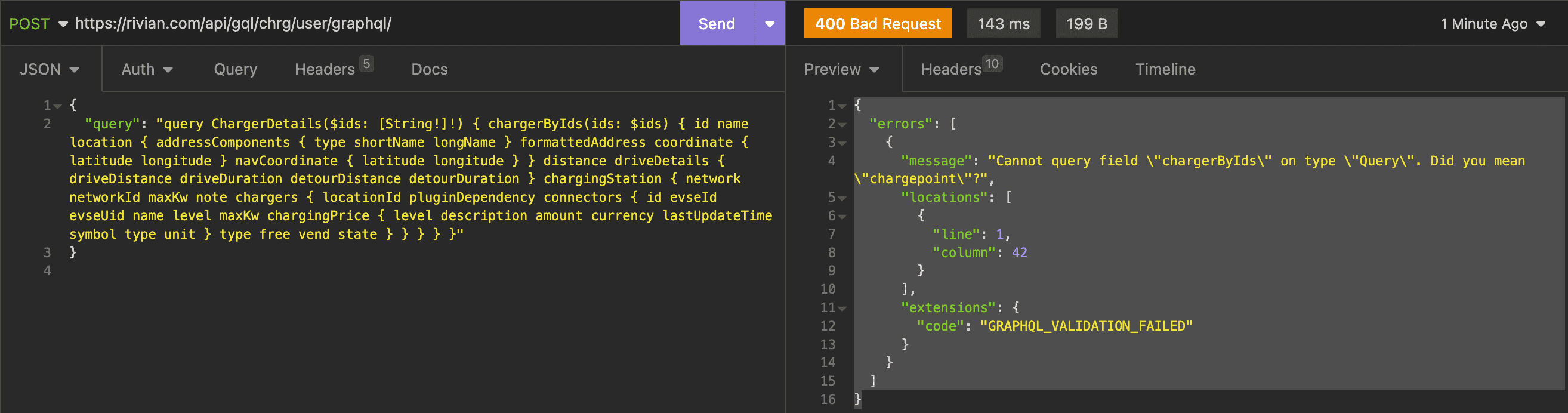
I tried running that but got this error:I haven’t found that yet. It may only come out of the trip routing api call. So you plan a trip then get charger ids then query them.
I’d guess all this will change with ABRP integration expanding.
Code:
{
    "errors": [
        {
            "message": "Cannot query field \"chargerByIds\" on type \"Query\". Did you mean \"chargepoint\"?",
            "locations": [
                {
                    "line": 1,
                    "column": 42
                }
            ],
            "extensions": {
                "code": "GRAPHQL_VALIDATION_FAILED"
            }
        }
    ]
}
I can't seem to find anything other than the rivian app that shows the live status of whether the chargers are in use or availableFor more open charge info you could try a non rivian source like https://openchargemap.org/site
the_mace
Well-Known Member
- First Name
- Rob
- Joined
- Apr 8, 2022
- Threads
- 11
- Messages
- 414
- Reaction score
- 343
- Location
- Boston, MA
- Vehicles
- Tesla Model S75D, Ford F350 Diesel, Mercedes GLC30
- Occupation
- CTO
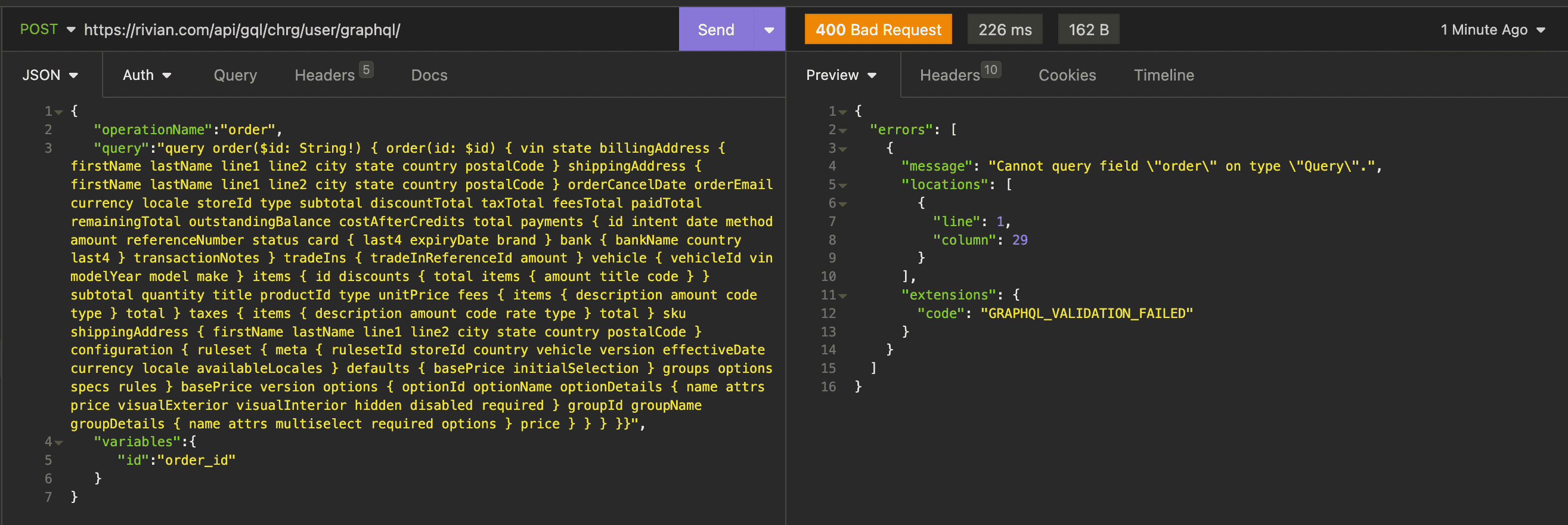
You'd have to include the operation name and variables in the query if you're not already, like:I tried running that but got this error:
Code:{ "errors": [ { "message": "Cannot query field \"chargerByIds\" on type \"Query\". Did you mean \"chargepoint\"?", "locations": [ { "line": 1, "column": 42 } ], "extensions": { "code": "GRAPHQL_VALIDATION_FAILED" } } ] }
I can't seem to find anything other than the rivian app that shows the live status of whether the chargers are in use or available
Code:
query = {
"operationName": "order",
"query": "query order($id: String!) { order(id: $id) { vin state billingAddress { firstName lastName line1 line2 city state country postalCode } shippingAddress { firstName lastName line1 line2 city state country postalCode } orderCancelDate orderEmail currency locale storeId type subtotal discountTotal taxTotal feesTotal paidTotal remainingTotal outstandingBalance costAfterCredits total payments { id intent date method amount referenceNumber status card { last4 expiryDate brand } bank { bankName country last4 } transactionNotes } tradeIns { tradeInReferenceId amount } vehicle { vehicleId vin modelYear model make } items { id discounts { total items { amount title code } } subtotal quantity title productId type unitPrice fees { items { description amount code type } total } taxes { items { description amount code rate type } total } sku shippingAddress { firstName lastName line1 line2 city state country postalCode } configuration { ruleset { meta { rulesetId storeId country vehicle version effectiveDate currency locale availableLocales } defaults { basePrice initialSelection } groups options specs rules } basePrice version options { optionId optionName optionDetails { name attrs price visualExterior visualInterior hidden disabled required } groupId groupName groupDetails { name attrs multiselect required options } price } } } }}",
"variables": {"id": order_id},
}
the_mace
Well-Known Member
- First Name
- Rob
- Joined
- Apr 8, 2022
- Threads
- 11
- Messages
- 414
- Reaction score
- 343
- Location
- Boston, MA
- Vehicles
- Tesla Model S75D, Ford F350 Diesel, Mercedes GLC30
- Occupation
- CTO
So you have to pass in the order_id, you're passing in a string "order_id" at least from what I can see. The example I shared didnt have order_id quoted as its a variable containing the order_id.I tried the code you have and received a very similar response. Other basic API functions are working as expected.

Sponsored
Similar threads

- Replies
- 111
- Views
- 10,596

- Replies
- 36
- Views
- 3,022
- Replies
- 6
- Views
- 936

- Replies
- 67
- Views
- 13,489
