Sponsored

Camera screen stays on

mightyratz

Member
Joined
May 16, 2023
Threads
6
Messages
24
Reaction score
27
Location
California
Vehicles
Rivian R1S
So both my former R1T, and my current R1S have the same issue: When i reverse out of the garage/parking spot, and then drive away, the camera screen stays stuck on. When my partner drives the truck it doesn't do this, and Rivian couldn't duplicate the issue on a diagnostic drive. It seems it may be related to either my profile or my phone. I've unpaired my phone from the R1S and deleted the app off my phone, reinstalled the app and setup PAAK again, but the issue persists.

Has anyone else experienced this?

Thanks
Sponsored

 

godfodder0901

Well-Known Member
First Name
Jared
Joined
Mar 12, 2019
Threads
27
Messages
5,750
Reaction score
10,139
Location
Washington
Vehicles
2022 Rivian R1T LE
So both my former R1T, and my current R1S have the same issue: When i reverse out of the garage/parking spot, and then drive away, the camera screen stays stuck on. When my partner drives the truck it doesn't do this, and Rivian couldn't duplicate the issue on a diagnostic drive. It seems it may be related to either my profile or my phone. I've unpaired my phone from the R1S and deleted the app off my phone, reinstalled the app and setup PAAK again, but the issue persists.

Has anyone else experienced this?

Thanks
Sounds like the camera screen was on before you reversed. It'll just stay on after the rear camera, but shift to the front camera in this case.
 

Dark-Fx

Well-Known Member
First Name
Brian
Joined
Jul 15, 2020
Threads
148
Messages
13,536
Reaction score
27,315
Location
Michigan
Vehicles
R1T, R1S, Livewire One, Sierra EV, R1S
Occupation
Engineering
Clubs
 
Sounds like the camera screen was on before you reversed. It'll just stay on after the rear camera, but shift to the front camera in this case.
I was playing around with the Alexa routine to kick the camera on when I pull into my driveway (it's not reliable). Camera is still active when I get back in and stays up even though the screen says it's on navigation (or whichever app I was on before the camera screen). There is definitely a software bug here.
 
OP
OP
mightyratz

mightyratz

Member
Joined
May 16, 2023
Threads
6
Messages
24
Reaction score
27
Location
California
Vehicles
Rivian R1S
I was playing around with the Alexa routine to kick the camera on when I pull into my driveway (it's not reliable). Camera is still active when I get back in and stays up even though the screen says it's on navigation (or whichever app I was on before the camera screen). There is definitely a software bug here.
Dang I think this is it. Whenever I pull into the garage or my parking spot at work I turn on the camera manually, and don't turn it off (I just assumed it turned off when I powered down the truck). So it makes sense when I get back into the car even though it's on the main "drive setting" screen, the camera is running in the background. (I think that's what you're saying here, and it makes sense). I'll turn off the camera after I park, and see if the issue persists after re-start.
 
OP
OP
mightyratz

mightyratz

Member
Joined
May 16, 2023
Threads
6
Messages
24
Reaction score
27
Location
California
Vehicles
Rivian R1S
Sounds like the camera screen was on before you reversed. It'll just stay on after the rear camera, but shift to the front camera in this case.
Exactly what it's doing.
 

Sponsored

godfodder0901

Well-Known Member
First Name
Jared
Joined
Mar 12, 2019
Threads
27
Messages
5,750
Reaction score
10,139
Location
Washington
Vehicles
2022 Rivian R1T LE

SoCal Rob

Well-Known Member
First Name
Rob
Joined
Apr 19, 2021
Threads
39
Messages
2,808
Reaction score
5,964
Location
Laguna Niguel / Palm Springs / Pioneertown
Vehicles
2025 Rivian R1S & 2021 VW ID.4 (2023 R1S sold)
Occupation
Information Technology
Clubs
 
I was playing around with the Alexa routine to kick the camera on when I pull into my driveway (it's not reliable). Camera is still active when I get back in and stays up even though the screen says it's on navigation (or whichever app I was on before the camera screen). There is definitely a software bug here.
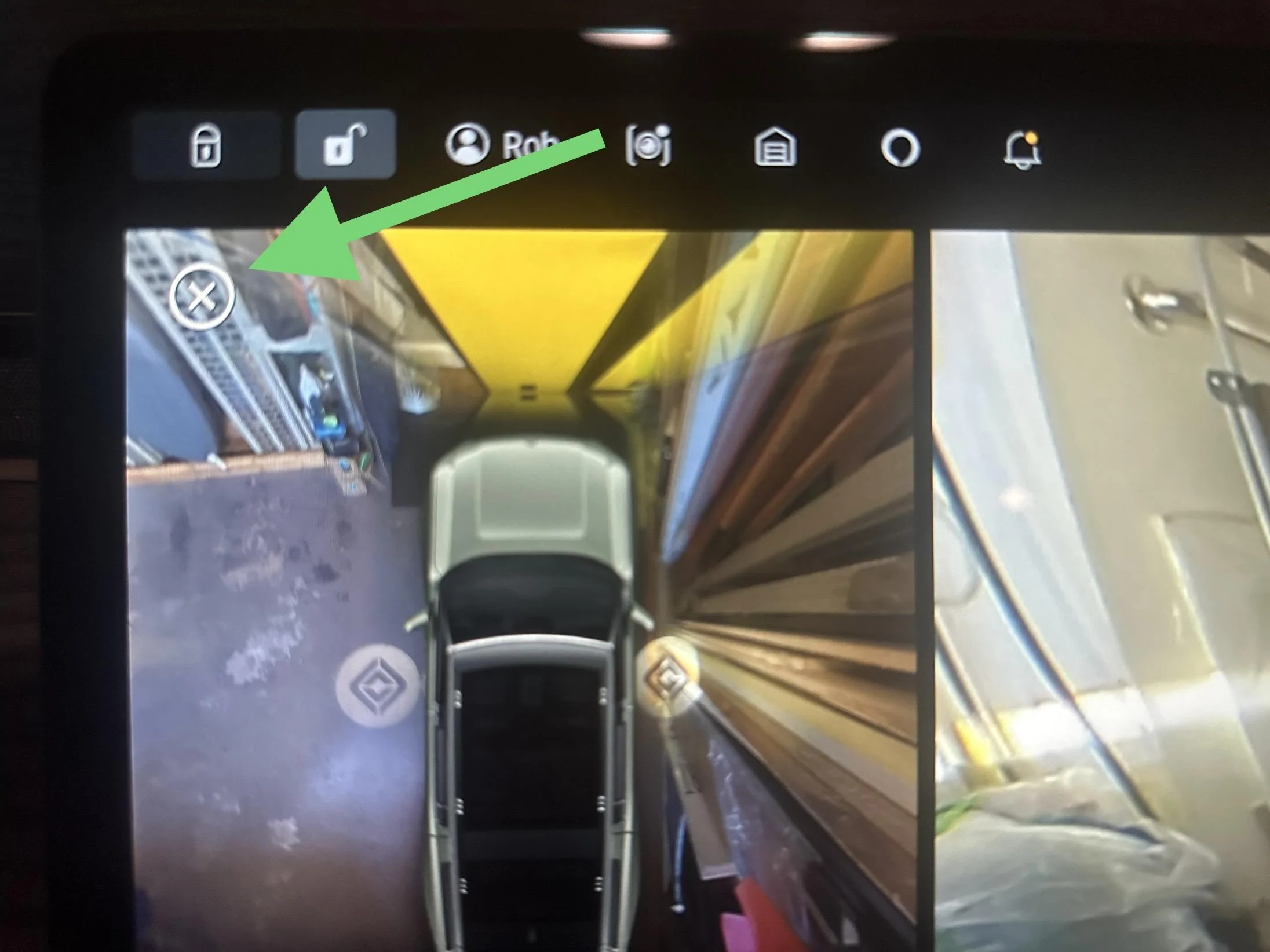
I have the routine setup and I noticed a difference when the camera app is brought to the foreground by Alexa. There is an X in a circle in the upper left corner of the camera display and tapping it returns the camera app to the background restoring whatever app was running.
Rivian R1T R1S Camera screen stays on IMG_2751


I think that could be the behavior you’re seeing. When I manually switch to the camera app, I don’t get the X in the circle since the main screen fully switches to the camera app rather than just bringing it to the foreground. I think this is intentional and I suspect that an Alexa command to turn off the camera is equivalent to tapping the X in the circle.
 

Dark-Fx

Well-Known Member
First Name
Brian
Joined
Jul 15, 2020
Threads
148
Messages
13,536
Reaction score
27,315
Location
Michigan
Vehicles
R1T, R1S, Livewire One, Sierra EV, R1S
Occupation
Engineering
Clubs
 
I have the routine setup and I noticed a difference when the camera app is brought to the foreground by Alexa. There is an X in a circle in the upper left corner of the camera display and tapping it returns the camera app to the background restoring whatever app was running.
IMG_2751.jpeg


I think that could be the behavior you’re seeing. When I manually switch to the camera app, I don’t get the X in the circle since the main screen fully switches to the camera app rather than just bringing it to the foreground. I think this is intentional and I suspect that an Alexa command to turn off the camera is equivalent to tapping the X in the circle.
I'll keep an eye out for that, but it would make sense if it's an overlay instead of an app switch.
Sponsored


Top