Sponsored

Door locks cycle constantly

Skysurfer

Well-Known Member
Joined
Aug 7, 2024
Threads
3
Messages
53
Reaction score
103
Location
Oregon
Vehicles
'25 R1S, '18 Model 3, '87 XL600R, '86 IROC-Z
Anyone else have issues with the door locks constantly cycling?

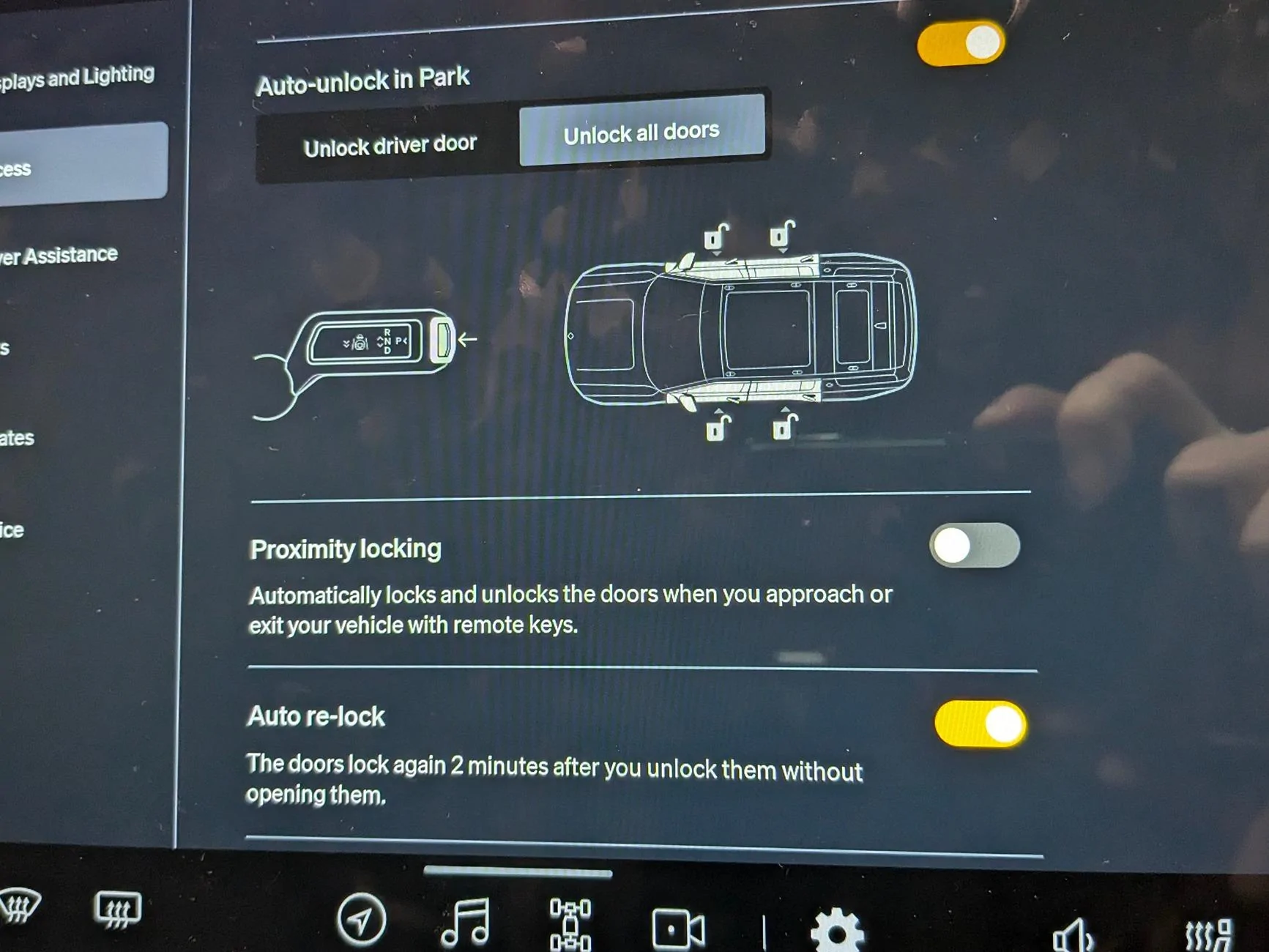
I have a home office space directly above the garage where my R1 sits and all day I can hear the door handles extending and retracting. Already this morning it is averaging about 10 cycles/hour. I have proximity unlocking off entirely since the location based setting didn't appear to help. The service center looked at it but didn't have anything helpful other than trying the most recent update. Curious if anyone else has seen similar behavior.

Rivian R1T R1S Door locks cycle constantly Screenshot from 2024-08-20 08-05-51

Rivian R1T R1S Door locks cycle constantly Proximity Locking
Sponsored


Electrified Outdoors

Well-Known Member
First Name
Ken
Joined
Jan 30, 2023
Threads
63
Messages
3,683
Reaction score
3,980
Location
Mount Airy, Maryland
Website
EVoutdoors.org
Vehicles
2024 Rivian R1S Quad, 2024 Silverado EV RST First Edition
Occupation
Real Estate
Clubs
 
Try a hard reset?

Hold down both the hazard button and far left steering wheel button at the same time until the truck reboots.

With proximity locking off completely there should be no automatic lock/unlock. You could also try turning proximity lock back on and then turning it off for all the devices but leaving the overall function on to see if that makes a difference.
 
OP
OP
Skysurfer

Skysurfer

Well-Known Member
Joined
Aug 7, 2024
Threads
3
Messages
53
Reaction score
103
Location
Oregon
Vehicles
'25 R1S, '18 Model 3, '87 XL600R, '86 IROC-Z
Appreciate the suggestions. Tried a hard reset and it still cycled again after a few minutes. Enabling the proximity locking and disabling both phone keys also did not make a difference.

It is interesting that even with the auto re-lock enabled it spends most of the day unlocked after cycling a bunch.

Rivian R1T R1S Door locks cycle constantly Screenshot from 2024-08-20 14-55-39
 

Zoidz

Well-Known Member
First Name
Gil
Joined
Feb 28, 2021
Threads
226
Messages
5,185
Reaction score
11,685
Location
PA
Vehicles
23 R1S Adv, Avalanche, BMWs-X3,330cic,K1200RS bike
Occupation
Engineer
Is the Rivian app running on your phone? If so, kill the Rivian app and see if that makes a difference.
 

tate16t

Well-Known Member
First Name
Robert
Joined
Apr 7, 2022
Threads
64
Messages
1,396
Reaction score
1,181
Location
NY
Vehicles
2023 El Cap Granite R1S
Occupation
Car Enthusiast
Has this started since the latest update?
 

Sponsored

DeanB1452

Well-Known Member
First Name
Dean
Joined
Jun 12, 2023
Threads
12
Messages
394
Reaction score
621
Location
Milpitas, CA
Vehicles
'22 R1T LE/LG/BM
Occupation
IT Administrator
Clubs
 
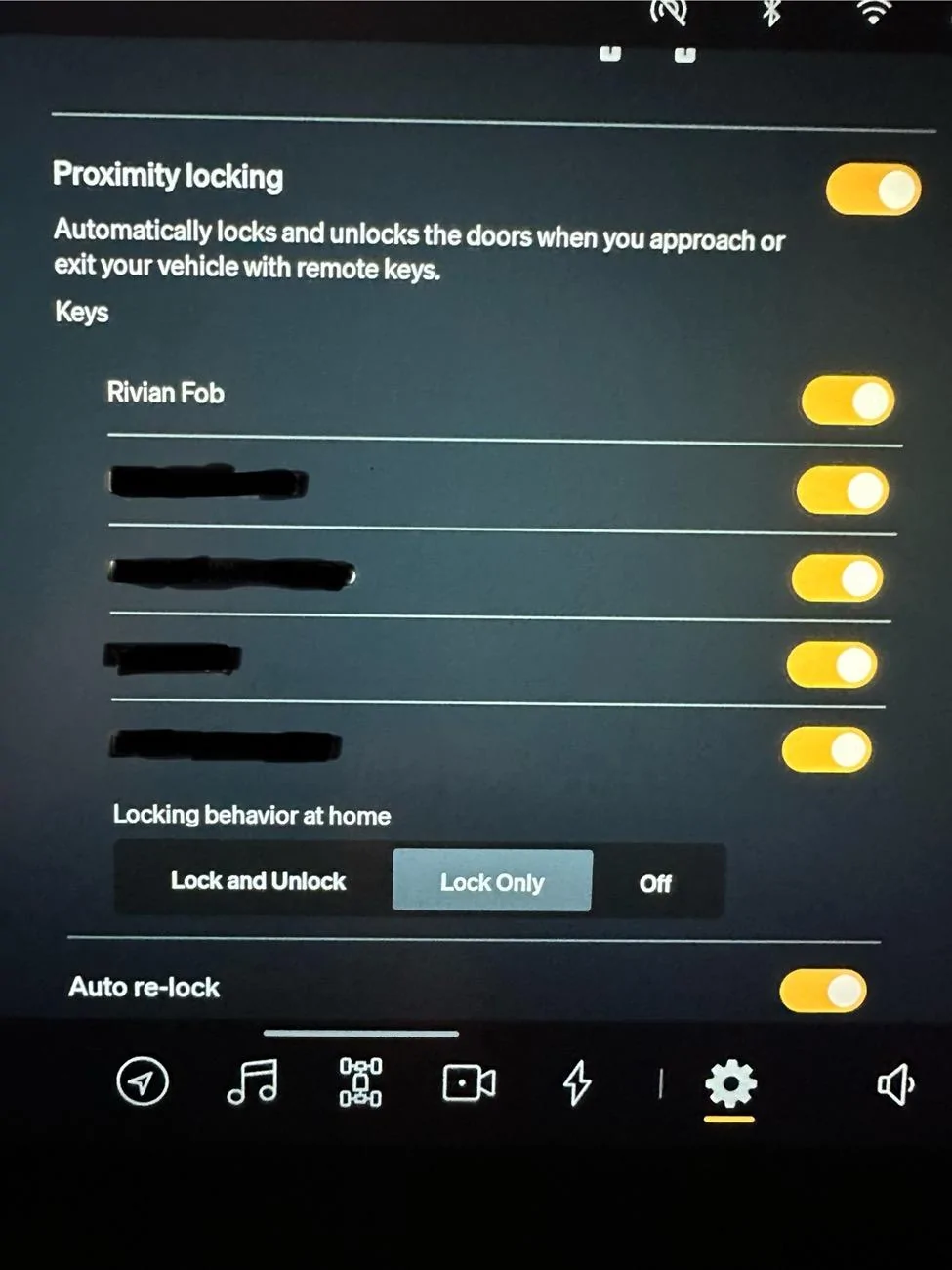
Got tired of the doors constantly unlocking and locking as I walked by the truck. Turn ON the proximity locking. Then select which keys you want proximity locking to work with. Finally, select Lock Only or Off, under locking behavior at home. If is set to Lock Only, as you walk away it locks once and won’t unlock until you manually unlock it with the fob, your phone app, or voice command through Siri Shortcuts. If you have it set to Off, your doors won’t lock while you are at home and it’s safely in your garage. The drawback with that is if you’re parked in your driveway or the curb next to your house, it will stay unlocked until you manually lock the doors with the fob or phone.

Rivian R1T R1S Door locks cycle constantly IMG_2531
 

VSG

Well-Known Member
Joined
Oct 3, 2022
Threads
4
Messages
3,198
Reaction score
5,984
Location
WA
Vehicles
R1T LE/RB/OC/20
Where'd you leave your FOB?
 

DeanB1452

Well-Known Member
First Name
Dean
Joined
Jun 12, 2023
Threads
12
Messages
394
Reaction score
621
Location
Milpitas, CA
Vehicles
'22 R1T LE/LG/BM
Occupation
IT Administrator
Clubs
 
Where'd you leave your FOB?
Lol. It's in the house. Didn't black it out since it's standard with every Rivian. Only blacked out the names of the phones as keys.
 

VSG

Well-Known Member
Joined
Oct 3, 2022
Threads
4
Messages
3,198
Reaction score
5,984
Location
WA
Vehicles
R1T LE/RB/OC/20
Was asking the OP - the FOB can also cause the OPs behavior, and while the OP mentioned turning off PaaK etc. to try to stop this, he said nothing about a FOB which may be sitting in the center console of his Rivian keeping and it from locking himself out ...
 
OP
OP
Skysurfer

Skysurfer

Well-Known Member
Joined
Aug 7, 2024
Threads
3
Messages
53
Reaction score
103
Location
Oregon
Vehicles
'25 R1S, '18 Model 3, '87 XL600R, '86 IROC-Z
Is the Rivian app running on your phone? If so, kill the Rivian app and see if that makes a difference.
If I turn off Bluetooth on my phone it stops, but haven't played around with killing the phone app yet. I'll give that a try today.

Has this started since the latest update?
No this has been going on since delivery, so last two updates.

Got tired of the doors constantly unlocking and locking as I walked by the truck. Turn ON the proximity locking. Then select which keys you want proximity locking to work with. Finally, select Lock Only or Off, under locking behavior at home. If is set to Lock Only, as you walk away it locks once and won’t unlock until you manually unlock it with the fob, your phone app, or voice command through Siri Shortcuts. If you have it set to Off, your doors won’t lock while you are at home and it’s safely in your garage. The drawback with that is if you’re parked in your driveway or the curb next to your house, it will stay unlocked until you manually lock the doors with the fob or phone.

IMG_2531.jpeg
Yeah, I did try that, also tried Off and disabling both keys individually but no luck. The 2024.27.30 release notes had a line mentioning fixing the locking behavior at home setting but sadly that did not change anything for my situation. Just really strange that even with proximity locking off entirely it still behaves the same when in my office above the vehicle.

Where'd you leave your FOB?
No FOB included with Gen2, only phone key and key cards at delivery.

I am wondering if it thinks the phone is inside the vehicle. Might try some experiments locking the phone key in the car to see how it behaves.
 

Sponsored

SparkyR1t

Well-Known Member
Joined
Apr 5, 2023
Threads
2
Messages
380
Reaction score
388
Location
Chicago
Vehicles
R1t/Model Y
Occupation
Retired Commercial Electrician and mechanic
I notice the same issue with constant locking and unlocking at home when parked even though I have setting to not lock/ unlock at home location. Has done this since I had the 2022 truck. Have to believe this has a lot to do with parasitic drain.
 
OP
OP
Skysurfer

Skysurfer

Well-Known Member
Joined
Aug 7, 2024
Threads
3
Messages
53
Reaction score
103
Location
Oregon
Vehicles
'25 R1S, '18 Model 3, '87 XL600R, '86 IROC-Z
I notice the same issue with constant locking and unlocking at home when parked even though I have setting to not lock/ unlock at home location. Has done this since I had the 2022 truck. Have to believe this has a lot to do with parasitic drain.
Yeah, it keeps it from sleeping which causes the drain to be quite high. While sleeping the drain is very minimal but when awake it can go through a couple percent a day. I see it in my logging, overnight when it is not cycling and instead sleeping, it loses 0-0.1% charge, but during the day while cycling 1-2%.

Rivian R1T R1S Door locks cycle constantly Screenshot from 2024-08-21 07-55-29
 
OP
OP
Skysurfer

Skysurfer

Well-Known Member
Joined
Aug 7, 2024
Threads
3
Messages
53
Reaction score
103
Location
Oregon
Vehicles
'25 R1S, '18 Model 3, '87 XL600R, '86 IROC-Z
I think I am getting a handle on the issue. It is most likely the push-to-unlock buttons under the front door handles, I think they are triggering randomly (like a floating input, aka wire disconnected) and when my phone is in proximity, it triggers the unlock.

This push-to-unlock feature, from my understanding, works even when the proximity locking is disabled. Explaining why none of the proximity settings had any impact. I also noticed when I push on the front handles, they don't respond and unlock. So seems to be a minor hardware issue isolated to my vehicle. I have a service appointment in two weeks to take another look, and I suspect we can finally get it resolved.

Would have been easier if I had some diagnostic access so I could simply see if those button inputs were picked up, but I think I am getting there.
Sponsored


Top