Sponsored

How to set follow distance

rivianguy

Well-Known Member
Joined
Jun 10, 2022
Threads
39
Messages
257
Reaction score
680
Location
Seattle
Vehicles
Rivian R1S
Not sure if I'm doing something wrong or whether there is a glitch in my ride. Trying to set follow distance in adaptive cruise control. I thought this was set by the right hand thumb wheel but when I spin that while in cruise control (either just cruise control or the other one that stays in the lane also) nothing happens. Am I doing something wrong?
Sponsored
 

R1TandMe

Well-Known Member
First Name
Mike
Joined
Aug 29, 2024
Threads
13
Messages
223
Reaction score
277
Location
Depends
Vehicles
R1T, Corvette, Audi A7, HD VRod
Occupation
Retired and loving it
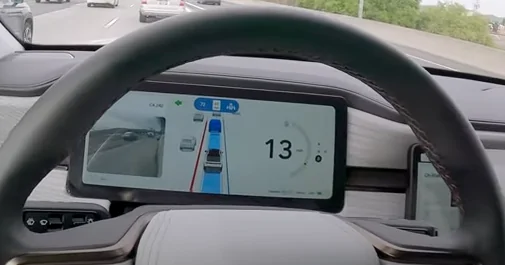
Do you see the blue line on the drivers screen that should be behind the car in front of you? If scrolling to narrow the gap with the car in front of you it will only go so far.
 
OP
OP
rivianguy

rivianguy

Well-Known Member
Joined
Jun 10, 2022
Threads
39
Messages
257
Reaction score
680
Location
Seattle
Vehicles
Rivian R1S
Do you see the blue line on the drivers screen that should be behind the car in front of you? If scrolling to narrow the gap with the car in front of you it will only go so far.
Well the scroll wheel doesn't seem to do anything at all no matter if there is a car ahead or not
 

NewRMan

Member
First Name
Joe
Joined
Apr 20, 2025
Threads
2
Messages
20
Reaction score
12
Location
NJ, USA
Vehicles
2023 Rivian R1S
Occupation
Retired
The right scroll wheel should adjust the following distance, and you should see a series of dark blue lines perpendicular to your direction of travel on your main binnacle screen between you and the car you are following (you can see one of the dark blue lines in this pic). Scrolling the wheel adjusts between 5 options (I think it's 5).

I misinterpreted the lines for the first month I owned my R1S, thinking closer to the car I am following means closer follow distance. That is not the case, moving the line closer to your car reduces the following distance and moving it closer to the car you are following increases the following distance.

If you don't see anything try a reboot.


Rivian R1T R1S How to set follow distance Screenshot 2025-06-26 at 4.08.13 PM
 

iamnid

Well-Known Member
Joined
Aug 10, 2023
Threads
7
Messages
623
Reaction score
778
Location
California
Vehicles
Mercedes EQE, Rivian R1S
As others have said, spinning the right wheel should make a blue line (parallel to the front of your vehicle) move forward and back, setting the follow distance.
 

Sponsored

bigsky

Banned
Well-Known Member
Joined
Jan 8, 2024
Threads
12
Messages
1,098
Reaction score
740
Location
MUM
Vehicles
MUM
Hope you get it to work. Setting the car ahead of you as far as feature will allow, your vehicle windshield would thank you if it could speak.
 

sfvR1S

Well-Known Member
First Name
James
Joined
Oct 16, 2023
Threads
6
Messages
329
Reaction score
391
Location
Los Angeles, CA
Vehicles
2023 R1S QM AT 2021 718 Cayman GTS 4.0
Occupation
CRE
Clubs
 
My memory is a bit fuzzy and I could be wrong, but I think the distance appears when you're using highway assist, but if you're just in the adaptive cruise, I don't think it shows the distance, even if it's being adjusted.
 

Trinculo73

Well-Known Member
First Name
Mike
Joined
Jan 14, 2024
Threads
5
Messages
85
Reaction score
85
Location
Inglewood, CA
Vehicles
Rivian R1T, Victory Magnum X1, Polestar 2 Launch Ed
Clubs
 
My memory is a bit fuzzy and I could be wrong, but I think the distance appears when you're using highway assist, but if you're just in the adaptive cruise, I don't think it shows the distance, even if it's being adjusted.
It definitely shows the distance when just using adaptive cruise, I use that regularly without lane centering.
 

sfvR1S

Well-Known Member
First Name
James
Joined
Oct 16, 2023
Threads
6
Messages
329
Reaction score
391
Location
Los Angeles, CA
Vehicles
2023 R1S QM AT 2021 718 Cayman GTS 4.0
Occupation
CRE
Clubs
 
It definitely shows the distance when just using adaptive cruise, I use that regularly without lane centering.
Like I said, I could be mistaken. I'll have to take a look tomorrow when I'm on the 405.
 

Sponsored

cohall

Well-Known Member
Joined
Mar 30, 2020
Threads
76
Messages
1,605
Reaction score
5,669
Location
Denver
Vehicles
2022 R1T, 2023 R1S
You are correct. Right thumbwheel. Scroll up to increase distance. Scroll down to reduce distance.

At least that's how it works on my '22.
 

sfvR1S

Well-Known Member
First Name
James
Joined
Oct 16, 2023
Threads
6
Messages
329
Reaction score
391
Location
Los Angeles, CA
Vehicles
2023 R1S QM AT 2021 718 Cayman GTS 4.0
Occupation
CRE
Clubs
 
Like I said, I could be mistaken. I'll have to take a look tomorrow when I'm on the 405.
I was mistaken. It displays on both highway assist and adaptive cruise. Guess when you're checked out on the 405, you don't remember half the things you do subconsciously.
 

Trinculo73

Well-Known Member
First Name
Mike
Joined
Jan 14, 2024
Threads
5
Messages
85
Reaction score
85
Location
Inglewood, CA
Vehicles
Rivian R1T, Victory Magnum X1, Polestar 2 Launch Ed
Clubs
 
I was mistaken. It displays on both highway assist and adaptive cruise. Guess when you're checked out on the 405, you don't remember half the things you do subconsciously.
LOL I am painfully familiar
 

AreWanTea

Member
Joined
May 9, 2025
Threads
0
Messages
6
Reaction score
1
Location
Alabama
Vehicles
R1T
Did you ever get this figured out? Mine just randomly started doing this today, I think because I finally used the garage door programming which messes with those right hand buttons
Sponsored


Top