

Sponsored

How to set follow distance

Honey

Well-Known Member
Joined
Mar 22, 2022
Threads
4
Messages
388
Reaction score
579
Location
SF Bay Area
Vehicles
Gen 2 Quad Launch Edition
Occupation
Firefighter
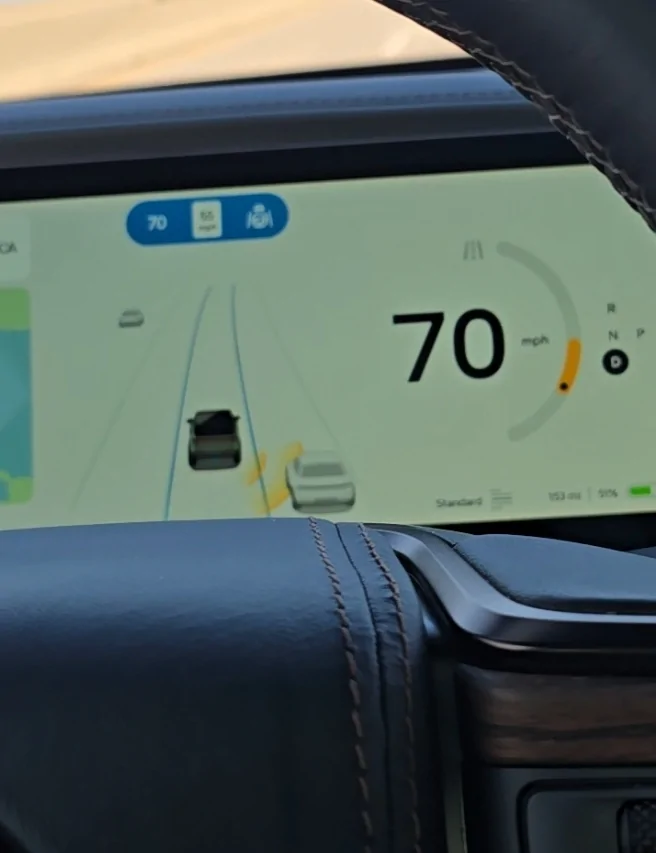
Not yet, but check out the rivian review video, notice that the follow distance lines never appears for him when he's on the highway, no matter how close he gets to the vehicle in front of him. I wonder if this is by design or if he is also affected by the same issue and doesn't know it yet. https://www.rivianforums.com/forum/threads/2025-46-update-release-notes.53697/post-916461

EDIT: Appears this may have been removed on purpose per the thread below, it definitely doesn't appear in the new version as the scroll wheel purpose has been reused to set the Autonomy Drive Styles: Mild, Medium, and Spicy. Maybe we were impacted by it unofficially before this software release went live??

https://www.rivianforums.com/forum/threads/2025-46-update-release-notes.53697/post-916581
Damn, I wish they let me know instead of wasting the service center and my time as well as money.
I don't even get the blue highlighted road.
Rivian R1T R1S How to set follow distance 1000016204
Sponsored

 
Last edited:

tnots

Member
Joined
Dec 8, 2025
Threads
0
Messages
8
Reaction score
6
Location
PA
Vehicles
Rivian R1S California Dune
I have the same exact issue on Gen2 R1S and it started right after 2025.38 (aka Halloween Update). It persisted through 2025.38.30. It is our second Rivian so I'm well aware of how it should act, and the Follow Distance feature worked previously prior to the software update. When we use ACC or ECC a little blue 'dot' appears underneath the car and it defaults to using the furthest distance away from the car in front of us. The lines never appear and the scroll wheel does nothing.

In addition, other problems have also appeared:

1. Music App preferences reset after a long sleep - i.e. I 'hide' Sirius, Spotify, Bluetooth, and they will reappear in my quick list of Music Apps after a long sleep.
2. Forward Collision Warning (FCW) Settings Reset - I set it to Early, it uses that for my current drive, but it reverts to the default aka Normal setting after a long sleep.
3. Upon backing up into our garage, the rear sensors light up as if there is an obstacle immediately behind the rear bumper (i.e. Red warning lines, beeps, etc) as soon as I go over the garage floor 'hump'. If I brake, stop reversing, it'll reset as if that obstacle is nowhere to be found and then monitors obstacles from a distance accordingly.

Troubleshooting Already Performed:
  1. Checked for mud/obstructions on rear bumper sensors/camera (Clean).
  2. Verified vehicle is NOT in Tow Mode.
  3. Performed Soft Reset (Infotainment).
  4. Performed Hard Reset (Full vehicle reboot).
  5. Performed "Deep Sleep" cycle (Unplugged, locked, waited 45+ mins).

I have a service appointment setup in a month after dealing with it for two months and getting tired of the software issues starting to pile up. Otherwise the car works fine.
happy to report all the issues I noticed before have been resolved with this update.
 

Honey

Well-Known Member
Joined
Mar 22, 2022
Threads
4
Messages
388
Reaction score
579
Location
SF Bay Area
Vehicles
Gen 2 Quad Launch Edition
Occupation
Firefighter
happy to report all the issues I noticed before have been resolved with this update.
Amazing. I'm going to call the service center and ask them to update my rivian and see if that fixes it. I hope to get my car back before christmas
Sponsored


Top