Sponsored

Rivian Navigation Range Cushion?

Drippy20

Active Member
First Name
Tom
Joined
Mar 22, 2023
Threads
9
Messages
32
Reaction score
99
Location
Barrington
Vehicles
'91 MR2 Turbo, '15 Highlander, '18 Wrangler Rubico
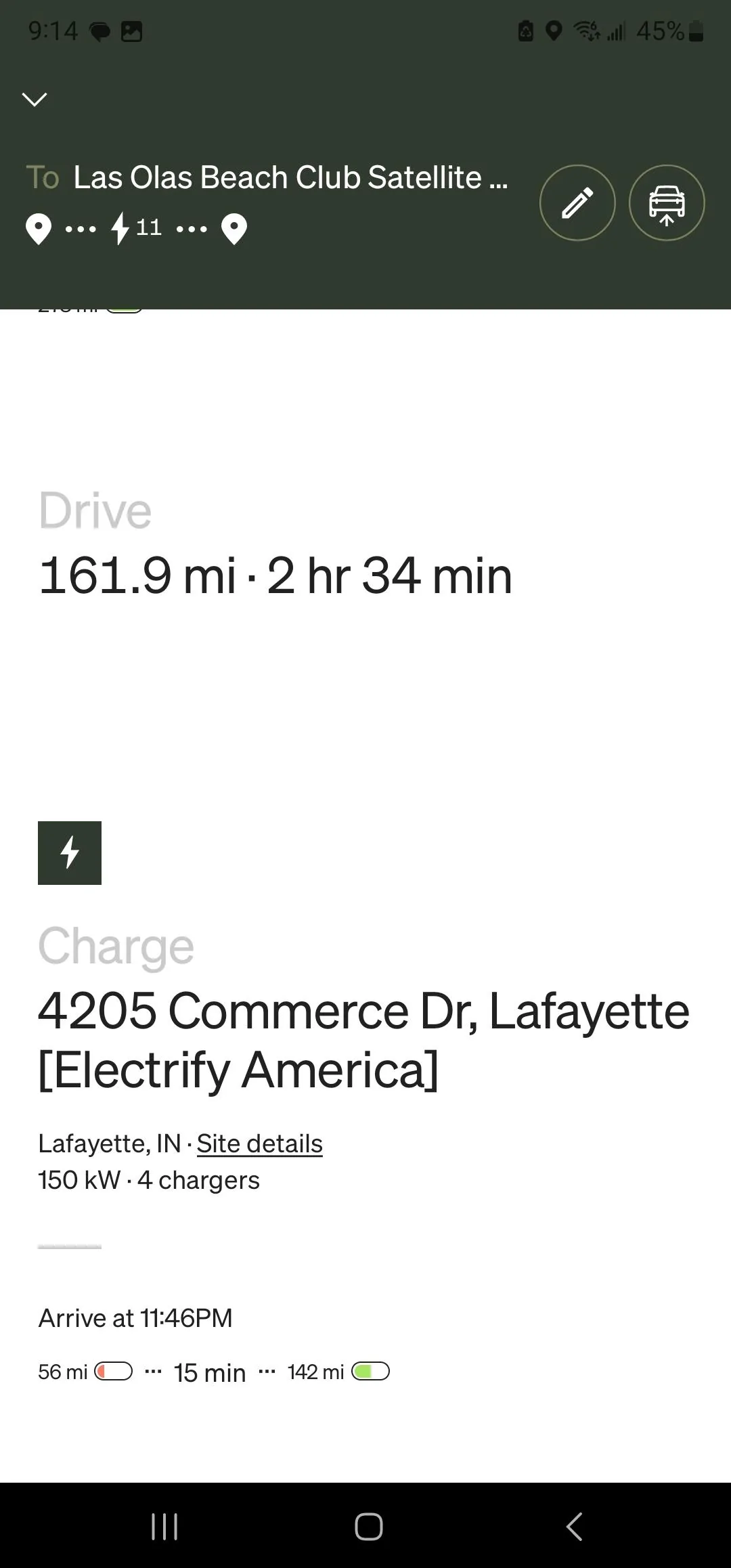
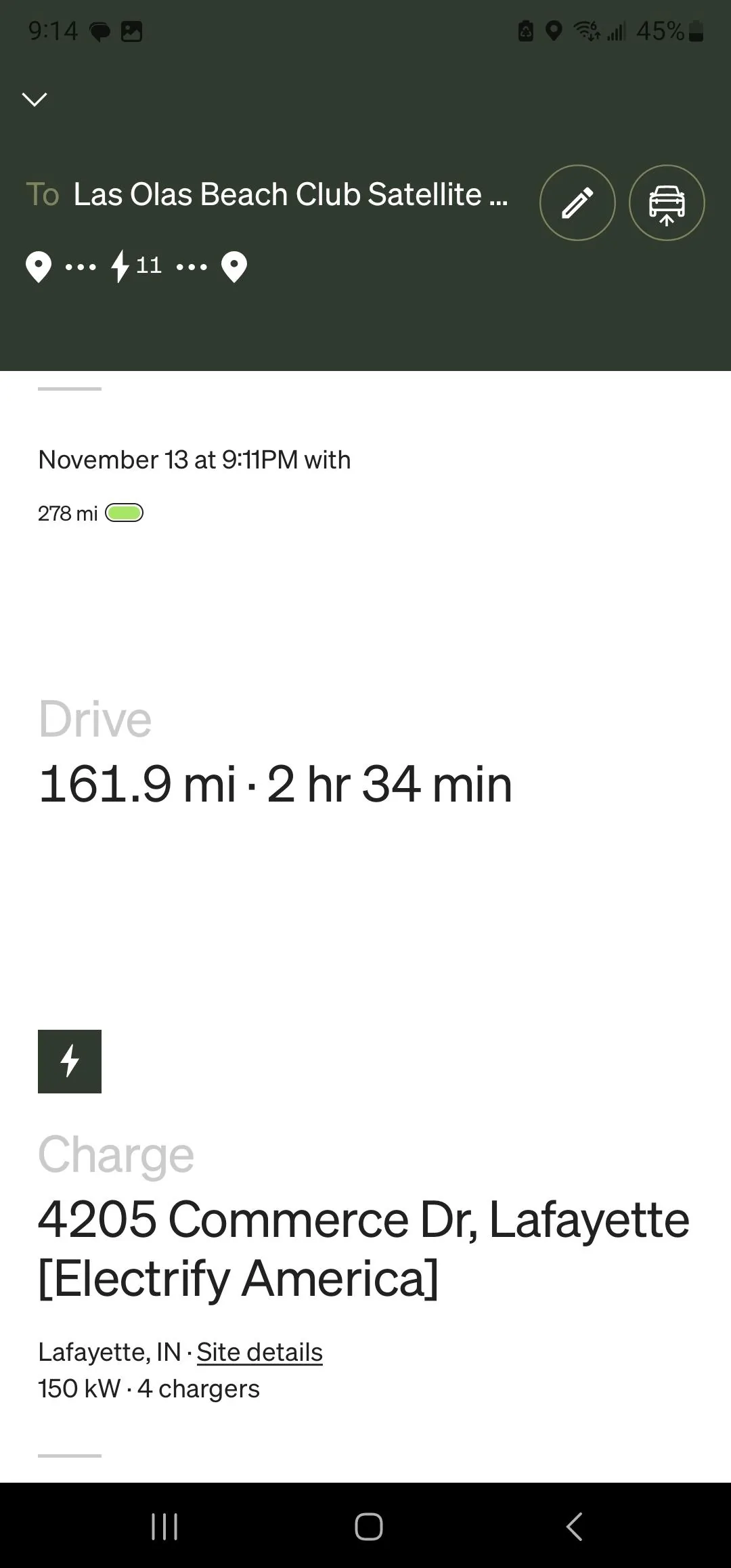
Has anyone determined the amount of cushion in the navigation? 100 percent charge said 278 miles, drive like 162 miles and arrive with 56 miles. This math isn’t even close. I should be able to drive to the next EA station in Indianapolis without issue. Is it just giving a huge cushion if the efficiency goes way down? Planning to drive to FL from Chicago next month and think this will impact potential stops or my marriage if I push past some suggested stops. I know math, and something doesn't add up!

Rivian R1T R1S Rivian Navigation Range Cushion? Screenshot_20231113_211406_Rivian


Rivian R1T R1S Rivian Navigation Range Cushion? Screenshot_20231113_211411_Rivian
Sponsored


VSG

Well-Known Member
Joined
Oct 3, 2022
Threads
4
Messages
3,221
Reaction score
6,015
Location
WA
Vehicles
R1T LE/RB/OC/20
Has anyone determined the amount of cushion in the navigation? 100 percent charge said 278 miles, drive like 162 miles and arrive with 56 miles. This math isn’t even close.
You're aware that your battery doesn't hold miles of range? It stores kWh of energy.

The 100% charge range doesn't mean you will be able to go 278 miles. Lots of things affect how far you can travel at 100% charge, and the distance between two points is only one of them. Those numbers are not supposed to add up, and will not add up unless your driving matches the EPA test conditions exactly (and it won't).

I don't use the (new, in-app) navigation planner, especially for long trips. The Rivian app only knows about a limited number of charging networks for one. And it doesn't give you control over a lot of things, like adding overnight stops, or choosing chargers near food options so you can charge while having lunch, or like adding points you'd like to visit along the way. If you send the in-app plan to the vehicle, you will find the vehicle shows you a different (and much more realistic) arrival number.

The in-car navigation, when you simply route to the next stop, gives you a pretty accurate estimate of charge remaining at your destination based on your drive mode and driving history, and it continually updates it as you drive to take account of your current usage.

So when driving long distances I first plan my trip using ABRP, then when driving I use the in-car navigation to route to my next planned stop. I have used this method on three different trips of >2000 miles each and this way gives me great results.

ABRP tends to be a little conservative in its estimates, and I always end up with more battery at my destination than I planned. But ABRP also has a lot of setting you can adjust to come up with numbers suited for you. ABRP will also help you pinpoint where the problem spots are going to be so you can check on PlugShare for the reliability of the chargers you're counting on and so you can explore backup options at each planned charge location, and re-do your plan if necessary so you will be traveling a route that DOES have backup options in case something goes wrong.

Rivian bought ABRP over the summer, and has started to integrate some of the ABRP features into the app - the rudimentary in-app travel planning was just the first step of this integration. But it's only a partial, limited integration so far. The full-on stand-alone ABRP website and/or app does a lot better job, and they're certainly way more convenient for planning a long road trip.
 

CharonPDX

Well-Known Member
First Name
Charon
Joined
Jul 12, 2021
Threads
31
Messages
2,506
Reaction score
4,177
Location
Cascadia
Vehicles
'22 R1T LE, '16 Model S, '19 Arcimoto FUV
Occupation
InfoSec Geek
Clubs
 
When towing, the cushion is "negative." Navigation multiple times tried to have me go further than was possible with the efficiency it knew my trailer produced!
 
OP
OP

Drippy20

Active Member
First Name
Tom
Joined
Mar 22, 2023
Threads
9
Messages
32
Reaction score
99
Location
Barrington
Vehicles
'91 MR2 Turbo, '15 Highlander, '18 Wrangler Rubico
You're aware that your battery doesn't hold miles of range? It stores kWh of energy.

The 100% charge range doesn't mean you will be able to go 278 miles. Lots of things affect how far you can travel at 100% charge, and the distance between two points is only one of them. Those numbers are not supposed to add up, and will not add up unless your driving matches the EPA test conditions exactly (and it won't).

I don't use the (new, in-app) navigation planner, especially for long trips. The Rivian app only knows about a limited number of charging networks for one. And it doesn't give you control over a lot of things, like adding overnight stops, or choosing chargers near food options so you can charge while having lunch, or like adding points you'd like to visit along the way. If you send the in-app plan to the vehicle, you will find the vehicle shows you a different (and much more realistic) arrival number.

The in-car navigation, when you simply route to the next stop, gives you a pretty accurate estimate of charge remaining at your destination based on your drive mode and driving history, and it continually updates it as you drive to take account of your current usage.

So when driving long distances I first plan my trip using ABRP, then when driving I use the in-car navigation to route to my next planned stop. I have used this method on three different trips of >2000 miles each and this way gives me great results.

ABRP tends to be a little conservative in its estimates, and I always end up with more battery at my destination than I planned. But ABRP also has a lot of setting you can adjust to come up with numbers suited for you. ABRP will also help you pinpoint where the problem spots are going to be so you can check on PlugShare for the reliability of the chargers you're counting on and so you can explore backup options at each planned charge location, and re-do your plan if necessary so you will be traveling a route that DOES have backup options in case something goes wrong.

Rivian bought ABRP over the summer, and has started to integrate some of the ABRP features into the app - the rudimentary in-app travel planning was just the first step of this integration. But it's only a partial, limited integration so far. The full-on stand-alone ABRP website and/or app does a lot better job, and they're certainly way more convenient for planning a long road trip.
Yea, I get that it is percent of battery it's just funny to me. ABRP is much better, but effort. I was just laughing at a 3 hr trip this weekend and it said I had 65 miles of range left for 45 miles of trip remaining. And wanted me to charge to add 100 miles of range to arrive with 50ish miles of range. And we are talking highway driving in flat IN and IL. I'm just trying to figure of how much to push regardless of using % of battery or miles.
 

VSG

Well-Known Member
Joined
Oct 3, 2022
Threads
4
Messages
3,221
Reaction score
6,015
Location
WA
Vehicles
R1T LE/RB/OC/20
65 miles of range left for 45 miles of trip remaining. And wanted me to charge to add 100 miles of range to arrive with 50ish miles of range.
That's because of the setting that specifies what % of battery you require at your destination. You're thinking in terms of >0% remaining at destination, but the default is >20% remaining at destination (which is about 56 miles in your case). Because you were going to arrive with only 20 miles left, which is less than 20%, it added a charging stop to ensure you would be above 20% the whole time.

That setting can be changed, both in the Rivian app and in ABRP, and is an important number to consider.

For road trips I usually use 10% for planning, which leaves me with about 30 miles of range at my destination. But for problem stretches I might up that to 50% required at my destination (you can change this for each waypoint individually in ABRP) so that I will have enough charge for local travel before I continue on or so that I have enough to reach the next station.

I agree it takes some effort at this time, because of lack of charging stations in general and lack of charging stations in some states and some major highways. But the charging situation has gotten noticeably better over the past year, and if Tesla follows through on opening their superchargers next year it will get a whole lot better, but we're still going to have to deal with this situation in many places. I would rather plan ahead and have a smooth trip than have to spend a day getting towed to the nearest slow charger when I run out of battery in the middle of nowhere.
Sponsored


Top