Sponsored

How do I record video when needed.

planetcase

Well-Known Member
First Name
Casey
Joined
Jan 12, 2024
Threads
13
Messages
96
Reaction score
89
Location
Annapolis, MD
Vehicles
R1S 2023
Hello

I don't know why I can't find this answer on my own, but here goes.

Yesterday, I was in a situation where I wanted to record what was happening outside my Rivian. I am pretty sure there is a way to manually start the recording.
I know the car will automatically save incidences/accidents. But how do I record when needed?

Thank you very much !
Sponsored

 

bael

Well-Known Member
Joined
Nov 24, 2021
Threads
31
Messages
557
Reaction score
903
Location
GA
Vehicles
LE R1T, X5
Clubs
 
Look for this icon in the top bar [0] (Don't have a picture handy) - press that and it should trigger the recording
 

SwampNut

Well-Known Member
First Name
Carlos
Joined
Apr 22, 2024
Threads
50
Messages
3,420
Reaction score
3,610
Location
Peoria AZ
Vehicles
2022 R1T Launch Edition
Occupation
Geek
Clubs
 
There's a button on the top bar. BUT, it's very stupid; it records back only ten seconds, and then forward a couple minutes (something like that). Weird since typically you want to record what just happened. Still, everything is already being recorded so you just have to pull the USB flash drive and get it. Hitting the button just makes a copy of part of the video in a different folder.
 

Dave Cundiff

Well-Known Member
First Name
Dave
Joined
Feb 28, 2024
Threads
4
Messages
1,173
Reaction score
1,586
Location
Pacific County, Washington
Vehicles
'23 R1S (DM,Max); '23 R1T (QM,Lg); '23 Chevy Bolt
@SwampNut:

Recording forward in time could help in case of a wildlife sighting; or to document that an event really WAS a hit and run.

Recording farther backward in time could help those of us who don't think of recording immediately when something strange happens.

Best wishes!
 

Sponsored

SwampNut

Well-Known Member
First Name
Carlos
Joined
Apr 22, 2024
Threads
50
Messages
3,420
Reaction score
3,610
Location
Peoria AZ
Vehicles
2022 R1T Launch Edition
Occupation
Geek
Clubs
 
It's easy to hit the record button again in the future. I did this a lot in the Tesla. The Rivian has me panic-reaching for the save. Though, again, the file is there anyway, you just have to do more searching.
 

Wokka1827

Well-Known Member
Joined
May 21, 2024
Threads
7
Messages
67
Reaction score
60
Location
Nashville
Vehicles
R1T
When you hit the horn it usually triggers the 2 minute recording - if that’s what you are referring to? However, when ever you are driving it is constantly recording on a loop (depending on the hard drive size I believe) so you can recall any time period.
 

Dave Cundiff

Well-Known Member
First Name
Dave
Joined
Feb 28, 2024
Threads
4
Messages
1,173
Reaction score
1,586
Location
Pacific County, Washington
Vehicles
'23 R1S (DM,Max); '23 R1T (QM,Lg); '23 Chevy Bolt
Each 15-minute DriveCam segment, from a single camera, is 1.13 gigabytes.

It takes a little time, but not much effort, to save those 15 minutes to my laptop.

To post it or email it, I would have to learn how to edit the 1.13 GB MP4 file.

Thanks and best wishes!
 
OP
OP

planetcase

Well-Known Member
First Name
Casey
Joined
Jan 12, 2024
Threads
13
Messages
96
Reaction score
89
Location
Annapolis, MD
Vehicles
R1S 2023
There's a button on the top bar. BUT, it's very stupid; it records back only ten seconds, and then forward a couple minutes (something like that). Weird since typically you want to record what just happened. Still, everything is already being recorded so you just have to pull the USB flash drive and get it. Hitting the button just makes a copy of part of the video in a different folder.
That button is not on my top bar. Need to find out why!
 

Sponsored

OP
OP

planetcase

Well-Known Member
First Name
Casey
Joined
Jan 12, 2024
Threads
13
Messages
96
Reaction score
89
Location
Annapolis, MD
Vehicles
R1S 2023
Look for this icon in the top bar [0] (Don't have a picture handy) - press that and it should trigger the recording
Thank you. For some reason that icon is not on my top bar. I'm researching why.
 

SwampNut

Well-Known Member
First Name
Carlos
Joined
Apr 22, 2024
Threads
50
Messages
3,420
Reaction score
3,610
Location
Peoria AZ
Vehicles
2022 R1T Launch Edition
Occupation
Geek
Clubs
 
Do you have a memory card plugged in and did you set up the gear guard or drive cam?
 

Magicbus

Well-Known Member
First Name
Dave
Joined
Nov 6, 2023
Threads
9
Messages
335
Reaction score
312
Location
Nantucket, MA
Vehicles
Dual Performance R1T, Volvo XC90 Hybrid
Occupation
Retired
Do you have a memory card plugged in and did you set up the gear guard or drive cam?
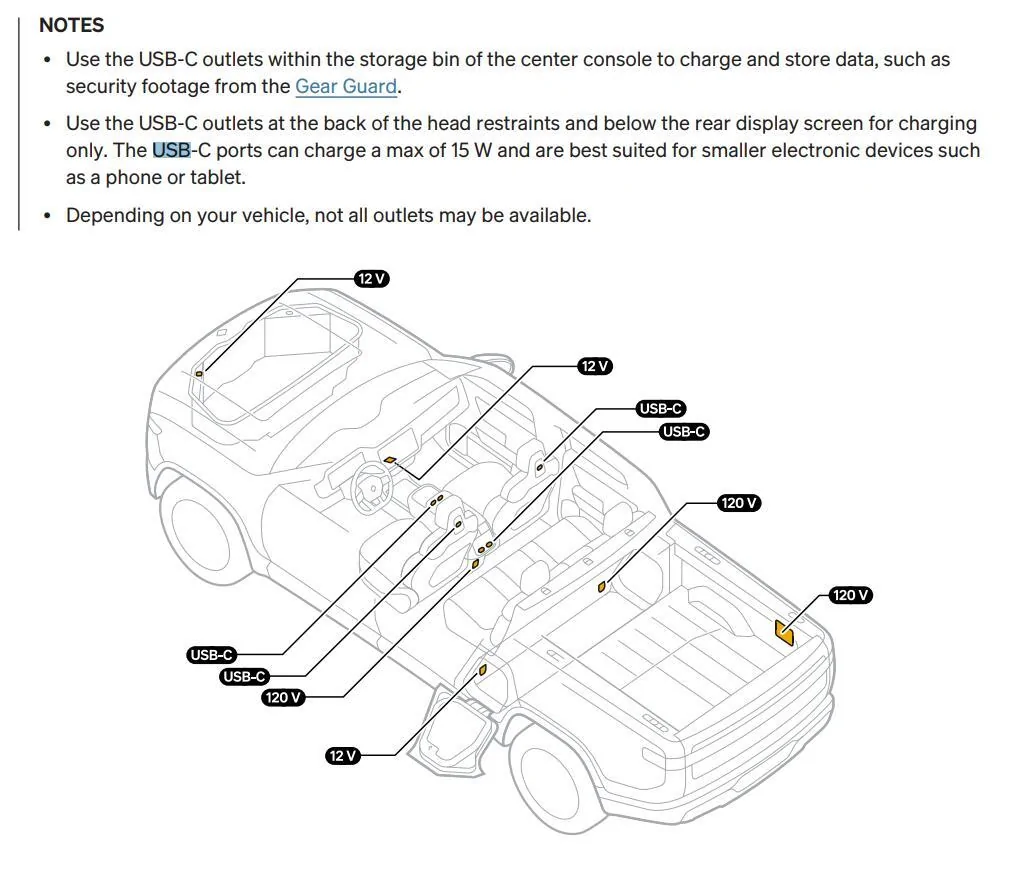
I've seen all of this recent news on Gear Guard and plugging in a USB stick to enable capture of "incidents" Where exactly do you plug in the USB stick? I've looked in the manual and it just seems to reference "an external storage device.
 

beatle

Well-Known Member
Joined
Jun 20, 2024
Threads
17
Messages
1,148
Reaction score
1,563
Location
Springfield, VA
Vehicles
'23 R1T PDM Max, '97/'25 Miatas, '19 Monkey
Occupation
IT
Clubs
 
I've seen all of this recent news on Gear Guard and plugging in a USB stick to enable capture of "incidents" Where exactly do you plug in the USB stick? I've looked in the manual and it just seems to reference "an external storage device.
Open the center console and look down into the cavity. On the wall of the console towards the front of the truck will be a couple of USB-C ports. You can use one of those for storage.

The picture from the manual isn't great, but it gives you a general idea of where they are:

Rivian R1T R1S How do I record video when needed. 1728234460661-17
 

Donald Stanfield

Well-Known Member
First Name
Donald
Joined
Jul 31, 2022
Threads
59
Messages
8,313
Reaction score
16,662
Location
USA
Vehicles
2025 R1S Tri Ascend, 2024 i4 M50
Occupation
Stuff and things
Remember that if you have a hard drive installed for the camera, it records all the time like a security camera. All the record does on the truck is save that particular clip to the truck's hard drive so you can watch it.

Should you need footage you didn't record in time, take the hard drive out of your truck and the footage using your computer.
Sponsored


Top