Sponsored

Remote AC button takes 3 tries to work

BrianB

Well-Known Member
First Name
Brian
Joined
Jun 9, 2024
Threads
14
Messages
189
Reaction score
294
Location
Conroe, TX
Vehicles
2025 R1S
Clubs
 
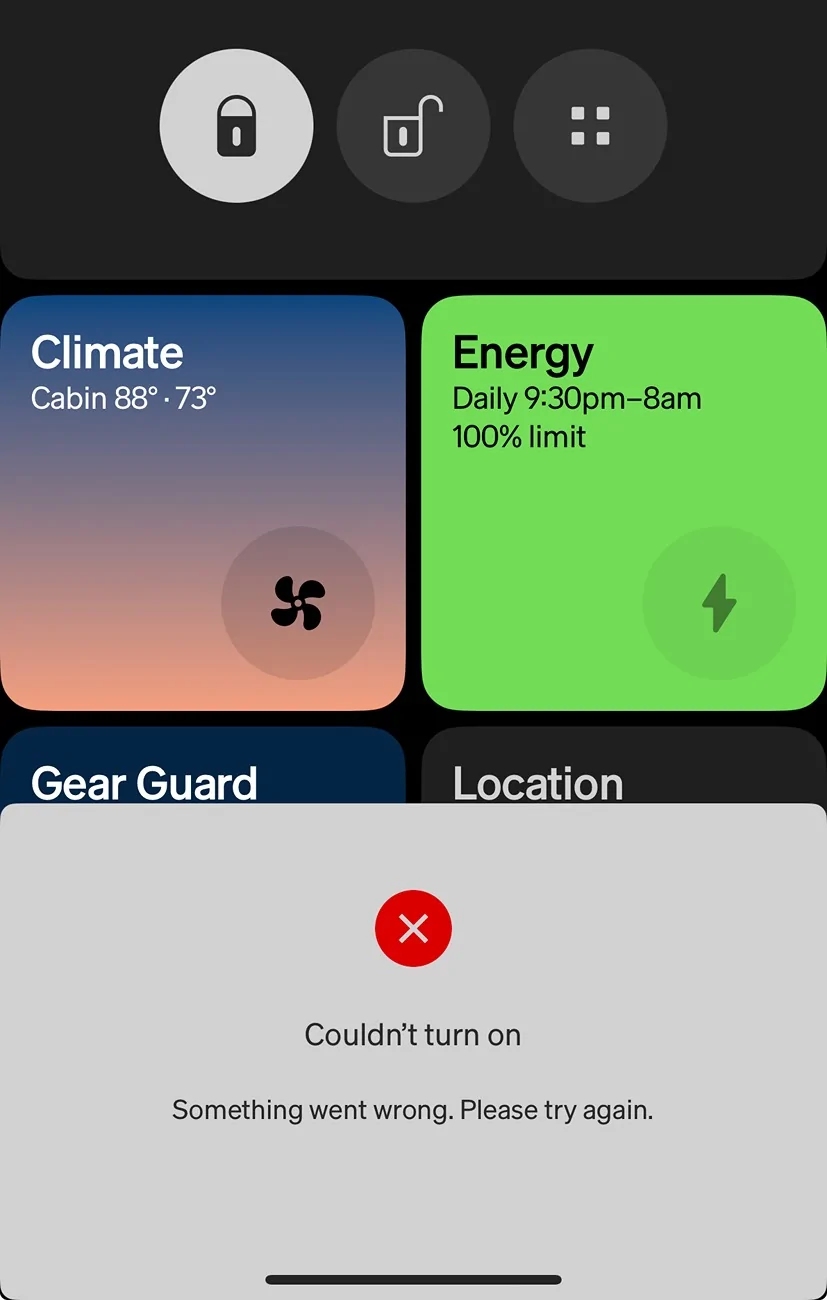
I live where it’s hot, so love to turn on the AC remotely before heading to my Gen 2 R1S. When I hit the AC button in the iOS app, it warns that it couldn’t connect. After 3-4 attempts, it connects. Happens when I’ve got a strong 4g/5g signal, and even when I’m on wifi at home.

Anyone know about this issue?

Rivian R1T R1S Remote AC button takes 3 tries to work IMG_9734
Sponsored


captainjp

Well-Known Member
First Name
John
Joined
Oct 18, 2024
Threads
9
Messages
1,220
Reaction score
1,843
Location
New Jersey
Vehicles
Gen 2 R1T
Clubs
 
Same. To get around this, I wake the vehicle first. In the app Home Screen, pull down from the top and tap on the words stating the vehicle is sleeping. It will confirm that you’d like to wake the vehicle. Once awake, HVAC buttons should work immediately
 

PaythePiper

Banned
Well-Known Member
Joined
Sep 2, 2024
Threads
5
Messages
587
Reaction score
697
Location
Phx AZ
Vehicles
Model Y, R1S Dual Max
Mine has always done this. It usually works after the error message most of the time .
 

Makes

New Member
Joined
Mar 8, 2025
Threads
0
Messages
1
Reaction score
0
Location
Atl
Vehicles
R1T
Probably my biggest complaint. I try to use this feature daily and it never works on the first or second go. I just keep hitting the button like an idiot.
 

Flyedouglas

Active Member
First Name
Eric
Joined
Jun 28, 2025
Threads
6
Messages
25
Reaction score
15
Location
Chicago
Vehicles
R1S
I’ve had the same issue. For whatever it’s worth my Volvo XC-40 Recharge had the same issue. It’s annoying AF. I was hoping Rivian would be better about this, but alas.

For the record my Rivian is LEAPS & BOUNDS better than my Volvo (which I loved). But still…
 

Sponsored

DeafPug

Well-Known Member
Joined
Oct 20, 2021
Threads
6
Messages
564
Reaction score
842
Location
Kansas
Vehicles
'18 Model 3, '22 R1T
My Model 3 behaved like this back in 2018. Somewhere along the way, they improved the HVAC activation from the app to send a message to the Tesla servers and have the servers handle the wakeup and HVAC activation in the background.
 

2kwik4u

Well-Known Member
First Name
Michael
Joined
Jan 8, 2025
Threads
11
Messages
818
Reaction score
1,057
Location
Western NY State
Vehicles
2024 Rivian R1T ; 2018 Nissan Rogue
I wake the vehicle first.
100% a "wake/sleep" issue. I've found PaaK and the Fob both respond almost instantly when the truck is "awake", but if I walk up and it's "asleep", then I'm waiting for it to wake before I get access. App behaves the same way.

Probably a hardware limitation, but sure would be nice to have a "constantly on" section of the hardware that controlled access and OTA commands. I'm sure this symptom is a function of limiting vampire drain, but it leads to this annoying behavior.
 
OP
OP
BrianB

BrianB

Well-Known Member
First Name
Brian
Joined
Jun 9, 2024
Threads
14
Messages
189
Reaction score
294
Location
Conroe, TX
Vehicles
2025 R1S
Clubs
 
Same. To get around this, I wake the vehicle first. In the app Home Screen, pull down from the top and tap on the words stating the vehicle is sleeping. It will confirm that you’d like to wake the vehicle. Once awake, HVAC buttons should work immediately
Thanks
100% a "wake/sleep" issue. I've found PaaK and the Fob both respond almost instantly when the truck is "awake", but if I walk up and it's "asleep", then I'm waiting for it to wake before I get access. App behaves the same way.

Probably a hardware limitation, but sure would be nice to have a "constantly on" section of the hardware that controlled access and OTA commands. I'm sure this symptom is a function of limiting vampire drain, but it leads to this annoying behavior.
Agreed. There are times that I really need to minimize vampire drain. However, in a typical week where I’m driving a bit most days and charging at the end of the week, I’d trade a higher level of vampire drain to have the vehicular constantly awake, at some level, and responsive to commands.
 
OP
OP
BrianB

BrianB

Well-Known Member
First Name
Brian
Joined
Jun 9, 2024
Threads
14
Messages
189
Reaction score
294
Location
Conroe, TX
Vehicles
2025 R1S
Clubs
 
My Model 3 behaved like this back in 2018. Somewhere along the way, they improved the HVAC activation from the app to send a message to the Tesla servers and have the servers handle the wakeup and HVAC activation in the background.
Glad to hear Tesla solved this. It gives me hope Rivian will copy the solution and push it to us in an update.
 

2kwik4u

Well-Known Member
First Name
Michael
Joined
Jan 8, 2025
Threads
11
Messages
818
Reaction score
1,057
Location
Western NY State
Vehicles
2024 Rivian R1T ; 2018 Nissan Rogue
Agreed. There are times that I really need to minimize vampire drain. However, in a typical week where I’m driving a bit most days and charging at the end of the week, I’d trade a higher level of vampire drain to have the vehicular constantly awake, at some level, and responsive to commands.
100% agreed there. I'll take vampire drain all day in my "normal" use, and then a more aggressive protection for things like parking at the airport for vacation.

Would be nice if we could "schedule" the sleep mode, or otherwise control it. Almost like the difference on a windows machine between "Sleep" and "Hibernate". Sleep just turns the screens, HVAC, and Audio off. Leave the core processing up and running. Then Hibernate is a full on "shut it 90% of the way down" mode.
 

Sponsored

OP
OP
BrianB

BrianB

Well-Known Member
First Name
Brian
Joined
Jun 9, 2024
Threads
14
Messages
189
Reaction score
294
Location
Conroe, TX
Vehicles
2025 R1S
Clubs
 
100% agreed there. I'll take vampire drain all day in my "normal" use, and then a more aggressive protection for things like parking at the airport for vacation.

Would be nice if we could "schedule" the sleep mode, or otherwise control it. Almost like the difference on a windows machine between "Sleep" and "Hibernate". Sleep just turns the screens, HVAC, and Audio off. Leave the core processing up and running. Then Hibernate is a full on "shut it 90% of the way down" mode.
Yeah. Come to think of it, Whoop and Apple Watch (and so my phone) know when I’m asleep. If AI could take all our jobs, surely the Rivian app could become aware of what the Whoop and Apple Health apps know about me to have my R1S sleep when I sleep.
 

beatle

Well-Known Member
Joined
Jun 20, 2024
Threads
17
Messages
1,144
Reaction score
1,562
Location
Springfield, VA
Vehicles
'23 R1T PDM Max, '97/'25 Miatas, '19 Monkey
Occupation
IT
Clubs
 
Same here. Mine has been like this for a long time. PaaK also will not work unless manually waking it up. I've found that
Same. To get around this, I wake the vehicle first. In the app Home Screen, pull down from the top and tap on the words stating the vehicle is sleeping. It will confirm that you’d like to wake the vehicle. Once awake, HVAC buttons should work immediately
I have found that the unlock command will go through when HVAC commands will not, but this seems like a more elegant solution.
 

WhidbeyIsland

Well-Known Member
First Name
Jon
Joined
Mar 16, 2022
Threads
2
Messages
197
Reaction score
171
Location
Langley, WA
Vehicles
2023 R1T & 2026 Lexus NX350
Occupation
Retired!
BTW, this happens on the Android version as well.. Ask me how I know...:(
 

captainjp

Well-Known Member
First Name
John
Joined
Oct 18, 2024
Threads
9
Messages
1,220
Reaction score
1,843
Location
New Jersey
Vehicles
Gen 2 R1T
Clubs
 
Looks like this issue is being addressed in the next OTA update.
Sponsored


Top