Sponsored

Please Help, My R1S is Bleeding Kilowatts

KenCar

Well-Known Member
First Name
Ken
Joined
Aug 27, 2024
Threads
1
Messages
60
Reaction score
58
Location
California
Vehicles
R1S
Rivian technicians say everything is okay, but my car is bleeding kilowatts! My Trip Meter shows 157kWh used to drive 142.6 miles. Does anyone else have this problem? At the advice of the local Service Station, I turned off MotionCam and LiveCam, and I turned off RoadCam, hotspot, and bluetooth.…to no avail.

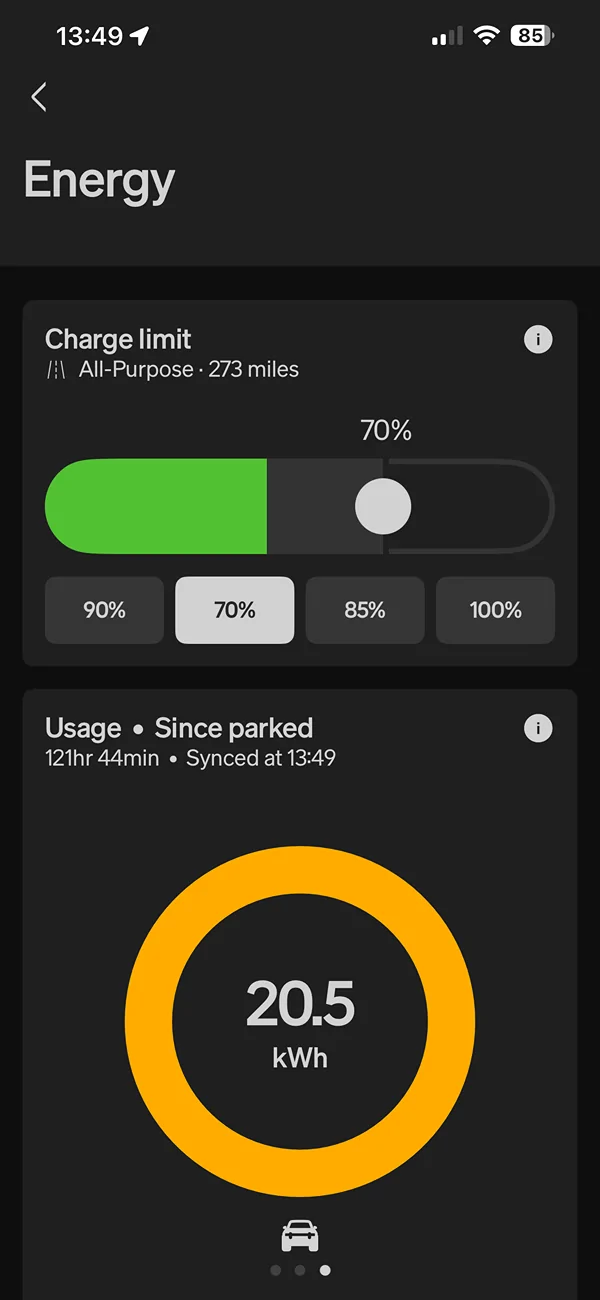
My R1S’ efficiency while driving seems normal, but park the car and watch the “kilowatts used” keep going! The Trip Meter loses 4X the kilowatts shown in the Energy Monitoring screen. Stop for one hour and the Trip Meter logs 2 kilowatts in the “kilowatts used” line. Park overnight and 4 or 5kWh are added. At this rate, my R1S’ lifetime efficiency will under 2.0 by the summer. FYI: My R1S is a Dual Motor with 22” Aero wheels; garage-kept, no towing, no off-roading, no pet-mode.

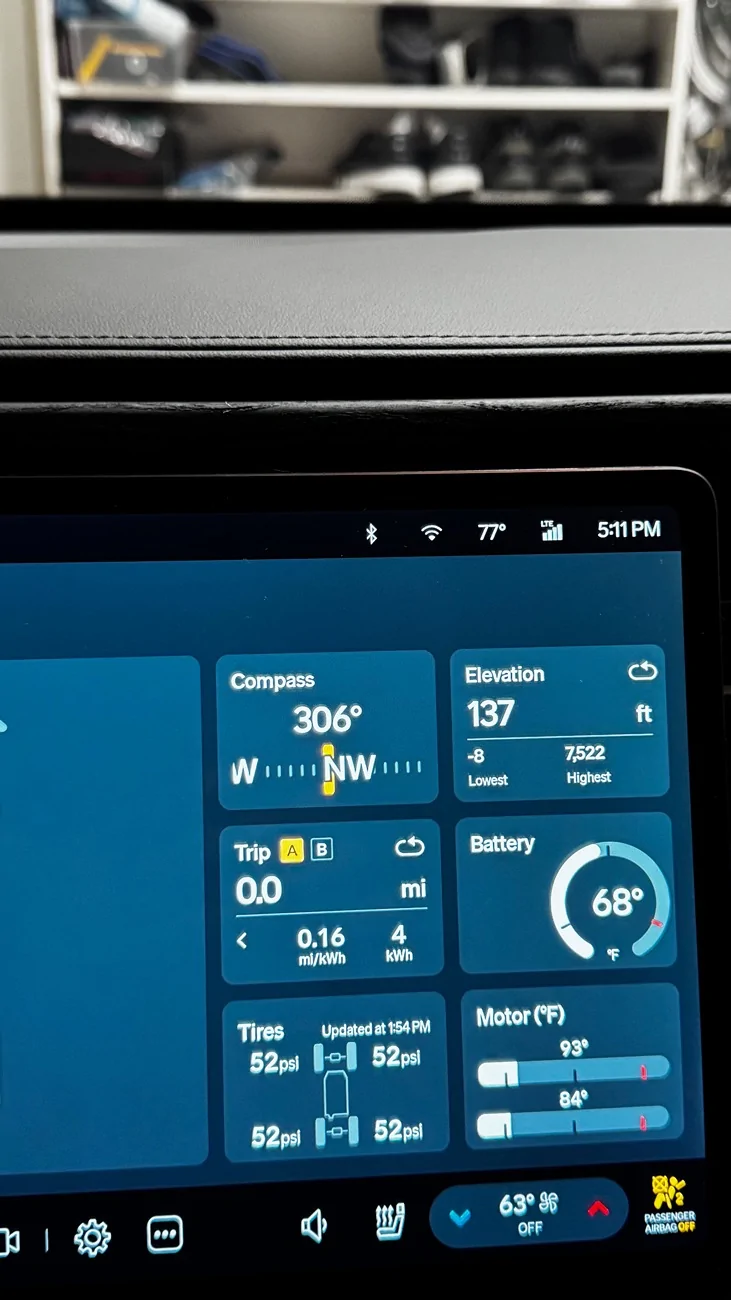
There are two more odd things. First, the projected range is often unaffected. How can the car “use” 5kWh, but lose no range? Second, those “parked” kilowatts show an efficiency of 0.16 miles/kWh. Why is it not zero? My parked car has not moved an inch.

I had a loaner Rivian R1T for a few days. Its Trip Meter did not tack on a single kilowatt while parked. Any suggestions?

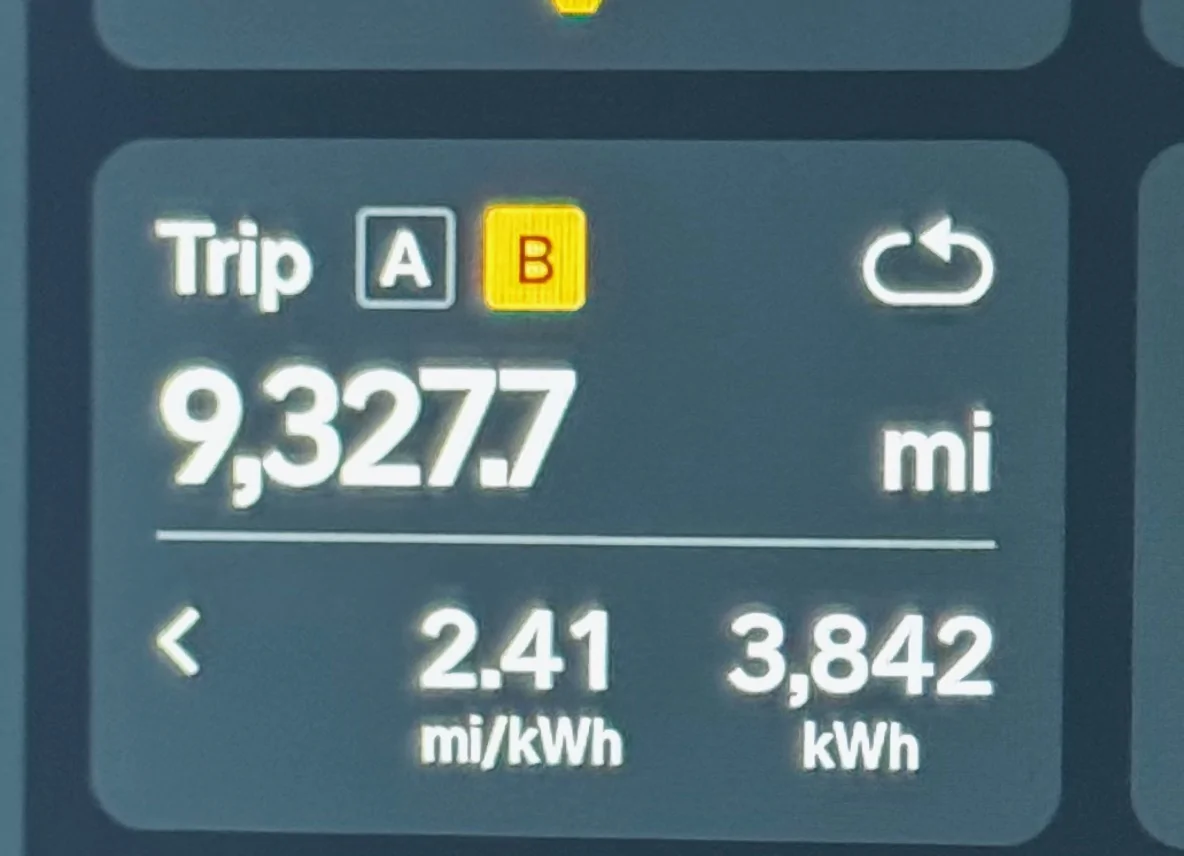
Rivian R1T R1S Please Help, My R1S is Bleeding Kilowatts 3842kwh 9327.7 miles Jan25 2026


Rivian R1T R1S Please Help, My R1S is Bleeding Kilowatts 3997kwh 9470.3 miles Feb07 2026


Rivian R1T R1S Please Help, My R1S is Bleeding Kilowatts 4kwh 0 miles 511pm
Sponsored


Nixapatfan

Well-Known Member
Joined
Aug 23, 2024
Threads
7
Messages
589
Reaction score
1,212
Location
Massachusetts
Vehicles
R1T
Yup these burn through a lot just sitting there and much more extreme when the temps drop below freezing. I haven't bothered to look closely at how it calculates efficiency but I don't think it takes into account the vampire drain losses.
 

Dark-Fx

Well-Known Member
First Name
Brian
Joined
Jul 15, 2020
Threads
147
Messages
13,519
Reaction score
27,286
Location
Michigan
Vehicles
R1T, R1S, Livewire One, Sierra EV, R1S
Occupation
Engineering
Clubs
 
Is your vehicle close to you when parked at your home? The loaner isn't going to get woken from the Bluetooth on your phone like your own vehicle will.

How about your scheduled climate settings?
 

Nixapatfan

Well-Known Member
Joined
Aug 23, 2024
Threads
7
Messages
589
Reaction score
1,212
Location
Massachusetts
Vehicles
R1T
If you have Home Assistant integration or Rivian Roamer you should be able to check the sleep/wake cycles to see how often it spends it time awake. Also check to make sure nothing on the seats, belts unbuckled and doors fully closed. Most likely the 12v battery is dying if you are losing 4kw a night around 1kw is "normal", sometimes a trickle charge and de-sulphation cycle will revive it enough to reduce the drain.
 
OP
OP

KenCar

Well-Known Member
First Name
Ken
Joined
Aug 27, 2024
Threads
1
Messages
60
Reaction score
58
Location
California
Vehicles
R1S
Thank you all for your advice.

My car is kept in the garage (@75 degrees), so it would be in bluetooth range of our phones. I actually turn off the car's bluetooth when I think of it, but it is always back on when I get in the car. I'm not sure how long bluetooth stays off, or what triggers it to turn back on. My family and I keep the Rivian App closed, and we have turned off "Live Activities" [I heard that causes more frequent talking between car and phone].

The 12V was replaced six months ago under a warranty recall; I hope that is not bad. Even so, neither the battery nor bluetooth explains how 4kWh is added to the Trip Meter, just 1kWh is used according to the Energy Monitor, and just 1 or 2 miles disappear from projected range [I really need to trust the Projected Range when I take my next roadtrip].

I’ll research the Home Assistant and Rivian Roamer. I’d love to get this figured out!
 

Sponsored

MI_Ranger

Member
First Name
J.R.
Joined
Jan 3, 2025
Threads
0
Messages
11
Reaction score
9
Location
South Carolina
Vehicles
R1T Performance Dual Motor Max Pack
Clubs
 
Rivian technicians say everything is okay, but my car is bleeding kilowatts! My Trip Meter shows 157kWh used to drive 142.6 miles. Does anyone else have this problem? At the advice of the local Service Station, I turned off MotionCam and LiveCam, and I turned off RoadCam, hotspot, and bluetooth.…to no avail.

My R1S’ efficiency while driving seems normal, but park the car and watch the “kilowatts used” keep going! The Trip Meter loses 4X the kilowatts shown in the Energy Monitoring screen. Stop for one hour and the Trip Meter logs 2 kilowatts in the “kilowatts used” line. Park overnight and 4 or 5kWh are added. At this rate, my R1S’ lifetime efficiency will under 2.0 by the summer. FYI: My R1S is a Dual Motor with 22” Aero wheels; garage-kept, no towing, no off-roading, no pet-mode.

There are two more odd things. First, the projected range is often unaffected. How can the car “use” 5kWh, but lose no range? Second, those “parked” kilowatts show an efficiency of 0.16 miles/kWh. Why is it not zero? My parked car has not moved an inch.

I had a loaner Rivian R1T for a few days. Its Trip Meter did not tack on a single kilowatt while parked. Any suggestions?

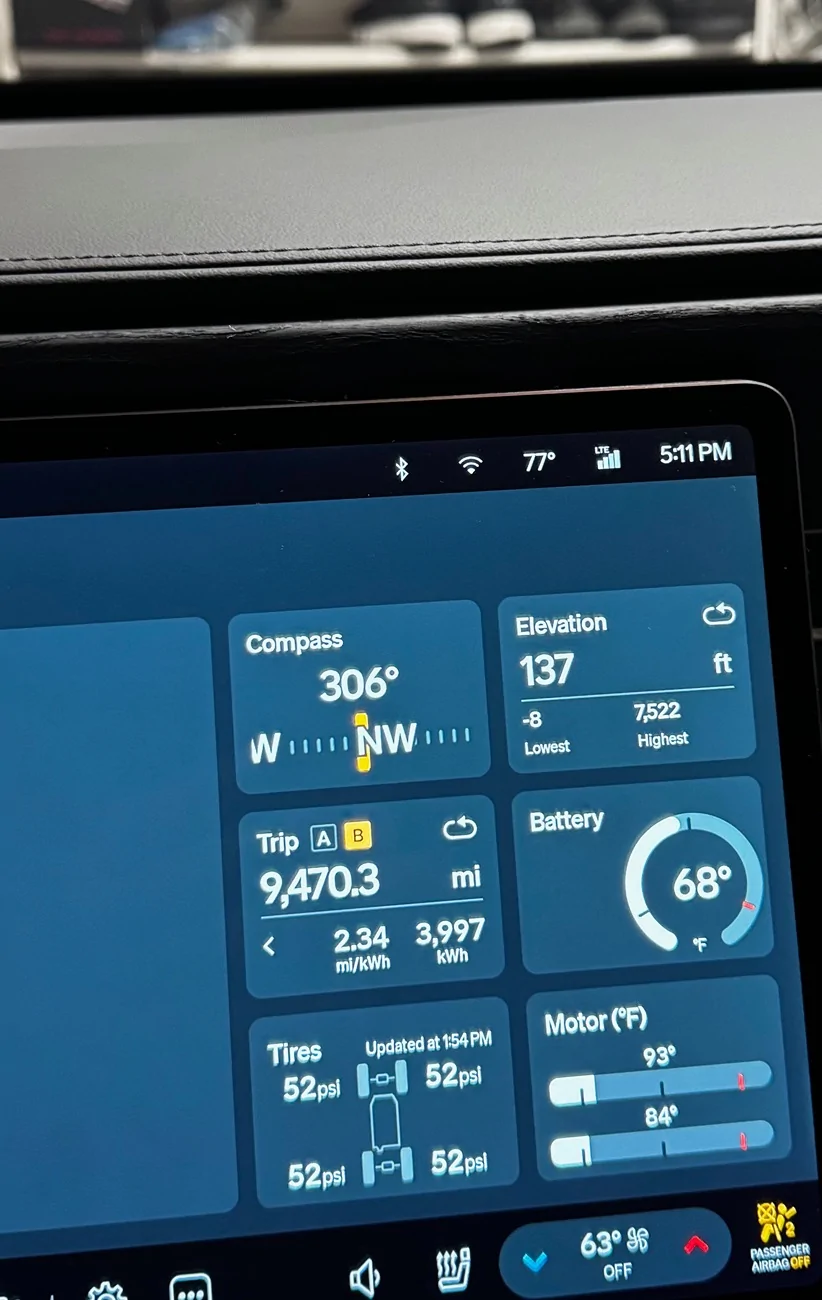
3842kwh 9327.7 miles Jan25 2026.webp


3997kwh 9470.3 miles Feb07 2026.webp


4kwh 0 miles 511pm.webp
Have you tried recalibrating your GPS? That sounds like your location is drifting and the car thinks it is moving. Yes that is a lot of vampire drain for just sitting, mine loses that much overnight in the cold (below freezing) but not in summer.
 

Rivian Roamer

Well-Known Member
Joined
Jul 18, 2024
Threads
2
Messages
470
Reaction score
659
Location
Seattle, WA
Website
rivianroamer.com
Vehicles
2024 R1S Quad Large, 2025 R1T Tri Max
Occupation
Adventurer
Have you tried recalibrating your GPS? That sounds like your location is drifting and the car thinks it is moving. Yes that is a lot of vampire drain for just sitting, mine loses that much overnight in the cold (below freezing) but not in summer.
This happened to me, my car was far enough away from "home" it was no longer "home" and gear guard was on all of the time.
 

EV-by-the-Sea

Well-Known Member
Joined
Oct 3, 2023
Threads
0
Messages
50
Reaction score
35
Location
Bay Area
Vehicles
R1S DM Performance; R1T Quad; Audi RS6
Thank you all for your advice.

My car is kept in the garage (@75 degrees), so it would be in bluetooth range of our phones. I actually turn off the car's bluetooth when I think of it, but it is always back on when I get in the car. I'm not sure how long bluetooth stays off, or what triggers it to turn back on. My family and I keep the Rivian App closed, and we have turned off "Live Activities" [I heard that causes more frequent talking between car and phone].

The 12V was replaced six months ago under a warranty recall; I hope that is not bad. Even so, neither the battery nor bluetooth explains how 4kWh is added to the Trip Meter, just 1kWh is used according to the Energy Monitor, and just 1 or 2 miles disappear from projected range [I really need to trust the Projected Range when I take my next roadtrip].

I’ll research the Home Assistant and Rivian Roamer. I’d love to get this figured out!
Since it lives in the garage and in bluetooth range, I would take a different approach -- instead of turning bluetooth on/off in the car (which I'm not 100% positive would help your situation) I would instead set the car up to turn off proximity locking when at your home location. That's what I do with my wife's R1S -- it lives in the garage and so when it's parked there it's always "unlocked" and our moving around the house with our phones doesn't continuously lock/unlock it and wake it up from deep sleep.
 

Rivian Roamer

Well-Known Member
Joined
Jul 18, 2024
Threads
2
Messages
470
Reaction score
659
Location
Seattle, WA
Website
rivianroamer.com
Vehicles
2024 R1S Quad Large, 2025 R1T Tri Max
Occupation
Adventurer
Since it lives in the garage and in bluetooth range, I would take a different approach -- instead of turning bluetooth on/off in the car (which I'm not 100% positive would help your situation) I would instead set the car up to turn off proximity locking when at your home location. That's what I do with my wife's R1S -- it lives in the garage and so when it's parked there it's always "unlocked" and our moving around the house with our phones doesn't continuously lock/unlock it and wake it up from deep sleep.
Keeping proximity unlocking on at home almost always is a source of drain.
 
OP
OP

KenCar

Well-Known Member
First Name
Ken
Joined
Aug 27, 2024
Threads
1
Messages
60
Reaction score
58
Location
California
Vehicles
R1S
Well, I am still confused. I drove to an L2 charger and charged for 90 minutes. I was well out of bluetooth range. When I returned, I found zero kWh added to the Trip Meter and 0.0kWh added to the parking Energy Monitor. For the first time in several weeks, there was no hit to my Trip Meter...yeah! That had me optimistic the solution was to leave my car plugged in at home.

Charging at home later, the Trip Meter advanced 2kWh...dang! Unplugged, it advanced another 5kWh in 90 minutes (doors unlocked), and another 2kWh in the next 90 minutes (doors locked, bluetooth off).

The good news: The projected range dropped just 2 miles for the afternoon's 9kWh hit on the Trip Meter. This strengthens my current belief it is a software glitch...but what is the trigger?

I just opened a Rivian Roamer account. Hopefully that sheds some light.
 

Sponsored

hudesigns

Well-Known Member
First Name
Jim
Joined
May 27, 2024
Threads
5
Messages
130
Reaction score
110
Location
New York
Vehicles
2026 R1S dual max performance
Same drain issue. I’m really tired of trying to identify exact source so I turn off gear guard completely, power off climate when getting out car, kill proximity and even want to find a way to turn off connectivity. Will definitely let connect+ expire! And the stupid GPS always think I’m blocks away from home so scheduled charging never works.


Rivian R1T R1S Please Help, My R1S is Bleeding Kilowatts IMG_9270
 
Last edited:

stormbreaker

Well-Known Member
First Name
Ettore
Joined
Sep 13, 2024
Threads
31
Messages
181
Reaction score
206
Location
Connecticut
Vehicles
23 R1T Dual/Large, 94 Z28
Occupation
SE
Doesn't the Energy panel indicate where power is being consumed? Whether its for motors, or climate, etc ?
 
OP
OP

KenCar

Well-Known Member
First Name
Ken
Joined
Aug 27, 2024
Threads
1
Messages
60
Reaction score
58
Location
California
Vehicles
R1S
Yes, beneath the yellow circle. The Energy Monitor shows how much power is consumed by the car, the HVAC, the electrical outlets, and gear guard. Perhaps Hudesigns can post a photo that is zoomed out a bit more.

For my 3.5-hour time window on Thursday, the Energy Monitor screens showed the driving energy was 0.8 and the parked energy was 0.3. However, the Trip Meter logged a bogus 10 "traveling kilowatts". My travel efficiency was also bogus [1.0 divided by 10 = 0.16mi/kWh], and the projected range dropped just 2 miles. If I'd actually used those 10 kilowatts, the range should have dropped 20 miles or more.

FYI: RivianRoamer.com provides nice detail on each drive I make, but nothing sheds light on the mysterious extra "traveling kilowatts" that are logged while the car is parked.
 

Cycliste

Well-Known Member
First Name
Scott
Joined
Jul 7, 2023
Threads
11
Messages
1,191
Reaction score
1,671
Location
Solano County, California
Vehicles
2023 R1T/20AT Brights, BMC TMR01/SRAM AXS/454 NSW
Occupation
Amateur aero weenie
Clubs


Top