schlosrat
Well-Known Member
- First Name
- Steve
- Joined
- Jun 23, 2024
- Threads
- 6
- Messages
- 191
- Reaction score
- 179
- Location
- Vancouver, WA
- Vehicles
- 2024 R1T Dual Large
- Occupation
- Engineer
- Thread starter
- #1
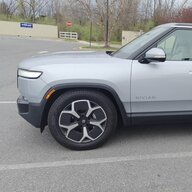
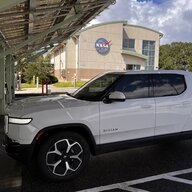
Yesterday I took delivery of my 2024 Glacier White Dual Large R1T with Ocean Coast interior, and I love it! This is my first EV, so I expect a learning curve with it, though so far it's been pretty intuitive and easy to operate. Everything I've tested seems to work great, with one possible exception - and I'm hopeful that's just an ID-10T error from the driver-seat occupant (me).
I used the comprehensive delivery checklist @Electrified Outdoors shared to help make sure I'd thoroughly inspected my new ride. My delivery guide (Cory at the Orlando SC) was very patient and helpful as I tested everything on the list. The only thing he and I could not get to work was the USB-C ports on the rear display. The 120V outlet below them works fine, and the seat back USB-C ports both work fine as do the ports inside the center console, but we were unable to get the ones on the rear display to deliver power to my phone.
Is there a setting in the SW that turns these on and off? We looked for ways using the rear display and the main display, but nothing we tried had the effect of energizing those ports.
One nice surprise I noticed was the cameras. I've read in many places that the Gen 1 cameras are not that good, and I'm sure the Gen 2 cameras are better, but from my perspective, the Gen 1 cameras are easily the best I've ever had and work great. Showing the truck off to some friends last night left them impressed with the cameras as well.
FYI - the checklist I used: https://www.electrifiedoutdoors.com/rivian/rivian-delivery-checklist
I used the comprehensive delivery checklist @Electrified Outdoors shared to help make sure I'd thoroughly inspected my new ride. My delivery guide (Cory at the Orlando SC) was very patient and helpful as I tested everything on the list. The only thing he and I could not get to work was the USB-C ports on the rear display. The 120V outlet below them works fine, and the seat back USB-C ports both work fine as do the ports inside the center console, but we were unable to get the ones on the rear display to deliver power to my phone.
Is there a setting in the SW that turns these on and off? We looked for ways using the rear display and the main display, but nothing we tried had the effect of energizing those ports.
One nice surprise I noticed was the cameras. I've read in many places that the Gen 1 cameras are not that good, and I'm sure the Gen 2 cameras are better, but from my perspective, the Gen 1 cameras are easily the best I've ever had and work great. Showing the truck off to some friends last night left them impressed with the cameras as well.
FYI - the checklist I used: https://www.electrifiedoutdoors.com/rivian/rivian-delivery-checklist
Sponsored