Sponsored

Gear Guard for R2

Jeremy3292

Well-Known Member
First Name
Jeremy
Joined
Apr 27, 2026
Threads
8
Messages
1,224
Reaction score
2,227
Location
South Carolina
Vehicles
R2
Personally, I plan to use a thumb drive to avoid having a cable and hard drive rattling around.
I haven't done my research yet, but here are some options I'm considering:
As a follow up for those reading this:

The Samsung USB-C drive above is more rugged (operating temperature, heat sink, metal design, etc) and faster write speed than a normal cheapo USB-C drive. I read a bunch of older posts that this thumb drive did work for people on this forum. I have no direct experience with it myself but purchased one bc it was cheap-ish to try out when I get my R2. This didn't use to be an issue 1,2,3 years ago but with the price of RAM so high now people have to be a bit more discerning in what they buy. Obviously the $300 Samsung T7 Shield SSD works, but that's a pretty penny compared to the $75-$100 cost of it a year or so ago. There are other much cheaper SSD's available but a lot of their operating temperatures are too low and prone to failure...so YMMV.
Sponsored


 

rsfkff

Member
First Name
Robert
Joined
Jul 23, 2026
Threads
3
Messages
14
Reaction score
18
Location
NY
Vehicles
Mod 3, Optiq
Has anyone formatted the drive and got it to work. I find when I follow the instructions on the screen and plug in the drive, nothing happens. Some research I have done says this isn't available yet.
 

emroch

Well-Known Member
First Name
Eric
Joined
Jun 9, 2026
Threads
6
Messages
331
Reaction score
724
Location
Austin, TX
Website
r2-dashboard.pages.dev
Vehicles
2027 R2 Launch Edition, Chevy Equinox
Occupation
HW Verification Engineer
Has anyone formatted the drive and got it to work. I find when I follow the instructions on the screen and plug in the drive, nothing happens. Some research I have done says this isn't available yet.
Yes, it works. Make sure your software is up to date and your drive has a good, solid connection. I had to try a few times to get the formatting to work on my old T5, and ended up switching to the Samsung flash drive linked earlier in the thread. I think not having a cable helped keep the connection more solid. The flash drive formatted first try and has been working ever since.
 

Mos Eisley

Well-Known Member
First Name
Chris
Joined
Feb 24, 2026
Threads
47
Messages
958
Reaction score
1,846
Location
Minnesota
Vehicles
Mazda CX-5, CX-30 & R2 on the way!
Occupation
Marketing & Sales Consultant, Freelance Photographer
Yes, it works. Make sure your software is up to date and your drive has a good, solid connection. I had to try a few times to get the formatting to work on my old T5, and ended up switching to the Samsung flash drive linked earlier in the thread. I think not having a cable helped keep the connection more solid. The flash drive formatted first try and has been working ever since.
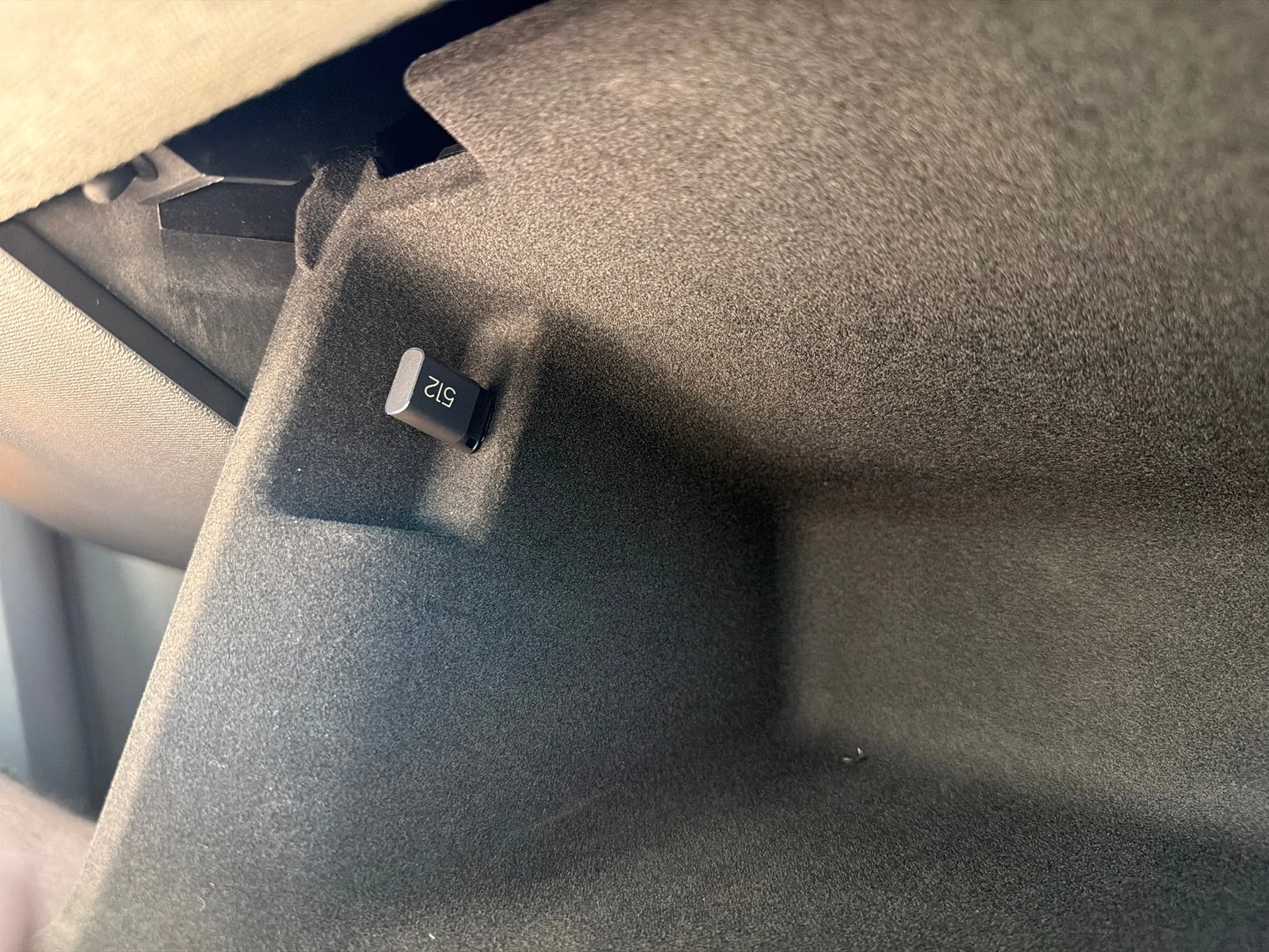
Did you go with the 512?
 

UnsungZero_OldTimeAdMan

Well-Known Member
First Name
Barnum
Joined
Mar 20, 2023
Threads
75
Messages
9,405
Reaction score
13,141
Location
SoCal
Vehicles
'23 GW Quad-Large R1T "Ghost"
Occupation
Advertising Circus
Yes, it works. Make sure your software is up to date and your drive has a good, solid connection. I had to try a few times to get the formatting to work on my old T5, and ended up switching to the Samsung flash drive linked earlier in the thread. I think not having a cable helped keep the connection more solid. The flash drive formatted first try and has been working ever since.
If you know the drive is fast enough but getting error anyway… try editing the benchmark.log file with a text editor.

From Reddit:
Unplug the drive from your Rivian's USB port. Connect the drive to your computer or laptop. Open the root folder of the drive.Locate benchmark.log, which is a plain text file. Open it in a basic text editor like Notepad (Windows) or TextEdit (Mac). Find the text inside, which likely reads VERY_SLOW or too slow. Replace the text entirely with the single word READY (capitalized, no quotes). Save and close the file. Eject and plug the drive back into your Rivian.

That said a large high speed drive is not necessary (especially given today’s highly inflated ssd prices). Any drive with 400 mb/s read/write is faster than minimal requirements. I am not certain but I think it’s as low as 200. And min size is something like 128 gb. Larger size is needed only if you wish to keep lots of footage/incidents before drive fills and starts overwriting older recordings.
 

Sponsored

emroch

Well-Known Member
First Name
Eric
Joined
Jun 9, 2026
Threads
6
Messages
331
Reaction score
724
Location
Austin, TX
Website
r2-dashboard.pages.dev
Vehicles
2027 R2 Launch Edition, Chevy Equinox
Occupation
HW Verification Engineer

emroch

Well-Known Member
First Name
Eric
Joined
Jun 9, 2026
Threads
6
Messages
331
Reaction score
724
Location
Austin, TX
Website
r2-dashboard.pages.dev
Vehicles
2027 R2 Launch Edition, Chevy Equinox
Occupation
HW Verification Engineer
If you know the drive is fast enough but getting error anyway… try editing the benchmark.log file with a text editor.

From Reddit:
Unplug the drive from your Rivian's USB port. Connect the drive to your computer or laptop. Open the root folder of the drive.Locate benchmark.log, which is a plain text file. Open it in a basic text editor like Notepad (Windows) or TextEdit (Mac). Find the text inside, which likely reads VERY_SLOW or too slow. Replace the text entirely with the single word READY (capitalized, no quotes). Save and close the file. Eject and plug the drive back into your Rivian.

That said a large high speed drive is not necessary (especially given today’s highly inflated ssd prices). Any drive with 400 mb/s read/write is faster than minimal requirements. I am not certain but I think it’s as low as 200. And min size is something like 128 gb. Larger size is needed only if you wish to keep lots of footage/incidents before drive fills and starts overwriting older recordings.
Good tip, thanks. I wanted to use the T5 simply because I had it already and could save $150, but it is only 250GB (vs the 512 flash drive or 1TB SSD options) and requires a cable which I wasn't thrilled about. It looks like the T5 is/was actually better for continuous writing than the T7 though, so I was hopeful that it would just work. It gave me just enough trouble that I decided the flash drive would be a cleaner and easier solution.
 

thk808

Member
First Name
T
Joined
Jun 30, 2026
Threads
0
Messages
20
Reaction score
30
Location
ID
Vehicles
Nissan Ariya
https://a.co/d/0eM05PLG
I use this drive for my R2. Not an ssd but it’s plenty fast enough, cheap and worked on plugin. The R2 does a speed check when formatting to make sure your drive is compatible but 20 MB/s as a requirement is pretty slow for today’s standards.
 

rsfkff

Member
First Name
Robert
Joined
Jul 23, 2026
Threads
3
Messages
14
Reaction score
18
Location
NY
Vehicles
Mod 3, Optiq
Thanks for all of the advise, but still nothing. I started using SanDisk portable, 1TB. Nothing happens when I plug it in while in Gear Guard format screen. I formatted it in my PC still nothing. Swapped cables and tried a flash drive but it has no effect. Kind of stumped.
 

emroch

Well-Known Member
First Name
Eric
Joined
Jun 9, 2026
Threads
6
Messages
331
Reaction score
724
Location
Austin, TX
Website
r2-dashboard.pages.dev
Vehicles
2027 R2 Launch Edition, Chevy Equinox
Occupation
HW Verification Engineer
Thanks for all of the advise, but still nothing. I started using SanDisk portable, 1TB. Nothing happens when I plug it in while in Gear Guard format screen. I formatted it in my PC still nothing. Swapped cables and tried a flash drive but it has no effect. Kind of stumped.
Sounds like it's not the drive or how you're connecting it, so have you tried a vehicle reset? Start with a soft reset using the halo wheels.
 

Sponsored

emroch

Well-Known Member
First Name
Eric
Joined
Jun 9, 2026
Threads
6
Messages
331
Reaction score
724
Location
Austin, TX
Website
r2-dashboard.pages.dev
Vehicles
2027 R2 Launch Edition, Chevy Equinox
Occupation
HW Verification Engineer
I would reproduce the issue and then use the mobile app to request service. The Rivian Assistant will gather diagnostics that probably won't reveal anything but might be useful for engineering. There's probably not much they could actually do at a service appointment, but if you open the ticket and start messaging them they might be able to capture logs or something to escalate.
 

rsfkff

Member
First Name
Robert
Joined
Jul 23, 2026
Threads
3
Messages
14
Reaction score
18
Location
NY
Vehicles
Mod 3, Optiq
Thanks, I figured next step was to open a ticket. One other minor failure i have is the charging pad doesn't work. Maybe there is a wire harness that is common, Nether matter too much.
 

vmi9d3

Well-Known Member
First Name
Brian
Joined
Mar 16, 2026
Threads
2
Messages
72
Reaction score
39
Location
MD
Vehicles
2024 Sportage PHEV; 2027 R2 LE
Occupation
Retired USCG; Beer League Hockey Player;

emroch

Well-Known Member
First Name
Eric
Joined
Jun 9, 2026
Threads
6
Messages
331
Reaction score
724
Location
Austin, TX
Website
r2-dashboard.pages.dev
Vehicles
2027 R2 Launch Edition, Chevy Equinox
Occupation
HW Verification Engineer
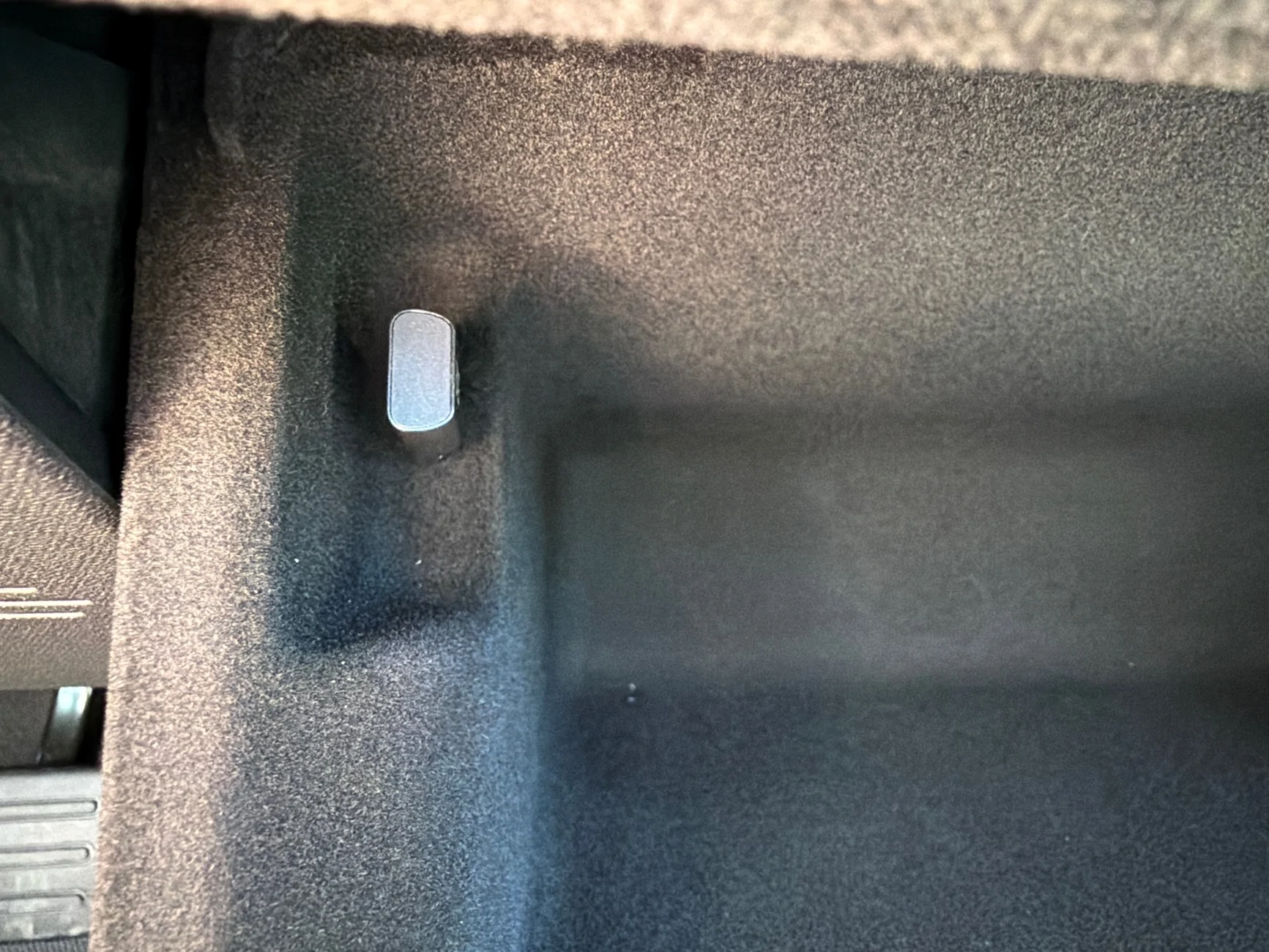
How far out does the flash drive extend inside the console? Any concerns with hitting it as things are put in and out of the console?
No, it is nicely tucked away. The port is in a little cutout so it's not protruding into the main space at all.
Rivian R1T R1S Gear Guard for R2 imag
Sponsored


Top