Sponsored

Overhead camera view

Jon

Member
Joined
Feb 2, 2023
Threads
1
Messages
6
Reaction score
2
Location
Des Moines
Vehicles
Dodge Ram 1500
Occupation
Contractor
I'd like to see a quick / easy access to the overhead camera view when I'm parking. Maybe a button on the steering wheel similar to the garage door access.
Sponsored


 

JToeps

Member
First Name
Jim
Joined
May 2, 2023
Threads
0
Messages
18
Reaction score
22
Location
PacNW
Vehicles
R1S CY/OC
Occupation
Game Designer
Clubs
 
it's sometimes annoying at red lights when I want to see my next turn coming up, but my Tacoma's overhead camera just comes on the screen anytime you are below ~10 mph. It's awesome for car washes, aggressive urban parking, driveways, etc.

Would love to have something like that, but preferably that didn't overwrite navigation information.
 

Grajjie

Well-Known Member
Joined
Aug 29, 2022
Threads
0
Messages
90
Reaction score
108
Location
NYC
Vehicles
BMW M340i, Ioniq Electric, Rivian R1T
Occupation
IT
Clubs
 
it's sometimes annoying at red lights when I want to see my next turn coming up, but my Tacoma's overhead camera just comes on the screen anytime you are below ~10 mph. It's awesome for car washes, aggressive urban parking, driveways, etc.

Would love to have something like that, but preferably that didn't overwrite navigation information.
I would like to see an option to show it on the left section of the driver display. Feel like that area is a bit lacking with only having the efficiency graph, map and tire pressures.
 

RexRemus

Well-Known Member
First Name
Chuck
Joined
Sep 27, 2021
Threads
42
Messages
759
Reaction score
1,345
Location
Chicago, IL
Vehicles
2023 R1S
Clubs
 
Yes. I think this would be nice, honestly any camera should be able to be put over there, I'd even take some kind of full-screen setup with a translucent overlay of speedo and such for low speed driving
 

Sponsored

BeanEW

Well-Known Member
First Name
Eugene
Joined
Nov 16, 2020
Threads
20
Messages
495
Reaction score
599
Location
SF California
Vehicles
R1S
Occupation
Retired
You can change the prefer touch button to be one of those 5s so you don't have to do two touches. I did that. I moved one of the least use to the 2nd set.
 

kylealden

Well-Known Member
First Name
Kyle
Joined
Feb 25, 2021
Threads
20
Messages
1,458
Reaction score
4,461
Location
Seattle
Vehicles
2022 Rivian R1T LE (QM/L), 2024 Zero DSR/X
Occupation
Product Management
You can change the prefer touch button to be one of those 5s so you don't have to do two touches. I did that. I moved one of the least use to the 2nd set.
Yeah, this is what I did. Everything else can be behind a swipe menu. One of my favorite QOL changes in recent updates.
 

Gman

Well-Known Member
First Name
Garth
Joined
Jan 20, 2023
Threads
2
Messages
172
Reaction score
92
Location
Hanalei
Vehicles
Porsche Cayenne, Toyota Landcruiser, Toyota Tacoma
Occupation
Open Ocean Swimmer
You can change the prefer touch button to be one of those 5s so you don't have to do two touches. I did that. I moved one of the least use to the 2nd set.
Hey - can you explain to me the prefer touch button? I would really like for the camera to pop on when I park, too. I resort to touching camera button. Is your option a quicker/ easier method? Thanks.
 

godfodder0901

Well-Known Member
First Name
Jared
Joined
Mar 12, 2019
Threads
27
Messages
5,755
Reaction score
10,140
Location
Washington
Vehicles
2022 Rivian R1T LE
Hey - can you explain to me the prefer touch button? I would really like for the camera to pop on when I park, too. I resort to touching camera button. Is your option a quicker/ easier method? Thanks.
It is the same. He just means pinning the Camera app so it is always one click away.
 

Gman

Well-Known Member
First Name
Garth
Joined
Jan 20, 2023
Threads
2
Messages
172
Reaction score
92
Location
Hanalei
Vehicles
Porsche Cayenne, Toyota Landcruiser, Toyota Tacoma
Occupation
Open Ocean Swimmer
It is the same. He just means pinning the Camera app so it is always one click away.
Ok, get it I think- the 5 buttons at bottom of main screen- I didn’t know they could be changed? How do you change them? Can you move them to different positions on the screen by dragging them to 1st position, etc.? is
there section in manual which explains this? Thanks for your help.
 

Sponsored

BeanEW

Well-Known Member
First Name
Eugene
Joined
Nov 16, 2020
Threads
20
Messages
495
Reaction score
599
Location
SF California
Vehicles
R1S
Occupation
Retired
Hey - can you explain to me the prefer touch button? I would really like for the camera to pop on when I park, too. I resort to touching camera button. Is your option a quicker/ easier method? Thanks.
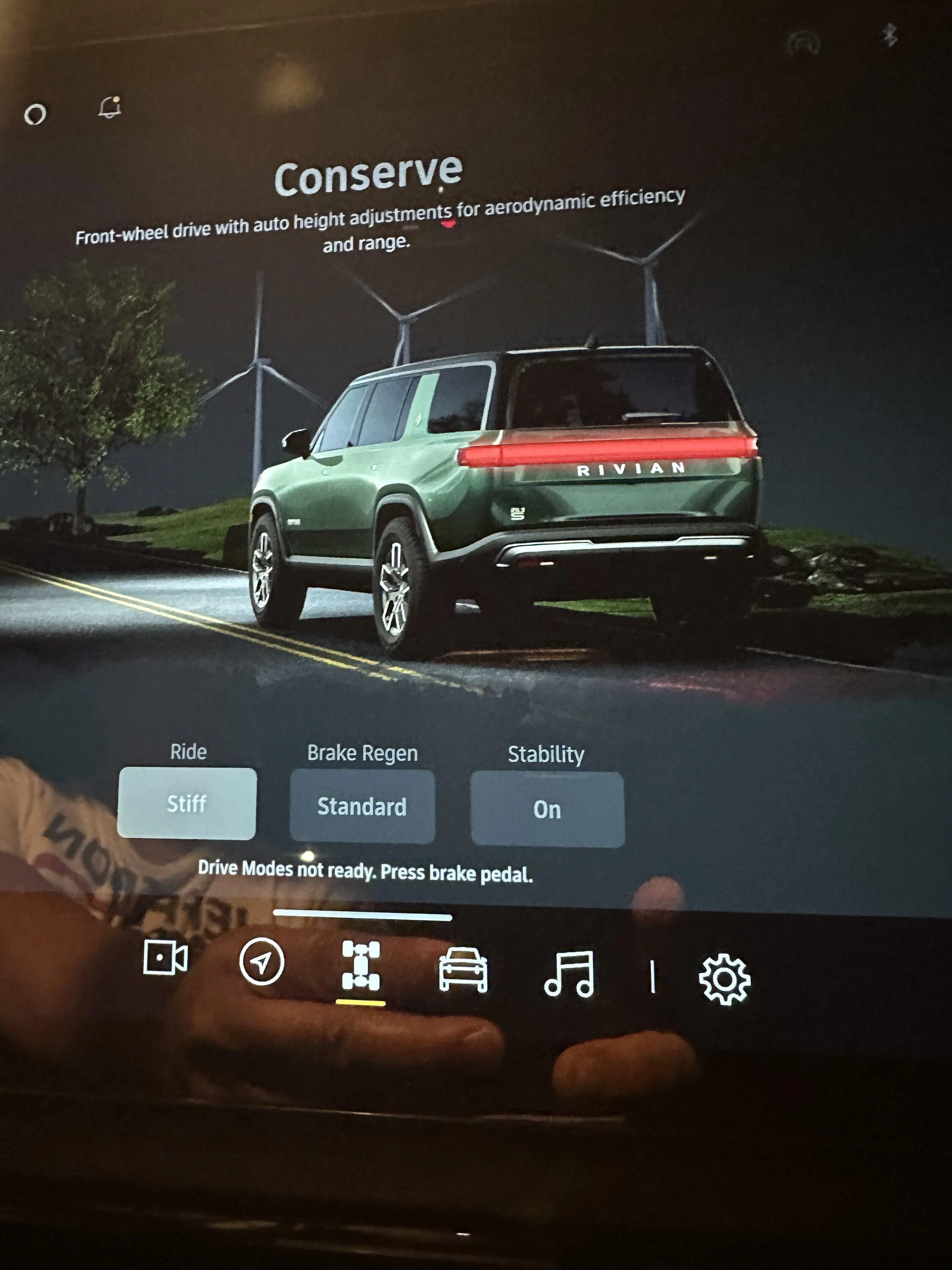
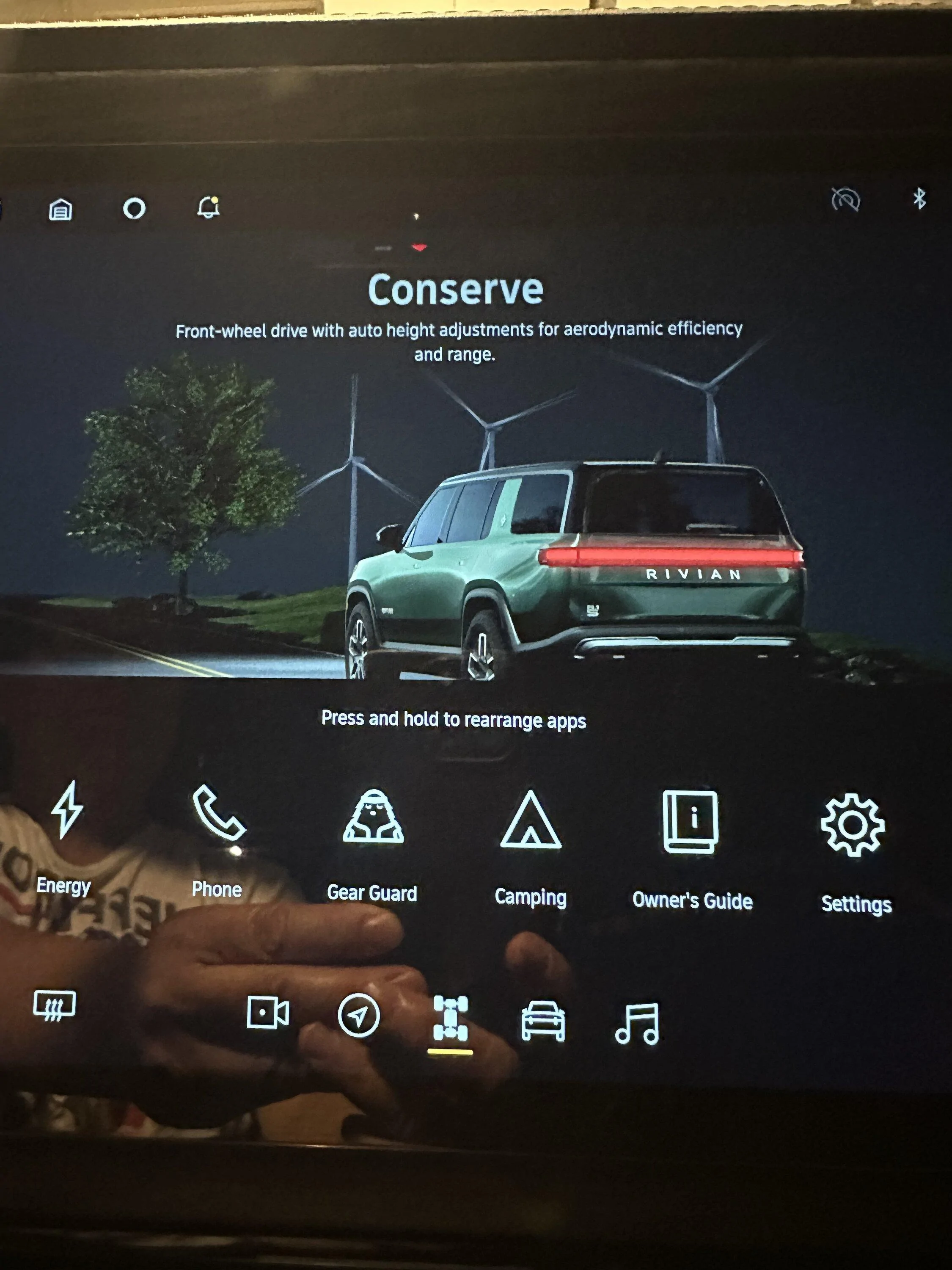
Sorry, maybe I misled you... what I meant was instead of two-touch to see the camera views, you can do one-touch by moving the camera button to the main set of functions.

Rivian R1T R1S Overhead camera view IMG_3432
Rivian R1T R1S Overhead camera view IMG_3433
 

Gman

Well-Known Member
First Name
Garth
Joined
Jan 20, 2023
Threads
2
Messages
172
Reaction score
92
Location
Hanalei
Vehicles
Porsche Cayenne, Toyota Landcruiser, Toyota Tacoma
Occupation
Open Ocean Swimmer
Ok, get it I think- the 5 buttons at bottom of main screen- I didn’t know they could be changed? How do you change them? Can you move them to different positions on the screen by dragging them to 1st position, etc.? is
there section in manual which explains this? Thanks for your help.
 

Gman

Well-Known Member
First Name
Garth
Joined
Jan 20, 2023
Threads
2
Messages
172
Reaction score
92
Location
Hanalei
Vehicles
Porsche Cayenne, Toyota Landcruiser, Toyota Tacoma
Occupation
Open Ocean Swimmer
Ok, get it I think- the 5 buttons at bottom of main screen- I didn’t know they could be changed? How do you change them? Can you move them to different positions on the screen by dragging them to 1st position, etc.? is
there section in manual which explains this? Thanks for your help.
I see it- press & hold to move apps
 

godfodder0901

Well-Known Member
First Name
Jared
Joined
Mar 12, 2019
Threads
27
Messages
5,755
Reaction score
10,140
Location
Washington
Vehicles
2022 Rivian R1T LE
Ok, get it I think- the 5 buttons at bottom of main screen- I didn’t know they could be changed? How do you change them? Can you move them to different positions on the screen by dragging them to 1st position, etc.? is
there section in manual which explains this? Thanks for your help.
It is in the manual. Really, just long press the icon, and then move it to where you want and drop it.
 

Gman

Well-Known Member
First Name
Garth
Joined
Jan 20, 2023
Threads
2
Messages
172
Reaction score
92
Location
Hanalei
Vehicles
Porsche Cayenne, Toyota Landcruiser, Toyota Tacoma
Occupation
Open Ocean Swimmer
It is in the manual. Really, just long press the icon, and then move it to where you want and drop it.
Got- see on screen now press & hold.
Sponsored


Top