Sponsored

Proximity Locking 2025.38.0 at Home Issue

Badtoro

Member
Joined
Feb 21, 2025
Threads
4
Messages
17
Reaction score
10
Location
Jacksonville FL
Vehicles
R1T 2025
Occupation
IT
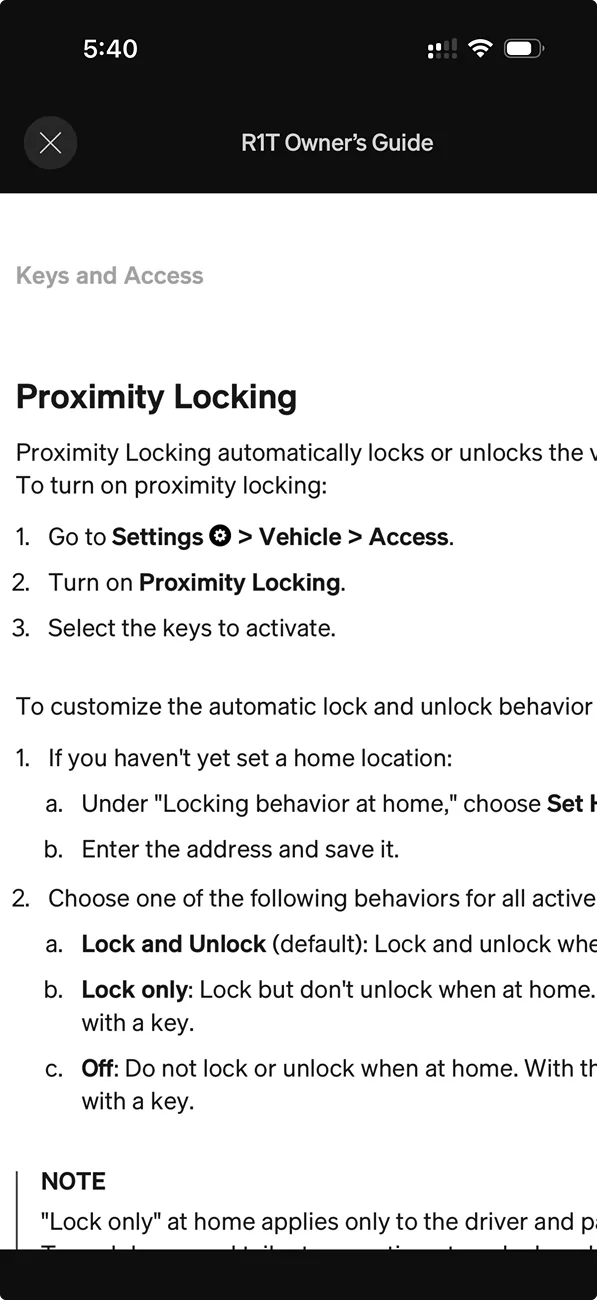
I'm pretty sure, maybe smoking crack, that pre 2025.38.0 that my proximity unlock was off at the house. I doubled checked that my home address is still set, it is. I deleted and re-added it. I have dont a hard reset as well to the R1T 2025 Gen2. When I read the owners manual it mentions PROXIMITY settings but I dont see it, just passive entry. I know I'm dumb, where do I go to set the R1 from not unocking/presenting the handles at home?

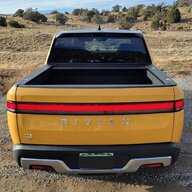
Rivian R1T R1S Proximity Locking  2025.38.0 at Home Issue image1


Rivian R1T R1S Proximity Locking  2025.38.0 at Home Issue Screenshot 2025-10-26 at 5.40.56 PM
Sponsored


Golfer04

Well-Known Member
First Name
Mike
Joined
Aug 21, 2023
Threads
11
Messages
569
Reaction score
599
Location
Illinois
Vehicles
R1T
Occupation
Finance
I'm pretty sure, maybe smoking crack, that pre 2025.38.0 that my proximity unlock was off at the house. I doubled checked that my home address is still set, it is. I deleted and re-added it. I have dont a hard reset as well to the R1T 2025 Gen2. When I read the owners manual it mentions PROXIMITY settings but I dont see it, just passive entry. I know I'm dumb, where do I go to set the R1 from not unocking/presenting the handles at home?
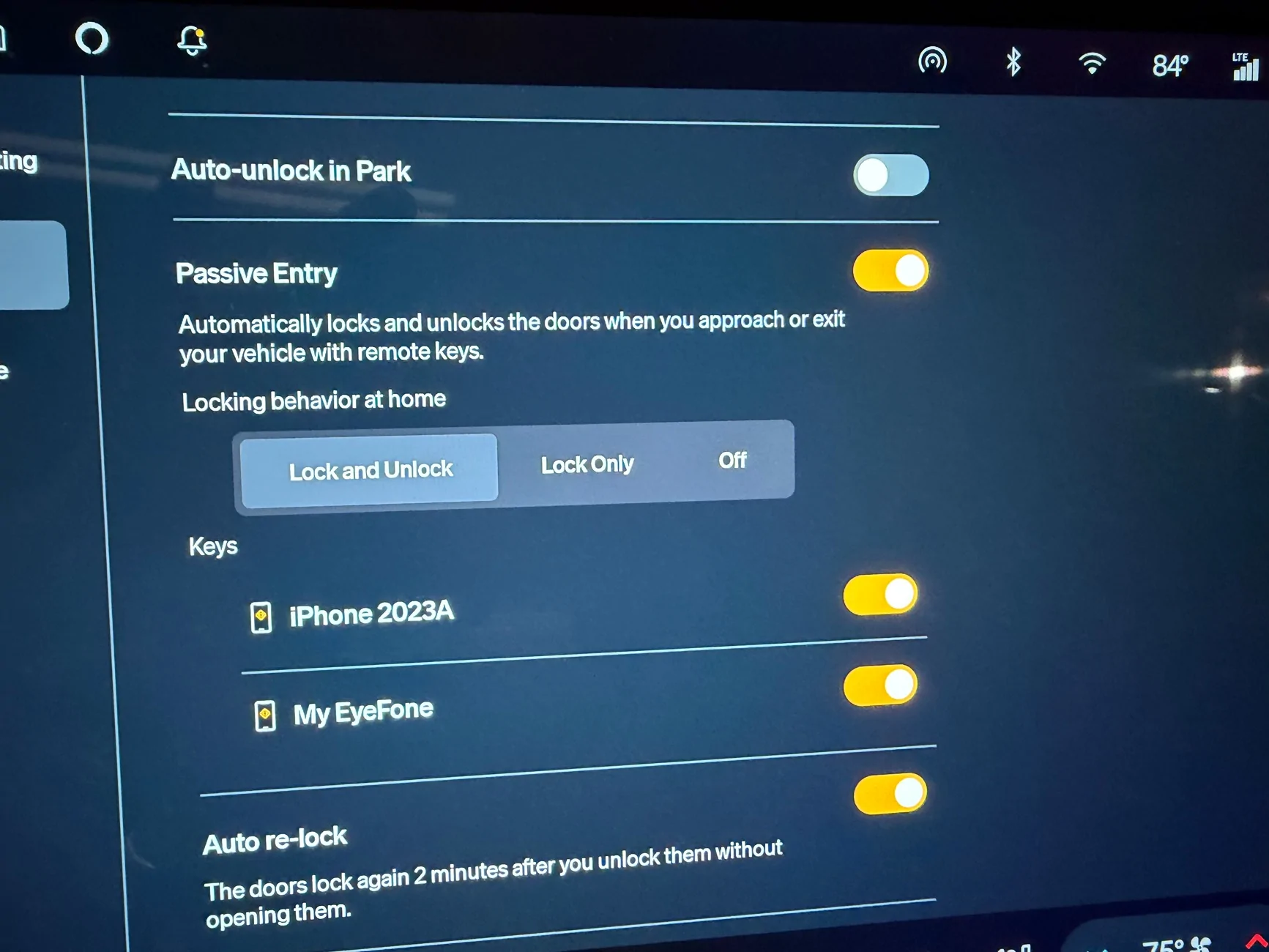
image1.webp


Screenshot 2025-10-26 at 5.40.56 PM.webp
If it makes you feel any better I had the same issue. You have "lock and unlock" highlighted. Change it to off. I think the last update changed the presentation & makes it more difficult to see the "behavior at home" button. When you make the change your vehicle will stay unlocked when you are at home. If you want it to lock only then highlight "lock".
 

the.phd

Well-Known Member
Joined
May 25, 2024
Threads
5
Messages
265
Reaction score
176
Location
Las Vegas, NV
Vehicles
2023 R1S Quad Large
Clubs
 
My behavior at home has been spotty at best. At least once if not more a week I'll get a message from the app that my doors are still unlocked after returning home. Can't figure out what causes it to work sometimes and not other times.
 
OP
OP

Badtoro

Member
Joined
Feb 21, 2025
Threads
4
Messages
17
Reaction score
10
Location
Jacksonville FL
Vehicles
R1T 2025
Occupation
IT
If it makes you feel any better I had the same issue. You have "lock and unlock" highlighted. Change it to off. I think the last update changed the presentation & makes it more difficult to see the "behavior at home" button. When you make the change your vehicle will stay unlocked when you are at home. If you want it to lock only then highlight "lock".
So you're saying just to turn it off? That would mean, that I'd have to use the app to open it all the time/or hopefully the touch strip on the handle works?
 

LeDiable

Well-Known Member
Joined
May 17, 2022
Threads
2
Messages
137
Reaction score
103
Location
Ankeny, IA
Vehicles
R1T Adventure
Occupation
Software Engineer
Clubs
 
My truck has not yet gotten the 2025.38 update and I just checked what the settings are called - mine still says "Proximity" as mentioned in the manual, not "Passive". A little odd that they felt the need to rename that without updating the manual to match. Probably will eventually.

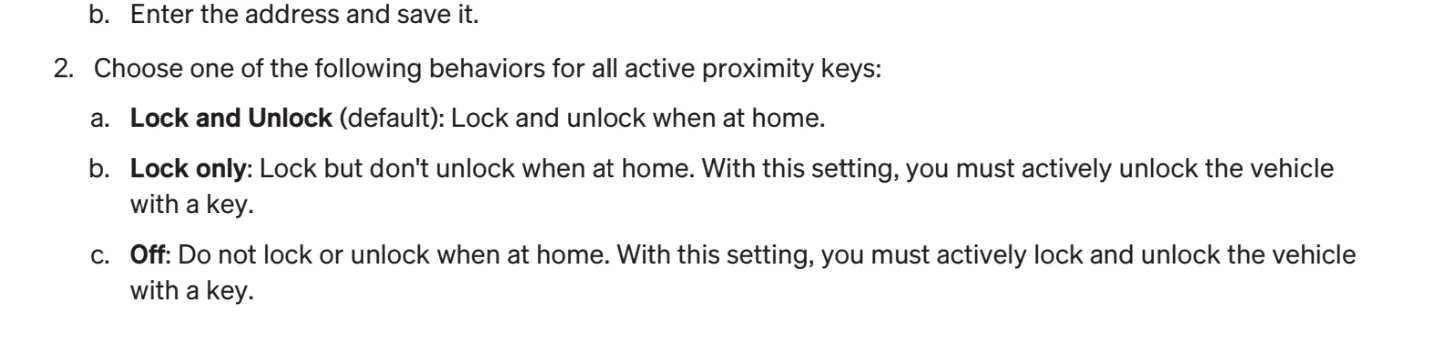
Section 2A-2C explains the different options for passive/proximity behavior at home:
Rivian R1T R1S Proximity Locking  2025.38.0 at Home Issue 1000013143


It sounds like you want it to lock automatically but not unlock. If that is correct you would set it to Lock only.

That would mean, that I'd have to use the app to open it all the time/or hopefully the touch strip on the handle works?
If you set it to either Lock Only or Off then yes you have to use the app/fob to unlock it. But if you choose "Off" for this setting then it wouldn't lock on it's own to begin with, so you wouldn't have to unlock it either. But then the handles would be presented which is what your initial post indicates you want to avoid.


I park in my garage so I have this turned off. My kitchen shares the wall with the back of the garage so it would constantly lock & unlock any time I'm raiding the fridge or cooking. Plus the nuisance of wanting to go somewhere but then I have to stand there, dig my phone out of my pocket and unlock that, then hit the unlock button on the Rivian app widget just to get into the truck. I'm too lazy for that.
 

Sponsored

Kaiju

Well-Known Member
Joined
Aug 18, 2024
Threads
2
Messages
136
Reaction score
254
Location
Texas
Vehicles
R1T
I dunno about you guys, but after the last update my proximity locking is broken. It started acting like the home settings weren't working, locking and unlocking whenever I moved near it doing yard work. Usually turning proximity lock on/off fixes it when it glitches, but not this time.

Then I went and removed the home location and readded it, did a hard reset. Problem was fixed! Sorta. It stopped locking/unlocking constantly at home until I went somewhere and realized it was not locking or unlocking at all anywhere.

I fussed with behavior at home settings and it was an instant fix...when I wasn't at home. Seems to be overriding the default settings for some reason and it's pretty baffling.
 
OP
OP

Badtoro

Member
Joined
Feb 21, 2025
Threads
4
Messages
17
Reaction score
10
Location
Jacksonville FL
Vehicles
R1T 2025
Occupation
IT
I dunno about you guys, but after the last update my proximity locking is broken. It started acting like the home settings weren't working, locking and unlocking whenever I moved near it doing yard work. Usually turning proximity lock on/off fixes it when it glitches, but not this time.

Then I went and removed the home location and readded it, did a hard reset. Problem was fixed! Sorta. It stopped locking/unlocking constantly at home until I went somewhere and realized it was not locking or unlocking at all anywhere.

I fussed with behavior at home settings and it was an instant fix...when I wasn't at home. Seems to be overriding the default settings for some reason and it's pretty baffling.

yeah it's hella broke. I just left it with auto unlock/lock and pray it works when my hands are full. Mostly, I still find myself standing by the R1 for about 30 seconds before it acknowledges my phone as key. Even if I open the app and smash the unlock button, it spins (iPhone 17, fresh os install, reinstalled app numerous times). If I pull the card from my wallet and touch the sensor, instant access. I know the PaaK is trivial to some but to me, it's enough not to ever buy another Rivian, the software bugs are insane. My previous and current Tesla works flawlessly, including my other cars. I really love this truck the the software piece is hot garbage and takes away from the over all experience. ie. If I open my right gear tunnel door and shut it/slam it shut/weld it shut over and over, the dash still shows it as open until I HARD reboot after each time I open it. My gen2 roller tonneau cover just randomly opens up while driving until I do a hard reboot, then is good for about 2 to 3 weeks. Also the Roomy entry and exit is hit or miss. Yesterday, I was standing 20 feet from my car in a parking lot talking to a co-worker, the R1 just kept unlocking and locking. I moved further away then the mirrors just kept folding and unfolding. Rivian really needs to do better in the software QA part. No way these updates should be making it out to the wild with these huge oversights. Any way rant over, just annoyed . Happy Halloween all.
 

Golfer04

Well-Known Member
First Name
Mike
Joined
Aug 21, 2023
Threads
11
Messages
569
Reaction score
599
Location
Illinois
Vehicles
R1T
Occupation
Finance
yeah it's hella broke. I just left it with auto unlock/lock and pray it works when my hands are full. Mostly, I still find myself standing by the R1 for about 30 seconds before it acknowledges my phone as key. Even if I open the app and smash the unlock button, it spins (iPhone 17, fresh os install, reinstalled app numerous times). If I pull the card from my wallet and touch the sensor, instant access. I know the PaaK is trivial to some but to me, it's enough not to ever buy another Rivian, the software bugs are insane. My previous and current Tesla works flawlessly, including my other cars. I really love this truck the the software piece is hot garbage and takes away from the over all experience. ie. If I open my right gear tunnel door and shut it/slam it shut/weld it shut over and over, the dash still shows it as open until I HARD reboot after each time I open it. My gen2 roller tonneau cover just randomly opens up while driving until I do a hard reboot, then is good for about 2 to 3 weeks. Also the Roomy entry and exit is hit or miss. Yesterday, I was standing 20 feet from my car in a parking lot talking to a co-worker, the R1 just kept unlocking and locking. I moved further away then the mirrors just kept folding and unfolding. Rivian really needs to do better in the software QA part. No way these updates should be making it out to the wild with these huge oversights. Any way rant over, just annoyed . Happy Halloween all.
I've had all of these issues too. The software for daily/normal use has WAY too many bugs. My Roomy entry only works if I wake truck up BEFORE I open the door. I would feel differently if these features were cutting edge. They aren't.
 

McLovin

Well-Known Member
Joined
Jul 30, 2024
Threads
7
Messages
512
Reaction score
1,161
Location
Virginia
Vehicles
R1T
Clubs
 
My previous and current Tesla works flawlessly, including my other cars.
I've owned multiple Audi's (A3, A5, Q5) over the last 10 years, and for every one I've had issues w/ the 'reach for handle to unlock' feature. Sometimes it works, sometimes it locks if it was previously unlocked, sometimes it does nothing and I have to reach my hand away, then reach back again.

Point being, I don't think this is a Rivian thing only, and I'm sure it's not just Audi that has had issues.
 

oobernabber

Member
Joined
Dec 22, 2024
Threads
0
Messages
5
Reaction score
1
Location
portland, or
Vehicles
g2 r1t (dual/lg), Cooper HT SE, i4 M50
Semi-related, but will post on the off chance it helps.

The lock/unlock at home behavior was erratic at best for my R1Tg2. I had it set to lock only for months, but eventually got sick of it randomly unlocking whenever anyone with an authorized phone was nearby, so turned off proximity lock and unlock and added the issue to a recent service visit. After much troubleshooting by the techs, they traced the issue to a faulty door handle sensor. So, if anyone is struggling with this feature, pre/post update or otherwise, have the Service center check it out. They will have to set their location to Home and you'll have to add them as an authorized user.
 

CO-Ed

Well-Known Member
First Name
Edward
Joined
Oct 28, 2022
Threads
4
Messages
71
Reaction score
142
Location
81624
Vehicles
2022 Rivian R1T / CY / BM / 21
Occupation
retired
Also posting here in case this helps.

I'm having the problem that the truck (2022 R1T) locks at home when it's configured NOT to.

Here's what I'm doing:
  • Park the truck outside my garage
  • From the map favorites menu, delete my HOME location
  • From the same map favorites menu, select to add home address (haven't moved the truck)
  • The map responds by showing the XY where I'm parked but then immediately overwrites that XY with the nearest street address (which, by the way, is my home address - so it's not wrong if it was delivering mail, but for true location purposes, my house is 0.5 miles from my mailbox)
I think I've traced it to the new Google Maps wanting to save a street address and not the XY where you save the HOME location (didn't have this problem before the new maps).

For me, and maybe others, the XY where you save the HOME location isn't where Google places the street address, and if that's a big enough distance, when the truck is at the exact physical location you set as HOME, it's actually not at the location that the map overwrites and then the truck locks and unlocks "at home" when it's configured not to.
Sponsored


Top