
chiu0nthls
New Member
Mine still does not go to sleep, and the other night I randomly checked the garage and my car was blowing air from the vents with no one inside.
Sponsored
That's definitely odd and if it's not fixed after a reset, you should contact the Customer Support ASAPMine still does not go to sleep, and the other night I randomly checked the garage and my car was blowing air from the vents with no one inside.
Do you have a Rivian Roamer account? if not, create one (free should work but I would definititely consider the pay subscription and it adds lots of value for the money)and monitor your truck for 24hrs and watch the Activity bar on RivianRoamer's dashboard:Gen2 R1T owner searching for answers on a similar/same issue. Two days ago I noticed the rear lights (just the turn signal portions, L and R, not the whole bar) blinking about every 60 seconds or so. I only noticed this as I was parked outside at night as we are traveling away from home. Then I noticed the abnormally large system use of the battery. Last night for example I lost a full 5% SoC. I uploaded diagnostics then did a hard reset. Seems to be sleeping fine now, but the SC says it needs to come in even after looking at the diagnostics I uploaded.
Taking to SC on Friday. Not entirely sure if this is the same issue from this thread or something different.
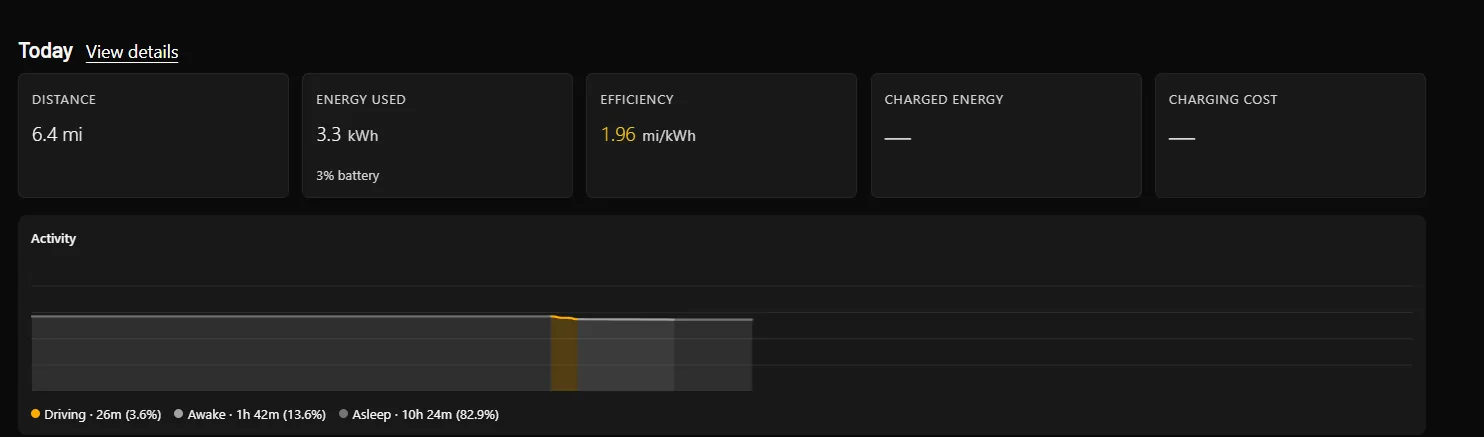

Cool, then monitor the sleep time during the day today and if it doesn't sleep at all, then I would keep it plugged into an L2 charger. Otherwise the 12V battery will sufferThank you.
I do have an RR account, just not the paid one (yet) to see the deeper data.
the tonneau works fine. No issues.
Wonder if this is a new thing.

If the vehicle is not going to sleep, then yes - you're going to see that high drain and potential 12v battery damage. RR, ElectraFi, etc., can help you monitor.Gen2 R1T owner searching for answers on a similar/same issue. Two days ago I noticed the rear lights (just the turn signal portions, L and R, not the whole bar) blinking about every 60 seconds or so. I only noticed this as I was parked outside at night as we are traveling away from home. Then I noticed the abnormally large system use of the battery. Last night for example I lost a full 5% SoC. I uploaded diagnostics then did a hard reset. Seems to be sleeping fine now, but the SC says it needs to come in even after looking at the diagnostics I uploaded.
Taking to SC on Friday. Not entirely sure if this is the same issue from this thread or something different.

Might be kind of the same as the other time but wasn't widespread this time... Maybe?FWIW - Update.
I picked up the truck last night from the service center. The report from the technician was that they could not diagnose the blinking tail lights. They indicated that was a normal function when a key or phone is within range for proximity functionality. In my case, there was no key or phone within range for that to trigger, and it also occurred after I turned off the proximity functionality.
Not posted previously, but on my way back from my trip my parking and proximity sensors all started to trip/fail. Adaptive, cruise and Autonomy+ was not functional.
Luckily, my service appointment was the next day so I added this to my ticket. I did a soft reset when I got home. That temporarily solved the problem, but on my way up to the service center the same errors occurred again. The technician said that there is a software issue that they’ve identified and are working with vendor to fix it through a future OTA software update. When I drove home last night from the service center, a two hour trip, everything worked fine.
Not really sure what to make of this other than wait to see if it happens again.


