Sponsored

R2 unexpected Drain - 7% over 4 days.

Just Passing By

Well-Known Member
First Name
John
Joined
Jan 18, 2025
Threads
1
Messages
236
Reaction score
324
Location
Bay Area
Vehicles
(Ancient Audi A6 gone) - 2 wheels-only for now Honda CB500X
My takeaway from this thread.
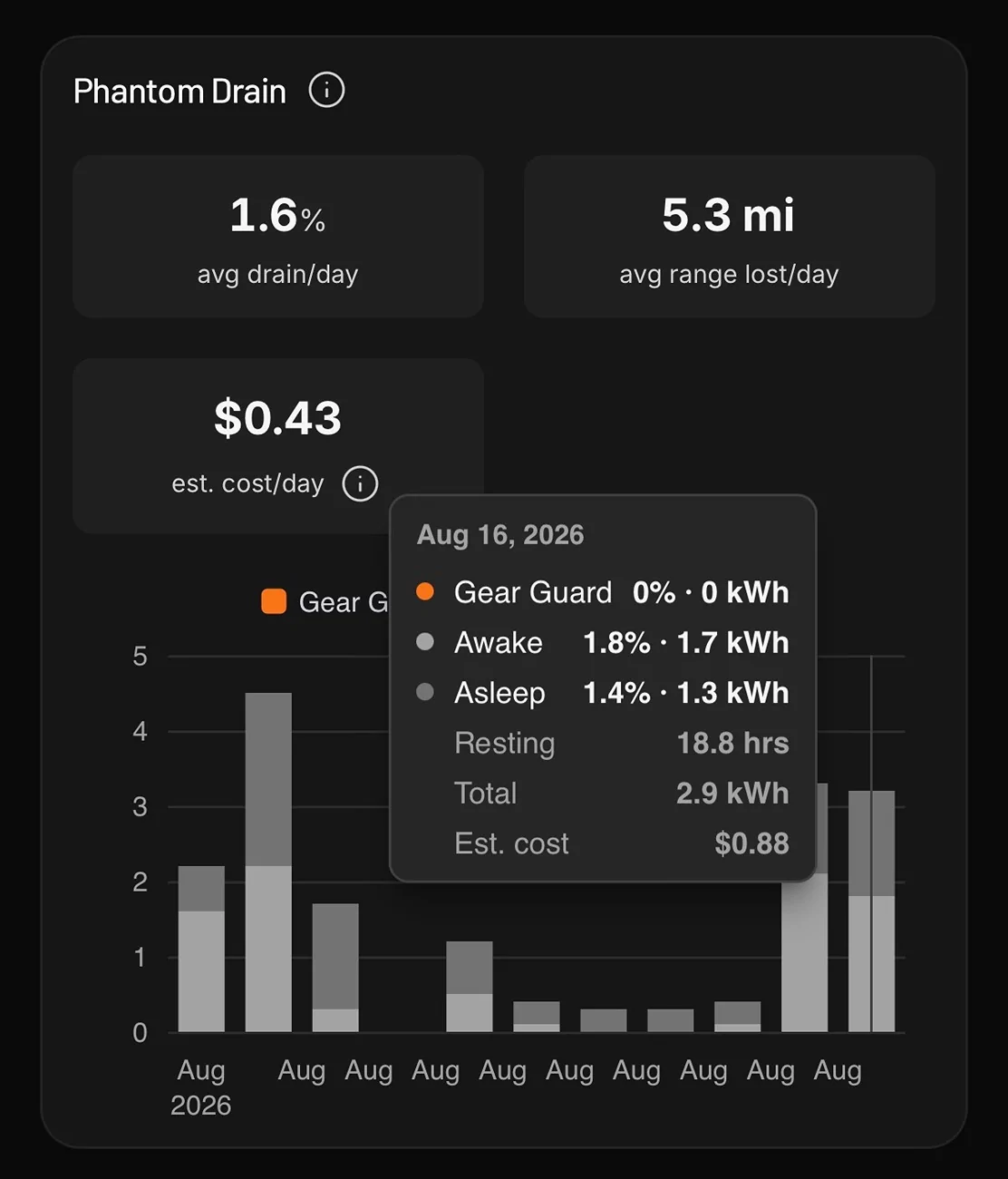
  1. Gear Guard uses very little energy if not detecting anything. OP's posted screen shot shows this.
  2. The elephant in the room is that the R2 reported 4.1 kWh used over ~ 5 hours when the vehicle was parked
That second bullet is a lot of energy for "doing nothing" over 5 hours. So I guess one question might be is it a genuine use of energy and if so what could it possibly be? Or is it the system making an adjustment from incorrectly measuring the amount of energy in the battery previously? If the latter then that would also be a cause for concern since using ~4.5% of the maximum battery capacity isn't trivial.

If I had something like that reported then I would raise a ticket to see if Rivian can explain what caused it.
Sponsored

 

mkg3

Well-Known Member
Joined
Nov 19, 2021
Threads
91
Messages
2,963
Reaction score
3,977
Location
SoCal
Vehicles
R1S, Model 3, Outback, Artura
Clubs
 
Fine, it shows that the energy consumption is low for GG. Have you done the same without GG on?

It may be bookkeeping how the charge is being consumed. By having GG on, it may provoke/require other subsystems on the vehicle to also be on, such as the ethernet zonal communication to not shut down. Since this is architectural and not necessarily dedicated to GG, it may not show up as GG consumption.
 

cwq93r

Well-Known Member
Joined
Jun 18, 2026
Threads
8
Messages
157
Reaction score
184
Location
Bay Area, CA
Website
rivianroamer.com
Vehicles
Ioniq 5, Rivian R2
Clubs
 
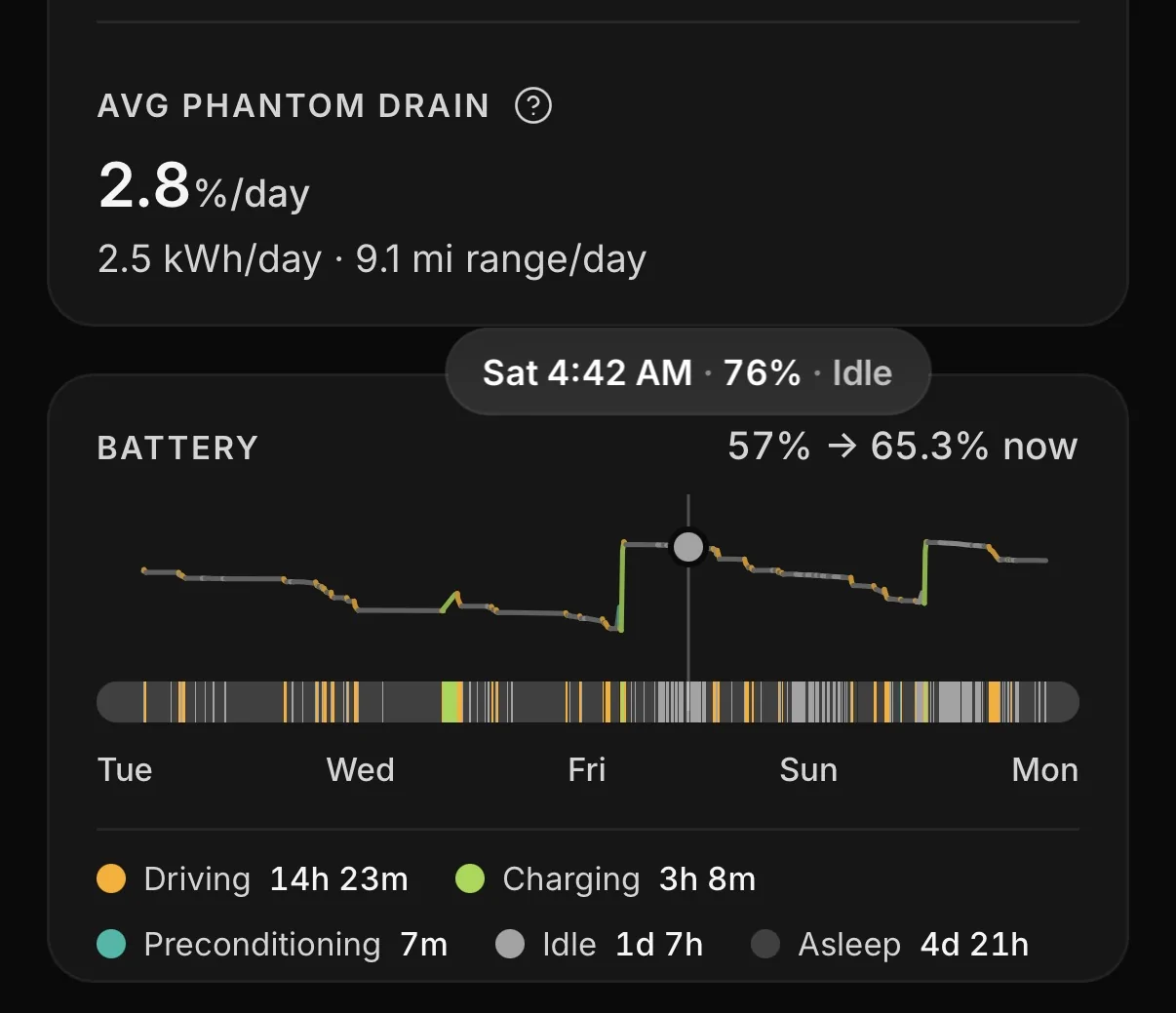
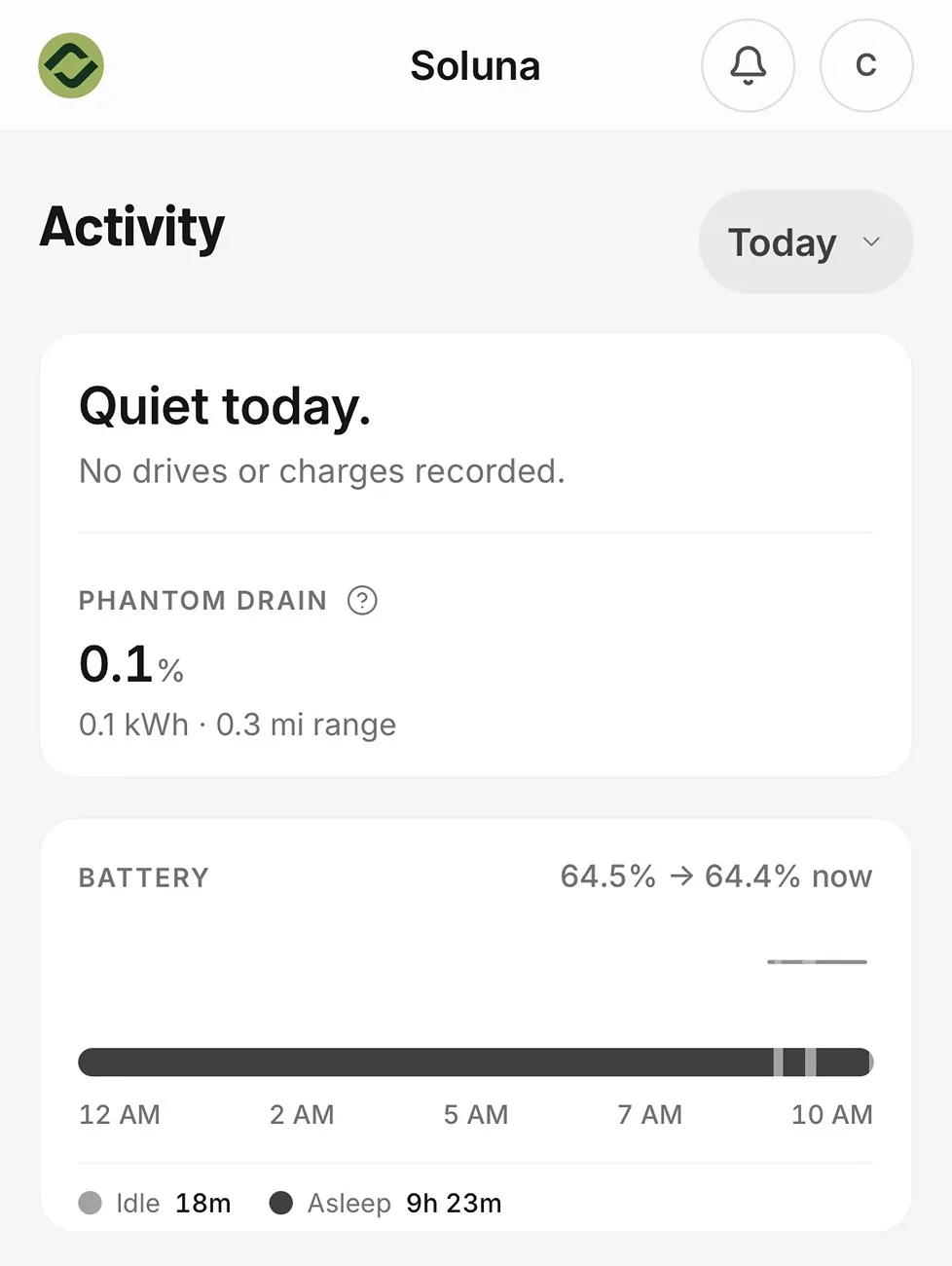
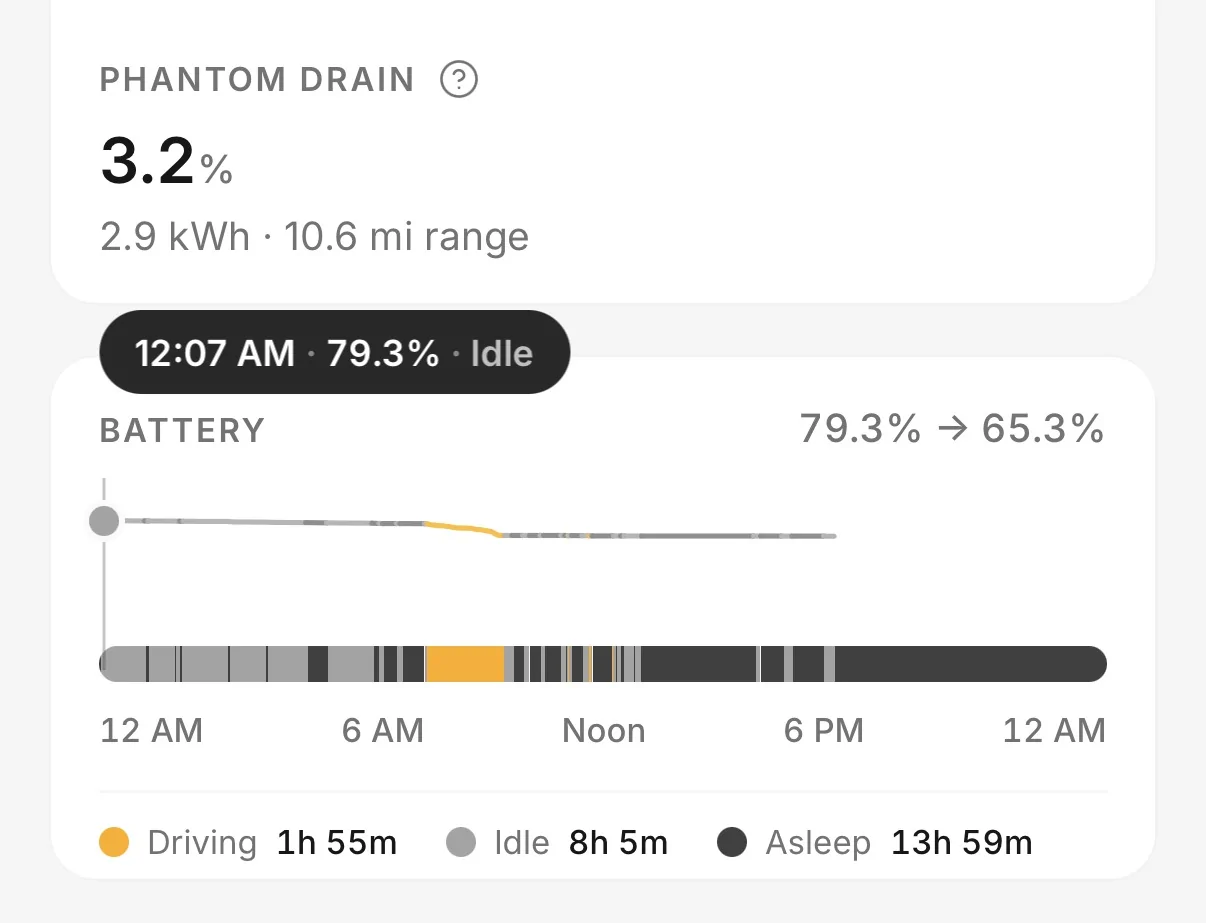
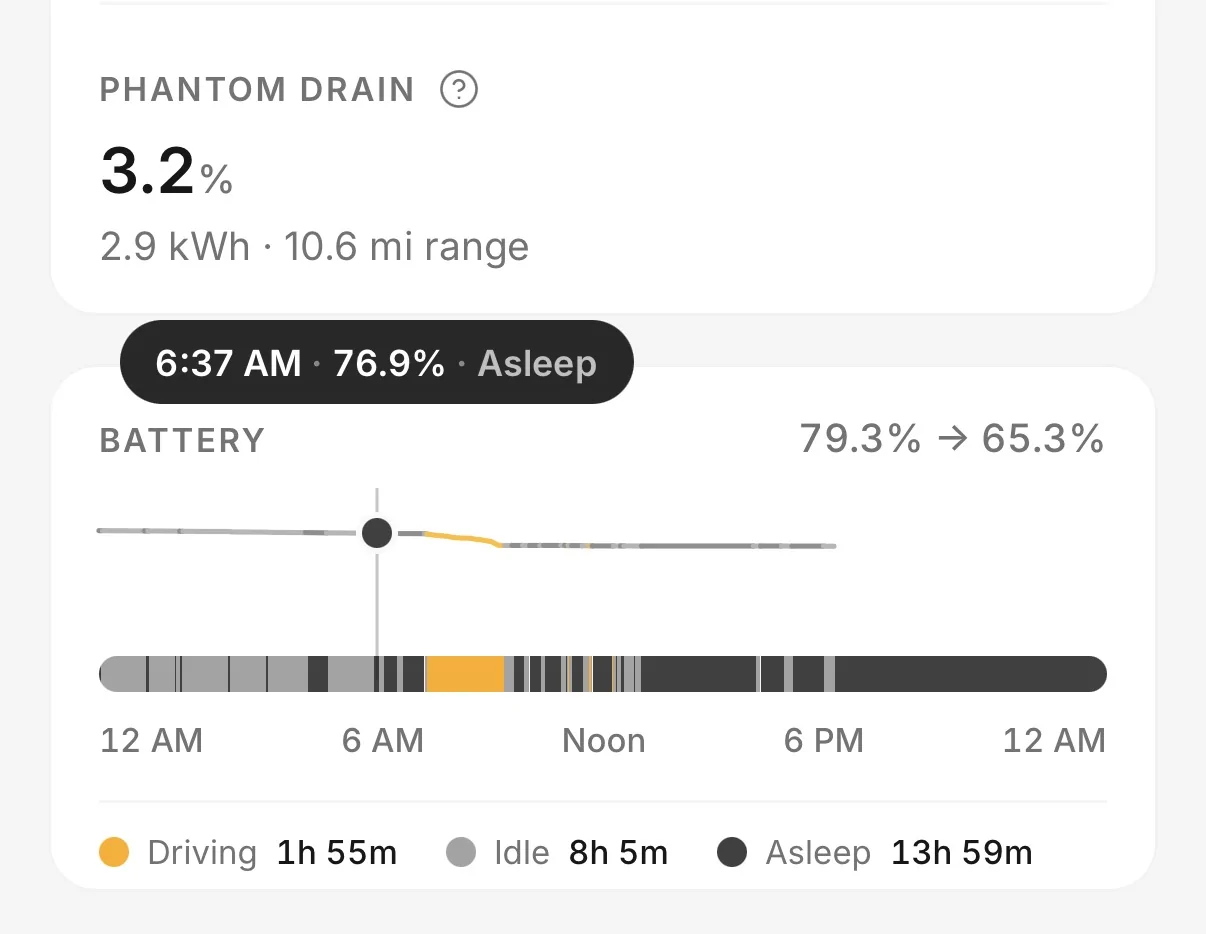
Here’s my data. Phantom drain is very inconsistent. It’s stay idle instead of asleep the past few nights. Drained a lot over the weekend. Gear Guard stays on at my house parked outside. It’s at a shop getting ceramic coated and tint the next 2 days. I turned motion cam off for tonight. I’ll turn it on tomorrow night to see what happens. Only other changes is that the R2 is not connected to WiFi like at home and the doors are unlocked. They have the card key at the shop.
IMG_1854.webp

IMG_1855.webp
 
OP
OP
Manalishi

Manalishi

Well-Known Member
First Name
Larry
Joined
Sep 27, 2024
Threads
3
Messages
85
Reaction score
90
Location
Illinois
Vehicles
2025 Rivian R1S, 2021 Mustang Mach-E FE
Occupation
Software Sales
My takeaway from this thread.
  1. Gear Guard uses very little energy if not detecting anything. OP's posted screen shot shows this.
  2. The elephant in the room is that the R2 reported 4.1 kWh used over ~ 5 hours when the vehicle was parked
That second bullet is a lot of energy for "doing nothing" over 5 hours. So I guess one question might be is it a genuine use of energy and if so what could it possibly be? Or is it the system making an adjustment from incorrectly measuring the amount of energy in the battery previously? If the latter then that would also be a cause for concern since using ~4.5% of the maximum battery capacity isn't trivial.

If I had something like that reported then I would raise a ticket to see if Rivian can explain what caused it.
I did report it to Rivian via the app chat. The bot said nothing was in the logs to explain it and recommended I make a service appointment. I've rebooted the car and am going to wait to see if it happens again before I bother with that.
Here’s my data. Phantom drain is very inconsistent. It’s stay idle instead of asleep the past few nights. Drained a lot over the weekend. Gear Guard stays on at my house parked outside. It’s at a shop getting ceramic coated and tint the next 2 days. I turned motion cam off for tonight. I’ll turn it on tomorrow night to see what happens. Only other changes is that the R2 is not connected to WiFi like at home and the doors are unlocked. They have the card key at the shop.
IMG_1854.webp

IMG_1855.webp
Is that a paid Rivian Roamer chart?
 

cwq93r

Well-Known Member
Joined
Jun 18, 2026
Threads
8
Messages
157
Reaction score
184
Location
Bay Area, CA
Website
rivianroamer.com
Vehicles
Ioniq 5, Rivian R2
Clubs
 
Here’s my data. Phantom drain is very inconsistent. It’s stay idle instead of asleep the past few nights. Drained a lot over the weekend. Gear Guard stays on at my house parked outside. It’s at a shop getting ceramic coated and tint the next 2 days. I turned motion cam off for tonight. I’ll turn it on tomorrow night to see what happens. Only other changes is that the R2 is not connected to WiFi like at home and the doors are unlocked. They have the card key at the shop.
IMG_1854.webp

IMG_1855.webp
Looks like it slept all night at the shop last night, so it could either be phone key or being connected to Wi-Fi at the house.
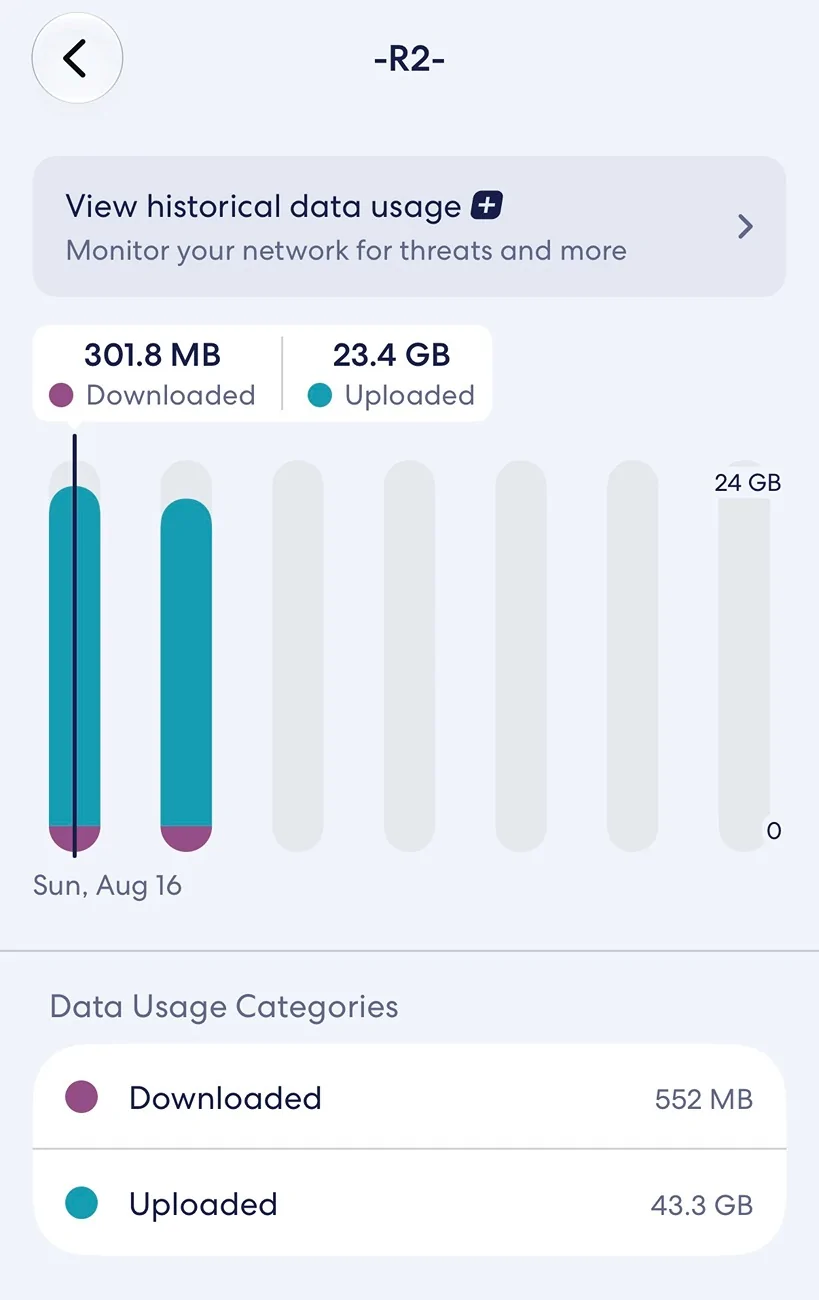
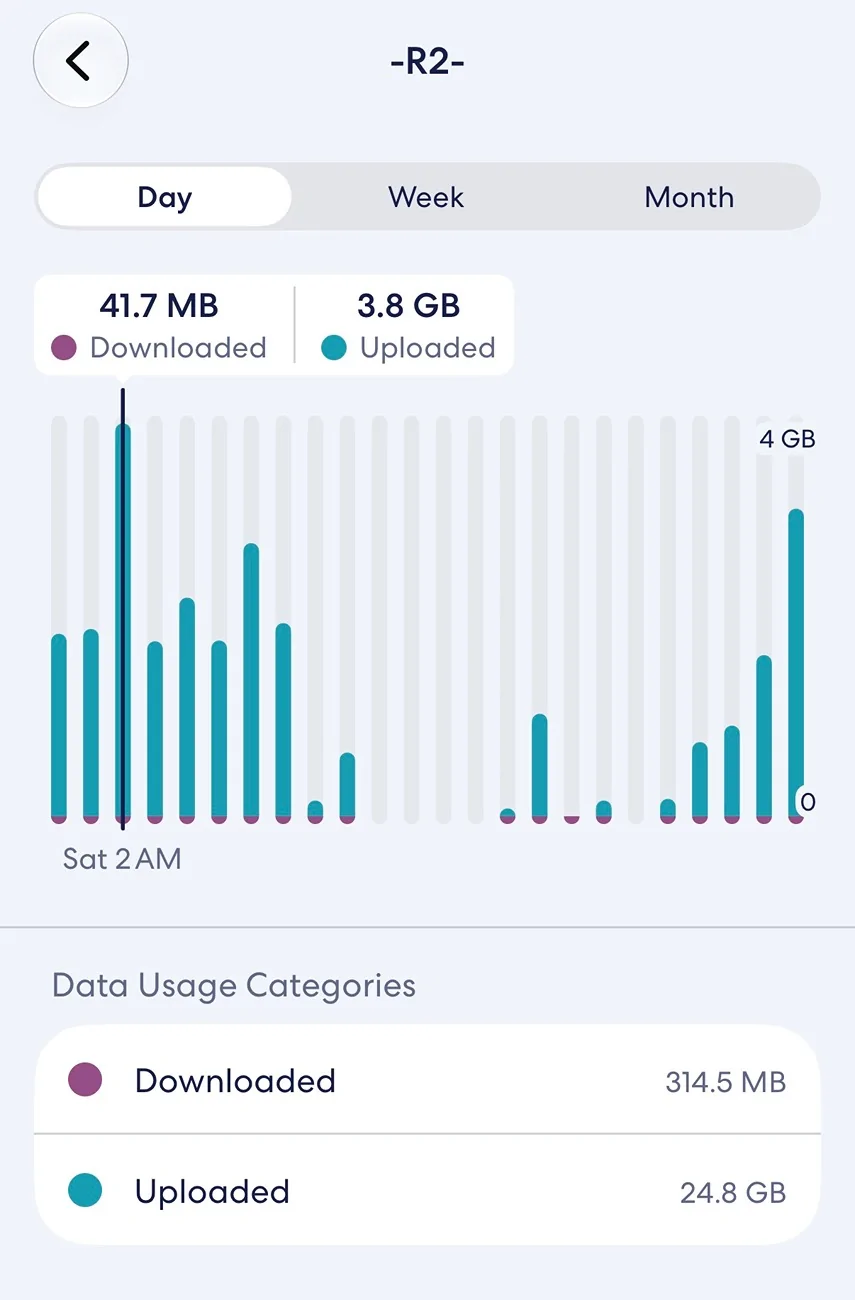
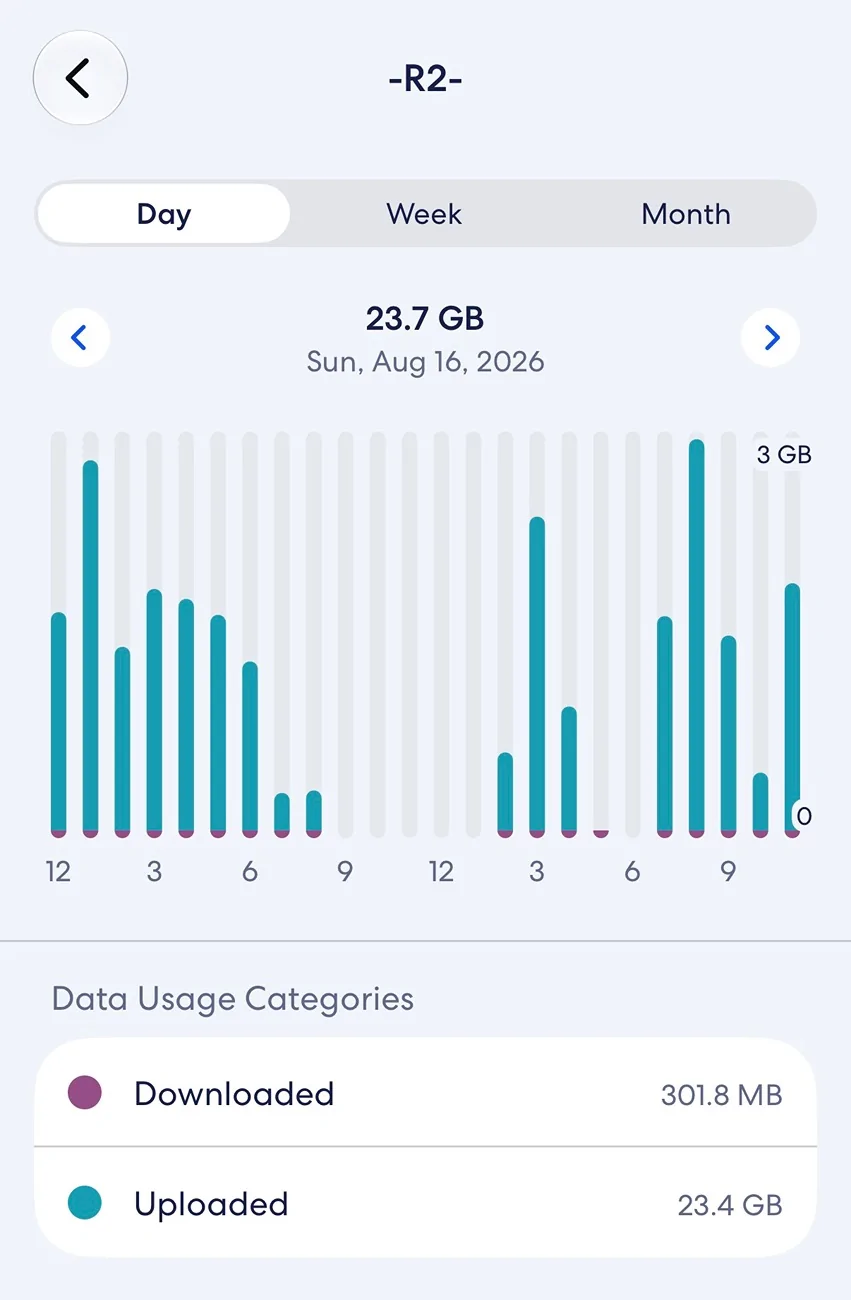
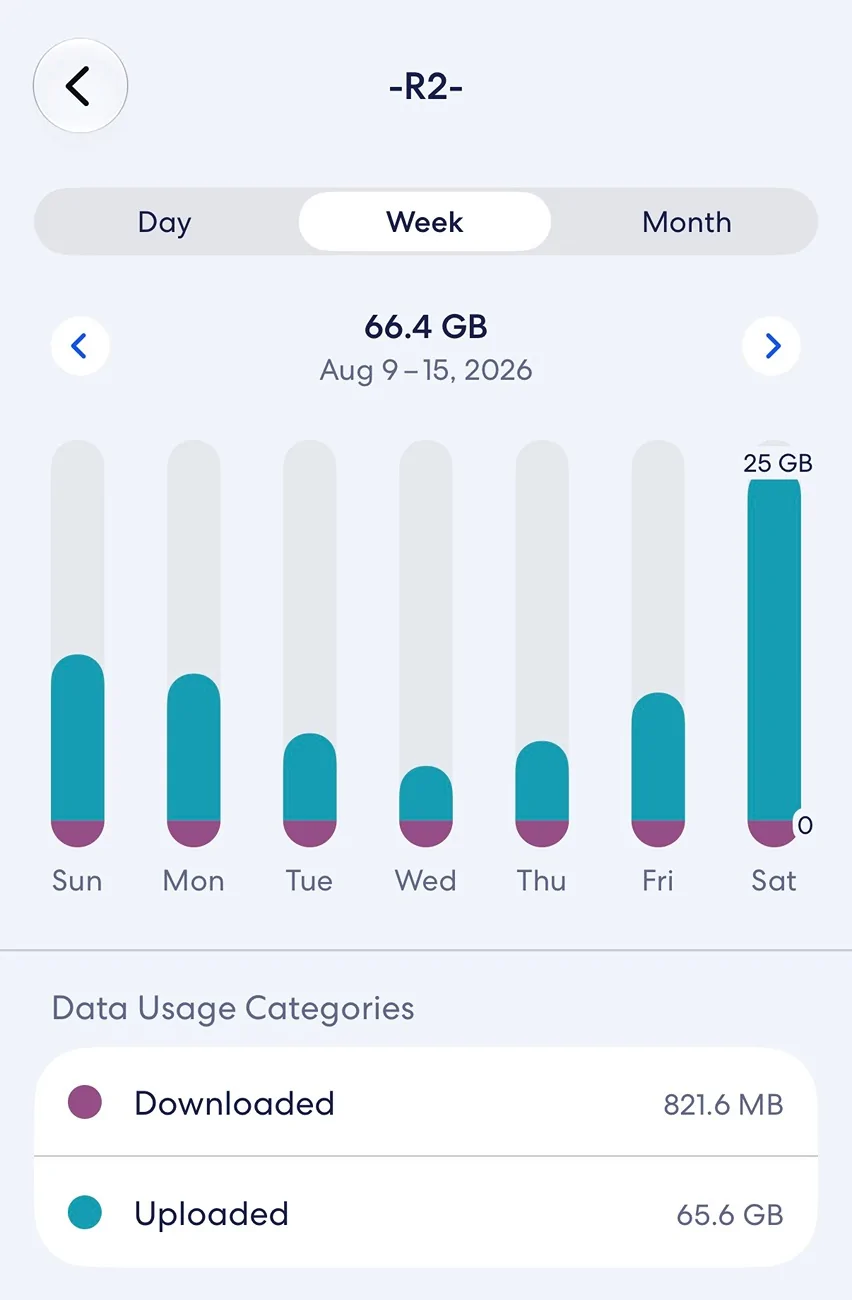
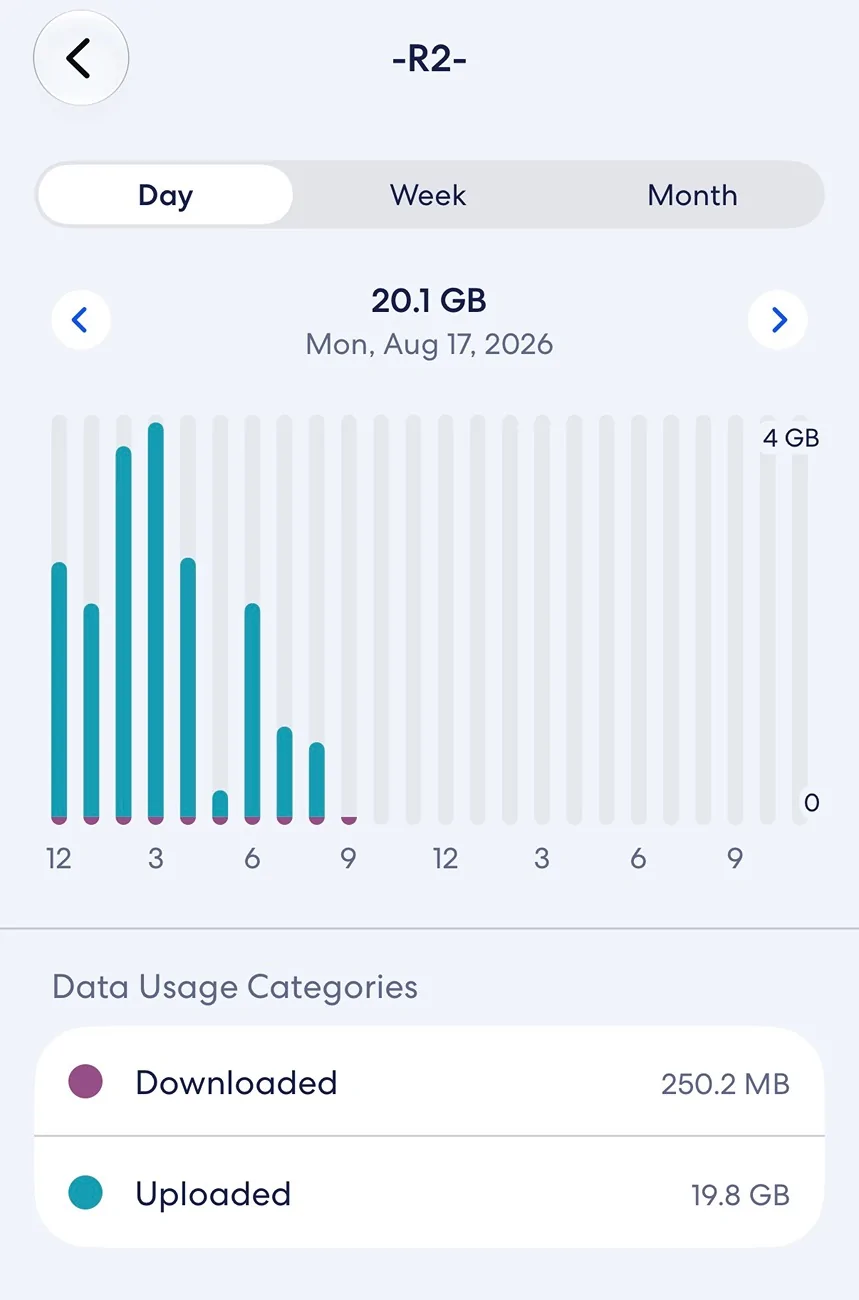
The vehicle is uploading massive amounts of data when connected to my Wi-Fi at home.
Eero only shows data for the day and doesn’t break it down by hour unless I subscribe to eero+. I’ll probably do that if I can find a 50% off coupon code
IMG_1856.webp

IMG_1857.webp
 

Sponsored

cwq93r

Well-Known Member
Joined
Jun 18, 2026
Threads
8
Messages
157
Reaction score
184
Location
Bay Area, CA
Website
rivianroamer.com
Vehicles
Ioniq 5, Rivian R2
Clubs
 
Here’s my data. Phantom drain is very inconsistent. It’s stay idle instead of asleep the past few nights. Drained a lot over the weekend. Gear Guard stays on at my house parked outside. It’s at a shop getting ceramic coated and tint the next 2 days. I turned motion cam off for tonight. I’ll turn it on tomorrow night to see what happens. Only other changes is that the R2 is not connected to WiFi like at home and the doors are unlocked. They have the card key at the shop.
IMG_1854.webp

IMG_1855.webp
Figured it out. It’s staying awake because it is uploading data over WiFi. You can see the overnight data for Saturday and Sunday, and then the weekly totals compared to the Rivian Roamer screenshot above. My guess is if you turn R2’s Wi-Fi off at home, phantom drain will stop. Anywhere else it doesn’t matter if Wi-Fi is on because it has nothing to connect to, like my vehicle did nothing last night.
IMG_1859.webp
IMG_1860.webp
IMG_1861.webp
 
OP
OP
Manalishi

Manalishi

Well-Known Member
First Name
Larry
Joined
Sep 27, 2024
Threads
3
Messages
85
Reaction score
90
Location
Illinois
Vehicles
2025 Rivian R1S, 2021 Mustang Mach-E FE
Occupation
Software Sales
Figured it out. It’s staying awake because it is uploading data over WiFi. You can see the overnight data for Saturday and Sunday, and then the weekly totals compared to the Rivian Roamer screenshot above. My guess is if you turn R2’s Wi-Fi off at home, phantom drain will stop. Anywhere else it doesn’t matter if Wi-Fi is on because it has nothing to connect to, like my vehicle did nothing last night.
IMG_1859.webp
IMG_1860.webp
IMG_1861.webp
this was my leading theory - that the vehicle had phoned home - but man, 4.0 kWh to send data back to the mothership - that's steep.
 

Just Passing By

Well-Known Member
First Name
John
Joined
Jan 18, 2025
Threads
1
Messages
236
Reaction score
324
Location
Bay Area
Vehicles
(Ancient Audi A6 gone) - 2 wheels-only for now Honda CB500X
this was my leading theory - that the vehicle had phoned home - but man, 4.0 kWh to send data back to the mothership - that's steep.
I can't imagine what data the R2 would be sending that amounts to the 25GB in just one day that @cwq93r has reported, unless its sending large amounts of video. Some blu-ray movie discs only have that much data. The weekly data total of 66.4GB is the level of storage of a UHD movie disc, its nuts.

The 4.1kWh energy use over 5 hours that you reported also can't be due to communications. That energy consumption amounts to ~800 Watts of continuous power draw for 5 hours, i.e. a portable induction hob at approximately half power setting, or a very high end gaming computer operating at max power consumption, its a lot of power being consumed for a long time.

Hopefully all of this is just some temporary anomaly but its worth keeping an eye on to see if others have similar experiences. My R2, when I get it, will likely sit in my garage for relatively long periods since I am retired; I wouldn't want to see the type of energy consumption both of you have reported ... or frankly the amount of data being sent.

Thanks for posting.
 

cwq93r

Well-Known Member
Joined
Jun 18, 2026
Threads
8
Messages
157
Reaction score
184
Location
Bay Area, CA
Website
rivianroamer.com
Vehicles
Ioniq 5, Rivian R2
Clubs
 
I just realized I could calculate the battery drain using Rivian Romer data. you can see the battery percentage in the screenshots below for Monday between the hours of midnight and around 6:30 AM. It does slow down the data uploads between 6:30-8am. where you can see the data stopped uploading at the house.
IMG_1862.webp
IMG_1863.webp
IMG_1864.webp
 

Sponsored

EV-overland

Well-Known Member
First Name
Taka
Joined
Mar 12, 2026
Threads
6
Messages
53
Reaction score
92
Location
Orange County, CA
Vehicles
Tesla Model Y Performance. Rivan on order. Honda S2000
That’s actually pretty good. If my tesla had sentry mode on for 4 days, I’d use way more than that.
 

VandalSibs

Well-Known Member
First Name
Andrew
Joined
Dec 27, 2023
Threads
16
Messages
1,681
Reaction score
2,983
Location
Eastern Washington State
Website
www.sibulskymusic.com
Vehicles
R1T Dual Motor Large Pack
Occupation
Composer, IT Service Desk Analyst
Clubs
 
I can't imagine what data the R2 would be sending that amounts to the 25GB in just one day that @cwq93r has reported, unless its sending large amounts of video. Some blu-ray movie discs only have that much data. The weekly data total of 66.4GB is the level of storage of a UHD movie disc, its nuts.

The 4.1kWh energy use over 5 hours that you reported also can't be due to communications. That energy consumption amounts to ~800 Watts of continuous power draw for 5 hours, i.e. a portable induction hob at approximately half power setting, or a very high end gaming computer operating at max power consumption, its a lot of power being consumed for a long time.

Hopefully all of this is just some temporary anomaly but its worth keeping an eye on to see if others have similar experiences. My R2, when I get it, will likely sit in my garage for relatively long periods since I am retired; I wouldn't want to see the type of energy consumption both of you have reported ... or frankly the amount of data being sent.

Thanks for posting.
If it's uploading video for mapping purposes, the camera on the R2 are 4k res. So depending on the number of camera feeds it's sending (plus related data), it could be quite a bit of data heading up.

And of the Wifi connection is week, it may be taking a long time to upload that data, which would use more power.

Granted, those are semi-educated guesses on my part...
 

NY_Rob

Well-Known Member
First Name
Rob
Joined
Feb 9, 2022
Threads
23
Messages
5,640
Reaction score
8,444
Location
long island
Vehicles
Model 3 LR AWD, BMW i3 REX, 2024 Rubicon 4xe
Occupation
IT
If the R2 is anything like the R1's, disconnecting it from your WiFi won't stop the data transfers/lack of sleep mode, it will only force the vehicle to failover to cellular for uploading data. I tried that trick with my R1T... it didn't work.
 

Just Passing By

Well-Known Member
First Name
John
Joined
Jan 18, 2025
Threads
1
Messages
236
Reaction score
324
Location
Bay Area
Vehicles
(Ancient Audi A6 gone) - 2 wheels-only for now Honda CB500X
If it's uploading video for mapping purposes, the camera on the R2 are 4k res. So depending on the number of camera feeds it's sending (plus related data), it could be quite a bit of data heading up.

And of the Wifi connection is week, it may be taking a long time to upload that data, which would use more power.

Granted, those are semi-educated guesses on my part...
Power can't be WIFI, regardless of connection strength. Even Starlink maxes out at 150W on the Performance 3 model when active and the more usual Starlink Mini is max 40W and that's communicating to space.

I said before that I couldn't imagine what the data transmission and energy consumption could be be, but if Rivian is doing a lot of intensive video processing and/or compression using the nVidia processors, on a lot (all?) of the video being captured, then that may explain both phenomena. If so, then presumably an R2 parked for a long time should see data txfr/power consumption drop significantly.

Or maybe Rivian is using the processors for crypto currency mining ... :D
Sponsored


Top