Sponsored
OP
OP
jebinc

jebinc

Well-Known Member
First Name
John
Joined
Oct 5, 2022
Threads
49
Messages
2,310
Reaction score
2,134
Location
Seattle, WA
Vehicles
2021+ Tesla MS Plaid, R1T Adventure
Occupation
Retired
So far I’ve been lucky enuf to not need to tap into the fuse boxes after having both the 12v under dash and doing a mirror tap for radar.

How easy are the fuse boxes to access for a fuse tap?

I’m recovering from a foot injury now and can’t contort too well. Or mebbe I’m just too large and have the flexibility of a 2x4.

Please and thanks.

This EV Sportline CP unit feels like my next add, thanks @jebinc.
Given your injury, and need to “contort” in order to get up and personal with the fuse box, I can easily recommend the 12v plug option. Parts listed upthread.
Sponsored


Lizardo

Well-Known Member
Joined
Jun 9, 2022
Threads
28
Messages
740
Reaction score
504
Location
TX
Vehicles
R1T
Occupation
Self
Clubs
 
Yes, details up thread.

Last I saw was that none of the usb-c cig adapters worked... Did that change? Some something about PD vs QC power delivery?
 
OP
OP
jebinc

jebinc

Well-Known Member
First Name
John
Joined
Oct 5, 2022
Threads
49
Messages
2,310
Reaction score
2,134
Location
Seattle, WA
Vehicles
2021+ Tesla MS Plaid, R1T Adventure
Occupation
Retired
Last I saw was that none of the usb-c cig adapters worked... Did that change? Some something about PD vs QC power delivery?
Solution is easy. Use a USB-A to C right angle cable or a C to C right angle cable with a A to C adapter. See prior posts, up thread.
 

a76marine

Well-Known Member
First Name
Tom
Joined
Jun 17, 2021
Threads
14
Messages
212
Reaction score
347
Location
Chicagoland
Vehicles
1979 Jeep J10 (Pickup Truck) & 2022 Rivian R1T
Occupation
Data Analytics and Intelligence
Clubs
 
Cannot wait for part two, thank you @jebinc !

I would love to see you input a random address via the Rivian NAV and Carplay Maps or Waze and see what the difference is in routing. Maybe something you already know doesn't route correctly in the RIV.
 

Sponsored

OP
OP
jebinc

jebinc

Well-Known Member
First Name
John
Joined
Oct 5, 2022
Threads
49
Messages
2,310
Reaction score
2,134
Location
Seattle, WA
Vehicles
2021+ Tesla MS Plaid, R1T Adventure
Occupation
Retired
Cannot wait for part two, thank you @jebinc !

I would love to see you input a random address via the Rivian NAV and Carplay Maps or Waze and see what the difference is in routing. Maybe something you already know doesn't route correctly in the RIV.

I’ve done this many times - Rivian nav vs the many iPhone app nav options. Always different, with the Rivian native nav routing being junk. This display does nothing to effect that as it runs the same apps from your phone.
@EV Sportline
 

a76marine

Well-Known Member
First Name
Tom
Joined
Jun 17, 2021
Threads
14
Messages
212
Reaction score
347
Location
Chicagoland
Vehicles
1979 Jeep J10 (Pickup Truck) & 2022 Rivian R1T
Occupation
Data Analytics and Intelligence
Clubs
 
I’ve done this many times - Rivian nav vs the many iPhone app nav options. Always different, with the Rivian native nav routing being junk. This display does nothing to effect that as it runs the same apps from your phone.
@EV Sportline
Understood, but since grabbing this display kit for me would be nearly entirely to use Waze or Google Maps I'm hoping to see some examples of the side-by-side comparison. It's all good if you're not able to capture, maybe whoever reviews next will grab that for us.
 
OP
OP
jebinc

jebinc

Well-Known Member
First Name
John
Joined
Oct 5, 2022
Threads
49
Messages
2,310
Reaction score
2,134
Location
Seattle, WA
Vehicles
2021+ Tesla MS Plaid, R1T Adventure
Occupation
Retired
Understood, but since grabbing this display kit for me would be nearly entirely to use Waze or Google Maps I'm hoping to see some examples of the side-by-side comparison. It's all good if you're not able to capture, maybe whoever reviews next will grab that for us.
As mentioned, you can do this today with your phone, to see the routing differences. The display is just a mirror of the phone nav app you have running. This one is a “Self Service” that you could do right now, test wise.
 
Last edited:
OP
OP
jebinc

jebinc

Well-Known Member
First Name
John
Joined
Oct 5, 2022
Threads
49
Messages
2,310
Reaction score
2,134
Location
Seattle, WA
Vehicles
2021+ Tesla MS Plaid, R1T Adventure
Occupation
Retired
Anyone receive their unit and have an installation report to share?
 

Lizardo

Well-Known Member
Joined
Jun 9, 2022
Threads
28
Messages
740
Reaction score
504
Location
TX
Vehicles
R1T
Occupation
Self
Clubs
 

Sponsored

R1Thor

Well-Known Member
First Name
Joe
Joined
Aug 9, 2023
Threads
8
Messages
1,533
Reaction score
2,415
Location
Lancaster, PA
Vehicles
23QM R1T, Limestone + Ocean Coast, 21" & UBS
Occupation
Mechanical Engineering Lead
Clubs
 
Mine was delivered to the house yesterday, but I'm out of town for the holiday.

Hope to get this installed maybe Tuesday? Depends on if the body shop can maintain the schedule for dropoff (irrelevant story); but worst case, I should have it installed before the end of next weekend.

If no one else shows up, I will report back
 
OP
OP
jebinc

jebinc

Well-Known Member
First Name
John
Joined
Oct 5, 2022
Threads
49
Messages
2,310
Reaction score
2,134
Location
Seattle, WA
Vehicles
2021+ Tesla MS Plaid, R1T Adventure
Occupation
Retired
Mine was delivered to the house yesterday, but I'm out of town for the holiday.

Hope to get this installed maybe Tuesday? Depends on if the body shop can maintain the schedule for dropoff (irrelevant story); but worst case, I should have it installed before the end of next weekend.

If no one else shows up, I will report back
Many thanks and Happy Holiday's!
 

R1Thor

Well-Known Member
First Name
Joe
Joined
Aug 9, 2023
Threads
8
Messages
1,533
Reaction score
2,415
Location
Lancaster, PA
Vehicles
23QM R1T, Limestone + Ocean Coast, 21" & UBS
Occupation
Mechanical Engineering Lead
Clubs
 
Hey, so I arrived home today much earlier than anticipated. And being a grown up child, I didn't want to wait and went right to it.

I have *very* mixed feelings about this product, but will give it a few weeks as a benefit-of-the-doubt type scenario. Suffice to say, EV Sportsline is banking hard that Rivian won't give you Waze, because I don't know that this is really going to bring many other benefits. Worth spending ~$260 for a temporary 'fix' to that...time will tell.

What went right?
1- It's very straightforward. If you're even tangentially mechanically and DC electrically savvy, you probably could put this kit to use with all of 2 instructions (which fuse to tap and how to install the custom bracket).
2- The custom bracket is, absolutely, clever design. Easy to install and would be easy to uninstall. It's also phenomenal not to require any cutting, tapping, modifying, or hardware integrating with the vehicle. You don't even need any kind of double-stick tape or anything like that. I dig it.

What was so-so?
3- EV Sportline's instructions are fragmented the same as they are with their running boards/rock sliders. What do I mean by that? You can't just watch the video or just read the instructions and knock this one out intuitively. Do both. Is that a show stopper? Not necessarily, but in my case, I was happy to use my tablet for the video and my phone for the PDF instructions. I would've been a little more inconvenienced by having to switch between both.
4- The cable management. I don't like seeing cables. I'm not crazy about the routing of the USB-C. I even made a slight adjustment/improvement over what EV Sportline recommends (Photo below), but... yeah this one will continue to annoy me for sure. I didn't put it in the not-so-great category because this is just a personal gripe.
Notwithstanding, you have a TON of extra wiring that needs tucked away. They don't come out and say this, but I'm saying it: If you don't like rattles in your vehicle, make DARN sure you secure everything very well (all that extra wire). AND, be certain nothing is rubbing/interfering with your steering assembly, as your steering shaft is in the same area you'll be adding your power tap (unless you're one of the fortunate ones who have the 12VDC plug under their dash and are going the alternative route--this wouldn't apply to you).

What went not-so-great?
5- I'll concede a point that this is partly on me. I took for granted the resilience of our dashboard wood. But there was no emphasis made by anyone I'd seen so far. I scratched the heck out of my dash, and I was earnestly being 'careful,' however not careful the way I should've been. Let me explain:
- EV Sportline's adapter (looks like a machined custom extrusion) sits *between* the top of the dash vinyl and the wood trim. EV Sportline advised to use 2 screwdrivers to pry at the vinyl portion of the dash to open up a gap to wedge this adapter into. I thought that might be too much of a risk to the dash, and I happen to own some nice plastic, non-marring trim tools. HOWEVER, my trim tools didn't immediately give me the gap I probably needed, and going from the way the video made it SEEM super easy to wedge the mechanical adapter in, I managed to scrape my dash terribly. I will say--you cannot see the scraped bits with the screen installed, but I am dreading removing this thing and already planning to talk to my favorite detail shop to see if they have any solutions to re-conditioning the black ash.

What would I recommend? Do what EV Sportline recommends and use 2 long screwdrivers to REALLY open the dash/gap so you can get the adapter in. DO EVERYTHING YOU CAN TO avoid impacting/sliding anything against the wood trim. I would advise using a soft cloth or something (lay it out) while you're installing, and then pull it out once you have everything in place. That's what I wish I did. It all happened quite quickly, and I promise you I wasn't being careless. LEARN from my mistake!!

6- I wasn't 100% certain what Android Auto is/was. I just know that I have a terrible commute and looked down...WAY more than I care to admit to see what Waze was telling me (Waze is MUCH more accurate than Rivian's navigation and it's crucial to my commute for live traffic, to understand where incidents are, and yes...even to understand where speed traps are). Insofar as I may drive a bit fast, I'm extremely outspoken about not fussing with phones while driving. As such, I am hoping that this will make me much more capable of focusing ON THE ROAD. I would've figured out a way to mount my phone to my dash, but A) I hate wires and need to keep charge, as my phone doing 3 things at once tends to drain battery and B) I don't have the under-dash 12V as I'd mentioned. Though admittedly, I could've used this fuse tap solution and I am dealing with wires anyway.

All of that backstory for the simple point of: I will be able to use Waze and YT Music. I paid $260 for that privilege (and scratched the hell out of my dash for it). AND technically, I had both of those capabilities before installing this--I just had to look down or wait until I was at a traffic stop to fuss with my phone. I also like to listen to podcasts through YouTube, which I cannot open or select even with Android Auto. That's me in a niche situation, however. But, we'll see how happy I am to have this setup now.

For those of you who wanted AA/CP in your vehicle, this is probably still the best way to achieve that. If it's less than a year until (IF) Rivian improves their navigation significantly enough, or enables Waze, and/or enables integrated YT Music, then I'll probably not feel great about this investment...

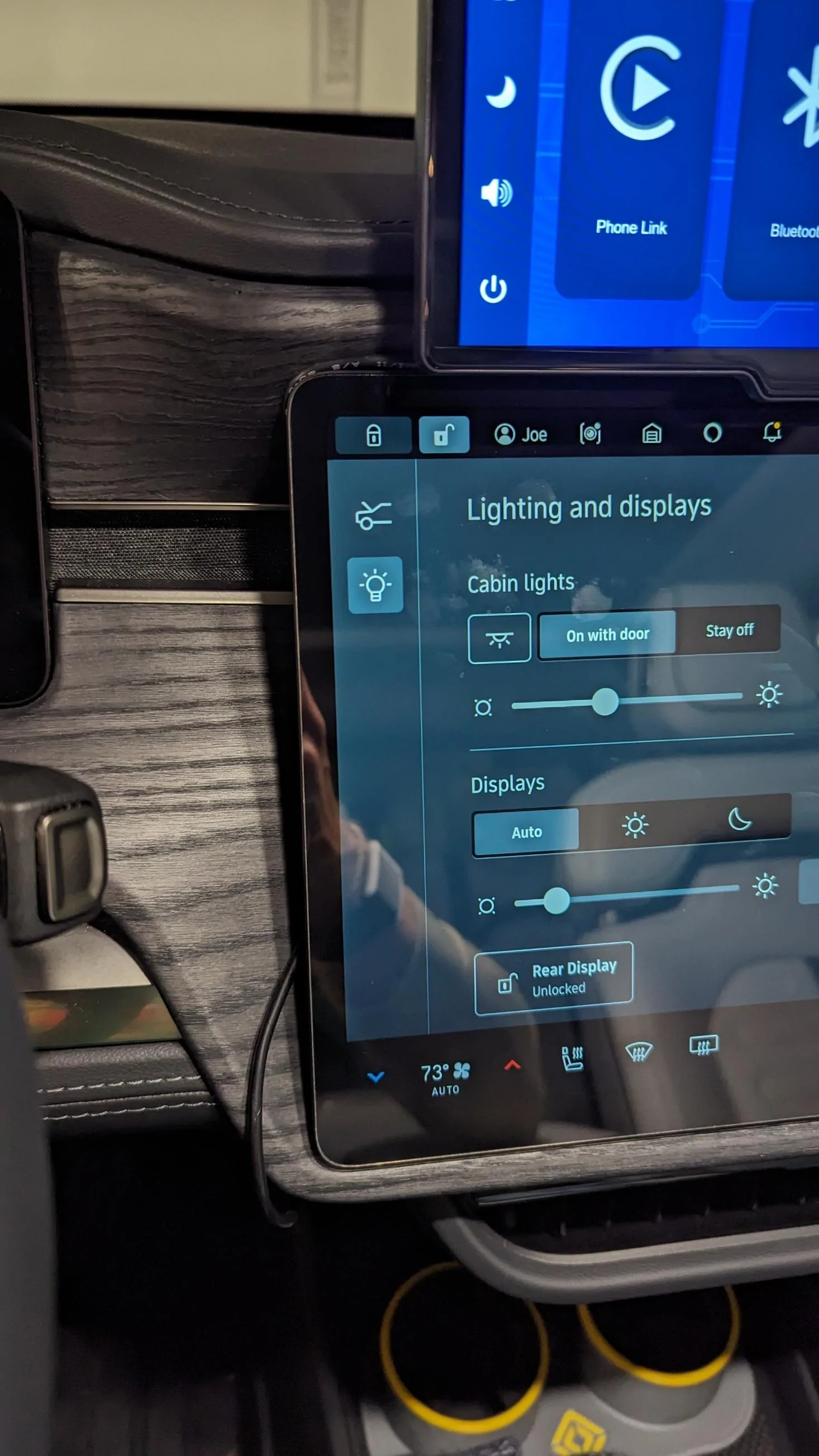
Here's what bothers me (top left and bottom left--areas you can see the cable dangling. You can get it to be a bit 'tighter' along the bottom edge, but...it's still there):
Rivian R1T R1S Master Thread: JEBINC’s installation tips and review of 1EV / EV Sportline CarPlay / Android Auto display kit 1703454428384


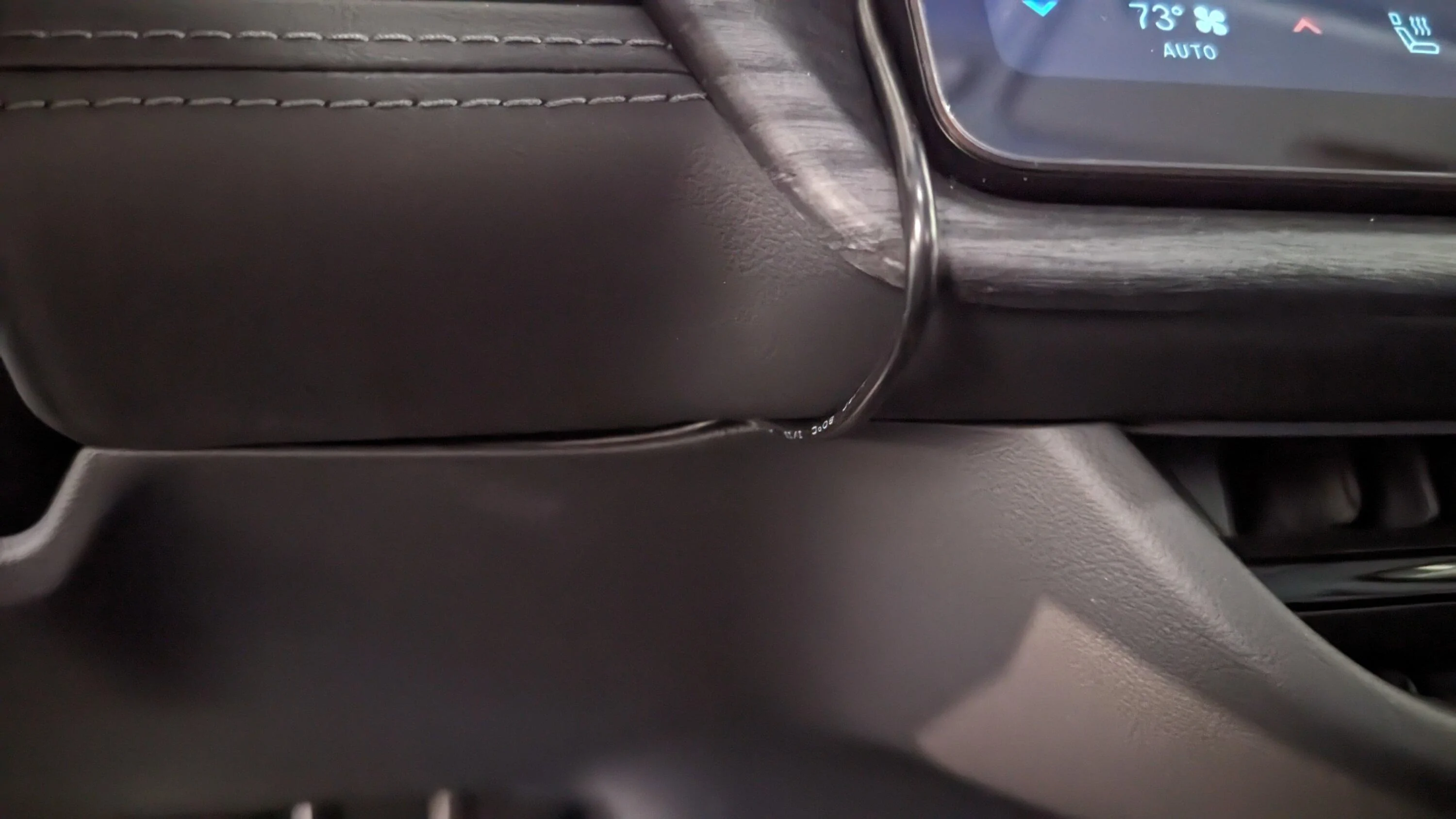
AND here's the *slight* improvement I made. EV Sportline recommends running the cable down along the underside of the dash until you come (naturally) to the underside. I decided to run the USB-C Cable BETWEEN the top and lower portions of the dash. It's a bit cleaner, but then it creates a small gap /relief for the cable. But you definitely cannot see it from where you're naturally sitting, so... you do you--I'm just providing my solution:
Rivian R1T R1S Master Thread: JEBINC’s installation tips and review of 1EV / EV Sportline CarPlay / Android Auto display kit 1703454519180


Good luck everyone. BE CAREFUL WITH YOUR DASH!! :)
 
OP
OP
jebinc

jebinc

Well-Known Member
First Name
John
Joined
Oct 5, 2022
Threads
49
Messages
2,310
Reaction score
2,134
Location
Seattle, WA
Vehicles
2021+ Tesla MS Plaid, R1T Adventure
Occupation
Retired
Hey, so I arrived home today much earlier than anticipated. And being a grown up child, I didn't want to wait and went right to it.

I have *very* mixed feelings about this product, but will give it a few weeks as a benefit-of-the-doubt type scenario. Suffice to say, EV Sportsline is banking hard that Rivian won't give you Waze, because I don't know that this is really going to bring many other benefits. Worth spending ~$260 for a temporary 'fix' to that...time will tell.

What went right?
1- It's very straightforward. If you're even tangentially mechanically and DC electrically savvy, you probably could put this kit to use with all of 2 instructions (which fuse to tap and how to install the custom bracket).
2- The custom bracket is, absolutely, clever design. Easy to install and would be easy to uninstall. It's also phenomenal not to require any cutting, tapping, modifying, or hardware integrating with the vehicle. You don't even need any kind of double-stick tape or anything like that. I dig it.

What was so-so?
3- EV Sportline's instructions are fragmented the same as they are with their running boards/rock sliders. What do I mean by that? You can't just watch the video or just read the instructions and knock this one out intuitively. Do both. Is that a show stopper? Not necessarily, but in my case, I was happy to use my tablet for the video and my phone for the PDF instructions. I would've been a little more inconvenienced by having to switch between both.
4- The cable management. I don't like seeing cables. I'm not crazy about the routing of the USB-C. I even made a slight adjustment/improvement over what EV Sportline recommends (Photo below), but... yeah this one will continue to annoy me for sure. I didn't put it in the not-so-great category because this is just a personal gripe.
Notwithstanding, you have a TON of extra wiring that needs tucked away. They don't come out and say this, but I'm saying it: If you don't like rattles in your vehicle, make DARN sure you secure everything very well (all that extra wire). AND, be certain nothing is rubbing/interfering with your steering assembly, as your steering shaft is in the same area you'll be adding your power tap (unless you're one of the fortunate ones who have the 12VDC plug under their dash and are going the alternative route--this wouldn't apply to you).

What went not-so-great?
5- I'll concede a point that this is partly on me. I took for granted the resilience of our dashboard wood. But there was no emphasis made by anyone I'd seen so far. I scratched the heck out of my dash, and I was earnestly being 'careful,' however not careful the way I should've been. Let me explain:
- EV Sportline's adapter (looks like a machined custom extrusion) sits *between* the top of the dash vinyl and the wood trim. EV Sportline advised to use 2 screwdrivers to pry at the vinyl portion of the dash to open up a gap to wedge this adapter into. I thought that might be too much of a risk to the dash, and I happen to own some nice plastic, non-marring trim tools. HOWEVER, my trim tools didn't immediately give me the gap I probably needed, and going from the way the video made it SEEM super easy to wedge the mechanical adapter in, I managed to scrape my dash terribly. I will say--you cannot see the scraped bits with the screen installed, but I am dreading removing this thing and already planning to talk to my favorite detail shop to see if they have any solutions to re-conditioning the black ash.

What would I recommend? Do what EV Sportline recommends and use 2 long screwdrivers to REALLY open the dash/gap so you can get the adapter in. DO EVERYTHING YOU CAN TO avoid impacting/sliding anything against the wood trim. I would advise using a soft cloth or something (lay it out) while you're installing, and then pull it out once you have everything in place. That's what I wish I did. It all happened quite quickly, and I promise you I wasn't being careless. LEARN from my mistake!!

6- I wasn't 100% certain what Android Auto is/was. I just know that I have a terrible commute and looked down...WAY more than I care to admit to see what Waze was telling me (Waze is MUCH more accurate than Rivian's navigation and it's crucial to my commute for live traffic, to understand where incidents are, and yes...even to understand where speed traps are). Insofar as I may drive a bit fast, I'm extremely outspoken about not fussing with phones while driving. As such, I am hoping that this will make me much more capable of focusing ON THE ROAD. I would've figured out a way to mount my phone to my dash, but A) I hate wires and need to keep charge, as my phone doing 3 things at once tends to drain battery and B) I don't have the under-dash 12V as I'd mentioned. Though admittedly, I could've used this fuse tap solution and I am dealing with wires anyway.

All of that backstory for the simple point of: I will be able to use Waze and YT Music. I paid $260 for that privilege (and scratched the hell out of my dash for it). AND technically, I had both of those capabilities before installing this--I just had to look down or wait until I was at a traffic stop to fuss with my phone. I also like to listen to podcasts through YouTube, which I cannot open or select even with Android Auto. That's me in a niche situation, however. But, we'll see how happy I am to have this setup now.

For those of you who wanted AA/CP in your vehicle, this is probably still the best way to achieve that. If it's less than a year until (IF) Rivian improves their navigation significantly enough, or enables Waze, and/or enables integrated YT Music, then I'll probably not feel great about this investment...

Here's what bothers me (top left and bottom left--areas you can see the cable dangling. You can get it to be a bit 'tighter' along the bottom edge, but...it's still there):
1703454428384.jpeg


AND here's the *slight* improvement I made. EV Sportline recommends running the cable down along the underside of the dash until you come (naturally) to the underside. I decided to run the USB-C Cable BETWEEN the top and lower portions of the dash. It's a bit cleaner, but then it creates a small gap /relief for the cable. But you definitely cannot see it from where you're naturally sitting, so... you do you--I'm just providing my solution:
1703454519180.jpeg


Good luck everyone. BE CAREFUL WITH YOUR DASH!! :)
Thanks for posting the detailed review and comments!

I doubt Rivian or Tesla will ever offer Waze, CarPlay or Android auto- given they both want to control the customer interface.

Re benefits of this display, beyond having better navigation options, I find the hands free messaging/texting to be a huge plus for me, in addition to streaming. Basically, I never have to risk picking up my phone to accomplish something that the Rivian UI doesn’t offer. Happy Holiday’s and Merry Xmas, for those that observe!

Rivian R1T R1S Master Thread: JEBINC’s installation tips and review of 1EV / EV Sportline CarPlay / Android Auto display kit IMG_0186


Rivian R1T R1S Master Thread: JEBINC’s installation tips and review of 1EV / EV Sportline CarPlay / Android Auto display kit IMG_0188


@EV Sportline
 

Lizardo

Well-Known Member
Joined
Jun 9, 2022
Threads
28
Messages
740
Reaction score
504
Location
TX
Vehicles
R1T
Occupation
Self
Clubs
 
Hey, so I arrived home today much earlier than anticipated. And being a grown up child, I didn't want to wait and went right to it.

I have *very* mixed feelings about this product, but will give it a few weeks as a benefit-of-the-doubt type scenario. Suffice to say, EV Sportsline is banking hard that Rivian won't give you Waze, because I don't know that this is really going to bring many other benefits. Worth spending ~$260 for a temporary 'fix' to that...time will tell.

What went right?
1- It's very straightforward. If you're even tangentially mechanically and DC electrically savvy, you probably could put this kit to use with all of 2 instructions (which fuse to tap and how to install the custom bracket).
2- The custom bracket is, absolutely, clever design. Easy to install and would be easy to uninstall. It's also phenomenal not to require any cutting, tapping, modifying, or hardware integrating with the vehicle. You don't even need any kind of double-stick tape or anything like that. I dig it.

What was so-so?
3- EV Sportline's instructions are fragmented the same as they are with their running boards/rock sliders. What do I mean by that? You can't just watch the video or just read the instructions and knock this one out intuitively. Do both. Is that a show stopper? Not necessarily, but in my case, I was happy to use my tablet for the video and my phone for the PDF instructions. I would've been a little more inconvenienced by having to switch between both.
4- The cable management. I don't like seeing cables. I'm not crazy about the routing of the USB-C. I even made a slight adjustment/improvement over what EV Sportline recommends (Photo below), but... yeah this one will continue to annoy me for sure. I didn't put it in the not-so-great category because this is just a personal gripe.
Notwithstanding, you have a TON of extra wiring that needs tucked away. They don't come out and say this, but I'm saying it: If you don't like rattles in your vehicle, make DARN sure you secure everything very well (all that extra wire). AND, be certain nothing is rubbing/interfering with your steering assembly, as your steering shaft is in the same area you'll be adding your power tap (unless you're one of the fortunate ones who have the 12VDC plug under their dash and are going the alternative route--this wouldn't apply to you).

What went not-so-great?
5- I'll concede a point that this is partly on me. I took for granted the resilience of our dashboard wood. But there was no emphasis made by anyone I'd seen so far. I scratched the heck out of my dash, and I was earnestly being 'careful,' however not careful the way I should've been. Let me explain:
- EV Sportline's adapter (looks like a machined custom extrusion) sits *between* the top of the dash vinyl and the wood trim. EV Sportline advised to use 2 screwdrivers to pry at the vinyl portion of the dash to open up a gap to wedge this adapter into. I thought that might be too much of a risk to the dash, and I happen to own some nice plastic, non-marring trim tools. HOWEVER, my trim tools didn't immediately give me the gap I probably needed, and going from the way the video made it SEEM super easy to wedge the mechanical adapter in, I managed to scrape my dash terribly. I will say--you cannot see the scraped bits with the screen installed, but I am dreading removing this thing and already planning to talk to my favorite detail shop to see if they have any solutions to re-conditioning the black ash.

What would I recommend? Do what EV Sportline recommends and use 2 long screwdrivers to REALLY open the dash/gap so you can get the adapter in. DO EVERYTHING YOU CAN TO avoid impacting/sliding anything against the wood trim. I would advise using a soft cloth or something (lay it out) while you're installing, and then pull it out once you have everything in place. That's what I wish I did. It all happened quite quickly, and I promise you I wasn't being careless. LEARN from my mistake!!

6- I wasn't 100% certain what Android Auto is/was. I just know that I have a terrible commute and looked down...WAY more than I care to admit to see what Waze was telling me (Waze is MUCH more accurate than Rivian's navigation and it's crucial to my commute for live traffic, to understand where incidents are, and yes...even to understand where speed traps are). Insofar as I may drive a bit fast, I'm extremely outspoken about not fussing with phones while driving. As such, I am hoping that this will make me much more capable of focusing ON THE ROAD. I would've figured out a way to mount my phone to my dash, but A) I hate wires and need to keep charge, as my phone doing 3 things at once tends to drain battery and B) I don't have the under-dash 12V as I'd mentioned. Though admittedly, I could've used this fuse tap solution and I am dealing with wires anyway.

All of that backstory for the simple point of: I will be able to use Waze and YT Music. I paid $260 for that privilege (and scratched the hell out of my dash for it). AND technically, I had both of those capabilities before installing this--I just had to look down or wait until I was at a traffic stop to fuss with my phone. I also like to listen to podcasts through YouTube, which I cannot open or select even with Android Auto. That's me in a niche situation, however. But, we'll see how happy I am to have this setup now.

For those of you who wanted AA/CP in your vehicle, this is probably still the best way to achieve that. If it's less than a year until (IF) Rivian improves their navigation significantly enough, or enables Waze, and/or enables integrated YT Music, then I'll probably not feel great about this investment...

Here's what bothers me (top left and bottom left--areas you can see the cable dangling. You can get it to be a bit 'tighter' along the bottom edge, but...it's still there):
1703454428384.jpeg


AND here's the *slight* improvement I made. EV Sportline recommends running the cable down along the underside of the dash until you come (naturally) to the underside. I decided to run the USB-C Cable BETWEEN the top and lower portions of the dash. It's a bit cleaner, but then it creates a small gap /relief for the cable. But you definitely cannot see it from where you're naturally sitting, so... you do you--I'm just providing my solution:
1703454519180.jpeg


Good luck everyone. BE CAREFUL WITH YOUR DASH!! :)

The ruining your dash caught my attenuation... they do make it sound very simple. Curious how other people find installing it moving forward
Sponsored


Top