Sponsored

Vampire drain over the holidays - trip computer vs %

Guy

Well-Known Member
First Name
Guy
Joined
Nov 6, 2021
Threads
12
Messages
1,607
Reaction score
1,518
Location
Philadelphia suburbs
Vehicles
Mazda 6, Toyota Sienna
Occupation
Scientist
Clubs
 
I bought my R1T back in September (June 2023 build VIN 25xxx) and had no concerns with vampire drain. As I was away for the holidays I thought I would test that. The truck stayed locked in my garage with gear guard off. I am in eastern PA so the vehicle was in the 40s.

I checked the app once a day but did not force the truck awake and it was a sleep a lot (as expected). During that time it lost 4% of the the battery (going from 80% to 76%). This would equate to 5.4kWh or less than 0.75kWh per day which I would view as acceptable.

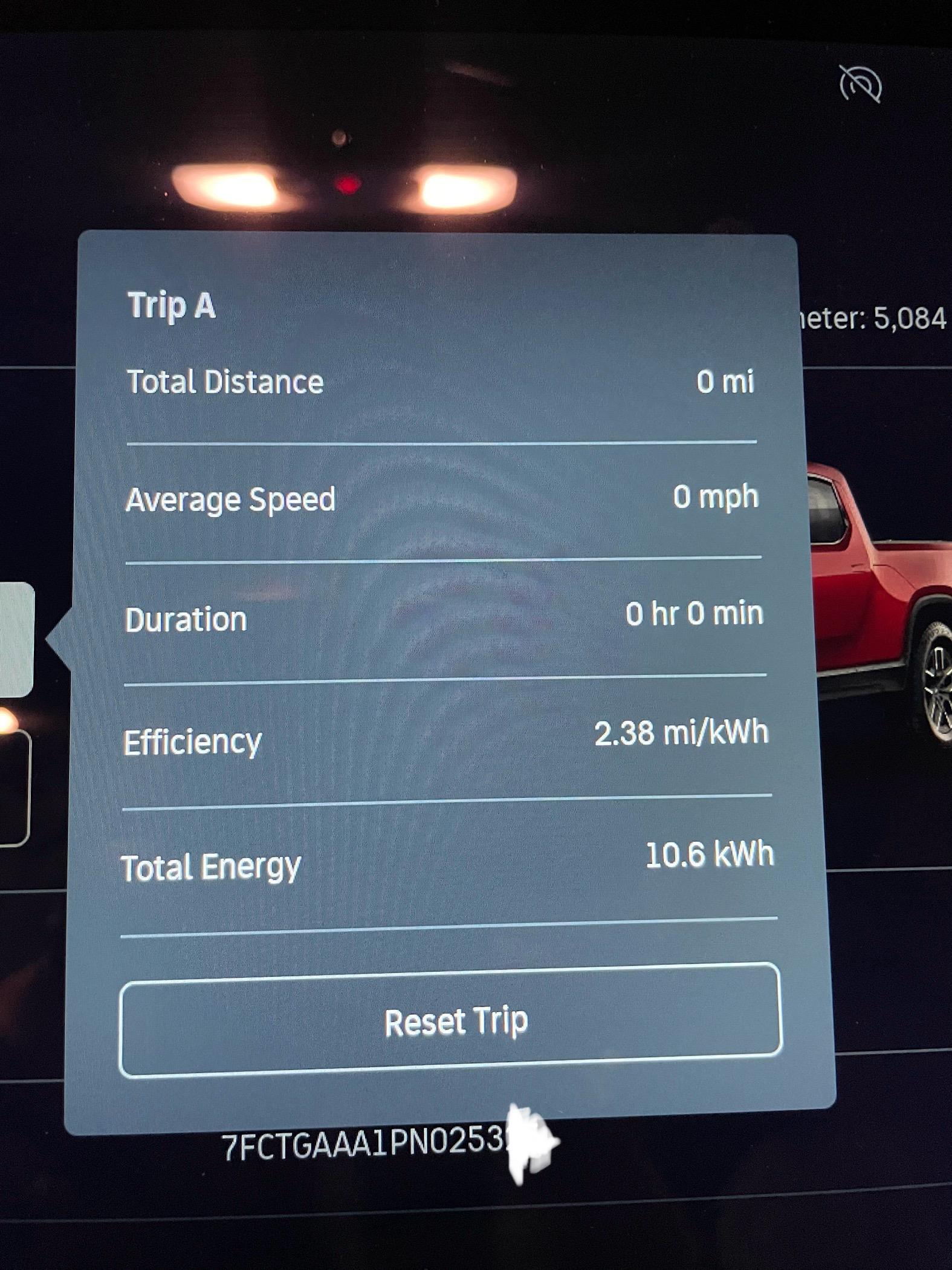
I had read others on here suggesting the most accurate way to assess the drain is to reset the trip computer and I did. This was 10.6 kWh or more than 1.25kWh per day - a significantly higher amount than by % alone.

Rivian R1T R1S Vampire drain over the holidays - trip computer vs % IMG_5570


Other than the temperature this was an ideal test so I am a little surprised by the drain being over 1 kWh a day. The vehicle is open up quickly upon my return and no issues noted.

Wanted to share as a data point for people.
Sponsored

 

madgrey

Well-Known Member
First Name
Allan
Joined
Feb 26, 2022
Threads
4
Messages
903
Reaction score
1,241
Location
Fidalgo Island, WA
Vehicles
2022 R1T, 2016 Miata, 2015 Viper
Occupation
Hardware Design Verification
My two experiments using the trip computer were both 4 days long. I didn't check the R1T status until I returned and the temps were September mild.

GearGuard on: 1.5kWh/day
GearGuard off: 1.1kWh/day

I'm curious what the latest firmware revision is doing given the better PAAK response.
 
  • Like
Reactions: Guy
OP
OP

Guy

Well-Known Member
First Name
Guy
Joined
Nov 6, 2021
Threads
12
Messages
1,607
Reaction score
1,518
Location
Philadelphia suburbs
Vehicles
Mazda 6, Toyota Sienna
Occupation
Scientist
Clubs
 
My two experiments using the trip computer were both 4 days long. I didn't check the R1T status until I returned and the temps were September mild.

GearGuard on: 1.5kWh/day
GearGuard off: 1.1kWh/day

I'm curious what the latest firmware revision is doing given the better PAAK response.
Thanks for your update, similar power drain per day in the low 1 kWh/day region.
 

NY_Rob

Well-Known Member
First Name
Rob
Joined
Feb 9, 2022
Threads
23
Messages
5,391
Reaction score
7,961
Location
long island
Vehicles
Model 3 LR AWD, BMW i3 REX, 2024 Rubicon 4xe
Occupation
IT
At 4pm yesterday I reset my trip odometer then put my R1T in Shipping Mode and Service Mode and completely disabled Proximity locking altogether, GG is off as well... and never had PAAK setup on my phone. Our fobs are stored in a Faraday box FWIW.
I will not open my Rivian app today so that will not be running either.

I honestly am out of things to turn off and disable at this point.

Will check drain at 4pm today and report loss over 24hrs....
 

Joefly78

Active Member
First Name
Joe
Joined
Jan 2, 2024
Threads
2
Messages
37
Reaction score
30
Location
Atlanta, GA
Vehicles
2023 R1T Max
Occupation
Pilot
Hey, I'm in my second month of R1T ownership and think I finally might have the vampire drain problem figured out, at least in my case. My scenario and fix is below, though admittedly less scientific than other approaches.

TLDR: Turn off Bluetooth and WIFI in the truck. Turn off proximity at home. Key fob in faraday bag.

My garage is directly below my kitchen. Watching the nest cam that looks at my truck in the garage, I can tell that the truck lights up and gets stuff going whenever I walk over it on the floor above. It must be doing this twenty times a day. Previously, my vampire drain was around 5-8 percent a day. After fiddling with a bunch of things, I found that turning off bluetooth on the truck prevents it from sensing me walking around in the kitchen (with my phone in my pocket) and stays asleep. Also turned off Wifi on truck and put my fob in a faraday bag. Been a couple of days now and only seeing 1-2 miles of reduced range per day. Much better than it was. Even with PAAK turned off, with bluetooth ON, the car STILL sees the phone and gets ready to roll when it's near. Not sure if it's a design flaw or intentional, but turning bluetooth off prevents that it seems.
 

Sponsored

NY_Rob

Well-Known Member
First Name
Rob
Joined
Feb 9, 2022
Threads
23
Messages
5,391
Reaction score
7,961
Location
long island
Vehicles
Model 3 LR AWD, BMW i3 REX, 2024 Rubicon 4xe
Occupation
IT
Hey, I'm in my second month of R1T ownership and think I finally might have the vampire drain problem figured out, at least in my case..
TLDR: Turn off Bluetooth and WIFI in the truck. Turn off proximity at home.
Go back out to the truck after 24hrs.. bet you a donut BT (and probably WiFi as well) is "magically" back on again. I have brought this to Rivian's attention.. they say "that's normal" to which I replied "then why even offer the ability to switch them off?".. they have never answered that question.
 

NY_Rob

Well-Known Member
First Name
Rob
Joined
Feb 9, 2022
Threads
23
Messages
5,391
Reaction score
7,961
Location
long island
Vehicles
Model 3 LR AWD, BMW i3 REX, 2024 Rubicon 4xe
Occupation
IT
At 4pm yesterday I reset my trip odometer then put my R1T in Shipping Mode and Service Mode and completely disabled Proximity locking altogether, GG is off as well... and never had PAAK setup on my phone. Our fobs are stored in a Faraday box FWIW.
I will not open my Rivian app today so that will not be running either.

I honestly am out of things to turn off and disable at this point.

Will check drain at 4pm today and report loss over 24hrs....
With all the conditions above in place, 1.1kWh loss over exactly 24hrs.

Before the late summer/fall updates I was at 0.5kWh loss/day.
 

Joefly78

Active Member
First Name
Joe
Joined
Jan 2, 2024
Threads
2
Messages
37
Reaction score
30
Location
Atlanta, GA
Vehicles
2023 R1T Max
Occupation
Pilot
Go back out to the truck after 24hrs.. bet you a donut BT (and probably WiFi as well) is "magically" back on again. I have brought this to Rivian's attention.. they say "that's normal" to which I replied "then why even offer the ability to switch them off?".. they have never answered that question.
You are right about BT...it comes back on every time you open the driver's door. WHY!? This makes no sense. Wifi remains off. I'd like to think that their developers are working at a much higher pay grade than I do, but this seems like bad coding to me...
 

shap

Well-Known Member
Joined
Nov 18, 2021
Threads
16
Messages
870
Reaction score
765
Location
Austin,TX
Vehicles
BMW 45e, R1T
Clubs
 
You are right about BT...it comes back on every time you open the driver's door. WHY!? This makes no sense. Wifi remains off. I'd like to think that their developers are working at a much higher pay grade than I do, but this seems like bad coding to me...
I 100% agree, I think this should have at least an option to delay the AC, BT, and other systems when you just open a door to take something from the car (similar to when you open the frunk - nothing starts)
 

NY_Rob

Well-Known Member
First Name
Rob
Joined
Feb 9, 2022
Threads
23
Messages
5,391
Reaction score
7,961
Location
long island
Vehicles
Model 3 LR AWD, BMW i3 REX, 2024 Rubicon 4xe
Occupation
IT
You are right about BT...it comes back on every time you open the driver's door. WHY!? This makes no sense. Wifi remains off. I'd like to think that their developers are working at a much higher pay grade than I do, but this seems like bad coding to me...
I suspect the BT is coming on without even opening the doors.. it's just the display indicator moving to "on" when you get in and we see that state change where it could have turned back on days or hours earlier. I've also had the WiFi pop back on by itself, it's super frustrating..
 

Sponsored

Joefly78

Active Member
First Name
Joe
Joined
Jan 2, 2024
Threads
2
Messages
37
Reaction score
30
Location
Atlanta, GA
Vehicles
2023 R1T Max
Occupation
Pilot
I 100% agree, I think this should have at least an option to delay the AC, BT, and other systems when you just open a door to take something from the car (similar to when you open the frunk - nothing starts)
The gurgling, whining, buzzing, pumping sounds that this thing makes when you just walk by it are unsettling. I know it's just doing its thing, but it sure seems like it's putting miles on the parts just sitting in the garage. I have 3 other EVs and none of them do this. :)
 

shap

Well-Known Member
Joined
Nov 18, 2021
Threads
16
Messages
870
Reaction score
765
Location
Austin,TX
Vehicles
BMW 45e, R1T
Clubs
 
The gurgling, whining, buzzing, pumping sounds that this thing makes when you just walk by it are unsettling. I know it's just doing its thing, but it sure seems like it's putting miles on the parts just sitting in the garage. I have 3 other EVs and none of them do this. :)
Well, my X5 45E does the same (I have a proximity unlock/lock function). And it will not loose a single % after 4 weeks. However, my R1T is kind of ok - I loose maybe 0.3% per day.

Still, see no reason to turn AC on for 5 minutes just because I opened and closed the door)
 

Joefly78

Active Member
First Name
Joe
Joined
Jan 2, 2024
Threads
2
Messages
37
Reaction score
30
Location
Atlanta, GA
Vehicles
2023 R1T Max
Occupation
Pilot
This may already be known, but it seems there are really two bluetooth connections from your phone to the car:

1) The "traditional" connection that you have in every other car, which lets you play music from your phone.

2) The Rivian app's bluetooth connection to the car. You can't use the app to access the car without bluetooth access allocated to the app, even remotely.

Connection #2 is the problem. Is the one that unlocks the car and handles proximity duties. However, it seems that the bluetooth setting in the car isn't sensitive to it? When you turn off bluetooth in the Rivian's menu, it shuts both connection types off. It seems that an easy solution would be to allow app access to the car (for checking charge states) without having bluetooth on. I see no need for it, since connectivity the car via the app is handled via cellular.
 

jjswan33

Well-Known Member
First Name
Joshua
Joined
Sep 17, 2021
Threads
135
Messages
4,455
Reaction score
9,876
Location
Sandy, OR
Vehicles
Rivian R1T LE, Hyundai Ioniq 5 Limited
Occupation
Engineer
Clubs
 
This may already be known, but it seems there are really two bluetooth connections from your phone to the car:

1) The "traditional" connection that you have in every other car, which lets you play music from your phone.

2) The Rivian app's bluetooth connection to the car. You can't use the app to access the car without bluetooth access allocated to the app, even remotely.

Connection #2 is the problem. Is the one that unlocks the car and handles proximity duties. However, it seems that the bluetooth setting in the car isn't sensitive to it? When you turn off bluetooth in the Rivian's menu, it shuts both connection types off. It seems that an easy solution would be to allow app access to the car (for checking charge states) without having bluetooth on. I see no need for it, since connectivity the car via the app is handled via cellular.
There are more than 2. "Rivian Audio" is the 'traditional' one that you mention. Checking just now I have 'Rivian Phone Key', 'Rivian Sensor 1', 'Rivian Sensor 3', 'Rivian Sensor 4' that are currently connected to my phone. Currently not connected are 'Rivian Audio'.
 

HyperionMark

Well-Known Member
First Name
Mark
Joined
Apr 22, 2022
Threads
14
Messages
416
Reaction score
358
Location
South Dakota
Vehicles
R1T and Model Y (previously a 3 and X)
There are more than 2. "Rivian Audio" is the 'traditional' one that you mention. Checking just now I have 'Rivian Phone Key', 'Rivian Sensor 1', 'Rivian Sensor 3', 'Rivian Sensor 4' that are currently connected to my phone. Currently not connected are 'Rivian Audio'.
Are there ways to "deny" these connections through BT so your phone can stay connected to other stuff?
Sponsored


Top