Sponsored

Underthe110

Well-Known Member
First Name
Steve
Joined
Sep 11, 2023
Threads
4
Messages
55
Reaction score
84
Location
South Orange county
Vehicles
R1T
Occupation
Longshoreman
This testing was done on an R1S, this many not likely be the optimal setup for the R1T as the cabin is dramatically different.
I know but it is better than it was, I’ll most likely tweak it as time goes on.
Sponsored


LoneStar

Well-Known Member
Joined
Aug 2, 2020
Threads
79
Messages
1,589
Reaction score
3,543
Location
San Diego
Vehicles
'25 R1T Gen2
Occupation
engineer
Clubs
 
@superfluid
Kodos to you! Convinced you know what you’re doing.

I’m a classic Country-western music lover. Have a Spotify playlist that I listen to frequently. Never has it sounded so sweet, crisp & crystal clear.

if you’re willing to experience it yourself, play “You Never Even Called Me By My Name” (David Allan Coe). That steel guitar is just amazingly distinct like I could see player on stage right.

And if you’re truly daring, listen to “The Devil Went Down to Georgia” by The Charlie Daniels Band. Incredible violin!

thank you truly, sir. ???

R1S non-Meridian
 

Stretch

Well-Known Member
Joined
Oct 30, 2023
Threads
7
Messages
79
Reaction score
88
Location
Boise, Idaho
Vehicles
Vivian ('23 R1S) & Sparky ('23 R1T)
TLDR;
  1. Flatten your EQ by using the “Default” setting or the reset icon.
  2. Turn off 3D Surround Sound.
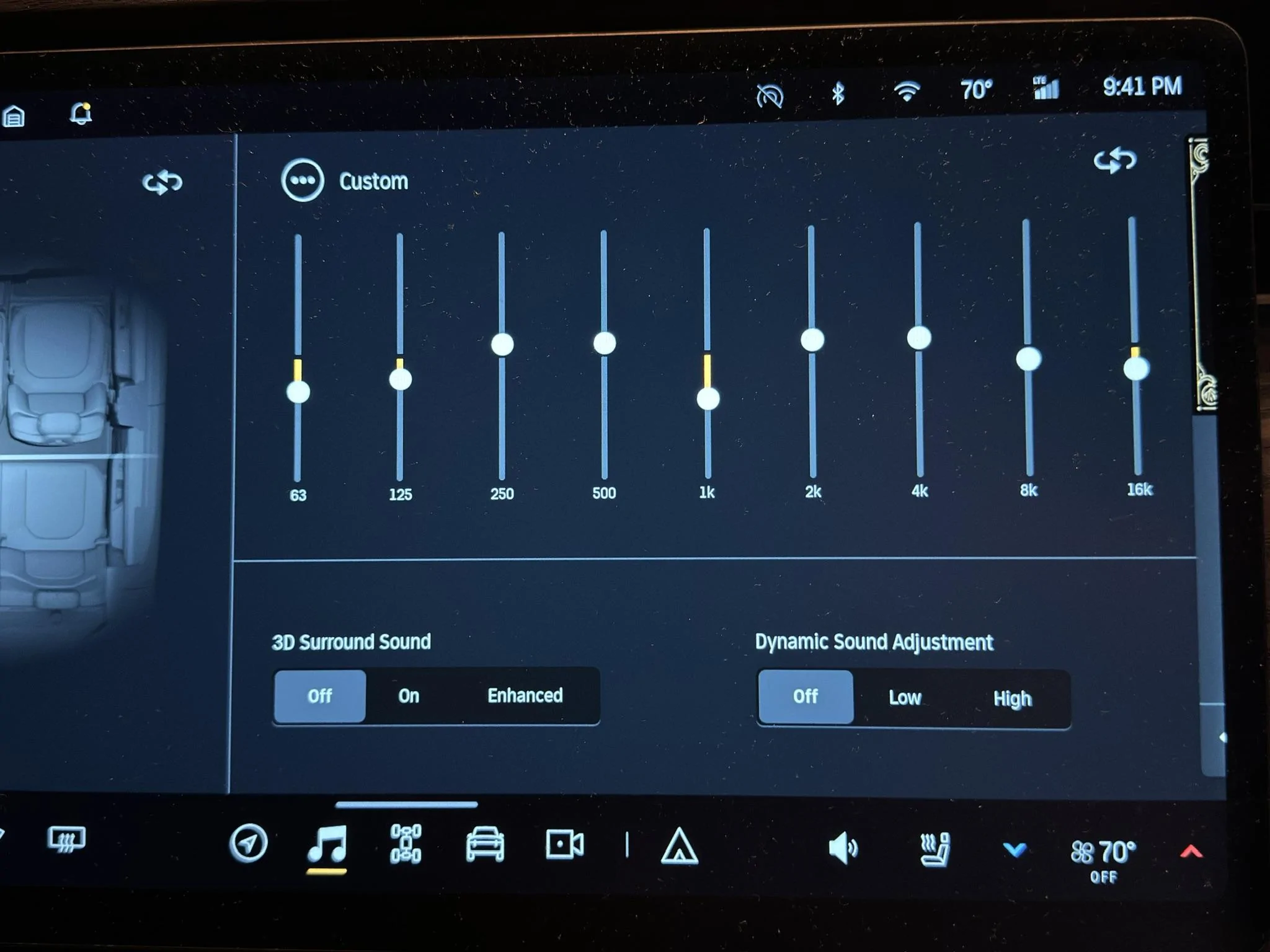
  3. Use these EQ settings: 63 hz -3 notches, 125 hz -2, 250 hz +1, 500 hz +1, 1 khz -4, 2 khz +1, 4 khz +1, 8 khz -1, 16 khz -2.
  4. Use Tidal or Spotify in high quality playback mode. Avoid Bluetooth for music playback.
  5. Enjoy better listening.
Tip: Listen to the new setting for a while using familiar songs at low volume and higher-than-average volume. Your ears/brain may take a bit to get accustomed to the new balance. What should happen is that you hear instruments/sounds more clearly because overtly emphasized frequency ranges aren't drawing attention away from them. Then tweak to taste.

I arrived at these settings after taking 18 acoustic measurements and analyzing their results. To learn more about what I did and how I arrived at those settings, read on.

11E517FA-F12B-4BE5-8282-4CD2EEDA3AC8_1_102_o.jpeg


Why I Measured My R1S’s Audio Performance

Rivian sold the R1S/T’s sound system as a major feature. As a former audio engineer who worked on a few indie albums and short movies--and as a hi-fi enthusiast—I considered the Meridian system a significant selling point. I wanted to measure its performance when I got my vehicle to be impressed and feel good about my purchase. When Rivian switched the Meridian system to an in-house system and claimed that testers preferred it to the Meridian, I got annoyed and wanted to test it even more. My R1S has the Rivian Audio/non-Meridian system.

When I took delivery of my R1S in August 2023, I was enthralled by the vehicle but not by its sound system. That said, it wasn’t wholly disappointing, either. I haven’t owned a vehicle with a better sound system than the R1S, but I certainly had vehicles with much worse systems (looking at you, Lexus, and Honda).

If my prior vehicles sounded no better than the R1S, what’s my reference point?

My home theater setup. It comprises relatively high-end gear carefully calibrated in an acoustically treated room. I paid several acousticians to help me solve specific acoustic problems (speaker bounder interference response effects, etc.), including the well-known acoustician Matthew Poes of Audioholics fame. To give you an idea of my system’s performance, dual 15” ported subwoofers generate bass with a depth and volume that approaches the electronica concerts I attend—the kind that affects your equilibrium. (For those who know what this means, my -3 dB point is 16.2 Hz.) The stereo image it creates borders on holographic; if you close your eyes, you can “see” the bassist standing to the left of the singer. This system isn’t perfect (it has relatively high RT60 decay times, and the subwoofers can bottom out at high sound pressure levels), but I tell you all this so you know I come at my Rivian tests with somewhat educated ears.

All right, enough setup. Let’s get into the tests and results.

Objectives, Methodology, Tests, and Results

Objectives

  1. Understand the R1S audio system’s faults.
  2. Understand the system’s behavior.
  3. Determine what—if anything—I could do to improve its performance.
Methodology
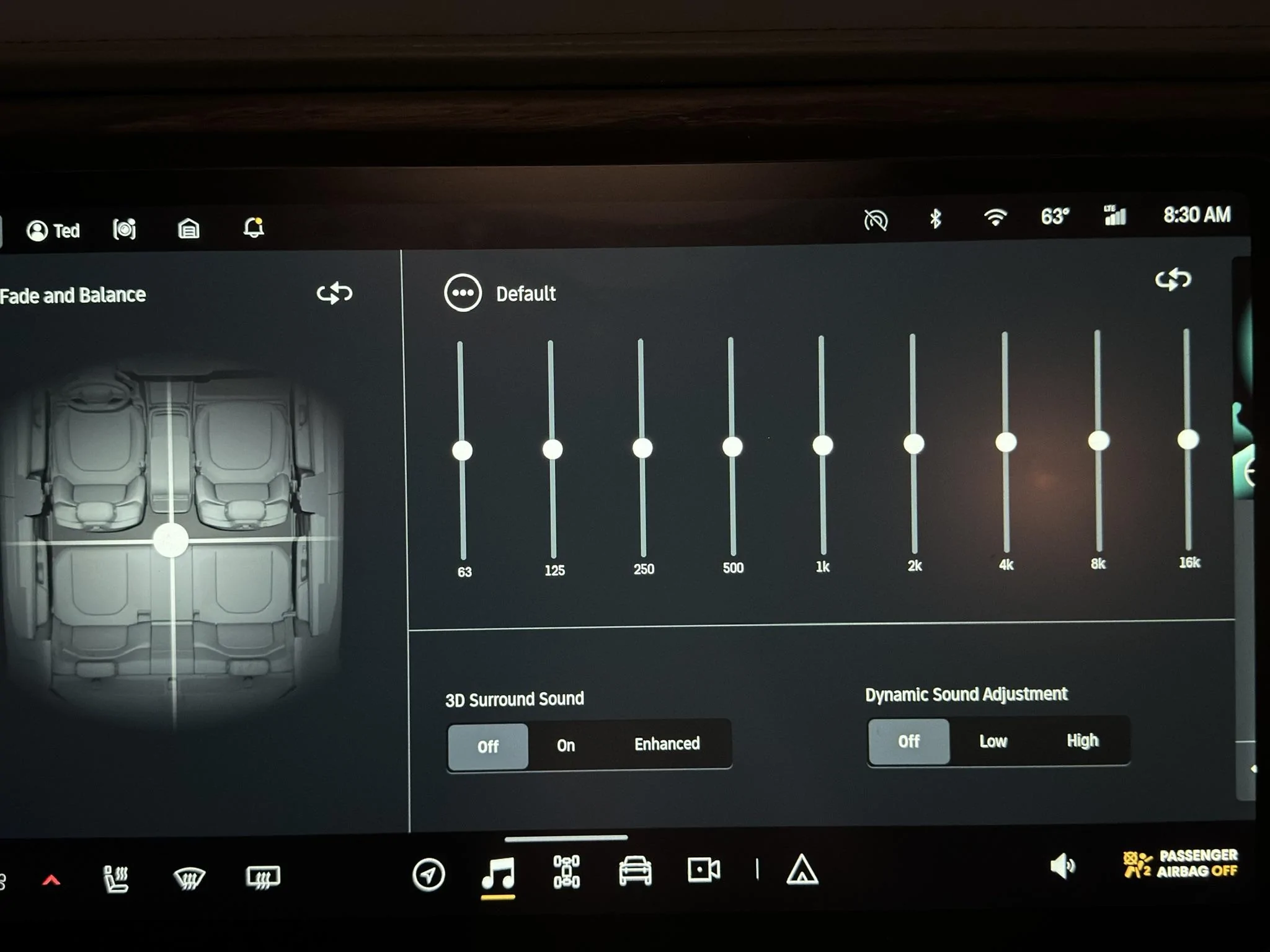
  • Flattened the EQ using the Default setting.
  • Turned off 3D Surround Sound and Dynamic Sound Adjustment.
  • Turned off climate control to reduce in-cabin noise as much as possible.
  • Parked in a closed garage to reduce external noise as much as possible.
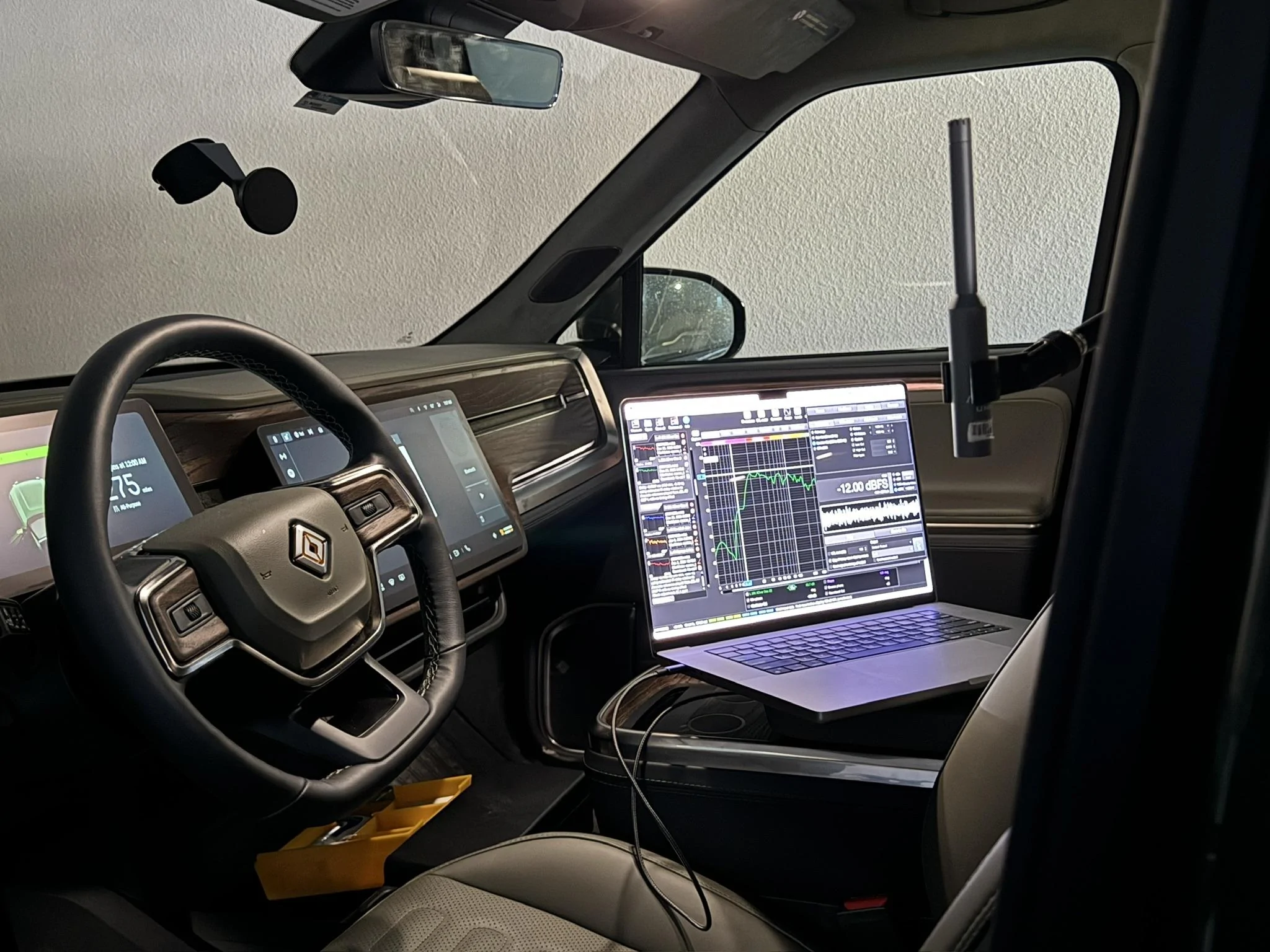
  • Put a calibrated UMIK-1 microphone roughly where my ears would be in the driver’s seat.
  • Connected my MacBook Pro to the Rivian Audio system via Bluetooth. This connection method had meaningful downsides—namely data and resolution loss- but Rivian Support told me they didn’t know of another way to make the vehicle a target audio device. USB didn’t work. It was the best I could do at the time.
  • Set the Rivian’s volume to 16 to give me 75 dB of pink noise, C-weighted, generated by Room EQ Wizard (the industry standard acoustic measurement app). 75 dB is a typical level for performing measurements.
6DEDA574-7C1E-42B6-8D7B-D9B519317668_1_102_o.jpeg


9EBFAF6C-AF1C-4143-AF16-292D3273B2BA_1_102_o.jpeg


Tests and a Short Lesson in Room (Cabin) Acoustics

I ran 18 sweeps from 0-20,000 Hz through the Left and Right device inputs. A sweep is an audio signal sent to the sound system that sweeps across a given frequency range at a uniform volume. The recording microphone picks up what comes out of the speakers and what the room—the cabin, in this case—does to the sound.

Ideally, the microphone records uniform volume across the given frequency range so that we hear the musician’s recording as it was mixed. Mixing engineers decide the right balance between the kick drum, snare, bass guitar, and voice, which all occupy different frequency ranges. However, the world is messy, and we never hear what the engineer intended.

Here’s why.

The space sound bounces around contributes approximately 50% of what you hear in a typical home theater. As sound waves, like water waves, bounce off boundaries, they reflect and interfere with other waves—think of the surface of a pool after a kid cannonballs into it. We hear bounced waves like we hear waves coming directly from speakers, except that bounced waves are time-delayed (because they cover a greater distance to your ears) and frequency-skewed because the materials they bounce off of absorb and reflect different frequencies of sound with different strengths. Think how clapping inside a tile/glass room sounds vs. a carpeted closet filled with clothes. Same clap, different surfaces reflecting that clap.

Given the dimensions of the space and the location of the listener, waves at different frequencies constructively or destructively interfere with each other (remember physics class?) at that listening location, meaning the room acts like an EQ on your music, boosting and cutting frequencies. When a peak meets a peak, the volume of that frequency increases. When a peak meets a trough, they cancel at that frequency.

Unfortunately, the room is an equalizer whose settings you can’t change unless you move your listening position (hard to do as the driver), change the cabin’s dimensions and material composition (hard to do unless you’re Rivian), move the speakers (also hard to do unless you’re Rivian), or remove the cabin’s walls, roof, and floor altogether, allowing the speakers to play in free air (hard to do and pass NHTSA safety regulations). Moreover, smaller rooms bounce waves back sooner and with more energy (i.e., volume) than larger spaces because waves travel a shorter distance and lose less energy to friction and propagation. Remember, sound waves propagate in all 3 dimensions, losing power as the inverse square of distance. I’m not a car audio engineer, but I suspect a car cabin dictates more than 50% of what you hear because of how small it is.

Got all that?

Good.

I used the first sweep as a reference to see outstanding acoustic issues and set a baseline for the effects of the EQ changes I made. I only changed EQ because I had no other tools at my disposal. In home theater systems, you can change delay and implement different kinds of filters to affect phase and other stuff that doesn’t matter in the Rivian because we can’t change it.

Changing the audio source (e.g., to in-built Tidal instead of Bluetooth) made a significant difference in overall quality, but that had to do with higher resolution than with getting closer to the source material’s frequency balance. An improperly EQ’d system impairs high-quality sources the same as low-quality sources, making it the main limiting factor of the R1S’s audio performance.

I learned a few useful things from taking measurements:
  • The EQ’s scale is 10 dB. Each notch represents +/- 1 dB of gain or attenuation.
  • The EQ is (obviously) graphic, which means it lets you change the amount of boost/cut but not the frequency being boosted or cut. The frequencies are fixed. That is typical but also rather disappointing for reasons I’ll show later. I hope they change it to a parametric EQ in a firmware update to allow us to choose the frequencies being boosted or cut.
  • Subjective listening via Bluetooth is highly misleading in the R1S. It sounds awful compared to in-built Tidal. Bluetooth makes high hats and voices highly sibilant and phasey because it’s highly lossy (e.g., discards a ton of high-frequency information). I don’t know what codec Bluetooth was using but it didn’t sound like aptX to me. I couldn’t use songs played back from my laptop via Bluetooth in my subjective listening tests because it didn’t represent what the system could do at all. Since I made my reference measurement via Bluetooth—and made EQ correction decisions from that Bluetooth measurement—I had to tweak those EQ settings “by ear” when I switched to the built-in Tidal player. But it worked out.
Let’s get to how to improve things.

Results and How to Interpret a Frequency Response Graph

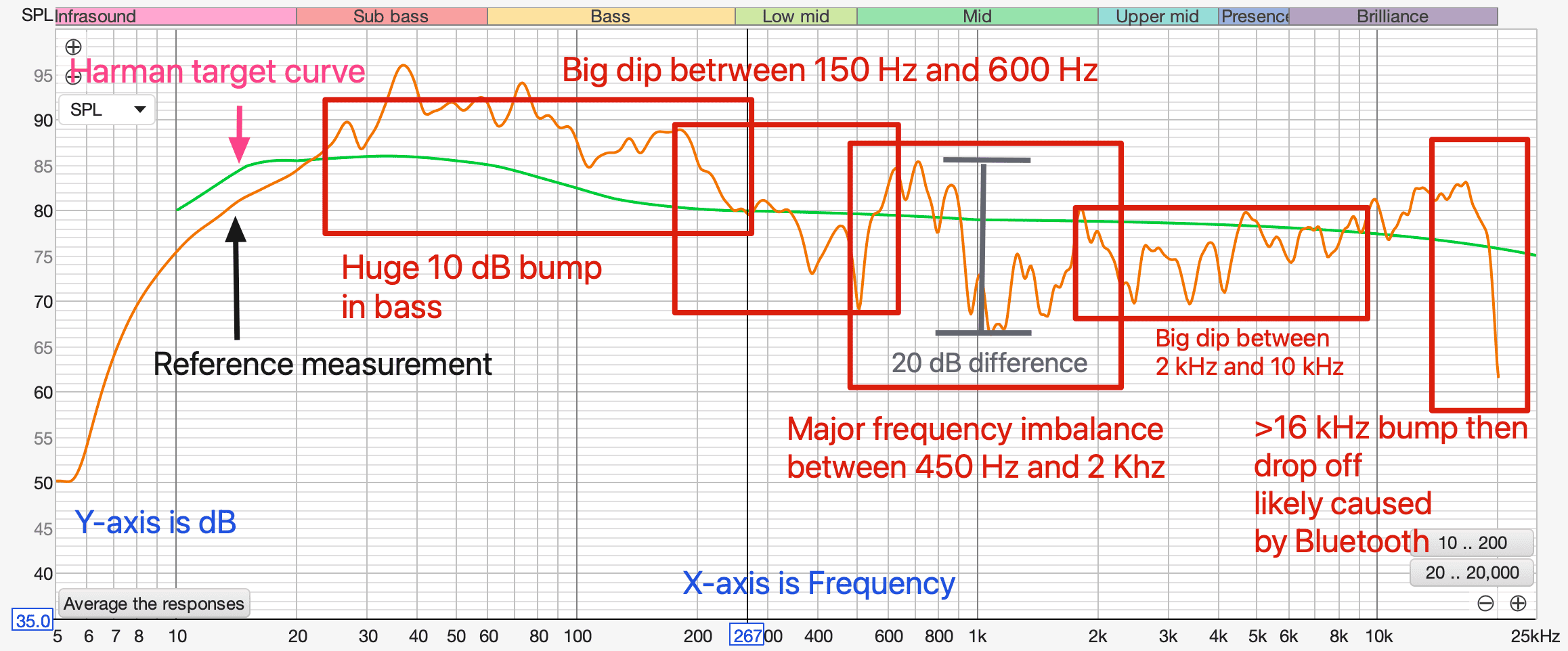
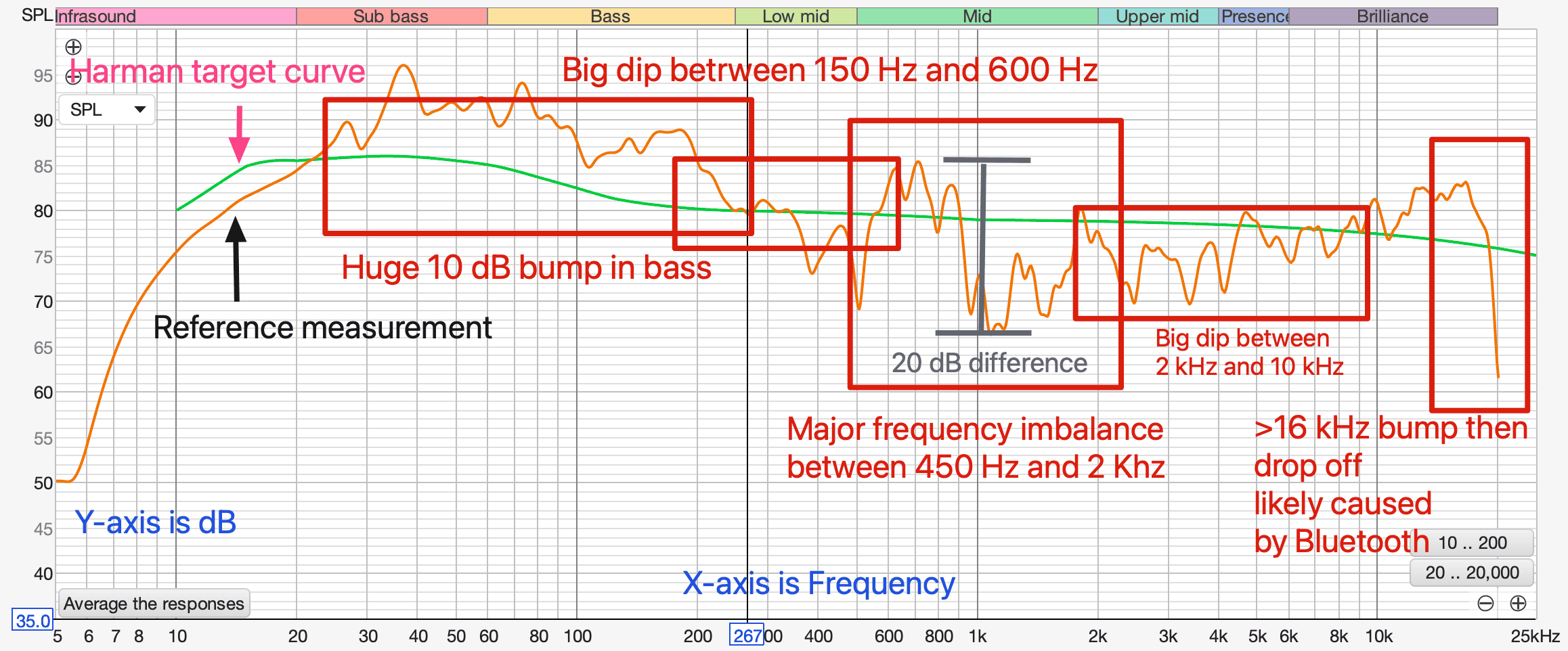
Here is the reference measurement with markup highlighting problem areas.

1707423462309.png


The graph shows frequency (x-axis) plotted against dB or volume (y-axis). In an ideal world, the graph would show a smooth line from 20 Hz to 20 kHz without big bumps and dips. The green line helps us visualize what that “ideal” frequency response might look like. It’s taken from Harman Audio’s research of people’s preferences. It isn’t ruler flat (zero slope) because people tend to prefer relatively more bass and relatively attenuated high frequencies. The closer a measurement is to a target curve like this one, the more balanced and clear the system will sound.

As you can see, my R1S measured pretty far off from the target curve.

My Rivian R1S’s main problems are:
  1. A huge 10 dB bump in bass between 20 Hz and 250 Hz beyond what people already tend to prefer, which is about 6 dB of bass boost from ruler flat. I love bass more than the next guy (see the above description of my home system’s bass output) but boosting bass this much masks adjacent frequencies, making music sound muddy and boomy. Low frequencies hang around in the air longer than high frequencies. The more low frequencies are boosted, the longer they hang around until they reach a volume we can’t hear anymore, causing boominess and making nearby frequencies hard to distinguish from the bass.
  2. A big 15 dB dip between 150 Hz and 600 Hz. This reduces the weight of male voices and the power of drums and bass.
  3. A massive 20 dB difference between frequencies between 450 Hz and 2 kHz. Humans hear differences of 3 dB, which means this difference is very audible. I consider this to be the R1S’s biggest audio performance problem. I’ll explain why when I explain how I address it.
  4. A big 8 dB dip between 2 kHz and 10 kHz that significantly reduces the clarity of voices, the texture of stringed instruments, and the snap of percussion.
  5. A sharp bump at 16 kHz followed by a sharp roll-off after 16 kHz. The bump has a tendency to make S’s and things like cymbals sound sibilant. The roll-off eliminates the “air” in music, or what we mostly hear as reverberant tails of high-frequency sound (like cymbal hits decaying) bouncing around the room where the instrument was recorded. This isn’t as big of a deal as the other issues because signals at that frequency tend to be a lower volume than the noise floor of the vehicle cabin. and most of the people who can afford an R1S are old enough to have lost a lot of their hearing above 17 kHz. I attribute this sharp roll-off to Bluetooth data compression, but I don’t know for sure. I didn’t compare it to a sweep originating from the Tidal app.
How do we address these issues?

Unfortunately, we can only address some of them and only to a certain extent because the Rivian system doesn’t allow us to change the frequencies we boost and cut. We’re stuck with the frequencies they give us, which don’t correspond well to the problematic frequencies.

After experimenting with several EQ settings, here’s where I landed:
  1. To address the 10 dB bump in bass, I cut 63 Hz by 3 dB and 125 Hz by 2 dB. I tried larger cuts to get the response closer to the Harman curve, but I preferred cutting it less. I’m not sure why, but I think it’s because long bass waveforms don’t resonate in a small space like a vehicle cabin, resulting in less bass reinforcement from the room boundaries, resulting in faster attenuation and lower bass energy. Unlike higher-frequency waves, bass waves have to cycle several times for our brains to register them. To make them hang around longer in a smaller space so we can hear them, maybe we need to boost them more than we would in a larger home media room. But this is just a guess.
  2. To address the 15 dB dip between 150 Hz and 600 Hz, I boosted 500 Hz by 1 dB. You might think that is a small boost for such a big dip, but remember that I cut 63 Hz and 125 Hz by 3 and 2 dB, respectively, reducing the difference more. The name of the game is frequency balance. I tried boosting 500 Hz more than that, but voices got too chesty for my taste and it raised the big peak at 600 Hz, adding to the already problematic 450 Hz to 2 kHz area.
  3. To address the 20 dB difference between 450 Hz and 2 kHz, I compromised. I wasn’t able to get the result I wanted. The reason is that the R1S’s EQ bands are fixed at 500 Hz, 1 kHz, and 2 kHz, the ranges near this problem area. As you can see, 1 kHz is bang in the middle of the highest peak and the lowest trough in that range (grey vertical line). As a result, boosting 1 kHz increases 1 kHz and the frequencies immediately around it, but the 20 dB difference between them stays the same. I think the huge peak at 850 Hz created massive resonance and possible speaker cone breakup where the speaker cone can’t handle that much power and that frequency without changing shape. To deal with the 850 Hz resonance, I cut 1 kHz by 4 dB. That improved sound quality significantly. That leaves an even greater dip at 1 hKz than when I started, but that sounded better than the 850 Hz boost. This is a compromise because we can’t change the frequencies we apply boosts and cuts to. What explains this issue? I suspect the crossover was not designed properly. This region has major phase issues, which indicates poor crossover implementation.
  4. To address the dip between 2 kHz and 10 kHz, I boosted 2 kHz by 1 dB, 4 kHz by 1 dB, and cut 8 kHz by 1 dB. This helped vocal clarity, string texture, and percussion snap. I didn’t raise it higher because it started sounding unbalanced to me. Based on the reference measurement, it shouldn’t have, but it did.
  5. To address the 16 kHz bump, I cut 16 kHz by 2 dB. More than that, and it sounded dull. Something worth noting: I’ve seen others recommend a huge boost at 16 kHz. I suspect they were trying to compensate for the big roll-off after 16 kHz, which is likely caused by Bluetooth compression. I don’t recommend doing this because it’s like taking a picture in the dark and then cranking up its brightness; there’s no information to brighten. You just create noise.
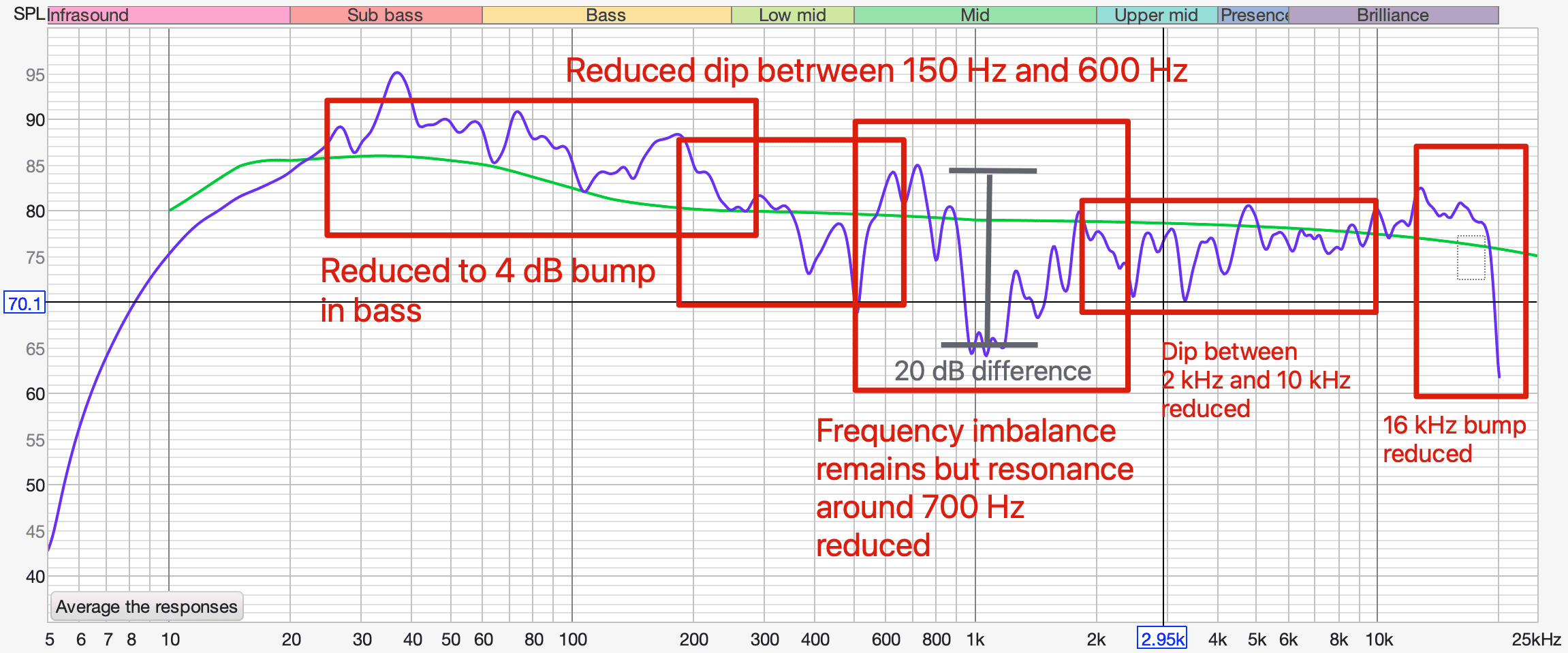
Here's what my frequency response looked like after making those changes.

1707424241431.png


Subjective listening notes:
  • 1 khz +5, 2 khz +5, 16 khz -5: Emerald Hooves. Better balanced than flat EQ. But lacks a little sparkle. May have something to do with very short decay times of small space, making me want to create space by adding air with high frequencies.
  • 1 khz +5, 2 khz +5, 16 kHz -2 dB is better. More air, but not as unbalanced as flat EQ.
  • 63 hz -5, 125 hz -5, 250 hz 0, 500 hz 0, 1 khz +10, 2 khz +3, 4 khz +5, 8 khz 0, 16 khz -2: Sounds terrible. Way too much 1 khz. Sounds extremely phasey.
  • 63 hz -3, 125 hz -3, 250 hz +3, 500 hz +3, 1 khz +2, 2 khz +1, 4 khz 0, 8 khz -1, 16 khz -2: The most pleasant so far. But imaging still mediocre. Playing around with 1 khz, something is very weird with that range. Boosted sounds awful, like there’s a phasing issue. Could be a crossover issue. The main issue is the huge 10 dB peak between 528 and 932 centered at 723 that you can’t get rid of.
  • 63 hz -3, 125 hz -2, 250 hz +1, 500 hz +1, 1 khz -4, 2 khz +1, 4 khz +1, 8 khz -1, 16 khz -2: Best subjective sound yet via Tidal. Increases vocal clarity because reduces muddiness from masking affect of mid range bump that can’t be eliminated. Phase in REW between 300 hz-2 khz is all messed up.
Regardless of whether you like the sound of my settings, I hope you found this interesting and have a better understanding of how the R1S’s sound system behaves and where its issues are.

Btw, I don’t know how these settings would work in an R1T because the R1T’s cabin volume is much less than the R1S. You can try them, though.

If you try my settings, let me know how they sound to you!

[Edit]

Additional Notes

- I would love Rivian to provide us with a parametric EQ via OTA. It would help us make much more targeted adjustments.
- I wonder if the apparent crossover issue around 1 kHz results from Rivian switching out the Meridian speakers with Elevation speakers and forgetting to modify the crossover. If the crossover is digital (e.g., the system is fully active), the issue could be fixed OTA, which would be amazing.


1707423307923.png
And RJ is hiring you when???

Soon, I hope!

Fantastic post, look forward to trying it out. I’m in my free trial period for Tidal, and I must say I’ve been a bit underwhelmed with the sound quality in Viv. Hopefully your suggestions will improve that!
 
OP
OP
superfluid

superfluid

Well-Known Member
Joined
Mar 29, 2021
Threads
20
Messages
290
Reaction score
923
Location
Austin, TX
Vehicles
Rivian R1S, Kia Telluride
Occupation
Tech and data
Clubs
 
@superfluid
Kodos to you! Convinced you know what you’re doing.

I’m a classic Country-western music lover. Have a Spotify playlist that I listen to frequently. Never has it sounded so sweet, crisp & crystal clear.

if you’re willing to experience it yourself, play “You Never Even Called Me By My Name” (David Allan Coe). That steel guitar is just amazingly distinct like I could see player on stage right.

And if you’re truly daring, listen to “The Devil Went Down to Georgia” by The Charlie Daniels Band. Incredible violin!

thank you truly, sir. ???

R1S non-Meridian
Thanks!

The guitar on the Coe track is fantastically sharp. I could almost see the slide move along the neck.

"The Devil Went Down the Georgia" is incredible. What a fiddle. Brought back memories of hearing this song for the first time when an American gymnast used it for her floor routine.

I enjoyed that!

Based on your music tastes, here are two recommendations back at ya:

"Change On the Rise" by Avi Kaplan. Rich and deep.

"House of the Rising Sun" by The White Buffalo with The Forest Rangers. Soulful and textured.
 
OP
OP
superfluid

superfluid

Well-Known Member
Joined
Mar 29, 2021
Threads
20
Messages
290
Reaction score
923
Location
Austin, TX
Vehicles
Rivian R1S, Kia Telluride
Occupation
Tech and data
Clubs
 
Fantastic write up!! I have adjust my EQ although I have a unicorn system. I have meridian EQ and Rivian speakers. Well at least the covers. Not sure what speakers are in there.
Interesting. Is the Meridian EQ different?
 

Sponsored

OP
OP
superfluid

superfluid

Well-Known Member
Joined
Mar 29, 2021
Threads
20
Messages
290
Reaction score
923
Location
Austin, TX
Vehicles
Rivian R1S, Kia Telluride
Occupation
Tech and data
Clubs
 
I plugged in the EQ settings and so far I'm really impressed. I think you've probably done the best you can with what you have to work with. I'm a big fan of EQ and I use the UMIK-1 at home with DIRAC to dial in my home system. Great work, thanks! Hopefully Rivian will see just how much we value the audio in our cars and either give us more ways to customize the settings or better yet, fix it so it sounds like a proper high-end system. Seems like all the hardware is there and just needs some TLC.
Glad it worked for you! Yes, unfortunately we don't have a lot of ways to adjust the sound. But I am going to ask support to implement a parametric EQ to give us better controls.

Cool that you're using Dirac at home. I use DL Bass Control in my home system. I'd love to see Rivian implement Dirac Live. I'd pay for that upgrade... but I'd want to see their before/after measurements before I did =)
 
OP
OP
superfluid

superfluid

Well-Known Member
Joined
Mar 29, 2021
Threads
20
Messages
290
Reaction score
923
Location
Austin, TX
Vehicles
Rivian R1S, Kia Telluride
Occupation
Tech and data
Clubs
 
I like the settings a lot so far...I sort of like a bit of the 3D sound though, but that might just be my personal taste.
Totally. It's all about what you like!
 
OP
OP
superfluid

superfluid

Well-Known Member
Joined
Mar 29, 2021
Threads
20
Messages
290
Reaction score
923
Location
Austin, TX
Vehicles
Rivian R1S, Kia Telluride
Occupation
Tech and data
Clubs
 
Like others have said superfluid, thanks for the impressive effort. Can’t wait to follow the procedure today. Question Superfluid - with all of your current findings, if you were to change one or two hardware components, what would that entail?
You're welcome!

If I could change two things, I'd change the crossover network and subwoofer. A higher-power sub with deeper extension would require a more powerful amplifier, but if we take the sub and amp as a package, then the crossover and sub.

I've seen posts of folks upgrading their subs to a 10" JL Audio and a stronger amp. That's on my list of upgrades, but I'm more interested in solving the 1 kHz frequency and phase issue atm. I think that will require new crossovers. If I end up replacing my crossovers, I'll probably get new speakers and a sub while I'm at it. =)
 
OP
OP
superfluid

superfluid

Well-Known Member
Joined
Mar 29, 2021
Threads
20
Messages
290
Reaction score
923
Location
Austin, TX
Vehicles
Rivian R1S, Kia Telluride
Occupation
Tech and data
Clubs
 
@superfluid
You got me really impressed!!
I dedicated this video to your research and amazing audio configuration skills.

I have a background installing and configuring home theater setups, and I always complain about the lack of a good calibration. You nailed it!

Thank you for dedicating the time not only to perform the testing and configuration, but to explain us your methodology and logic on this post.
That is very cool ? Thanks for doing that!
 

GsR1S

New Member
First Name
Guillermo
Joined
Jan 27, 2024
Threads
0
Messages
1
Reaction score
1
Location
San Dimas
Vehicles
R1S
Occupation
VP Telecom
TLDR;
  1. Flatten your EQ by using the “Default” setting or the reset icon.
  2. Turn off 3D Surround Sound.
  3. Use these EQ settings: 63 hz -3 notches, 125 hz -2, 250 hz +1, 500 hz +1, 1 khz -4, 2 khz +1, 4 khz +1, 8 khz -1, 16 khz -2.
  4. Use Tidal or Spotify in high quality playback mode. Avoid Bluetooth for music playback.
  5. Enjoy better listening.
Tip: Listen to the new setting for a while using familiar songs at low volume and higher-than-average volume. Your ears/brain may take a bit to get accustomed to the new balance. What should happen is that you hear instruments/sounds more clearly because overtly emphasized frequency ranges aren't drawing attention away from them. Then tweak to taste.

I arrived at these settings after taking 18 acoustic measurements and analyzing their results. To learn more about what I did and how I arrived at those settings, read on.

11E517FA-F12B-4BE5-8282-4CD2EEDA3AC8_1_102_o.jpeg


Why I Measured My R1S’s Audio Performance

Rivian sold the R1S/T’s sound system as a major feature. As a former audio engineer who worked on a few indie albums and short movies--and as a hi-fi enthusiast—I considered the Meridian system a significant selling point. I wanted to measure its performance when I got my vehicle to be impressed and feel good about my purchase. When Rivian switched the Meridian system to an in-house system and claimed that testers preferred it to the Meridian, I got annoyed and wanted to test it even more. My R1S has the Rivian Audio/non-Meridian system.

When I took delivery of my R1S in August 2023, I was enthralled by the vehicle but not by its sound system. That said, it wasn’t wholly disappointing, either. I haven’t owned a vehicle with a better sound system than the R1S, but I certainly had vehicles with much worse systems (looking at you, Lexus, and Honda).

If my prior vehicles sounded no better than the R1S, what’s my reference point?

My home theater setup. It comprises relatively high-end gear carefully calibrated in an acoustically treated room. I paid several acousticians to help me solve specific acoustic problems (speaker bounder interference response effects, etc.), including the well-known acoustician Matthew Poes of Audioholics fame. To give you an idea of my system’s performance, dual 15” ported subwoofers generate bass with a depth and volume that approaches the electronica concerts I attend—the kind that affects your equilibrium. (For those who know what this means, my -3 dB point is 16.2 Hz.) The stereo image it creates borders on holographic; if you close your eyes, you can “see” the bassist standing to the left of the singer. This system isn’t perfect (it has relatively high RT60 decay times, and the subwoofers can bottom out at high sound pressure levels), but I tell you all this so you know I come at my Rivian tests with somewhat educated ears.

All right, enough setup. Let’s get into the tests and results.

Objectives, Methodology, Tests, and Results

Objectives

  1. Understand the R1S audio system’s faults.
  2. Understand the system’s behavior.
  3. Determine what—if anything—I could do to improve its performance.
Methodology
  • Flattened the EQ using the Default setting.
  • Turned off 3D Surround Sound and Dynamic Sound Adjustment.
  • Turned off climate control to reduce in-cabin noise as much as possible.
  • Parked in a closed garage to reduce external noise as much as possible.
  • Put a calibrated UMIK-1 microphone roughly where my ears would be in the driver’s seat.
  • Connected my MacBook Pro to the Rivian Audio system via Bluetooth. This connection method had meaningful downsides—namely data and resolution loss- but Rivian Support told me they didn’t know of another way to make the vehicle a target audio device. USB didn’t work. It was the best I could do at the time.
  • Set the Rivian’s volume to 16 to give me 75 dB of pink noise, C-weighted, generated by Room EQ Wizard (the industry standard acoustic measurement app). 75 dB is a typical level for performing measurements.
6DEDA574-7C1E-42B6-8D7B-D9B519317668_1_102_o.jpeg


9EBFAF6C-AF1C-4143-AF16-292D3273B2BA_1_102_o.jpeg


Tests and a Short Lesson in Room (Cabin) Acoustics

I ran 18 sweeps from 0-20,000 Hz through the Left and Right device inputs. A sweep is an audio signal sent to the sound system that sweeps across a given frequency range at a uniform volume. The recording microphone picks up what comes out of the speakers and what the room—the cabin, in this case—does to the sound.

Ideally, the microphone records uniform volume across the given frequency range so that we hear the musician’s recording as it was mixed. Mixing engineers decide the right balance between the kick drum, snare, bass guitar, and voice, which all occupy different frequency ranges. However, the world is messy, and we never hear what the engineer intended.

Here’s why.

The space sound bounces around contributes approximately 50% of what you hear in a typical home theater. As sound waves, like water waves, bounce off boundaries, they reflect and interfere with other waves—think of the surface of a pool after a kid cannonballs into it. We hear bounced waves like we hear waves coming directly from speakers, except that bounced waves are time-delayed (because they cover a greater distance to your ears) and frequency-skewed because the materials they bounce off of absorb and reflect different frequencies of sound with different strengths. Think how clapping inside a tile/glass room sounds vs. a carpeted closet filled with clothes. Same clap, different surfaces reflecting that clap.

Given the dimensions of the space and the location of the listener, waves at different frequencies constructively or destructively interfere with each other (remember physics class?) at that listening location, meaning the room acts like an EQ on your music, boosting and cutting frequencies. When a peak meets a peak, the volume of that frequency increases. When a peak meets a trough, they cancel at that frequency.

Unfortunately, the room is an equalizer whose settings you can’t change unless you move your listening position (hard to do as the driver), change the cabin’s dimensions and material composition (hard to do unless you’re Rivian), move the speakers (also hard to do unless you’re Rivian), or remove the cabin’s walls, roof, and floor altogether, allowing the speakers to play in free air (hard to do and pass NHTSA safety regulations). Moreover, smaller rooms bounce waves back sooner and with more energy (i.e., volume) than larger spaces because waves travel a shorter distance and lose less energy to friction and propagation. Remember, sound waves propagate in all 3 dimensions, losing power as the inverse square of distance. I’m not a car audio engineer, but I suspect a car cabin dictates more than 50% of what you hear because of how small it is.

Got all that?

Good.

I used the first sweep as a reference to see outstanding acoustic issues and set a baseline for the effects of the EQ changes I made. I only changed EQ because I had no other tools at my disposal. In home theater systems, you can change delay and implement different kinds of filters to affect phase and other stuff that doesn’t matter in the Rivian because we can’t change it.

Changing the audio source (e.g., to in-built Tidal instead of Bluetooth) made a significant difference in overall quality, but that had to do with higher resolution than with getting closer to the source material’s frequency balance. An improperly EQ’d system impairs high-quality sources the same as low-quality sources, making it the main limiting factor of the R1S’s audio performance.

I learned a few useful things from taking measurements:
  • The EQ’s scale is 10 dB. Each notch represents +/- 1 dB of gain or attenuation.
  • The EQ is (obviously) graphic, which means it lets you change the amount of boost/cut but not the frequency being boosted or cut. The frequencies are fixed. That is typical but also rather disappointing for reasons I’ll show later. I hope they change it to a parametric EQ in a firmware update to allow us to choose the frequencies being boosted or cut.
  • Subjective listening via Bluetooth is highly misleading in the R1S. It sounds awful compared to in-built Tidal. Bluetooth makes high hats and voices highly sibilant and phasey because it’s highly lossy (e.g., discards a ton of high-frequency information). I don’t know what codec Bluetooth was using but it didn’t sound like aptX to me. I couldn’t use songs played back from my laptop via Bluetooth in my subjective listening tests because it didn’t represent what the system could do at all. Since I made my reference measurement via Bluetooth—and made EQ correction decisions from that Bluetooth measurement—I had to tweak those EQ settings “by ear” when I switched to the built-in Tidal player. But it worked out.
Let’s get to how to improve things.

Results and How to Interpret a Frequency Response Graph

Here is the reference measurement with markup highlighting problem areas.

1707423462309.png


The graph shows frequency (x-axis) plotted against dB or volume (y-axis). In an ideal world, the graph would show a smooth line from 20 Hz to 20 kHz without big bumps and dips. The green line helps us visualize what that “ideal” frequency response might look like. It’s taken from Harman Audio’s research of people’s preferences. It isn’t ruler flat (zero slope) because people tend to prefer relatively more bass and relatively attenuated high frequencies. The closer a measurement is to a target curve like this one, the more balanced and clear the system will sound.

As you can see, my R1S measured pretty far off from the target curve.

My Rivian R1S’s main problems are:
  1. A huge 10 dB bump in bass between 20 Hz and 250 Hz beyond what people already tend to prefer, which is about 6 dB of bass boost from ruler flat. I love bass more than the next guy (see the above description of my home system’s bass output) but boosting bass this much masks adjacent frequencies, making music sound muddy and boomy. Low frequencies hang around in the air longer than high frequencies. The more low frequencies are boosted, the longer they hang around until they reach a volume we can’t hear anymore, causing boominess and making nearby frequencies hard to distinguish from the bass.
  2. A big 15 dB dip between 150 Hz and 600 Hz. This reduces the weight of male voices and the power of drums and bass.
  3. A massive 20 dB difference between frequencies between 450 Hz and 2 kHz. Humans hear differences of 3 dB, which means this difference is very audible. I consider this to be the R1S’s biggest audio performance problem. I’ll explain why when I explain how I address it.
  4. A big 8 dB dip between 2 kHz and 10 kHz that significantly reduces the clarity of voices, the texture of stringed instruments, and the snap of percussion.
  5. A sharp bump at 16 kHz followed by a sharp roll-off after 16 kHz. The bump has a tendency to make S’s and things like cymbals sound sibilant. The roll-off eliminates the “air” in music, or what we mostly hear as reverberant tails of high-frequency sound (like cymbal hits decaying) bouncing around the room where the instrument was recorded. This isn’t as big of a deal as the other issues because signals at that frequency tend to be a lower volume than the noise floor of the vehicle cabin. and most of the people who can afford an R1S are old enough to have lost a lot of their hearing above 17 kHz. I attribute this sharp roll-off to Bluetooth data compression, but I don’t know for sure. I didn’t compare it to a sweep originating from the Tidal app.
How do we address these issues?

Unfortunately, we can only address some of them and only to a certain extent because the Rivian system doesn’t allow us to change the frequencies we boost and cut. We’re stuck with the frequencies they give us, which don’t correspond well to the problematic frequencies.

After experimenting with several EQ settings, here’s where I landed:
  1. To address the 10 dB bump in bass, I cut 63 Hz by 3 dB and 125 Hz by 2 dB. I tried larger cuts to get the response closer to the Harman curve, but I preferred cutting it less. I’m not sure why, but I think it’s because long bass waveforms don’t resonate in a small space like a vehicle cabin, resulting in less bass reinforcement from the room boundaries, resulting in faster attenuation and lower bass energy. Unlike higher-frequency waves, bass waves have to cycle several times for our brains to register them. To make them hang around longer in a smaller space so we can hear them, maybe we need to boost them more than we would in a larger home media room. But this is just a guess.
  2. To address the 15 dB dip between 150 Hz and 600 Hz, I boosted 500 Hz by 1 dB. You might think that is a small boost for such a big dip, but remember that I cut 63 Hz and 125 Hz by 3 and 2 dB, respectively, reducing the difference more. The name of the game is frequency balance. I tried boosting 500 Hz more than that, but voices got too chesty for my taste and it raised the big peak at 600 Hz, adding to the already problematic 450 Hz to 2 kHz area.
  3. To address the 20 dB difference between 450 Hz and 2 kHz, I compromised. I wasn’t able to get the result I wanted. The reason is that the R1S’s EQ bands are fixed at 500 Hz, 1 kHz, and 2 kHz, the ranges near this problem area. As you can see, 1 kHz is bang in the middle of the highest peak and the lowest trough in that range (grey vertical line). As a result, boosting 1 kHz increases 1 kHz and the frequencies immediately around it, but the 20 dB difference between them stays the same. I think the huge peak at 850 Hz created massive resonance and possible speaker cone breakup where the speaker cone can’t handle that much power and that frequency without changing shape. To deal with the 850 Hz resonance, I cut 1 kHz by 4 dB. That improved sound quality significantly. That leaves an even greater dip at 1 hKz than when I started, but that sounded better than the 850 Hz boost. This is a compromise because we can’t change the frequencies we apply boosts and cuts to. What explains this issue? I suspect the crossover was not designed properly. This region has major phase issues, which indicates poor crossover implementation.
  4. To address the dip between 2 kHz and 10 kHz, I boosted 2 kHz by 1 dB, 4 kHz by 1 dB, and cut 8 kHz by 1 dB. This helped vocal clarity, string texture, and percussion snap. I didn’t raise it higher because it started sounding unbalanced to me. Based on the reference measurement, it shouldn’t have, but it did.
  5. To address the 16 kHz bump, I cut 16 kHz by 2 dB. More than that, and it sounded dull. Something worth noting: I’ve seen others recommend a huge boost at 16 kHz. I suspect they were trying to compensate for the big roll-off after 16 kHz, which is likely caused by Bluetooth compression. I don’t recommend doing this because it’s like taking a picture in the dark and then cranking up its brightness; there’s no information to brighten. You just create noise.
Here's what my frequency response looked like after making those changes.

1707424241431.png


Subjective listening notes:
  • 1 khz +5, 2 khz +5, 16 khz -5: Emerald Hooves. Better balanced than flat EQ. But lacks a little sparkle. May have something to do with very short decay times of small space, making me want to create space by adding air with high frequencies.
  • 1 khz +5, 2 khz +5, 16 kHz -2 dB is better. More air, but not as unbalanced as flat EQ.
  • 63 hz -5, 125 hz -5, 250 hz 0, 500 hz 0, 1 khz +10, 2 khz +3, 4 khz +5, 8 khz 0, 16 khz -2: Sounds terrible. Way too much 1 khz. Sounds extremely phasey.
  • 63 hz -3, 125 hz -3, 250 hz +3, 500 hz +3, 1 khz +2, 2 khz +1, 4 khz 0, 8 khz -1, 16 khz -2: The most pleasant so far. But imaging still mediocre. Playing around with 1 khz, something is very weird with that range. Boosted sounds awful, like there’s a phasing issue. Could be a crossover issue. The main issue is the huge 10 dB peak between 528 and 932 centered at 723 that you can’t get rid of.
  • 63 hz -3, 125 hz -2, 250 hz +1, 500 hz +1, 1 khz -4, 2 khz +1, 4 khz +1, 8 khz -1, 16 khz -2: Best subjective sound yet via Tidal. Increases vocal clarity because reduces muddiness from masking affect of mid range bump that can’t be eliminated. Phase in REW between 300 hz-2 khz is all messed up.
Regardless of whether you like the sound of my settings, I hope you found this interesting and have a better understanding of how the R1S’s sound system behaves and where its issues are.

Btw, I don’t know how these settings would work in an R1T because the R1T’s cabin volume is much less than the R1S. You can try them, though.

If you try my settings, let me know how they sound to you!

[Edit]

Additional Notes

- I would love Rivian to provide us with a parametric EQ via OTA. It would help us make much more targeted adjustments.
- I wonder if the apparent crossover issue around 1 kHz results from Rivian switching out the Meridian speakers with Elevation speakers and forgetting to modify the crossover. If the crossover is digital (e.g., the system is fully active), the issue could be fixed OTA, which would be amazing.


1707423307923.png
Thank you for working this out. I applied your settings and found it was a huge improvement from my failed attempts. I did make very minor adjustments for my tastes, but would not have found it as easily as I did without your help.
 

Sponsored

Tr4ckD4ys

Well-Known Member
Joined
Oct 22, 2023
Threads
20
Messages
304
Reaction score
435
Location
Noneya, NY
Vehicles
2023 R1T
Clubs
 
TLDR;
  1. Flatten your EQ by using the “Default” setting or the reset icon.
  2. Turn off 3D Surround Sound.
  3. Use these EQ settings: 63 hz -3 notches, 125 hz -2, 250 hz +1, 500 hz +1, 1 khz -4, 2 khz +1, 4 khz +1, 8 khz -1, 16 khz -2.
  4. Use Tidal or Spotify in high quality playback mode. Avoid Bluetooth for music playback.
  5. Enjoy better listening.
Tip: Listen to the new setting for a while using familiar songs at low volume and higher-than-average volume. Your ears/brain may take a bit to get accustomed to the new balance. What should happen is that you hear instruments/sounds more clearly because overtly emphasized frequency ranges aren't drawing attention away from them. Then tweak to taste.

I arrived at these settings after taking 18 acoustic measurements and analyzing their results. To learn more about what I did and how I arrived at those settings, read on.

11E517FA-F12B-4BE5-8282-4CD2EEDA3AC8_1_102_o.webp


Why I Measured My R1S’s Audio Performance

Rivian sold the R1S/T’s sound system as a major feature. As a former audio engineer who worked on a few indie albums and short movies--and as a hi-fi enthusiast—I considered the Meridian system a significant selling point. I wanted to measure its performance when I got my vehicle to be impressed and feel good about my purchase. When Rivian switched the Meridian system to an in-house system and claimed that testers preferred it to the Meridian, I got annoyed and wanted to test it even more. My R1S has the Rivian Audio/non-Meridian system.

When I took delivery of my R1S in August 2023, I was enthralled by the vehicle but not by its sound system. That said, it wasn’t wholly disappointing, either. I haven’t owned a vehicle with a better sound system than the R1S, but I certainly had vehicles with much worse systems (looking at you, Lexus, and Honda).

If my prior vehicles sounded no better than the R1S, what’s my reference point?

My home theater setup. It comprises relatively high-end gear carefully calibrated in an acoustically treated room. I paid several acousticians to help me solve specific acoustic problems (speaker bounder interference response effects, etc.), including the well-known acoustician Matthew Poes of Audioholics fame. To give you an idea of my system’s performance, dual 15” ported subwoofers generate bass with a depth and volume that approaches the electronica concerts I attend—the kind that affects your equilibrium. (For those who know what this means, my -3 dB point is 16.2 Hz.) The stereo image it creates borders on holographic; if you close your eyes, you can “see” the bassist standing to the left of the singer. This system isn’t perfect (it has relatively high RT60 decay times, and the subwoofers can bottom out at high sound pressure levels), but I tell you all this so you know I come at my Rivian tests with somewhat educated ears.

All right, enough setup. Let’s get into the tests and results.

Objectives, Methodology, Tests, and Results

Objectives

  1. Understand the R1S audio system’s faults.
  2. Understand the system’s behavior.
  3. Determine what—if anything—I could do to improve its performance.
Methodology
  • Flattened the EQ using the Default setting.
  • Turned off 3D Surround Sound and Dynamic Sound Adjustment.
  • Turned off climate control to reduce in-cabin noise as much as possible.
  • Parked in a closed garage to reduce external noise as much as possible.
  • Put a calibrated UMIK-1 microphone roughly where my ears would be in the driver’s seat.
  • Connected my MacBook Pro to the Rivian Audio system via Bluetooth. This connection method had meaningful downsides—namely data and resolution loss- but Rivian Support told me they didn’t know of another way to make the vehicle a target audio device. USB didn’t work. It was the best I could do at the time.
  • Set the Rivian’s volume to 16 to give me 75 dB of pink noise, C-weighted, generated by Room EQ Wizard (the industry standard acoustic measurement app). 75 dB is a typical level for performing measurements.
6DEDA574-7C1E-42B6-8D7B-D9B519317668_1_102_o.webp


9EBFAF6C-AF1C-4143-AF16-292D3273B2BA_1_102_o.webp


Tests and a Short Lesson in Room (Cabin) Acoustics

I ran 18 sweeps from 0-20,000 Hz through the Left and Right device inputs. A sweep is an audio signal sent to the sound system that sweeps across a given frequency range at a uniform volume. The recording microphone picks up what comes out of the speakers and what the room—the cabin, in this case—does to the sound.

Ideally, the microphone records uniform volume across the given frequency range so that we hear the musician’s recording as it was mixed. Mixing engineers decide the right balance between the kick drum, snare, bass guitar, and voice, which all occupy different frequency ranges. However, the world is messy, and we never hear what the engineer intended.

Here’s why.

The space sound bounces around contributes approximately 50% of what you hear in a typical home theater. As sound waves, like water waves, bounce off boundaries, they reflect and interfere with other waves—think of the surface of a pool after a kid cannonballs into it. We hear bounced waves like we hear waves coming directly from speakers, except that bounced waves are time-delayed (because they cover a greater distance to your ears) and frequency-skewed because the materials they bounce off of absorb and reflect different frequencies of sound with different strengths. Think how clapping inside a tile/glass room sounds vs. a carpeted closet filled with clothes. Same clap, different surfaces reflecting that clap.

Given the dimensions of the space and the location of the listener, waves at different frequencies constructively or destructively interfere with each other (remember physics class?) at that listening location, meaning the room acts like an EQ on your music, boosting and cutting frequencies. When a peak meets a peak, the volume of that frequency increases. When a peak meets a trough, they cancel at that frequency.

Unfortunately, the room is an equalizer whose settings you can’t change unless you move your listening position (hard to do as the driver), change the cabin’s dimensions and material composition (hard to do unless you’re Rivian), move the speakers (also hard to do unless you’re Rivian), or remove the cabin’s walls, roof, and floor altogether, allowing the speakers to play in free air (hard to do and pass NHTSA safety regulations). Moreover, smaller rooms bounce waves back sooner and with more energy (i.e., volume) than larger spaces because waves travel a shorter distance and lose less energy to friction and propagation. Remember, sound waves propagate in all 3 dimensions, losing power as the inverse square of distance. I’m not a car audio engineer, but I suspect a car cabin dictates more than 50% of what you hear because of how small it is.

Got all that?

Good.

I used the first sweep as a reference to see outstanding acoustic issues and set a baseline for the effects of the EQ changes I made. I only changed EQ because I had no other tools at my disposal. In home theater systems, you can change delay and implement different kinds of filters to affect phase and other stuff that doesn’t matter in the Rivian because we can’t change it.

Changing the audio source (e.g., to in-built Tidal instead of Bluetooth) made a significant difference in overall quality, but that had to do with higher resolution than with getting closer to the source material’s frequency balance. An improperly EQ’d system impairs high-quality sources the same as low-quality sources, making it the main limiting factor of the R1S’s audio performance.

I learned a few useful things from taking measurements:
  • The EQ’s scale is 10 dB. Each notch represents +/- 1 dB of gain or attenuation.
  • The EQ is (obviously) graphic, which means it lets you change the amount of boost/cut but not the frequency being boosted or cut. The frequencies are fixed. That is typical but also rather disappointing for reasons I’ll show later. I hope they change it to a parametric EQ in a firmware update to allow us to choose the frequencies being boosted or cut.
  • Subjective listening via Bluetooth is highly misleading in the R1S. It sounds awful compared to in-built Tidal. Bluetooth makes high hats and voices highly sibilant and phasey because it’s highly lossy (e.g., discards a ton of high-frequency information). I don’t know what codec Bluetooth was using but it didn’t sound like aptX to me. I couldn’t use songs played back from my laptop via Bluetooth in my subjective listening tests because it didn’t represent what the system could do at all. Since I made my reference measurement via Bluetooth—and made EQ correction decisions from that Bluetooth measurement—I had to tweak those EQ settings “by ear” when I switched to the built-in Tidal player. But it worked out.
Let’s get to how to improve things.

Results and How to Interpret a Frequency Response Graph

Here is the reference measurement with markup highlighting problem areas.

1707423462309.png


The graph shows frequency (x-axis) plotted against dB or volume (y-axis). In an ideal world, the graph would show a smooth line from 20 Hz to 20 kHz without big bumps and dips. The green line helps us visualize what that “ideal” frequency response might look like. It’s taken from Harman Audio’s research of people’s preferences. It isn’t ruler flat (zero slope) because people tend to prefer relatively more bass and relatively attenuated high frequencies. The closer a measurement is to a target curve like this one, the more balanced and clear the system will sound.

As you can see, my R1S measured pretty far off from the target curve.

My Rivian R1S’s main problems are:
  1. A huge 10 dB bump in bass between 20 Hz and 250 Hz beyond what people already tend to prefer, which is about 6 dB of bass boost from ruler flat. I love bass more than the next guy (see the above description of my home system’s bass output) but boosting bass this much masks adjacent frequencies, making music sound muddy and boomy. Low frequencies hang around in the air longer than high frequencies. The more low frequencies are boosted, the longer they hang around until they reach a volume we can’t hear anymore, causing boominess and making nearby frequencies hard to distinguish from the bass.
  2. A big 15 dB dip between 150 Hz and 600 Hz. This reduces the weight of male voices and the power of drums and bass.
  3. A massive 20 dB difference between frequencies between 450 Hz and 2 kHz. Humans hear differences of 3 dB, which means this difference is very audible. I consider this to be the R1S’s biggest audio performance problem. I’ll explain why when I explain how I address it.
  4. A big 8 dB dip between 2 kHz and 10 kHz that significantly reduces the clarity of voices, the texture of stringed instruments, and the snap of percussion.
  5. A sharp bump at 16 kHz followed by a sharp roll-off after 16 kHz. The bump has a tendency to make S’s and things like cymbals sound sibilant. The roll-off eliminates the “air” in music, or what we mostly hear as reverberant tails of high-frequency sound (like cymbal hits decaying) bouncing around the room where the instrument was recorded. This isn’t as big of a deal as the other issues because signals at that frequency tend to be a lower volume than the noise floor of the vehicle cabin. and most of the people who can afford an R1S are old enough to have lost a lot of their hearing above 17 kHz. I attribute this sharp roll-off to Bluetooth data compression, but I don’t know for sure. I didn’t compare it to a sweep originating from the Tidal app.
How do we address these issues?

Unfortunately, we can only address some of them and only to a certain extent because the Rivian system doesn’t allow us to change the frequencies we boost and cut. We’re stuck with the frequencies they give us, which don’t correspond well to the problematic frequencies.

After experimenting with several EQ settings, here’s where I landed:
  1. To address the 10 dB bump in bass, I cut 63 Hz by 3 dB and 125 Hz by 2 dB. I tried larger cuts to get the response closer to the Harman curve, but I preferred cutting it less. I’m not sure why, but I think it’s because long bass waveforms don’t resonate in a small space like a vehicle cabin, resulting in less bass reinforcement from the room boundaries, resulting in faster attenuation and lower bass energy. Unlike higher-frequency waves, bass waves have to cycle several times for our brains to register them. To make them hang around longer in a smaller space so we can hear them, maybe we need to boost them more than we would in a larger home media room. But this is just a guess.
  2. To address the 15 dB dip between 150 Hz and 600 Hz, I boosted 500 Hz by 1 dB. You might think that is a small boost for such a big dip, but remember that I cut 63 Hz and 125 Hz by 3 and 2 dB, respectively, reducing the difference more. The name of the game is frequency balance. I tried boosting 500 Hz more than that, but voices got too chesty for my taste and it raised the big peak at 600 Hz, adding to the already problematic 450 Hz to 2 kHz area.
  3. To address the 20 dB difference between 450 Hz and 2 kHz, I compromised. I wasn’t able to get the result I wanted. The reason is that the R1S’s EQ bands are fixed at 500 Hz, 1 kHz, and 2 kHz, the ranges near this problem area. As you can see, 1 kHz is bang in the middle of the highest peak and the lowest trough in that range (grey vertical line). As a result, boosting 1 kHz increases 1 kHz and the frequencies immediately around it, but the 20 dB difference between them stays the same. I think the huge peak at 850 Hz created massive resonance and possible speaker cone breakup where the speaker cone can’t handle that much power and that frequency without changing shape. To deal with the 850 Hz resonance, I cut 1 kHz by 4 dB. That improved sound quality significantly. That leaves an even greater dip at 1 hKz than when I started, but that sounded better than the 850 Hz boost. This is a compromise because we can’t change the frequencies we apply boosts and cuts to. What explains this issue? I suspect the crossover was not designed properly. This region has major phase issues, which indicates poor crossover implementation.
  4. To address the dip between 2 kHz and 10 kHz, I boosted 2 kHz by 1 dB, 4 kHz by 1 dB, and cut 8 kHz by 1 dB. This helped vocal clarity, string texture, and percussion snap. I didn’t raise it higher because it started sounding unbalanced to me. Based on the reference measurement, it shouldn’t have, but it did.
  5. To address the 16 kHz bump, I cut 16 kHz by 2 dB. More than that, and it sounded dull. Something worth noting: I’ve seen others recommend a huge boost at 16 kHz. I suspect they were trying to compensate for the big roll-off after 16 kHz, which is likely caused by Bluetooth compression. I don’t recommend doing this because it’s like taking a picture in the dark and then cranking up its brightness; there’s no information to brighten. You just create noise.
Here's what my frequency response looked like after making those changes.

1707424241431.png


Subjective listening notes:
  • 1 khz +5, 2 khz +5, 16 khz -5: Emerald Hooves. Better balanced than flat EQ. But lacks a little sparkle. May have something to do with very short decay times of small space, making me want to create space by adding air with high frequencies.
  • 1 khz +5, 2 khz +5, 16 kHz -2 dB is better. More air, but not as unbalanced as flat EQ.
  • 63 hz -5, 125 hz -5, 250 hz 0, 500 hz 0, 1 khz +10, 2 khz +3, 4 khz +5, 8 khz 0, 16 khz -2: Sounds terrible. Way too much 1 khz. Sounds extremely phasey.
  • 63 hz -3, 125 hz -3, 250 hz +3, 500 hz +3, 1 khz +2, 2 khz +1, 4 khz 0, 8 khz -1, 16 khz -2: The most pleasant so far. But imaging still mediocre. Playing around with 1 khz, something is very weird with that range. Boosted sounds awful, like there’s a phasing issue. Could be a crossover issue. The main issue is the huge 10 dB peak between 528 and 932 centered at 723 that you can’t get rid of.
  • 63 hz -3, 125 hz -2, 250 hz +1, 500 hz +1, 1 khz -4, 2 khz +1, 4 khz +1, 8 khz -1, 16 khz -2: Best subjective sound yet via Tidal. Increases vocal clarity because reduces muddiness from masking affect of mid range bump that can’t be eliminated. Phase in REW between 300 hz-2 khz is all messed up.
Regardless of whether you like the sound of my settings, I hope you found this interesting and have a better understanding of how the R1S’s sound system behaves and where its issues are.

Btw, I don’t know how these settings would work in an R1T because the R1T’s cabin volume is much less than the R1S. You can try them, though.

If you try my settings, let me know how they sound to you!

[Edit]

Additional Notes

- I would love Rivian to provide us with a parametric EQ via OTA. It would help us make much more targeted adjustments.
- I wonder if the apparent crossover issue around 1 kHz results from Rivian switching out the Meridian speakers with Elevation speakers and forgetting to modify the crossover. If the crossover is digital (e.g., the system is fully active), the issue could be fixed OTA, which would be amazing.


1707423307923.png
It’s likely gonna take a while before someone does this with an R1T, and while I did the same you did here with my X7, I have since lowered my expectations on OEM sound systems, since they are always a ton more marketing than actual quality (both the HK and B&W in the BMW are rather disappointing).

however, given @superfluid experience and knowledge of the different cabin size & shape of the R1T - would you be able to venture a bit and let us know which of the setting you suggest here are most likely to differ (and in what direction) on the R1T?
 
Last edited:

Aerochrome2

Member
First Name
Matt
Joined
Sep 4, 2022
Threads
0
Messages
6
Reaction score
1
Location
USA
Vehicles
Xc90
Great write-up! Like something on ASR. Could we DIY Dirac with a minidsp or ARC with something like the Martin Logan Unison? You would have to use Bluetooth but my guess is the benefits would totally outweigh any fidelity loss unless there is something wrong besides an older codec.

Since I use ARC at home, I'm more familiar with that. There, it would be something like plugging the Unison into one of the AC outlets in the back, and going from one of the outputs in the Unison to a Bluetooth transmitter. You would then use DTS playfi to control the Unison, but get full room correction.
 
Last edited:

Ryanj

Active Member
First Name
Ryan
Joined
Mar 17, 2021
Threads
0
Messages
33
Reaction score
46
Location
Florida
Vehicles
Tesla Model 3, Audi e-tron, R1S preorder
Interesting. Is the Meridian EQ different?
The EQ has the same adjustable settings however I don’t know if the presets are the same. If if I remember correctly, Rivian wanted to tweak the Meridian system which Meridian did not want them to do. Now that it’s all in house they have more control of the system.

Your settings bring amazing clarity but to my unsophisticated ears, sounds like I’m losing some mid range? I may just be used to poor settings.
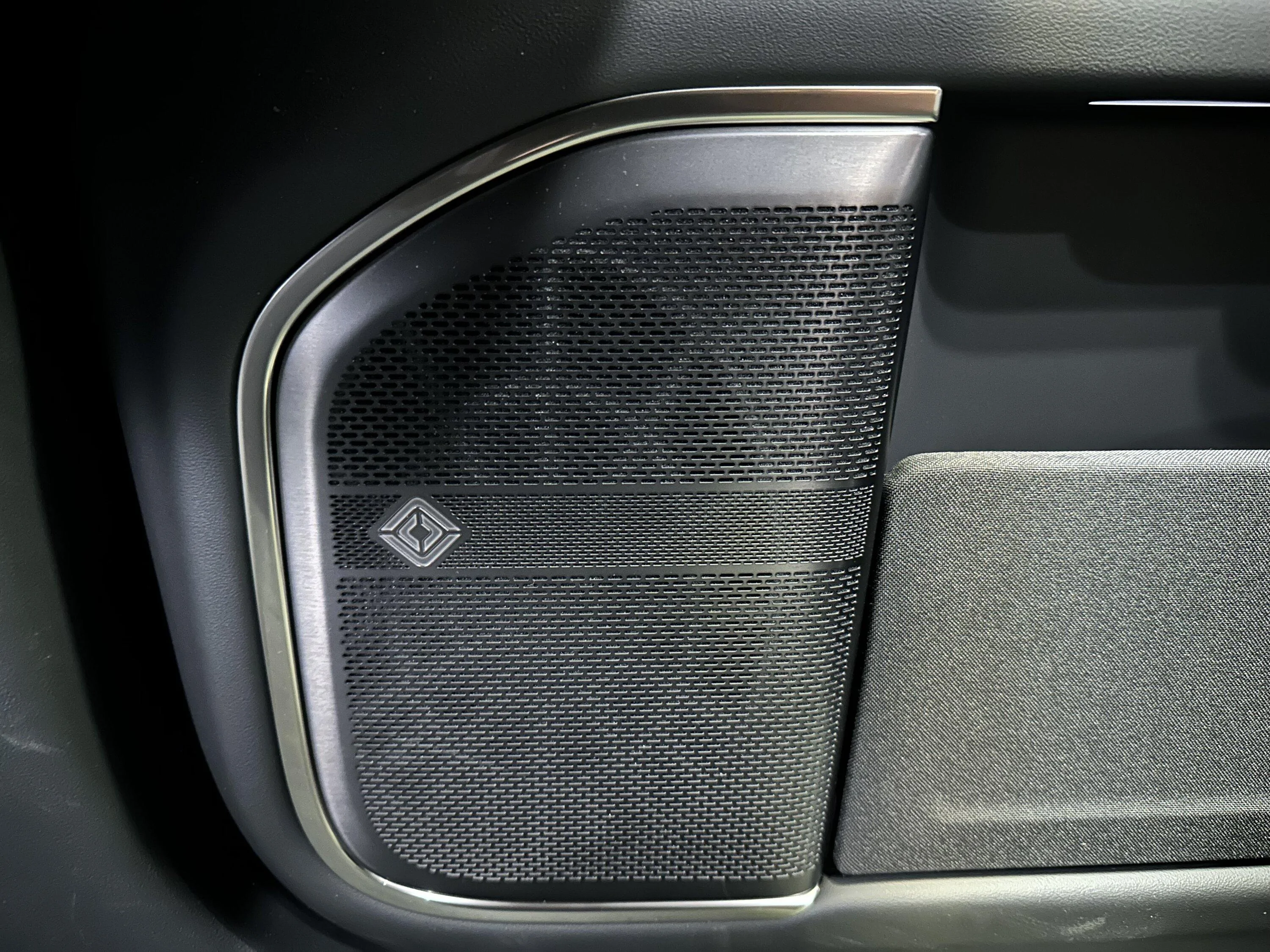
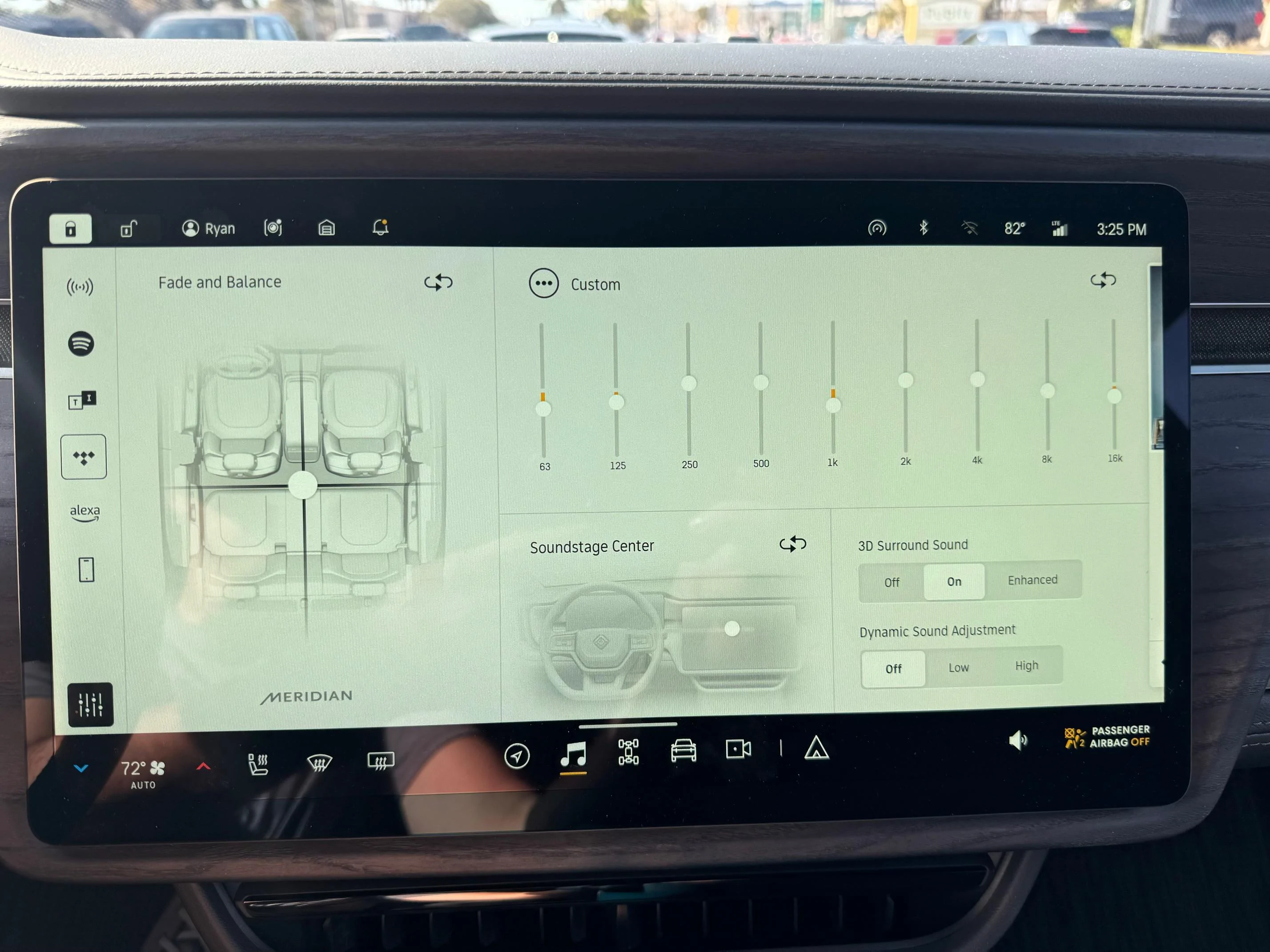
Here is a pic of my EQ screen and Rivian speaker covers. I haven’t taken my speaker covers off to see if I have the original Meridian set up.

Rivian R1T R1S How to Improve a Rivian R1S’s Elevation Sound System With Simple EQ Changes (Equipment Measured Tests & Results) IMG_3171


Rivian R1T R1S How to Improve a Rivian R1S’s Elevation Sound System With Simple EQ Changes (Equipment Measured Tests & Results) IMG_1398
 

OrthoBlock

Well-Known Member
Joined
Mar 19, 2021
Threads
8
Messages
133
Reaction score
224
Location
Philly Area
Vehicles
R1T, X5 PHEV
@superfluid do you happen to have the spectrogram view available to share as well (I'm assuming this is from REW)? I'd love to get a sense for the decay characteristics of the cabin -- curious how it compares to my home room acoustics.
 

Ryanide

Member
First Name
Ryan
Joined
Oct 24, 2021
Threads
1
Messages
22
Reaction score
29
Location
Los Angeles
Vehicles
Tesla Model 3 Performance
Occupation
Real Estate
SO I tried these EQ settings and YES it does sound much better. Thank you for the work you did and for sharing with us. Usually typical EQ settings are raised on the low end and high end in a more V shape, but that actually makes the Rivian sound worse and since I prefer a strong bass I wouldn't have thought to actually lower the settings on the low end. :please:
Sponsored


Top