Sponsored
OP
OP
superfluid

superfluid

Well-Known Member
Joined
Mar 29, 2021
Threads
20
Messages
290
Reaction score
923
Location
Austin, TX
Vehicles
Rivian R1S, Kia Telluride
Occupation
Tech and data
Clubs
 
Yup that’s my understanding too, I just noticed that OP had it turned off so I was curious.
Yeah dynamic adjustment just changes volume to compensate for cabin noise. I turned it off to remove as many variables as possible during testing but I leave mine off anyway because I find that it changes volume when I don’t think it should or needs to. I just change the volume myself with the left thumb wheel.
Sponsored

 
OP
OP
superfluid

superfluid

Well-Known Member
Joined
Mar 29, 2021
Threads
20
Messages
290
Reaction score
923
Location
Austin, TX
Vehicles
Rivian R1S, Kia Telluride
Occupation
Tech and data
Clubs
 
I ordered a mic and am going to repeat this tuning with my Meridian. Might take me a week to get to it.
Sweet! Looking forward to that.

It’ll be interesting to see if your Meridian system lacks the FR and phase issues the Elevation has around 1 kHz. If it does, I’d interpret that to mean Rivian didn’t change the crossover when they changed the speakers to the Elevations. I can give that comparison to Rivian support to get them to fix the issue, potentially via OTA if the crossover is digital. I’ll try to get them to fix it anyway, but this comparison would help me make the argument that it’s a design flaw rather than intended design ?
 
OP
OP
superfluid

superfluid

Well-Known Member
Joined
Mar 29, 2021
Threads
20
Messages
290
Reaction score
923
Location
Austin, TX
Vehicles
Rivian R1S, Kia Telluride
Occupation
Tech and data
Clubs
 
The sharp dip at 1k is probably where most of the improvement comes from -- looking at this EQ curve indicates the speakers are very muddy right in the middle of the range, so cutting a lot of that mud down will bring out a ton of clarity around it.
Completely agree. Cutting 1 kHz should definitely be the big takeaway for an R1S Elevation system.
 

Meengr2

Member
First Name
Barry Shukla
Joined
Jul 19, 2023
Threads
2
Messages
22
Reaction score
18
Location
Illinois
Vehicles
Rivian R1S
Occupation
IT Director
Clubs
 
This is fantastic! Love the science and logic behind all of this! I now what to checkout your home system. I want to feel the music! LOL
 
OP
OP
superfluid

superfluid

Well-Known Member
Joined
Mar 29, 2021
Threads
20
Messages
290
Reaction score
923
Location
Austin, TX
Vehicles
Rivian R1S, Kia Telluride
Occupation
Tech and data
Clubs
 
Wow! Great write up and research. Thanks for sharing!

Even cracking a window can make a huge difference. Being able to chose the specific frequencies, and able to have defined presets (i.e. windows down) would be great.
Thanks!

Multiple custom EQs is a great idea and something they should be able to implement OTA. If the vehicle can sense when windows are open (different from sensing changes to cabin noise), the system could automatically switch to a different EQ profile when windows come down. That’d be a neat feature.
 

Sponsored

OP
OP
superfluid

superfluid

Well-Known Member
Joined
Mar 29, 2021
Threads
20
Messages
290
Reaction score
923
Location
Austin, TX
Vehicles
Rivian R1S, Kia Telluride
Occupation
Tech and data
Clubs
 
This is fantastic! Love the science and logic behind all of this! I now what to checkout your home system. I want to feel the music! LOL
Thanks! If you’re ever in Austin, hit me up!
 

Aquinas

Well-Known Member
Joined
Oct 21, 2023
Threads
1
Messages
46
Reaction score
48
Location
Seattle
Vehicles
R1S
TLDR;
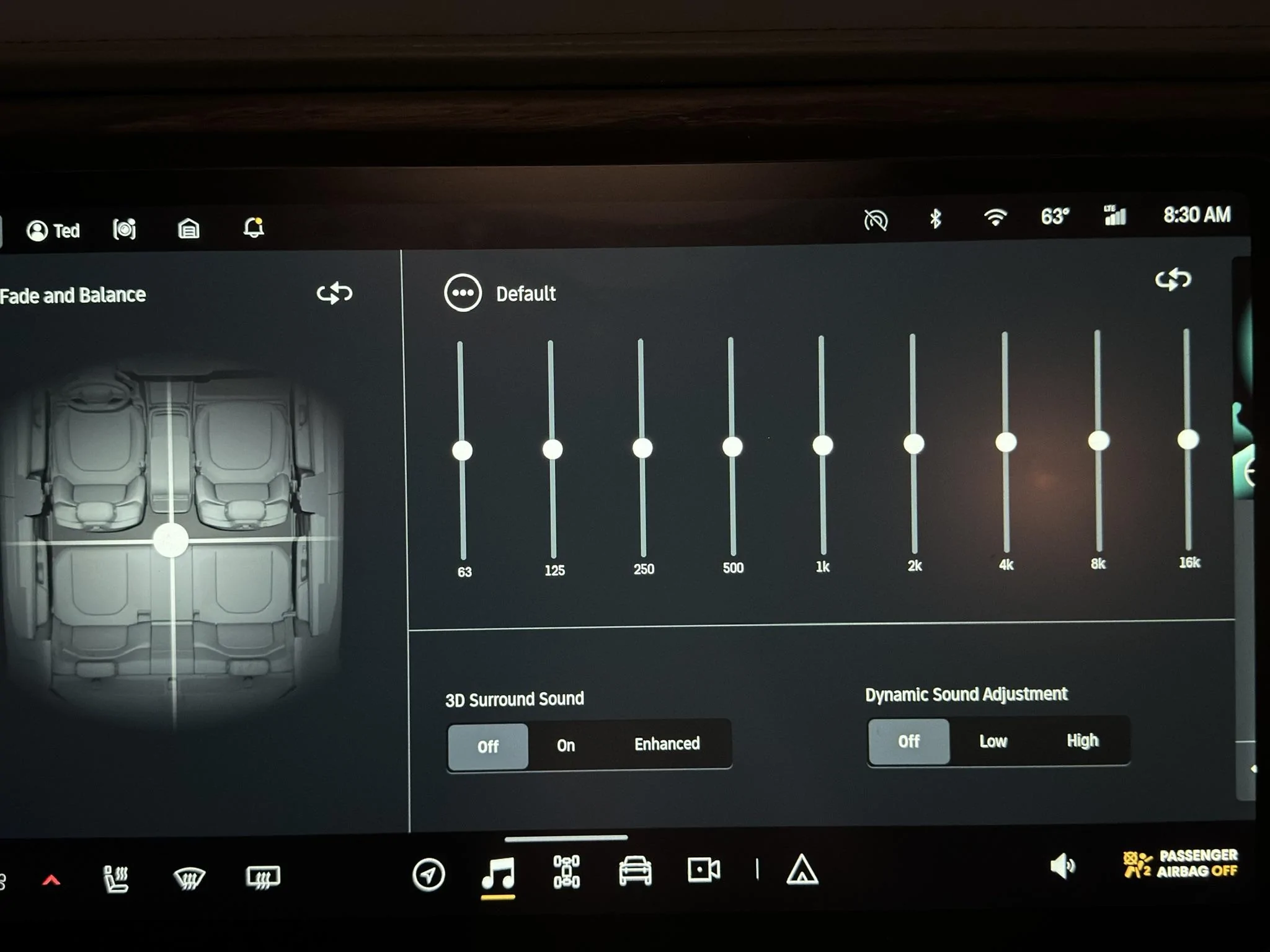
  1. Flatten your EQ by using the “Default” setting or the reset icon.
  2. Turn off 3D Surround Sound.
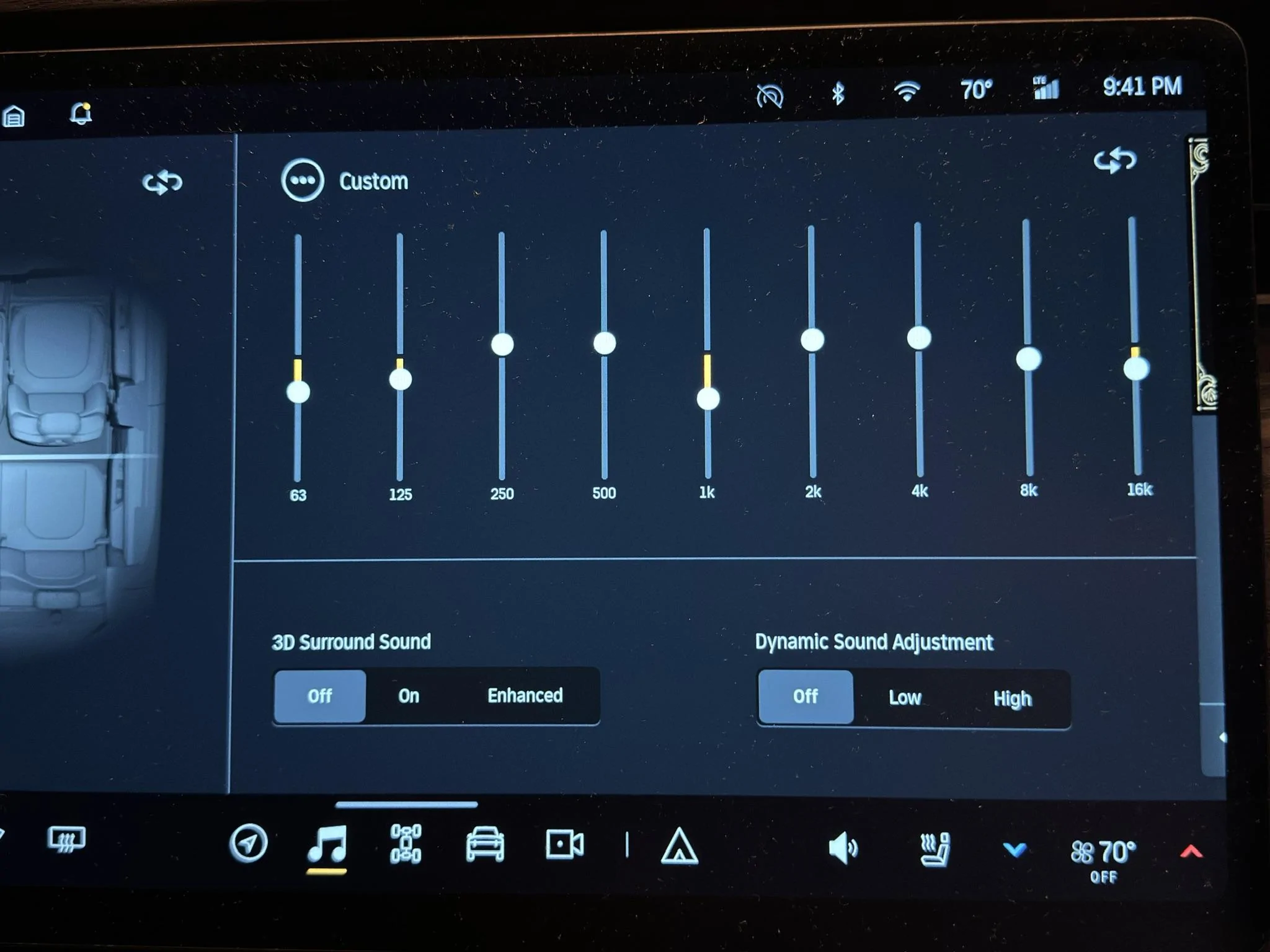
  3. Use these EQ settings: 63 hz -3 notches, 125 hz -2, 250 hz +1, 500 hz +1, 1 khz -4, 2 khz +1, 4 khz +1, 8 khz -1, 16 khz -2.
  4. Use Tidal or Spotify in high quality playback mode. Avoid Bluetooth for music playback.
  5. Enjoy better listening.
Tip: Listen to the new setting for a while using familiar songs at low volume and higher-than-average volume. Your ears/brain may take a bit to get accustomed to the new balance. What should happen is that you hear instruments/sounds more clearly because overtly emphasized frequency ranges aren't drawing attention away from them. Then tweak to taste.

I arrived at these settings after taking 18 acoustic measurements and analyzing their results. To learn more about what I did and how I arrived at those settings, read on.

11E517FA-F12B-4BE5-8282-4CD2EEDA3AC8_1_102_o.webp


Why I Measured My R1S’s Audio Performance

Rivian sold the R1S/T’s sound system as a major feature. As a former audio engineer who worked on a few indie albums and short movies--and as a hi-fi enthusiast—I considered the Meridian system a significant selling point. I wanted to measure its performance when I got my vehicle to be impressed and feel good about my purchase. When Rivian switched the Meridian system to an in-house system and claimed that testers preferred it to the Meridian, I got annoyed and wanted to test it even more. My R1S has the Rivian Audio/non-Meridian system.

When I took delivery of my R1S in August 2023, I was enthralled by the vehicle but not by its sound system. That said, it wasn’t wholly disappointing, either. I haven’t owned a vehicle with a better sound system than the R1S, but I certainly had vehicles with much worse systems (looking at you, Lexus, and Honda).

If my prior vehicles sounded no better than the R1S, what’s my reference point?

My home theater setup. It comprises relatively high-end gear carefully calibrated in an acoustically treated room. I paid several acousticians to help me solve specific acoustic problems (speaker bounder interference response effects, etc.), including the well-known acoustician Matthew Poes of Audioholics fame. To give you an idea of my system’s performance, dual 15” ported subwoofers generate bass with a depth and volume that approaches the electronica concerts I attend—the kind that affects your equilibrium. (For those who know what this means, my -3 dB point is 16.2 Hz.) The stereo image it creates borders on holographic; if you close your eyes, you can “see” the bassist standing to the left of the singer. This system isn’t perfect (it has relatively high RT60 decay times, and the subwoofers can bottom out at high sound pressure levels), but I tell you all this so you know I come at my Rivian tests with somewhat educated ears.

All right, enough setup. Let’s get into the tests and results.

Objectives, Methodology, Tests, and Results

Objectives

  1. Understand the R1S audio system’s faults.
  2. Understand the system’s behavior.
  3. Determine what—if anything—I could do to improve its performance.
Methodology
  • Flattened the EQ using the Default setting.
  • Turned off 3D Surround Sound and Dynamic Sound Adjustment.
  • Turned off climate control to reduce in-cabin noise as much as possible.
  • Parked in a closed garage to reduce external noise as much as possible.
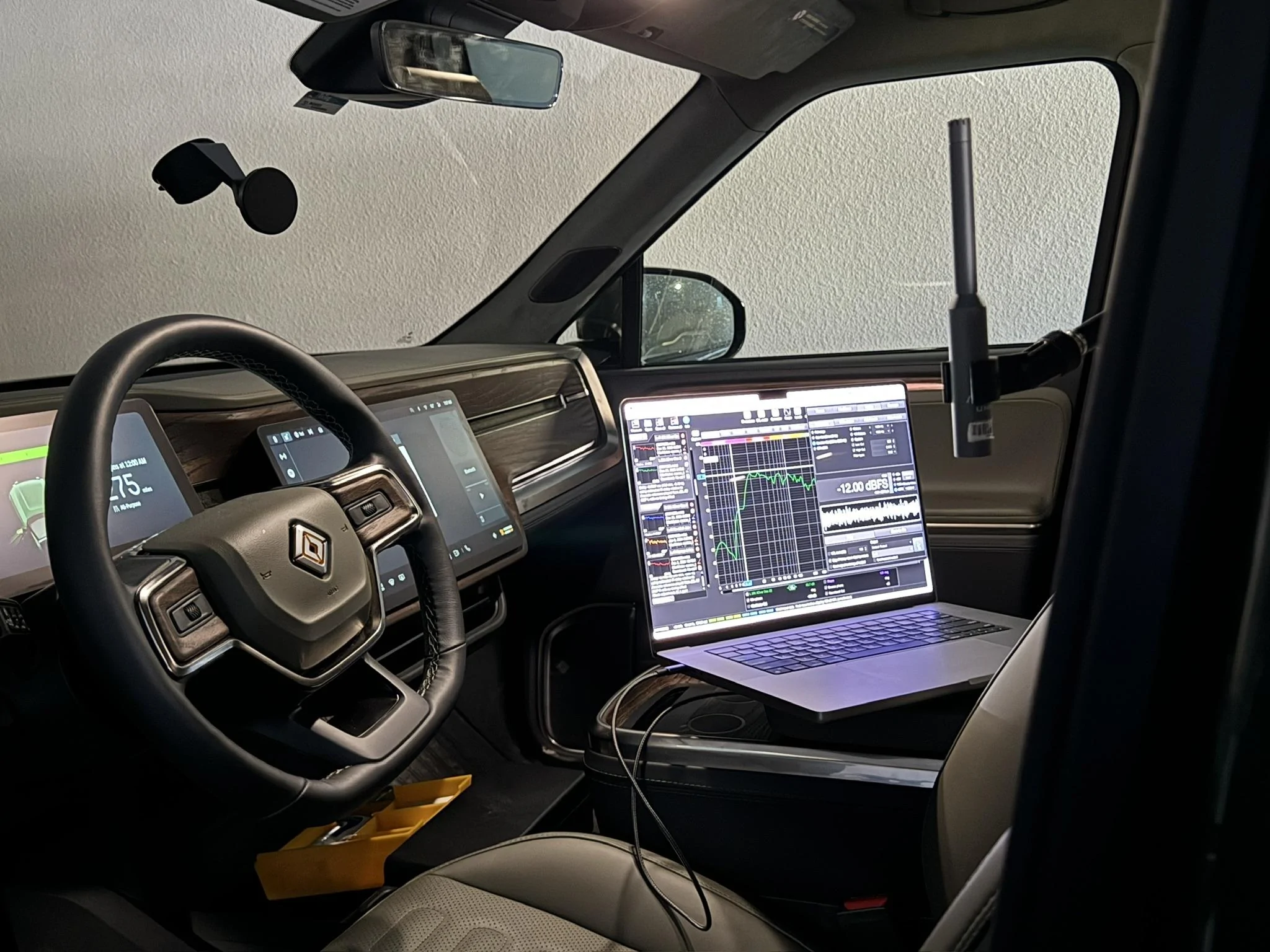
  • Put a calibrated UMIK-1 microphone roughly where my ears would be in the driver’s seat.
  • Connected my MacBook Pro to the Rivian Audio system via Bluetooth. This connection method had meaningful downsides—namely data and resolution loss- but Rivian Support told me they didn’t know of another way to make the vehicle a target audio device. USB didn’t work. It was the best I could do at the time.
  • Set the Rivian’s volume to 16 to give me 75 dB of pink noise, C-weighted, generated by Room EQ Wizard (the industry standard acoustic measurement app). 75 dB is a typical level for performing measurements.
6DEDA574-7C1E-42B6-8D7B-D9B519317668_1_102_o.webp


9EBFAF6C-AF1C-4143-AF16-292D3273B2BA_1_102_o.webp


Tests and a Short Lesson in Room (Cabin) Acoustics

I ran 18 sweeps from 0-20,000 Hz through the Left and Right device inputs. A sweep is an audio signal sent to the sound system that sweeps across a given frequency range at a uniform volume. The recording microphone picks up what comes out of the speakers and what the room—the cabin, in this case—does to the sound.

Ideally, the microphone records uniform volume across the given frequency range so that we hear the musician’s recording as it was mixed. Mixing engineers decide the right balance between the kick drum, snare, bass guitar, and voice, which all occupy different frequency ranges. However, the world is messy, and we never hear what the engineer intended.

Here’s why.

The space sound bounces around contributes approximately 50% of what you hear in a typical home theater. As sound waves, like water waves, bounce off boundaries, they reflect and interfere with other waves—think of the surface of a pool after a kid cannonballs into it. We hear bounced waves like we hear waves coming directly from speakers, except that bounced waves are time-delayed (because they cover a greater distance to your ears) and frequency-skewed because the materials they bounce off of absorb and reflect different frequencies of sound with different strengths. Think how clapping inside a tile/glass room sounds vs. a carpeted closet filled with clothes. Same clap, different surfaces reflecting that clap.

Given the dimensions of the space and the location of the listener, waves at different frequencies constructively or destructively interfere with each other (remember physics class?) at that listening location, meaning the room acts like an EQ on your music, boosting and cutting frequencies. When a peak meets a peak, the volume of that frequency increases. When a peak meets a trough, they cancel at that frequency.

Unfortunately, the room is an equalizer whose settings you can’t change unless you move your listening position (hard to do as the driver), change the cabin’s dimensions and material composition (hard to do unless you’re Rivian), move the speakers (also hard to do unless you’re Rivian), or remove the cabin’s walls, roof, and floor altogether, allowing the speakers to play in free air (hard to do and pass NHTSA safety regulations). Moreover, smaller rooms bounce waves back sooner and with more energy (i.e., volume) than larger spaces because waves travel a shorter distance and lose less energy to friction and propagation. Remember, sound waves propagate in all 3 dimensions, losing power as the inverse square of distance. I’m not a car audio engineer, but I suspect a car cabin dictates more than 50% of what you hear because of how small it is.

Got all that?

Good.

I used the first sweep as a reference to see outstanding acoustic issues and set a baseline for the effects of the EQ changes I made. I only changed EQ because I had no other tools at my disposal. In home theater systems, you can change delay and implement different kinds of filters to affect phase and other stuff that doesn’t matter in the Rivian because we can’t change it.

Changing the audio source (e.g., to in-built Tidal instead of Bluetooth) made a significant difference in overall quality, but that had to do with higher resolution than with getting closer to the source material’s frequency balance. An improperly EQ’d system impairs high-quality sources the same as low-quality sources, making it the main limiting factor of the R1S’s audio performance.

I learned a few useful things from taking measurements:
  • The EQ’s scale is 10 dB. Each notch represents +/- 1 dB of gain or attenuation.
  • The EQ is (obviously) graphic, which means it lets you change the amount of boost/cut but not the frequency being boosted or cut. The frequencies are fixed. That is typical but also rather disappointing for reasons I’ll show later. I hope they change it to a parametric EQ in a firmware update to allow us to choose the frequencies being boosted or cut.
  • Subjective listening via Bluetooth is highly misleading in the R1S. It sounds awful compared to in-built Tidal. Bluetooth makes high hats and voices highly sibilant and phasey because it’s highly lossy (e.g., discards a ton of high-frequency information). I don’t know what codec Bluetooth was using but it didn’t sound like aptX to me. I couldn’t use songs played back from my laptop via Bluetooth in my subjective listening tests because it didn’t represent what the system could do at all. Since I made my reference measurement via Bluetooth—and made EQ correction decisions from that Bluetooth measurement—I had to tweak those EQ settings “by ear” when I switched to the built-in Tidal player. But it worked out.
Let’s get to how to improve things.

Results and How to Interpret a Frequency Response Graph

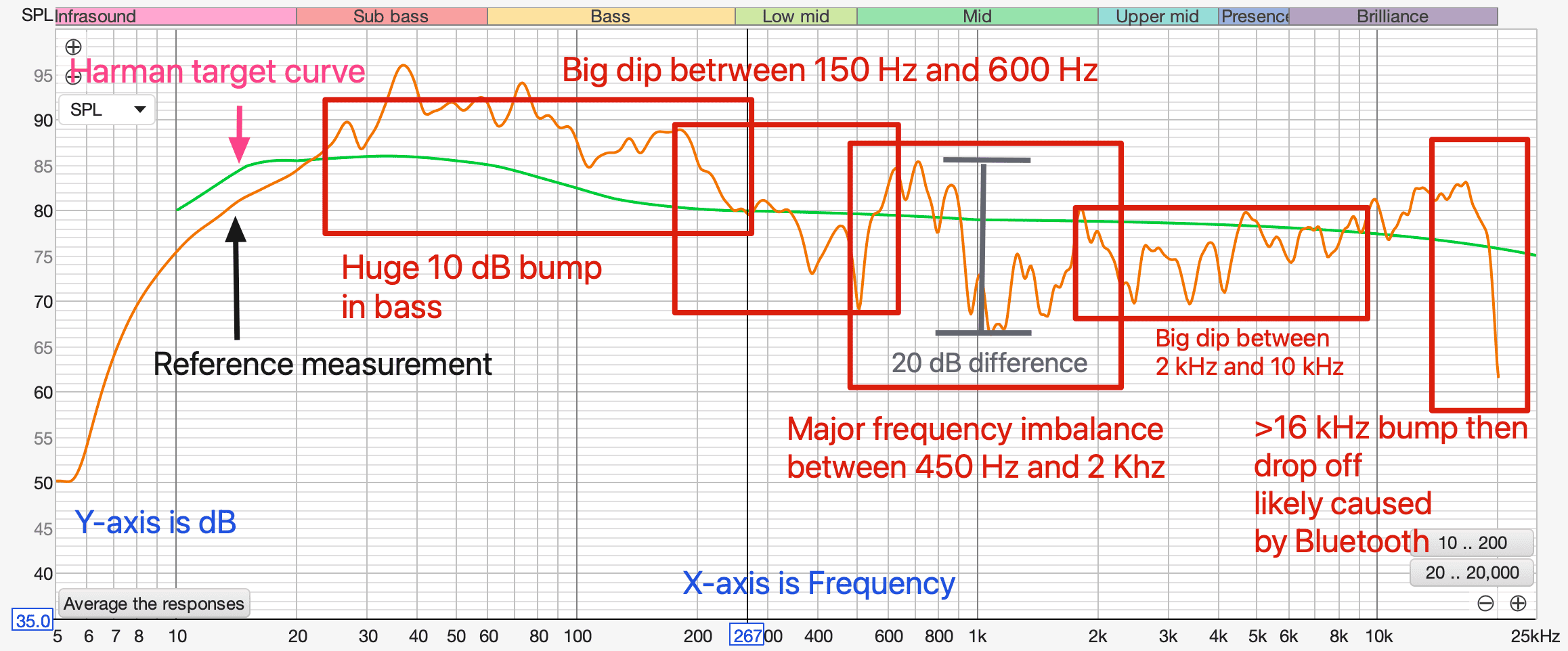
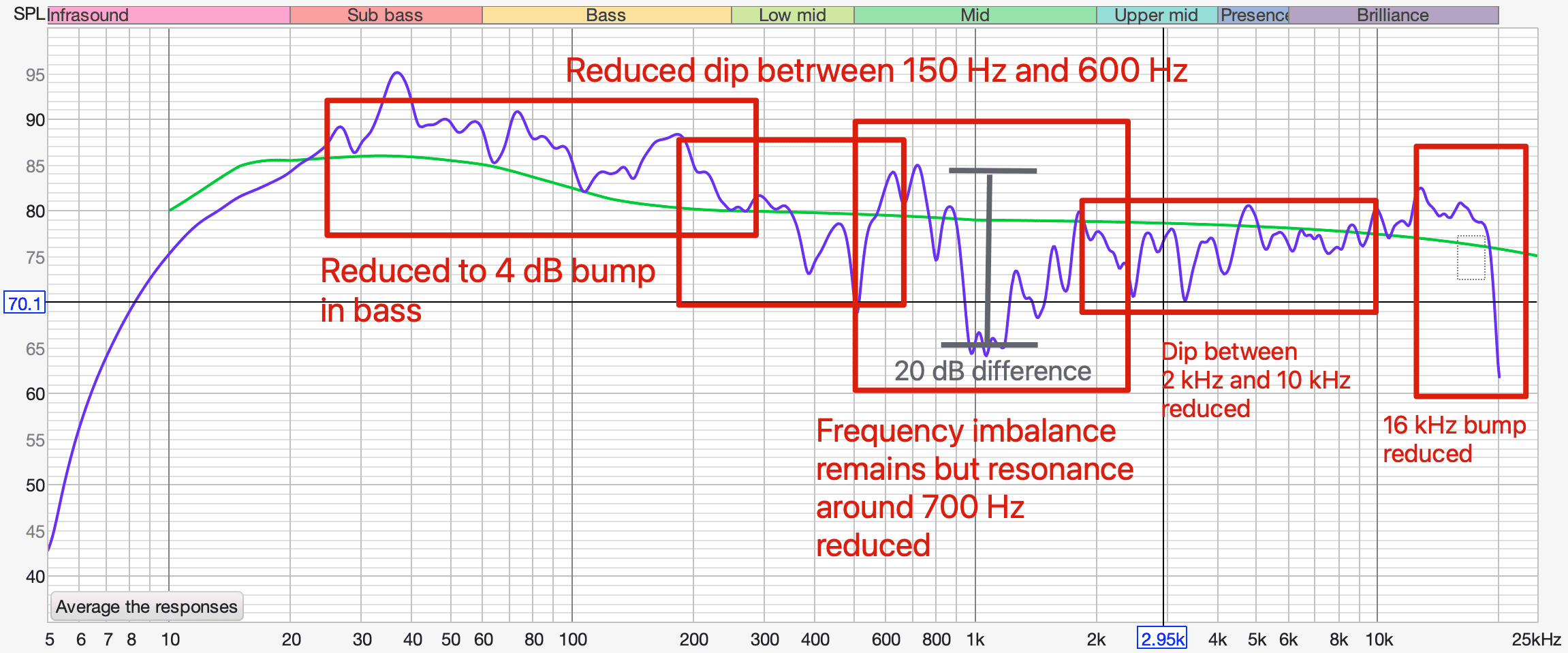
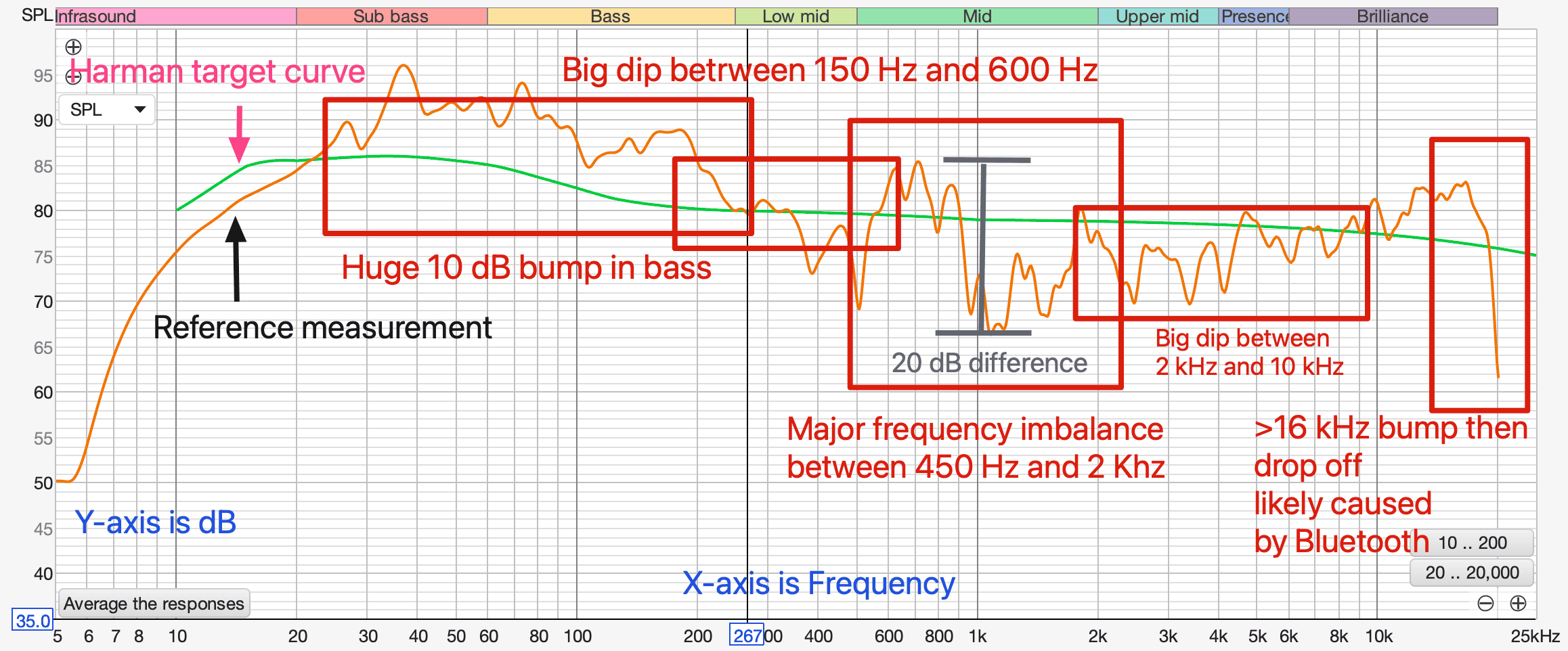
Here is the reference measurement with markup highlighting problem areas.

1707423462309.png


The graph shows frequency (x-axis) plotted against dB or volume (y-axis). In an ideal world, the graph would show a smooth line from 20 Hz to 20 kHz without big bumps and dips. The green line helps us visualize what that “ideal” frequency response might look like. It’s taken from Harman Audio’s research of people’s preferences. It isn’t ruler flat (zero slope) because people tend to prefer relatively more bass and relatively attenuated high frequencies. The closer a measurement is to a target curve like this one, the more balanced and clear the system will sound.

As you can see, my R1S measured pretty far off from the target curve.

My Rivian R1S’s main problems are:
  1. A huge 10 dB bump in bass between 20 Hz and 250 Hz beyond what people already tend to prefer, which is about 6 dB of bass boost from ruler flat. I love bass more than the next guy (see the above description of my home system’s bass output) but boosting bass this much masks adjacent frequencies, making music sound muddy and boomy. Low frequencies hang around in the air longer than high frequencies. The more low frequencies are boosted, the longer they hang around until they reach a volume we can’t hear anymore, causing boominess and making nearby frequencies hard to distinguish from the bass.
  2. A big 15 dB dip between 150 Hz and 600 Hz. This reduces the weight of male voices and the power of drums and bass.
  3. A massive 20 dB difference between frequencies between 450 Hz and 2 kHz. Humans hear differences of 3 dB, which means this difference is very audible. I consider this to be the R1S’s biggest audio performance problem. I’ll explain why when I explain how I address it.
  4. A big 8 dB dip between 2 kHz and 10 kHz that significantly reduces the clarity of voices, the texture of stringed instruments, and the snap of percussion.
  5. A sharp bump at 16 kHz followed by a sharp roll-off after 16 kHz. The bump has a tendency to make S’s and things like cymbals sound sibilant. The roll-off eliminates the “air” in music, or what we mostly hear as reverberant tails of high-frequency sound (like cymbal hits decaying) bouncing around the room where the instrument was recorded. This isn’t as big of a deal as the other issues because signals at that frequency tend to be a lower volume than the noise floor of the vehicle cabin. and most of the people who can afford an R1S are old enough to have lost a lot of their hearing above 17 kHz. I attribute this sharp roll-off to Bluetooth data compression, but I don’t know for sure. I didn’t compare it to a sweep originating from the Tidal app.
How do we address these issues?

Unfortunately, we can only address some of them and only to a certain extent because the Rivian system doesn’t allow us to change the frequencies we boost and cut. We’re stuck with the frequencies they give us, which don’t correspond well to the problematic frequencies.

After experimenting with several EQ settings, here’s where I landed:
  1. To address the 10 dB bump in bass, I cut 63 Hz by 3 dB and 125 Hz by 2 dB. I tried larger cuts to get the response closer to the Harman curve, but I preferred cutting it less. I’m not sure why, but I think it’s because long bass waveforms don’t resonate in a small space like a vehicle cabin, resulting in less bass reinforcement from the room boundaries, resulting in faster attenuation and lower bass energy. Unlike higher-frequency waves, bass waves have to cycle several times for our brains to register them. To make them hang around longer in a smaller space so we can hear them, maybe we need to boost them more than we would in a larger home media room. But this is just a guess.
  2. To address the 15 dB dip between 150 Hz and 600 Hz, I boosted 500 Hz by 1 dB. You might think that is a small boost for such a big dip, but remember that I cut 63 Hz and 125 Hz by 3 and 2 dB, respectively, reducing the difference more. The name of the game is frequency balance. I tried boosting 500 Hz more than that, but voices got too chesty for my taste and it raised the big peak at 600 Hz, adding to the already problematic 450 Hz to 2 kHz area.
  3. To address the 20 dB difference between 450 Hz and 2 kHz, I compromised. I wasn’t able to get the result I wanted. The reason is that the R1S’s EQ bands are fixed at 500 Hz, 1 kHz, and 2 kHz, the ranges near this problem area. As you can see, 1 kHz is bang in the middle of the highest peak and the lowest trough in that range (grey vertical line). As a result, boosting 1 kHz increases 1 kHz and the frequencies immediately around it, but the 20 dB difference between them stays the same. I think the huge peak at 850 Hz created massive resonance and possible speaker cone breakup where the speaker cone can’t handle that much power and that frequency without changing shape. To deal with the 850 Hz resonance, I cut 1 kHz by 4 dB. That improved sound quality significantly. That leaves an even greater dip at 1 hKz than when I started, but that sounded better than the 850 Hz boost. This is a compromise because we can’t change the frequencies we apply boosts and cuts to. What explains this issue? I suspect the crossover was not designed properly. This region has major phase issues, which indicates poor crossover implementation.
  4. To address the dip between 2 kHz and 10 kHz, I boosted 2 kHz by 1 dB, 4 kHz by 1 dB, and cut 8 kHz by 1 dB. This helped vocal clarity, string texture, and percussion snap. I didn’t raise it higher because it started sounding unbalanced to me. Based on the reference measurement, it shouldn’t have, but it did.
  5. To address the 16 kHz bump, I cut 16 kHz by 2 dB. More than that, and it sounded dull. Something worth noting: I’ve seen others recommend a huge boost at 16 kHz. I suspect they were trying to compensate for the big roll-off after 16 kHz, which is likely caused by Bluetooth compression. I don’t recommend doing this because it’s like taking a picture in the dark and then cranking up its brightness; there’s no information to brighten. You just create noise.
Here's what my frequency response looked like after making those changes.

1707424241431.png


Subjective listening notes:
  • 1 khz +5, 2 khz +5, 16 khz -5: Emerald Hooves. Better balanced than flat EQ. But lacks a little sparkle. May have something to do with very short decay times of small space, making me want to create space by adding air with high frequencies.
  • 1 khz +5, 2 khz +5, 16 kHz -2 dB is better. More air, but not as unbalanced as flat EQ.
  • 63 hz -5, 125 hz -5, 250 hz 0, 500 hz 0, 1 khz +10, 2 khz +3, 4 khz +5, 8 khz 0, 16 khz -2: Sounds terrible. Way too much 1 khz. Sounds extremely phasey.
  • 63 hz -3, 125 hz -3, 250 hz +3, 500 hz +3, 1 khz +2, 2 khz +1, 4 khz 0, 8 khz -1, 16 khz -2: The most pleasant so far. But imaging still mediocre. Playing around with 1 khz, something is very weird with that range. Boosted sounds awful, like there’s a phasing issue. Could be a crossover issue. The main issue is the huge 10 dB peak between 528 and 932 centered at 723 that you can’t get rid of.
  • 63 hz -3, 125 hz -2, 250 hz +1, 500 hz +1, 1 khz -4, 2 khz +1, 4 khz +1, 8 khz -1, 16 khz -2: Best subjective sound yet via Tidal. Increases vocal clarity because reduces muddiness from masking affect of mid range bump that can’t be eliminated. Phase in REW between 300 hz-2 khz is all messed up.
Regardless of whether you like the sound of my settings, I hope you found this interesting and have a better understanding of how the R1S’s sound system behaves and where its issues are.

Btw, I don’t know how these settings would work in an R1T because the R1T’s cabin volume is much less than the R1S. You can try them, though.

If you try my settings, let me know how they sound to you!

[Edit]

Additional Notes

- I would love Rivian to provide us with a parametric EQ via OTA. It would help us make much more targeted adjustments.
- I wonder if the apparent crossover issue around 1 kHz results from Rivian switching out the Meridian speakers with Elevation speakers and forgetting to modify the crossover. If the crossover is digital (e.g., the system is fully active), the issue could be fixed OTA, which would be amazing.


1707423307923.png
This is the greatest post of all time! Thank you for doing all this. I’ve used my ears and made tweaks, but I’m really excited to try this based on actual metering data.

Well freakin’ done!
 

Ryanide

Member
First Name
Ryan
Joined
Oct 24, 2021
Threads
1
Messages
22
Reaction score
29
Location
Los Angeles
Vehicles
Tesla Model 3 Performance
Occupation
Real Estate
Thank you for this write up and sharing your findings. I was really looking forward to the Meridian Sound system and was annoyed that Rivian dropped that to save some money without offering an optional upgrade. My Volvo XC90 had a B&O sound system that was beyond anything I've ever experienced since and I miss that the most, but the system in my Tesla Model 3p is pretty darn amazing with solid bass and clear vocals. So, coming from those to the Rivian audio, I've been quite disappointed.

I've attempted many EQ settings and keep going back to mostly flat but I still find the overall sound is very muddy. I'm going to try your EQ settings and will report back. Thank you again!!
 

dgennetten

Well-Known Member
First Name
Douglas
Joined
May 4, 2023
Threads
11
Messages
151
Reaction score
204
Location
Fort Collins
Vehicles
R1S
Occupation
Retired Electrical Engineer
Clubs
 
That very sibilent sound was me flushing everything else written to date on Rivian audio.

Thank you sir! Your write-up bleeds credibility.
 

Ryanj

Active Member
First Name
Ryan
Joined
Mar 17, 2021
Threads
0
Messages
33
Reaction score
46
Location
Florida
Vehicles
Tesla Model 3, Audi e-tron, R1S preorder
Fantastic write up!! I have adjust my EQ although I have a unicorn system. I have meridian EQ and Rivian speakers. Well at least the covers. Not sure what speakers are in there.
 

Sponsored

jbssfelix

Well-Known Member
First Name
J
Joined
Apr 3, 2022
Threads
3
Messages
191
Reaction score
384
Location
Denver, CO
Vehicles
Tesla Model 3; Rivian R1S
Clubs
 
Thank you for this write up and sharing your findings. I was really looking forward to the Meridian Sound system and was annoyed that Rivian dropped that to save some money without offering an optional upgrade. My Volvo XC90 had a B&O sound system that was beyond anything I've ever experienced since and I miss that the most, but the system in my Tesla Model 3p is pretty darn amazing with solid bass and clear vocals. So, coming from those to the Rivian audio, I've been quite disappointed.

I've attempted many EQ settings and keep going back to mostly flat but I still find the overall sound is very muddy. I'm going to try your EQ settings and will report back. Thank you again!!
We also had an XC90 with the B&O system. My God, that thing was sublime. I would often spend evenings just sitting in the car in the garage with my eyes closed taking in the beautiful soundstage coming from that thing.
 

cjust2006

Well-Known Member
Joined
May 9, 2022
Threads
27
Messages
326
Reaction score
415
Location
Houston, TX
Vehicles
R1T Adv Limestone
Occupation
IT Analyst
What blows my mind is that there's no way Rivian didn't have someone do something like this during the design, and yet it was still just meh.
 

AfroRick

Active Member
Joined
Oct 8, 2022
Threads
1
Messages
33
Reaction score
20
Location
Georgia
Vehicles
N/A
What blows my mind is that there's no way Rivian didn't have someone do something like this during the design, and yet it was still just meh.
True, but you end up with the same thing with monitors and TVs where the picture is meh, but then becomes exceptional with calibration.
 

a99ieJem

Active Member
First Name
Jeremy
Joined
May 12, 2023
Threads
0
Messages
36
Reaction score
32
Location
Cypress, TX
Vehicles
2022 Rivian R1T - Launch Edition
Occupation
Mech. Engr.
Clubs
 
Man, I'm impressed!

I'd love to make the drive over to Austin one weekend and have you lock in settings for my Meridian R1T.
 

garrison

Well-Known Member
First Name
pete
Joined
Jul 1, 2023
Threads
7
Messages
49
Reaction score
33
Location
hudson valley new york
Vehicles
r1s
Occupation
lawyer and house builder
Awesome work. Might be worth while to send this to Wassym at Rivian (he's active on the Rivian subreddit) to see if the EQ controls can be revised to add more bands or user-defined frequencies.
Sponsored


Top