
evlavista
Well-Known Member
As of 12:21 p.m. Mon 7/1 I still haven't received the new update date either. Really looking forward to this one so it's frustrating.
Sponsored

Yeah, no issues here. Hard to tell if the suspension was any better or not. Still the exceptionally optimistic range estimation as before.Thanks. Still waiting as well. Heading out on a towing trip Wednesday morning and I don’t like to mess with the configuration too soon before a trip.
Anyone do any towing with the new software?

Agree with you 100% on this point. They touted the ease of use when they went to the rocker-switch style toggle designs in the earlier update that added those (which I believe was earlier this year), and now went back to the less user friendly / more difficult to use setup.My only minor quibble is that I wish they used the up and down arrows like they do on the right height rather than tap to switch. At least I assume that’s how we accidentally ended up set to Firm on the freeway.

In my mind it makes sense to be consistent: 2 choices should be a tap to toggle between them. 3 or more choices should have the arrows.Agree with you 100% on this point. They touted the ease of use when they went to the rocker-switch style toggle designs in the earlier update that added those (which I believe was earlier this year), and now went back to the less user friendly / more difficult to use setup.
I suspect they think that most people will "set it and forget it" when they find the settings they want, and I also initially thought it was due to size / space constraints, but the new setup seems to take up almost exactly the same amount of space as the old toggles did.
For the life of me I just can't figure out why they would revert those changes & make those settings harder to use for no perceivable benefit.
Thanks! I’ve never seen that warning before but I also don’t pull anything heavy. How heavy is your trailer?Yeah, no issues here. Hard to tell if the suspension was any better or not. Still the exceptionally optimistic range estimation as before.
I did have more instances of my truck complaining about the suspension being overloaded, but it's likely just an artifact of changing suspension heights while moving.
It's probably nose-heavy right now, I haven't re-weighed the tongue on it recently. Most of the storage is in the front compartment. I can check what our current tongue weight is tonight. Overall, our trailer is probably somewhere slightly above 5000 lbs.Thanks! I’ve never seen that warning before but I also don’t pull anything heavy. How heavy is your trailer?
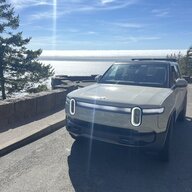

That’s great news! I’m gonna find some speed bumps later to test it…The front suspension squeak on my R1S is now gone with 2024.19.04.

sounds like there's something blocking the routing through that section. If you try to add more waypoints, does it get you through those sections of I-8?I have a few quibbles, and one serious disappointment with the Route Planning portion of navigation. We make quite a few trips to San Diego from our location here in AZ and the quickest route is always the same.
Friday morning we left from Gilbert, AZ to San Diego, CA (using standard I-8 plan) and the route planning wanted to take us 1hr. 25 further to the I-10 to Quartzsite RAN, then cut across through Blythe, CA and by Glamis sand dunes then reconnect to I-8 to San Diego. I reset, did it 3x and same route. Ignored it.
On the way home from San Diego today via the I-8, it wanted me to use an EA charger in El Centro, CA then work my way through Brawley, CA past Glamis Dunes and onto the I-10 and Quartzsite RAN again. This was now 1hr 30 minutes longer than taking I-8 to Gila Bend RAN and route through Maricopa and home.
I ignored the route planning and it recalculated after skipping the suggested stop in El Centro. 4 minutes from the RAN in Gila Bend, AZ up popped a new route to save time. I knew it was incorrect, but selected it and now it desired to reroute me 28 minutes out of my way back up to I-10.
The updated map software for the route planning for me, went well backwards. Is Rivian Support the best way to advise them?

I could be wrong but nothing with the route planning actually changed and they still use Mapbox? They improved the location searching using Google. Is it possible there was or is an actual road closure or some other reason it routed you differently?I have a few quibbles, and one serious disappointment with the Route Planning portion of navigation. We make quite a few trips to San Diego from our location here in AZ and the quickest route is always the same.
Friday morning we left from Gilbert, AZ to San Diego, CA (using standard I-8 plan) and the route planning wanted to take us 1hr. 25 further to the I-10 to Quartzsite RAN, then cut across through Blythe, CA and by Glamis sand dunes then reconnect to I-8 to San Diego. I reset, did it 3x and same route. Ignored it.
On the way home from San Diego today via the I-8, it wanted me to use an EA charger in El Centro, CA then work my way through Brawley, CA past Glamis Dunes and onto the I-10 and Quartzsite RAN again. This was now 1hr 30 minutes longer than taking I-8 to Gila Bend RAN and route through Maricopa and home.
I ignored the route planning and it recalculated after skipping the suggested stop in El Centro. 4 minutes from the RAN in Gila Bend, AZ up popped a new route to save time. I knew it was incorrect, but selected it and now it desired to reroute me 28 minutes out of my way back up to I-10.
The updated map software for the route planning for me, went well backwards. Is Rivian Support the best way to advise them?
Go to Settings -> Notifications -> Advanced Settings. Then enable "Manage notification categories for each app". Then go back to rivian app notification settings and it will allow you to disable specific categories.
Thank you, that did the trick!!That may very well be true. I may have enabled some feature that allows me to do that, such as the one @rylcannoneer pointed out, some time ago.
Have you reset your home location to see if that does it?I have the truck lock settings to stay unlocked at home, worked perfectly before update.
After the update, it will not stay unlocked. Toggled lock setting, soft reboot, hard reboot, nothing has worked. Had to leave the phone in the house while working outside because everytime I got close enough it would lock and unlock.
No road blocks, accidents, detours and what is of note is the re-routing was on two different sections of the trip. One outgoing and one returning. If there was a road block or other issue, when I ignored the route planning, I would have seen something.sounds like there's something blocking the routing through that section. If you try to add more waypoints, does it get you through those sections of I-8?


