Sponsored

Rivian phone app shows tesla charging station but doesn’t reflect it in my Rivian truck

Billofaustin2

Well-Known Member
First Name
Bill
Joined
Dec 22, 2023
Threads
26
Messages
80
Reaction score
54
Location
Austin
Vehicles
R1t
Occupation
Retired
I planned a trip using my phone app for Rivian and it has me stopping at a tesla station in Post Texas. However, when I upload it to my truck that Tesla station in Post is not reflected as even existing. Any help appreciate it as I’m on my way.
Sponsored


 

COdogman

Well-Known Member
First Name
Brian
Joined
Jan 21, 2022
Threads
33
Messages
11,641
Reaction score
34,494
Location
CO
Vehicles
2023 R1T
Occupation
Cyber defender
Clubs
 
Try playing with the map filters in your truck. In both the app and truck you need to turn off the “hide chargers that require an adapter” setting in your nav.

Just make sure the Tesla charger you are going to is not Tesla only and you do have an adapter?
 

TwelveVoltMan

Active Member
Joined
Oct 28, 2024
Threads
0
Messages
34
Reaction score
51
Location
Raleigh, NC
Vehicles
R1S Dual Max Performance, Jeep Wrangler Unlimited
Try playing with the map filters in your truck. In both the app and truck you need to turn off the “hide chargers that require an adapter” setting in your nav.

Just make sure the Tesla charger you are going to is not Tesla only and you do have an adapter?
I will add that for me it seems that the map filters have no effect on the nav planning. You need to go into the navigation settings menu and adjust what the navigation uses to plan trips.
 

DeafPug

Well-Known Member
Joined
Oct 20, 2021
Threads
6
Messages
564
Reaction score
842
Location
Kansas
Vehicles
'18 Model 3, '22 R1T
I will add that for me it seems that the map filters have no effect on the nav planning. You need to go into the navigation settings menu and adjust what the navigation uses to plan trips.
This is correct. The selection for charging stops that are automatically added to your route is controlled by the options under the gear icon on the route details. Which stations are displayed on the map is controlled by the filters at the top of the map screen. They have no apparent interaction.

While I would prefer that there was one setting required, I can see how Rivian would argue their setup is the best way to do it.
 

TwelveVoltMan

Active Member
Joined
Oct 28, 2024
Threads
0
Messages
34
Reaction score
51
Location
Raleigh, NC
Vehicles
R1S Dual Max Performance, Jeep Wrangler Unlimited
I only figured it out when I couldn’t get the route planner to stop trying to take me 21 minutes out of the way to a RAN station when a supercharger and Electrify America were on route.
 

Sponsored

Treebeard

Well-Known Member
First Name
Matthew
Joined
Mar 9, 2024
Threads
0
Messages
216
Reaction score
132
Location
Vermont
Vehicles
R1T
Clubs
 
I will add that for me it seems that the map filters have no effect on the nav planning. You need to go into the navigation settings menu and adjust what the navigation uses to plan trips.
Charger filters do affect the navigation. You need to play with it more.
 

TwelveVoltMan

Active Member
Joined
Oct 28, 2024
Threads
0
Messages
34
Reaction score
51
Location
Raleigh, NC
Vehicles
R1S Dual Max Performance, Jeep Wrangler Unlimited
Charger filters do affect the navigation. You need to play with it more.
I will play with it some more, but thus far map
filters have had zero impact on my navigation. I had to use the gear icon in the route details like @DeafPug mentions above to control which chargers the navigation uses on route somewhere. You can, of course, navigate directly to a charger using map filters.
 

SANZC02

Well-Known Member
First Name
Bob
Joined
Feb 11, 2021
Threads
50
Messages
7,403
Reaction score
12,692
Location
California
Vehicles
Tesla Model S, LE - R1S
Occupation
Retired
I planned a trip using my phone app for Rivian and it has me stopping at a tesla station in Post Texas. However, when I upload it to my truck that Tesla station in Post is not reflected as even existing. Any help appreciate it as I’m on my way.
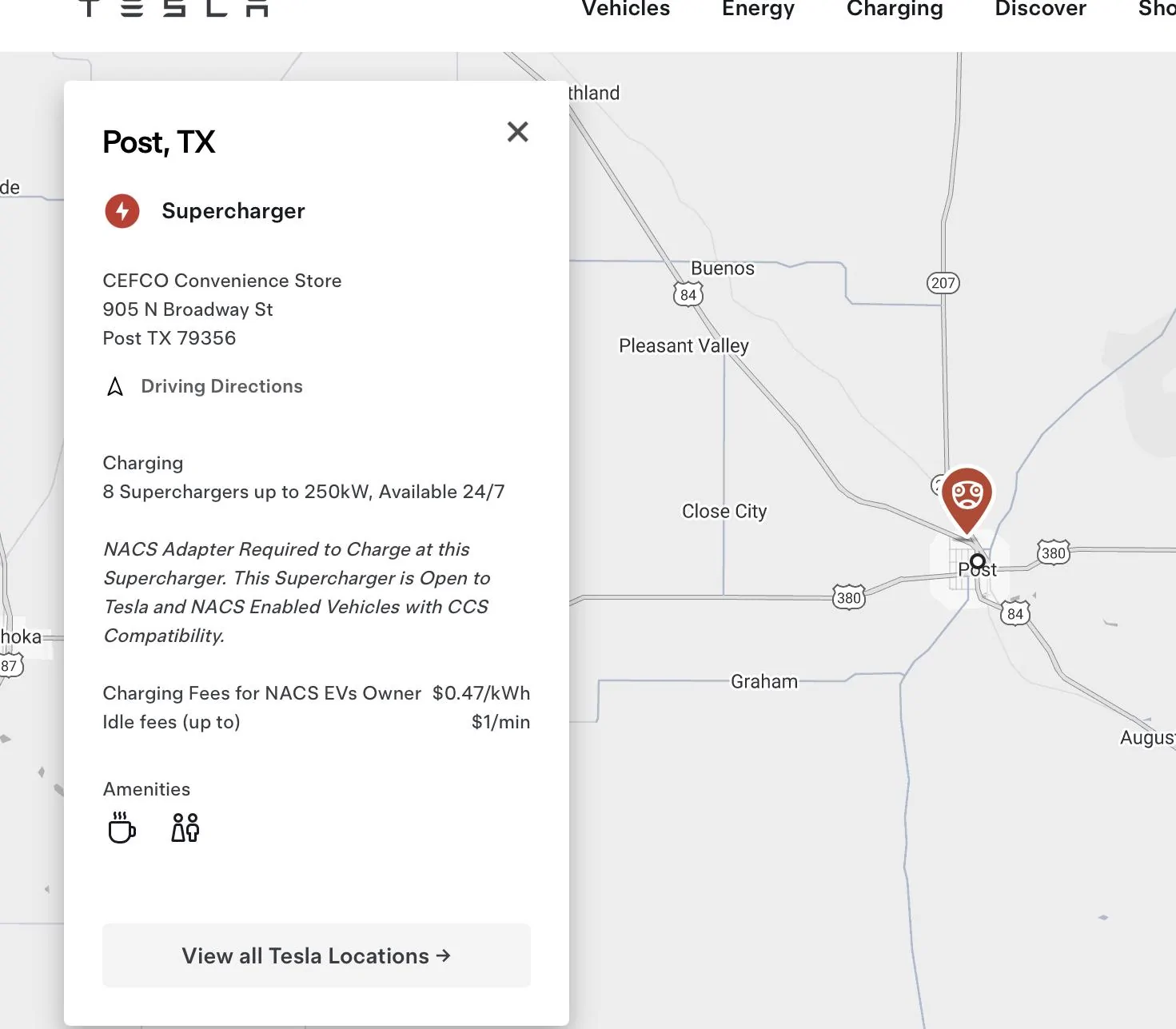
You should be good, according to Tesla that is a NACS compatible location.

Rivian R1T R1S Rivian phone app shows tesla charging station but doesn’t reflect it in my Rivian truck IMG_3882
 

tate16t

Well-Known Member
First Name
Robert
Joined
Apr 7, 2022
Threads
64
Messages
1,396
Reaction score
1,181
Location
NY
Vehicles
2023 El Cap Granite R1S
Occupation
Car Enthusiast
I experienced something similar yesterday. For the first time I attempted to route myself to a Tesla charger via my phone and when I sent it to my R1S it routed me to the wrong location. When I attempted to input the location within the vehicle, it didn’t show the Tesla chargers at all. I knew right away it was due to the search filters however, you would think if I’m configuring a search filter within the mobile app and sending it to the vehicle, it would assume those filters as well. Is this wishful thinking on my part?
 
OP
OP

Billofaustin2

Well-Known Member
First Name
Bill
Joined
Dec 22, 2023
Threads
26
Messages
80
Reaction score
54
Location
Austin
Vehicles
R1t
Occupation
Retired
Try playing with the map filters in your truck. In both the app and truck you need to turn off the “hide chargers that require an adapter” setting in your nav.

Just make sure the Tesla charger you are going to is not Tesla only and you do have an adapter?
Thank you for taking the time to help me out. Definitely my problem.
 

Sponsored

OP
OP

Billofaustin2

Well-Known Member
First Name
Bill
Joined
Dec 22, 2023
Threads
26
Messages
80
Reaction score
54
Location
Austin
Vehicles
R1t
Occupation
Retired
Thank you for taking the time to help me out. Was when I uploaded the route from my iPhone. The filter in the Rivian was only showing level two chargers. Even though I constantly have three and two selected, it must be resetting back whenever we have software updates.
 

Treebeard

Well-Known Member
First Name
Matthew
Joined
Mar 9, 2024
Threads
0
Messages
216
Reaction score
132
Location
Vermont
Vehicles
R1T
Clubs
 
I will play with it some more, but thus far map
filters have had zero impact on my navigation. I had to use the gear icon in the route details like @DeafPug mentions above to control which chargers the navigation uses on route somewhere. You can, of course, navigate directly to a charger using map filters.
I have had it do some strange things and have had to delete my trip and remap. Sometimes I do point to point only trips so I can hit the charger I want. It certainly is not perfect, but I’ve had good luck. VT to FL and back and it did well.
 
OP
OP

Billofaustin2

Well-Known Member
First Name
Bill
Joined
Dec 22, 2023
Threads
26
Messages
80
Reaction score
54
Location
Austin
Vehicles
R1t
Occupation
Retired
Rivian still has work to do on the planning side. You still have to do a lot of manual work to get from point a to point B. Especially in areas where you have limited chargers. I’m heading from Austin to Ruidoso New Mexico, and there are so many different routes, but in the end you get to a point where you don’t have many options left. And I really think the calculator that they use doesn’t take in consideration headwind, which is huge. wind can change your efficiency significantly. So I have to use a wind map called windy. Windy app gives me a forecast of wind direction even for several days out I think driving a rivian or any electric car for that matter is like playing a video game except you just don’t wanna ever lose. Lol.
 

Electrified Outdoors

Well-Known Member
First Name
Ken
Joined
Jan 30, 2023
Threads
63
Messages
3,683
Reaction score
3,980
Location
Mount Airy, Maryland
Website
EVoutdoors.org
Vehicles
2024 Rivian R1S Quad, 2024 Silverado EV RST First Edition
Occupation
Real Estate
Clubs
 
As others correctly stated it might be related to filters. It filters out chargers based on certain criteria. Incompatible, adapter needed, out of order, etc. It can even filter out chargers that have a low charging score.

I made a video on the NAV that might be helpful.

 
OP
OP

Billofaustin2

Well-Known Member
First Name
Bill
Joined
Dec 22, 2023
Threads
26
Messages
80
Reaction score
54
Location
Austin
Vehicles
R1t
Occupation
Retired
Thank you! Very Helpful
Sponsored


Top