Sponsored

Strange calibration issue on gen2 Max Pack - service has not seen this before

OP
OP

kxev

Active Member
Joined
Jan 23, 2026
Threads
1
Messages
30
Reaction score
28
Location
OR
Vehicles
Gen2 R1S Dual Max Performance
Edit: the BMS gets out of calibration if you have a lot of 40 to 80% charges. You need to charge to 100% once and a while, and discharge to 10%, otherwise the BMS looses track of the top and bottom of the pack.
The problem is that it loses track *immediately* after anything but a 100% charge. I do tons of 100% charges, often I do them 4x in a single day while towing in order to get reliable estimates.

E.g.:

1. Charge to 100%, drain to 0%. Trip meter reads ~133 - 135kWh consumed (see the infographic at the top of the post for more info on how I calculated this)

2. Charge to just where it flips to "99%", drain down to 0%.

The trip meter only shows ~115kWh for test #2. It takes just a single charge cycle to cause the calibration to be off by 15%. This is fully repeatable. This isn't some slow drift from repeated mid-SoC cycles like you propose, which I agree does exist.

Do you have a Max Pack? You can test what I'm seeing by draining to < 10%, then fast charging to a full 100%, then look at the charge curve. You'll likely see it flatlined at the top like mine for nearly half the charge, maybe a little less like mine did initially. Rivian saw this on a brand new gen2 Max Pack that they took to the RAN with mine, and this is what let them to conclude it's a bug.
Sponsored

 

mkhuffman

Well-Known Member
First Name
Mike
Joined
Nov 9, 2020
Threads
14
Messages
2,847
Reaction score
3,203
Location
Virginia
Vehicles
2025 R1T Tri-Max, Jeep GC-L, VW Jetta
I have done this a few times, though not 100% to your spec. I frequently charge to true 100% on both L2 and L3, often 4 - 5x/week. I occasionally let it sit at 100% and go to sleep after charging, so that it can get an unloaded voltage reading.

And I've drained from 100% to ~5% and let it sleep for an hour or two, but not as long as you suggest. I've also drained from 100% all the way to 0% more than once (then plugged in immediately.)

It also got multiple 100% charges, sleep cycles, and drains with the HVAC while at the service center for 3 weeks last month. And I'm still having the problem. I did a couple more 100% -> <10% cycles since then. Next time I have the opportunity, I'll let it sit for longer as you suggest.

Rivian Service did deep pack and BMS diagnostics, and escalated this up within their diagnostics team. So I trust them that this isn't just a pack/BMS issue or fixable by calibration. They told me the fix will be in a software update. My vehicle has actually been approved for a buyback, due to 4x visits for this issue and it now being deemed "unfixable" until a software fix is produced. So if there was some calibration fix, I suspect they would've done that instead.

They claim this affects all Max Packs. My theory is mine is worse affected due to my high mileage and likely higher degradation. (The problem was much more subtle at first, and got worse over time.)

I agree your logic would make sense for some types of calibration issues. E.g. if I was only charging to 99% all the time and never went to 100%, it would make sense to try that process. But this appears to be some deeper edge case issue due to a code bug, per Rivian's own investigation, and doesn't seem fixable in the same way.
If it is a bug, it is definitely an edge case because this has not been reported by anyone else on the forum.

I just recently DCF charged my truck to 99%, and it was true 99%. It was not like what happened to you. What happened to you is exactly what happens when the BMS is out of calibration.

So your BMS is calibrated. Other people can get this issue by mid-charging (i.e. keeping the battery in the mid levels, never at 100% and never below 20%). The BMS for LVP batteries have a very hard time determining SoC without regular charges to 100%.

The general public is not ready for BEVs when crap like this is normal. Who the hell would know or care about BMS calibration except a EE geek like me?
 

mkhuffman

Well-Known Member
First Name
Mike
Joined
Nov 9, 2020
Threads
14
Messages
2,847
Reaction score
3,203
Location
Virginia
Vehicles
2025 R1T Tri-Max, Jeep GC-L, VW Jetta
The problem is that it loses track *immediately* after anything but a 100% charge. I do tons of 100% charges, often I do them 4x in a single day while towing in order to get reliable estimates.

E.g.:

1. Charge to 100%, drain to 0%. Trip meter reads ~133 - 135kWh consumed (see the infographic at the top of the post for more info on how I calculated this)

2. Charge to just where it flips to "99%", drain down to 0%.

The trip meter only shows ~115kWh for test #2. It takes just a single charge cycle to cause the calibration to be off by 15%. This is fully repeatable. This isn't some slow drift from repeated mid-SoC cycles like you propose, which I agree does exist.

Do you have a Max Pack? You can test what I'm seeing by draining to < 10%, then fast charging to a full 100%, then look at the charge curve. You'll likely see it flatlined at the top like mine for nearly half the charge, maybe a little less like mine did initially.
I don't frequently DCFC. The last time I did, I ran it from 43% to 99%. No issues.

I need to look at my Electifi records but I think I did a 20% to 100% DCFC back in the summer.

Yes, I have a Tri Max.

I am willing to do a test for you on my truck. Can you outline the parameters and I will see if I can do it for you?
 

mkhuffman

Well-Known Member
First Name
Mike
Joined
Nov 9, 2020
Threads
14
Messages
2,847
Reaction score
3,203
Location
Virginia
Vehicles
2025 R1T Tri-Max, Jeep GC-L, VW Jetta
@kxev - so if I do a 10% to 100% DCFC, is that enough to duplicate your scenario?

I will try to do that in the next week or so. I may have the opportunity next week.
 
OP
OP

kxev

Active Member
Joined
Jan 23, 2026
Threads
1
Messages
30
Reaction score
28
Location
OR
Vehicles
Gen2 R1S Dual Max Performance
If it is a bug, it is definitely an edge case because this has not been reported by anyone else on the forum.

I just recently DCF charged my truck to 99%, and it was true 99%. It was not like what happened to you. What happened to you is exactly what happens when the BMS is out of calibration.

So your BMS is calibrated


I am willing to do a test for you on my truck. Can you outline the parameters and I will see if I can do it for you?
.
Rivian Service said it hadn't been reported to them either, or at least nobody has gotten it successfully escalated. It took me a TON of effort across three different SCs and really pressing the point with Energy screen photos and that infographic plus some ElectraFi + RR data. Definitely a edge case whatever is going on. But it consistently causes me ~15% loss off my nav estimate if I only charge to where it first shows "99%".

One theory I have is that the BMS is in fact miscalibrated, with some incorrect pack capacity value or top voltage. Maybe it's hitting that wrong value at "99%" expecting to be almost full, but it can always add another 15 - 20kWh after that (very slowly.)

To test this:

1. Drain to < 10% (closer to 0% the better, the problem magnifies the lower you go)
2. Fast charge to FULL 100%. Watch the energy screen, and record the added kWh amount when it first flips to "99%" (or use ElectraFi data to grab this)
3. Record the added kWh amount when it finally flips to "100%"

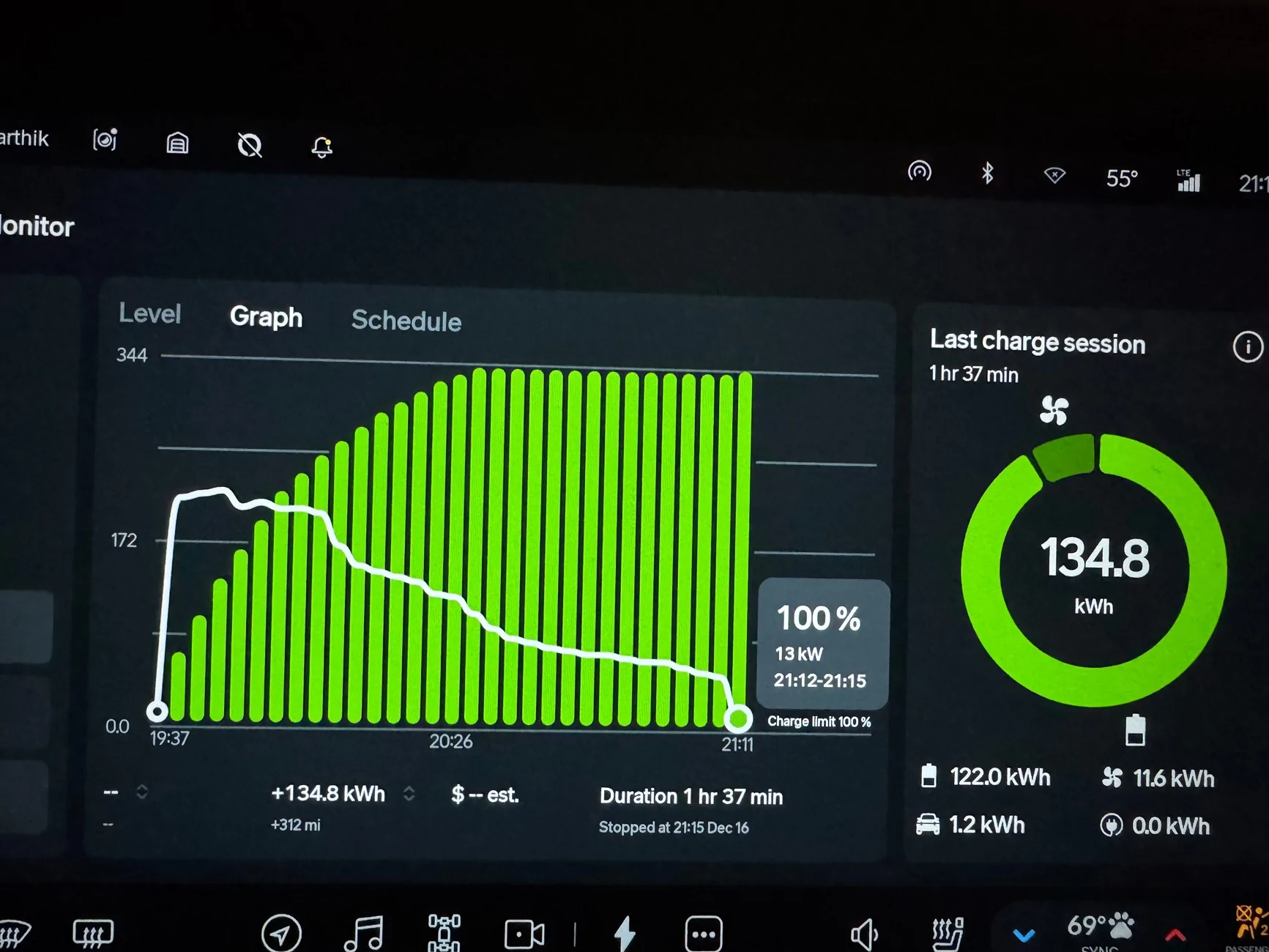
On mine, it takes 50 - 60 minutes from "99%" to 100%. It now spends slightly more time at "99%" than it does from 0% - 98%. (This has gotten worse over time.) Another symptom is that it hits "99%" at ~85kW, this is much higher than normal. You can see all of this in the small Energy screen photo in the top left of my infographic.

It would be great to see a photo of your Energy screen with the fast charge graph, with the time slice highlighted where it first flipped to 99%. Thanks for offering to test, this is why I posted here, I'm really curious how/if this affects others!

A more serious version of the test:

4. Reset trip meter at 100%, drain to 0%, record kWh consumed (or close to 0%, and extrapolate)—mine shows ~135kWh from here, prob degradation
5. Fast charge to EXACTLY where it first flips to "99%", disconnect immediately when that happens
6. Drain to 0%, record kWh consumed—mine only shows ~115kWh from here, consistently

The iOS app I wrote tracks charge kW and time spent at "99%", via Rivan API, to accurately calculate true SoC. So it shows me "85%" when the vehicle first shows "99%".
 

Sponsored

OP
OP

kxev

Active Member
Joined
Jan 23, 2026
Threads
1
Messages
30
Reaction score
28
Location
OR
Vehicles
Gen2 R1S Dual Max Performance
I don't frequently DCFC. The last time I did, I ran it from 43% to 99%. No issues.
The way I think this bug works...my vehicle now has 15 - 20kWh that it adds after showing "99%". When the problem first started, it was adding 10 - 12kWh after "99%", it gradually increased.

My battery also seems to be degraded to ~135kWh (per multiple drain tests), so I end up with only 115kWh from where it first shows "99%"

(The other weird thing is that it shows "370 miles" right from where it hits "99%"...but then it adds another 20kWh...and still shows "370 miles". That just doesn't make logical sense, how does it add that much capacity and not add range? The answer is that it's not truly at "370 miles" when it first shows that, it's 20kWh short!)

Let's say your vehicle has 10kWh stuffed away, less than mine.

Based on my observations, going from 43 to 99%, you'll experience 56% of the full scale of the bug (99-43.) So only 6kWh. (This assumes you had't otherwise drained below 43% since the last 100% charge, I wrote that app because the logic gets complicated here...basically the 100% charge fixes it, then the lower you go, it "unfixes" that portion of the pack and it loses some capacity until the next 100% charge.)

So let's say you have a full 140kWh available. (Seems like new vehicles may have up to 144kWh.) So now even with the bug, you'd still have 134kWh. Which is within the margin of error for nav estimates and would be easy to miss.

So this could be how all Max Packs are experiencing it, but I see the issue much worse than others. It could be that without fixing it, others will start to see real-world impact like I have. (I've had to divert to closer L3s and even L2s a bunch of times unexpectedly, until I understood the issue.)
 
OP
OP

kxev

Active Member
Joined
Jan 23, 2026
Threads
1
Messages
30
Reaction score
28
Location
OR
Vehicles
Gen2 R1S Dual Max Performance
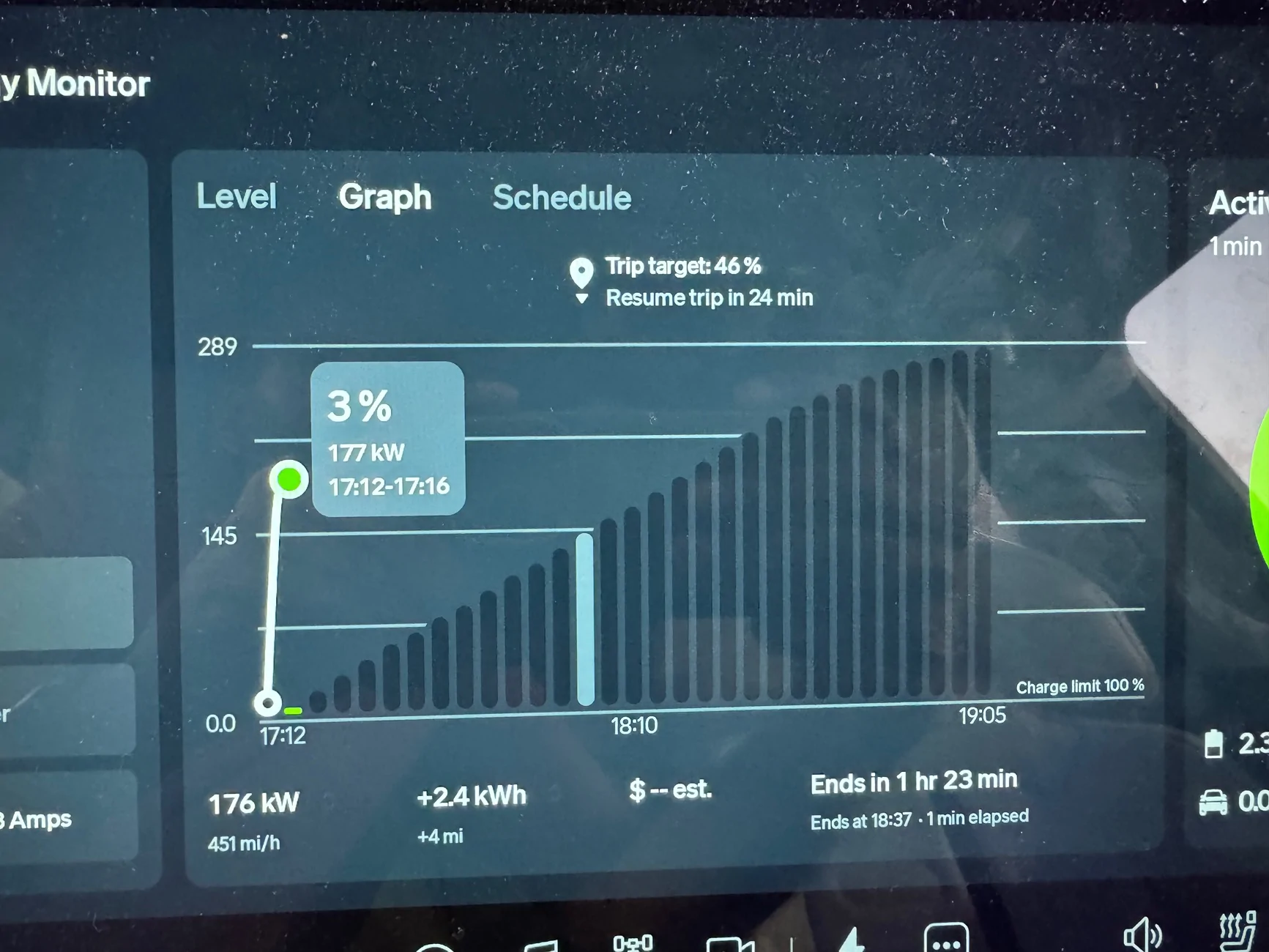
Here's a way to see the issue visually, if you charge to 100%. If you look at the graph at 3%, you can see the EXPECTED graph in the unfilled black bars. It's expected to gradually rise to 99%, of course slowing as it gets full, but then just spending a few minutes at 99%.

If you look at the completed graph, instead it gets to 99% much sooner than expected, then flatlines there for half of the charge time. Not matching the expected curve from the first graph. And it's supposed to be a curve after all, not a plateau like this.

Until July 20 of last year, my curve looked like the black bars when complete. Then it changed on July 21 (per ElectraFi), this was a couple days after getting 2025.22.30 and I theorize some BMS calibration code got messed up then. When I have a gen1 Large loaner, it looks like the black bar graph as well, not a plateau.

Rivian R1T R1S Strange calibration issue on gen2 Max Pack - service has not seen this before IMG_7803


Rivian R1T R1S Strange calibration issue on gen2 Max Pack - service has not seen this before IMG_7433
 

mkhuffman

Well-Known Member
First Name
Mike
Joined
Nov 9, 2020
Threads
14
Messages
2,847
Reaction score
3,203
Location
Virginia
Vehicles
2025 R1T Tri-Max, Jeep GC-L, VW Jetta
It really sounds like your pack is out of balance. Some cells are fully charged at 99% but many are not. If l the cells are at a similar charge level when you hit 99%, it should just be minor balancing after that. I have seen my truck spend a lot of L2 time at 99%, but the kW added isn't much.

It does sound like you have a pack issue. Maybe a few bad cells.

I may be able to do a 10 to 100% charge but not sure I can find the time to do your "serious test". I have yet to get my truck down to 0%. I did pretty close to that a few times in my Mach-e when coming home from a trip. Not yet in my R1T. I have arrived home at 10% a few times in my T.
 
OP
OP

kxev

Active Member
Joined
Jan 23, 2026
Threads
1
Messages
30
Reaction score
28
Location
OR
Vehicles
Gen2 R1S Dual Max Performance
It really sounds like your pack is out of balance. Some cells are fully charged at 99% but many are not. If l the cells are at a similar charge level when you hit 99%, it should just be minor balancing after that. I have seen my truck spend a lot of L2 time at 99%, but the kW added isn't much.

It does sound like you have a pack issue. Maybe a few bad cells.
That's what I thought too. Rivian says they ran pack balancing tests and everything is normal. I wish I knew what the actual graph looked like from the other Max Pack they tested.

Any low SoC test to 100% on another vehicle would definitely be nice to see, the full test shouldn't be necessary to see the basic issue present. You'll see it from 10% if it's there.

Edit: The other thing that makes a cell balance issue seem less likely is that it's at > 85kW when it hits "99%". I don't think it's balancing the pack at that speed, it's just part of the regular charge curve and it's actually only at 85%. I think the balancing doesn't happen until it's down below ~10kW, from there it still only takes 10 - 15 minutes for me.
 
Last edited:

mkhuffman

Well-Known Member
First Name
Mike
Joined
Nov 9, 2020
Threads
14
Messages
2,847
Reaction score
3,203
Location
Virginia
Vehicles
2025 R1T Tri-Max, Jeep GC-L, VW Jetta
That's what I thought too. Rivian says they ran pack balancing tests and everything is normal. I wish I knew what the actual graph looked like from the other Max Pack they tested.

Any low SoC test to 100% on another vehicle would definitely be nice to see, the full test shouldn't be necessary to see the basic issue present. You'll see it from 10% if it's there.
I am wondering if it could be related to the charging speed and maybe all the cells are not getting charged at the same rate, so when many are at 100%, there are many more that are way behind.

Just brainstorming a little here.

I'll make it a priority to do a 10 to 100% DCFC within the next week.

BTW, the last time I attempted a DCFC was a complete failure. The pack and charger were so cold it was practically charging at a L2 rate. I gave up after no SoC was added after five minutes of sitting there. Luckily I had enough to get home and didn't need that DCFC anyway. Public charging sucks.
 

Sponsored

OP
OP

kxev

Active Member
Joined
Jan 23, 2026
Threads
1
Messages
30
Reaction score
28
Location
OR
Vehicles
Gen2 R1S Dual Max Performance
BTW, the last time I attempted a DCFC was a complete failure. The pack and charger were so cold it was practically charging at a L2 rate. I gave up after no SoC was added after five minutes of sitting there. Luckily I had enough to get home and didn't need that DCFC anyway. Public charging sucks.
Hah, I make it a point to charge to 85% the night before if I'm leaving the car at a hotel or something in the cold. (...which is usually an indicated "99%" lately!) Charging on a cold pack is no fun.

The upside is that even though you may not break 150kW, the peak rate will hold for much longer and the overall charge won't be that much slower if you go all the way to 100%. Cold pack is kind of nice from that perspective instead of fighting heat for the entire charge. At least as long as we're talking like 40F and not 0F. After tons of fast charging in varying conditions with my R1S (probably 3/4 of its 45k miles), I definitely prefer charging in the cold to charging in > 90F weather. Esp when towing, when the battery is always running hot anways.
 

mkhuffman

Well-Known Member
First Name
Mike
Joined
Nov 9, 2020
Threads
14
Messages
2,847
Reaction score
3,203
Location
Virginia
Vehicles
2025 R1T Tri-Max, Jeep GC-L, VW Jetta
Hah, I make it a point to charge to 85% the night before if I'm leaving the car at a hotel or something in the cold. (...which is usually an indicated "99%" lately!) Charging on a cold pack is no fun.

The upside is that even though you may not break 150kW, the peak rate will hold for much longer and the overall charge won't be that much slower if you go all the way to 100%. Cold pack is kind of nice from that perspective instead of fighting heat for the entire charge. At least as long as we're talking like 40F and not 0F. After tons of fast charging in varying conditions with my R1S (probably 3/4 of its 45k miles), I definitely prefer charging in the cold to charging in > 90F weather. Esp when towing, when the battery is always running hot anways.
When the truck gets to 99%, I assume it shows 99% on the truck display and in the Rivian app, right? And that correlates with 99% in the Teslafi / Rivian Roamer data also, right? Just want to be sure I know how to monitor it so I can maybe see what you are seeing.
 
OP
OP

kxev

Active Member
Joined
Jan 23, 2026
Threads
1
Messages
30
Reaction score
28
Location
OR
Vehicles
Gen2 R1S Dual Max Performance
When the truck gets to 99%, I assume it shows 99% on the truck display and in the Rivian app, right? And that correlates with 99% in the Teslafi / Rivian Roamer data also, right? Just want to be sure I know how to monitor it so I can maybe see what you are seeing.
Yes, the point where it hits "99%" roughly matches between the vehicle display, Rivian app, and Rivian Roamer / ElectraFi data. (I think it may actually be at 98.5% in ElectraFi, rounded up, but close enough.)

Rivian Roamer wasn't tracking the 99% behavior properly as of a week ago. It merges all the "99%" samples into one record. (I reported this to RR.) ElectraFi tracks it properly, you'll see the entire range of "99%".

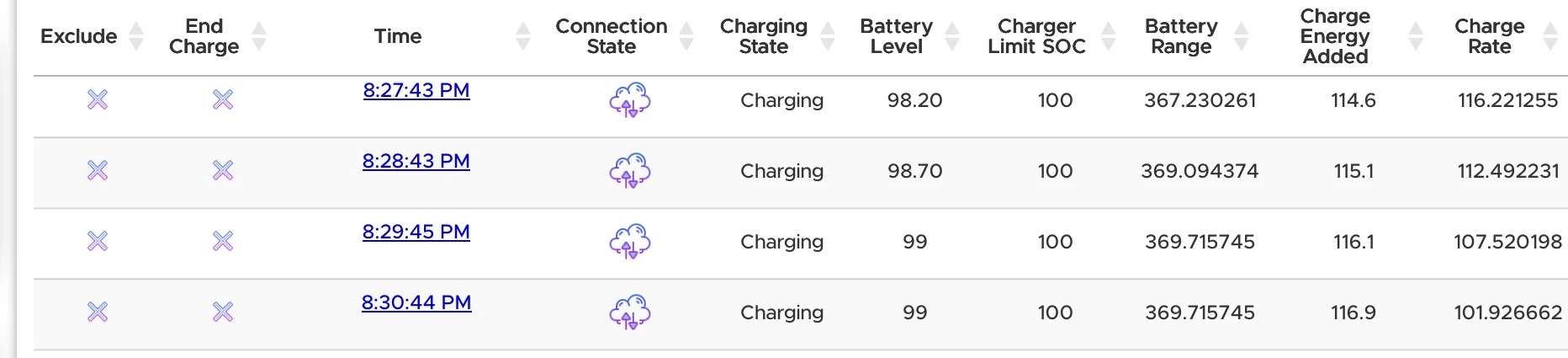
To see if the problem exists, check ElectraFi data for the "Charge Energy Added" value right when it flips to 99%, and then again when it hits 100%. Calculate the difference.

See my attached example, it hits "99%" with 116.1kWh added, and then 100% at 134.7kWh. So it adds ~19kWh after hitting "99%"! While the rated range remains the same, too. (The kWh values are not necessarily exact, I don't think ElectraFi adjusts for degradation so they are probably ~5% too high for my vehicle. But the proportions are correct, with ~15% of the pack being added after it hits "99%".)

Edit: You also can't necessarily debug this from old ElectraFI data, since if you unplug at 99% but the vehicle is close to 100%, it'll flip to "100%". ElectraFi can't tell that from a true 100% charge.

Rivian R1T R1S Strange calibration issue on gen2 Max Pack - service has not seen this before IMG_3628
Rivian R1T R1S Strange calibration issue on gen2 Max Pack - service has not seen this before IMG_3630
 
Last edited:

mkhuffman

Well-Known Member
First Name
Mike
Joined
Nov 9, 2020
Threads
14
Messages
2,847
Reaction score
3,203
Location
Virginia
Vehicles
2025 R1T Tri-Max, Jeep GC-L, VW Jetta
Yes, the point where it hits "99%" roughly matches between the vehicle display, Rivian app, and Rivian Roamer / ElectraFi data. (I think it may actually be at 98.5% in ElectraFi, rounded up, but close enough.)

Rivian Roamer wasn't tracking the 99% behavior properly as of a week ago. It merges all the "99%" samples into one record. (I reported this to RR.) ElectraFi tracks it properly, you'll see the entire range of "99%".

To see if the problem exists, check ElectraFi data for the "Charge Energy Added" value right when it flips to 99%, and then again when it hits 100%. Calculate the difference.

See my attached example, it hits "99%" with 116.1kWh added, and then 100% at 134.7kWh. So it adds ~19kWh after hitting "99%"! While the rated range remains the same, too. (The kWh values are not necessarily exact, I don't think ElectraFi adjusts for degradation so they are probably ~5% too high for my vehicle. But the proportions are correct, with ~15% of the pack being added after it hits "99%".)

Edit: You also can't necessarily debug this from old ElectraFI data, since if you unplug at 99% but the vehicle is close to 100%, it'll flip to "100%". ElectraFi can't tell that from a true 100% charge.

IMG_3628.webp
IMG_3630.webp
I will try to duplicate your test.

When it hits 99%, all that remains should be balancing the cells. If it adds that much power, that means the cells are really, really unbalanced. So weird Rivian Service says your pack is OK. Maybe the DCF charging process is hosed.
 

Rivian Roamer

Well-Known Member
Joined
Jul 18, 2024
Threads
2
Messages
470
Reaction score
659
Location
Seattle, WA
Website
rivianroamer.com
Vehicles
2024 R1S Quad Large, 2025 R1T Tri Max
Occupation
Adventurer
Yes, the point where it hits "99%" roughly matches between the vehicle display, Rivian app, and Rivian Roamer / ElectraFi data. (I think it may actually be at 98.5% in ElectraFi, rounded up, but close enough.)

Rivian Roamer wasn't tracking the 99% behavior properly as of a week ago. It merges all the "99%" samples into one record. (I reported this to RR.) ElectraFi tracks it properly, you'll see the entire range of "99%".

To see if the problem exists, check ElectraFi data for the "Charge Energy Added" value right when it flips to 99%, and then again when it hits 100%. Calculate the difference.

See my attached example, it hits "99%" with 116.1kWh added, and then 100% at 134.7kWh. So it adds ~19kWh after hitting "99%"! While the rated range remains the same, too. (The kWh values are not necessarily exact, I don't think ElectraFi adjusts for degradation so they are probably ~5% too high for my vehicle. But the proportions are correct, with ~15% of the pack being added after it hits "99%".)

Edit: You also can't necessarily debug this from old ElectraFI data, since if you unplug at 99% but the vehicle is close to 100%, it'll flip to "100%". ElectraFi can't tell that from a true 100% charge.

IMG_3628.webp
IMG_3630.webp
When you say Rivian Roamer merges the records, can you explain what you mean by this?
Sponsored


Top