Sponsored

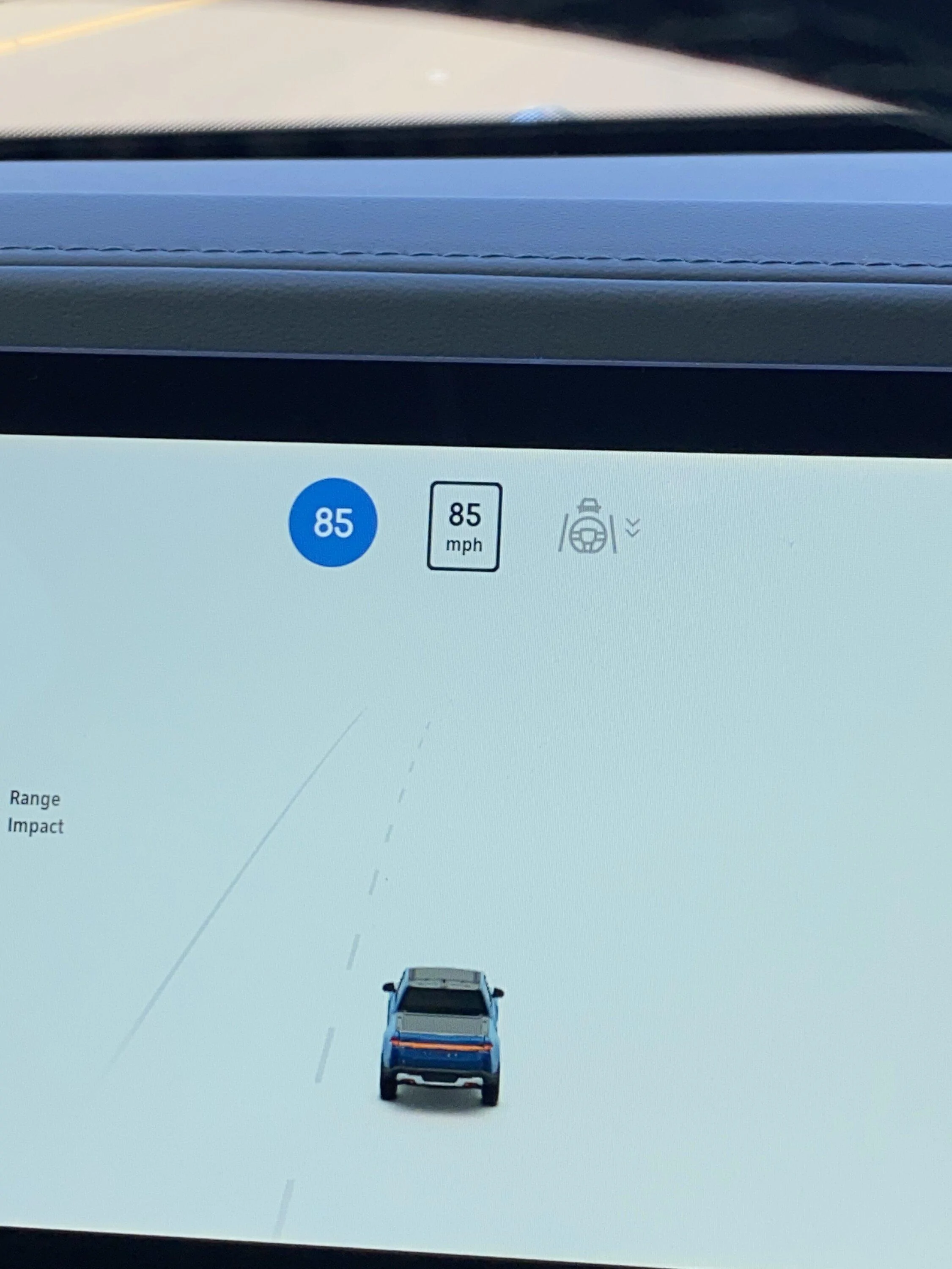
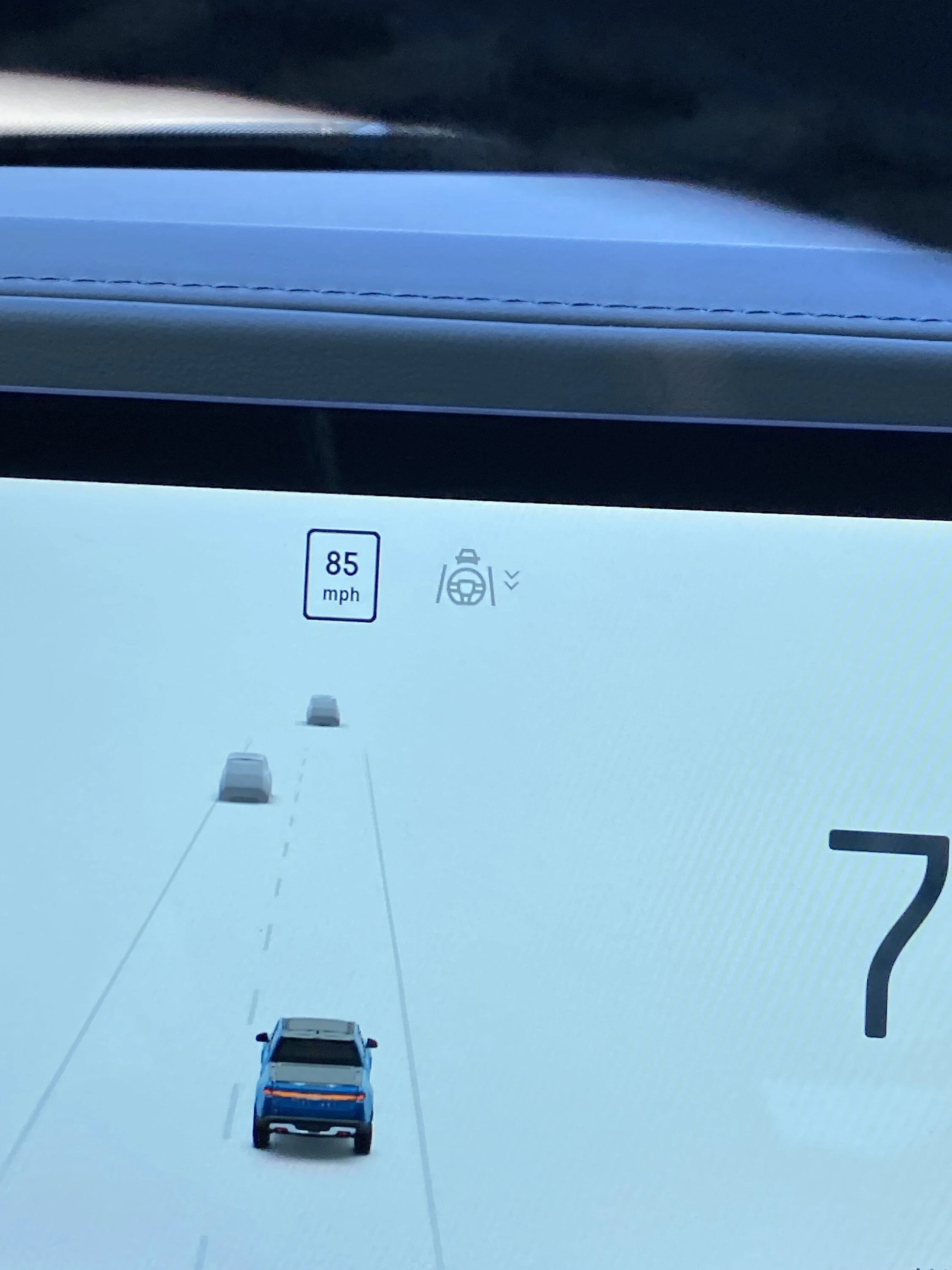
85mph at SLO?

OP
OP
PowerBugs

PowerBugs

Well-Known Member
First Name
Dru
Joined
Jun 13, 2022
Threads
37
Messages
227
Reaction score
235
Location
SF Bay Area
Vehicles
Toyota
Strange, I’ve never seen an 85 mph limit in CA.

Are you saying you cannot adjust the set speed for driver+ or ACC once it is engaged? I can adjust it to my desired speed once engaged in my R1S and it honors that speed.
If the speed limit is “65”, and you are driving at 55, if you engage the highway assist, it will set you up at 65 automatic. But then I forgot to try to go lower because I was just surprised why I went faster than I intended.
Now that you mention it, I will try that and see and I think I can but initially on any given day, the highway assist will take you up to the speed limit (whatever is posted on the highway) even if you’re driving slower than the speed limit. (Initially)
Sponsored

 

UnsungZero_OldTimeAdMan

Well-Known Member
First Name
Barnum
Joined
Mar 20, 2023
Threads
66
Messages
8,576
Reaction score
11,771
Location
SoCal
Vehicles
'23 GW Quad-Large R1T "Ghost"
Occupation
Advertising Circus
In settings you can have cruise abide by posted limit or your current speed. This was in update notes in one of the recent OTAs (good to read those if you haven’t).
 

BeanEW

Well-Known Member
First Name
Eugene
Joined
Nov 16, 2020
Threads
20
Messages
495
Reaction score
599
Location
SF California
Vehicles
R1S
Occupation
Retired
The Rivian map speed limits are sometimes wrong. However, I have only experienced the map speed is lower than the actual speed limit. The cruise control is set to the speed limit if the car speed is lower than the speed limit; therefore it was set to 85 (because the map was wrong). The car was doing what it supposed to but Rivian has to improve their maps.
 

emoore

Well-Known Member
Joined
Nov 29, 2020
Threads
4
Messages
3,815
Reaction score
4,240
Location
Colorado
Vehicles
2022 R1T
The Rivian map speed limits are sometimes wrong. However, I have only experienced the map speed is lower than the actual speed limit. The cruise control is set to the speed limit if the car speed is lower than the speed limit; therefore it was set to 85 (because the map was wrong). The car was doing what it supposed to but Rivian has to improve their maps.
There are a few streets by me that the Rivian map is higher than the actual speed limit. And it’s been the same speed limit for the 8 years I’ve been driving in those roads.
 

VSG

Well-Known Member
Joined
Oct 3, 2022
Threads
4
Messages
3,210
Reaction score
6,007
Location
WA
Vehicles
R1T LE/RB/OC/20
was going at 70mph and stayed at the right lane because other cars are going faster than me (This will be another topic one day). Then I hit cruise control to stay at 70 but was surprised I accelerated and glanced on my screen what was happening and it says “85”. Really? I immediately canceled it because I wasn’t sure if it is really 85. I wanted to stay at 70 but after the recent update or maybe the 2 previous update, it will automatically keep you at the maximum speed limit so I can’t cruise if I wanted to stay below.
There are two settings for the cruise control. From the Owner's Guide:

Go to Settings > Vehicle > Driver+ to toggle on or off the speed limit setting when Adaptive Cruise Control and Highway Assist are engaged. This feature works on divided highways where there is traffic going in different directions, separated by a barrier.​
  • On: Engages Adaptive Cruise Control or Highway Assist at the posted speed limit. This applies when the speed limit is higher than the current vehicle speed.
  • Off: Engages Adaptive Cruise Control or Highway Assist with the current vehicle speed as the set speed.
It sounds like you're using "on". I don't use "on" because it has unintended side-effects like this. If you switch to "off" I think it will behave the way you want it to.

I haven't found a good way to suggest edits to fix it, I have only been able to edit businesses in mapbox.
It's quick and easy to report issues like wrong speed limit. Visit this link: https://www.mapbox.com/contribute
Use the big blue "Contribute" button. Select "Speed limit" as the thing you want to correct. Pick a map location. Fill out the information. Submit. They will fix it. I have done this several times.
 
Last edited:

Sponsored

Greg Chick

Well-Known Member
First Name
Greg
Joined
Jan 27, 2023
Threads
12
Messages
914
Reaction score
652
Location
Tehachapi Ca. 93561
Website
diyplumbingadvice.com
Vehicles
R1T Quad, large battery, 21" Adventure
Occupation
Retired Plumbing Contractor
Clubs
 
There are two settings for the cruise control:
  1. Hold at your current speed.
  2. Hold at the speed limit.
It sounds like you're using #2. I don't use #2 because it has unintended side-effects like this. If you switch to #1 I think it will behave the way you want it to.


It's quick and easy to report issues like wrong speed limit. Visit this link: https://www.mapbox.com/contribute
Use the big blue "Contribute" button. Select "Speed limit" as the thing you want to correct. Pick a map location. Fill out the information. Submit. They will fix it. I have done this several times.
[/QUOTE

Then adjust it using the steering wheel buttons on sides of right hand side.
 

vince993

Member
Joined
Mar 3, 2022
Threads
2
Messages
8
Reaction score
15
Location
Los Angeles
Vehicles
R1S
I wonder if this is a map issue or a camera/software issue? My 2020 Discovery showed the posted speed limit on the driver instrument cluster similar to how Rivian's looks by "seeing" the speed limit signs on the side of the road with the forward-facing camera behind the rear view mirror.

I noticed the same thing as OP recently where my R1S showed posted speed was 85 and it was really 65.
 

emoore

Well-Known Member
Joined
Nov 29, 2020
Threads
4
Messages
3,815
Reaction score
4,240
Location
Colorado
Vehicles
2022 R1T
I wonder if this is a map issue or a camera/software issue? My 2020 Discovery showed the posted speed limit on the driver instrument cluster similar to how Rivian's looks by "seeing" the speed limit signs on the side of the road with the forward-facing camera behind the rear view mirror.

I noticed the same thing as OP recently where my R1S showed posted speed was 85 and it was really 65.
This is why I don't think Rivian uses the camera/software to read speed limit signs. They might have used to but not anymore.
 
OP
OP
PowerBugs

PowerBugs

Well-Known Member
First Name
Dru
Joined
Jun 13, 2022
Threads
37
Messages
227
Reaction score
235
Location
SF Bay Area
Vehicles
Toyota
There are two settings for the cruise control. From the Owner's Guide:

Go to Settings > Vehicle > Driver+ to toggle on or off the speed limit setting when Adaptive Cruise Control and Highway Assist are engaged. This feature works on divided highways where there is traffic going in different directions, separated by a barrier.​
  • On: Engages Adaptive Cruise Control or Highway Assist at the posted speed limit. This applies when the speed limit is higher than the current vehicle speed.
  • Off: Engages Adaptive Cruise Control or Highway Assist with the current vehicle speed as the set speed.
It sounds like you're using "on". I don't use "on" because it has unintended side-effects like this. If you switch to "off" I think it will behave the way you want it to.


It's quick and easy to report issues like wrong speed limit. Visit this link: https://www.mapbox.com/contribute
Use the big blue "Contribute" button. Select "Speed limit" as the thing you want to correct. Pick a map location. Fill out the information. Submit. They will fix it. I have done this several times.
Thanks ?? @VSG I did notice that my setting is “on”. That explains.
 

SSteveEV

Well-Known Member
First Name
Spencer
Joined
Nov 3, 2022
Threads
7
Messages
1,319
Reaction score
1,795
Location
Michigan
Vehicles
R1T, etc
Clubs
 
It's a big. Report to Rivian. Someone correct me if I'm wrong, but in the early days last year you could hit your hazard button twice when you experienced a bug and it made it easier to send the logs to Rivian - is that still correct?
You only need to hit it once. That places a marker in the log.
I use the press and hold on the driver name method to generate a diagnostic log. Takes a little longer but doesn't confuse anyone outside with hazards. It will pop up saying it has been logged after a few seconds.

I've also seen this 85mph bug but have never reported it
 

Sponsored

SANZC02

Well-Known Member
First Name
Bob
Joined
Feb 11, 2021
Threads
50
Messages
7,409
Reaction score
12,702
Location
California
Vehicles
Tesla Model S, LE - R1S
Occupation
Retired
This is why I don't think Rivian uses the camera/software to read speed limit signs. They might have used to but not anymore.
It used to read signs, then it stopped but as of the last 2 OTAs mine is back to reading them. It only overrides for a short distance then falls back to what it thinks the speed limit is.
 

shandel

Well-Known Member
Joined
Jul 20, 2022
Threads
6
Messages
252
Reaction score
201
Location
Half Moon Bay, CA
Vehicles
R1S FG/FE Adventure 20, Audi e-tron, Jeep Wrangler
Clubs
 
The 85mph change in Santa Cruz occurred right when I passed a 65mph sign, so there might be a connection to reading the sign incorrectly, but I'm not sure.
 

VSG

Well-Known Member
Joined
Oct 3, 2022
Threads
4
Messages
3,210
Reaction score
6,007
Location
WA
Vehicles
R1T LE/RB/OC/20
The 85mph change in Santa Cruz occurred right when I passed a 65mph sign, so there might be a connection to reading the sign incorrectly, but I'm not sure.
A lot of mapping data like this is taken directly from public information sources. Local governments know where their speed limit signs are located - they have GPS coordinates for all these signs in their GIS systems. The various mapping companies import all of that data.

So if the speed displayed in your Rivian changes as you pass a speed limit sign, that implies nothing about whether the Rivian is "reading" the signs. The fact that the Rivian gets it wrong sometimes is more likely due to bad data imported from the GIS (e.g. some systems might use a placeholder number when they don't know exactly what the sign says - 85 might be such a placeholder because it's easily recognizable as higher than any real sign would show.)

I find it unlikely that a character recognition software would fail on such an ideal use case - two numbers in high contrast with a known font are hard to get wrong because speed limit signs were designed to be highly visible and hard to confuse. Maybe 65 and 85 look similar in some fonts, but not in the font used on speed limit signs.
 

DJ24

Active Member
First Name
Drew
Joined
Oct 28, 2022
Threads
0
Messages
30
Reaction score
30
Location
Alameda, CA
Vehicles
Mazda CX-5
Clubs
 
Driving back from Central coast (California) to the SF Bay Area, we were on Hwy 101 at San Luis Obispo and was going at 70mph and stayed at the right lane because other cars are going faster than me (This will be another topic one day). Then I hit cruise control to stay at 70 but was surprised I accelerated and glanced on my screen what was happening and it says “85”. Really? I immediately canceled it because I wasn’t sure if it is really 85. I wanted to stay at 70 but after the recent update or maybe the 2 previous update, it will automatically keep you at the maximum speed limit so I can’t cruise if I wanted to stay below.
This went on for miles and miles and then it dropped to 70 even though I saw a sign that says 65. After we passed the 65 speed limit sign, the dash will change to 65 but after a quarter mile or so, it will revert to 70 again.
I think it “normalized” to 65 after we hit King City and onward.
Can someone who live or frequently drive the Central Coast confirm the upgrade of the speed limit? I believed it was a glitch but it would a welcome changed for me if it is.

IMG_0616.jpeg


IMG_0615.jpeg
I had the same thing happen today driving up the 101 through SLO. Must be a glitch.
 

godfodder0901

Well-Known Member
First Name
Jared
Joined
Mar 12, 2019
Threads
27
Messages
5,749
Reaction score
10,139
Location
Washington
Vehicles
2022 Rivian R1T LE
It's a big. Report to Rivian. Someone correct me if I'm wrong, but in the early days last year you could hit your hazard button twice when you experienced a bug and it made it easier to send the logs to Rivian - is that still correct?
You only need to hit it once. That places a marker in the log.
Long press the profile name on the center screen, top left.
Sponsored


Top