
mikehmb
Well-Known Member
- First Name
- Mike
- Joined
- Jan 12, 2022
- Threads
- 154
- Messages
- 2,303
- Reaction score
- 5,225
- Location
- SF Bay Area
- Vehicles
- My name is Mike, and I have a (car) problem
- Thread starter
- #1
Made an interesting, though not unexpected, discovery today.
In the app, all charging stations are listed in relative terms to CCS - meaning, if you toggle "adapter needed", the assumption is your truck is CCS and you need a NACS->CCS adapter to charge at a Supercharger station.
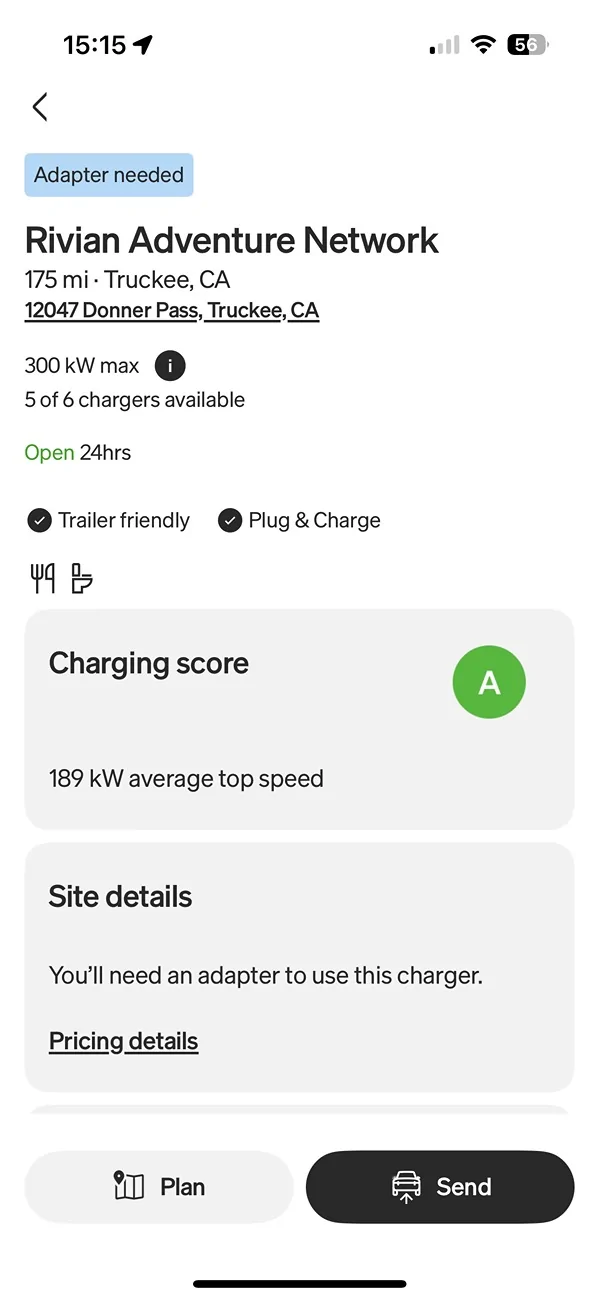
However, when you select an actual station that is CCS only, and your truck is NACS, you will get an "adapter needed" notification in blue in the app. Of course, the # of owners on NACS is microscopic compared to the installed base of CCS trucks.
It's an interesting fix that I am sure they have underway, but would be helpful to have a view of chargers that understands which DC charge port you have, so toggling "adapter needed" will be relative to the car you're driving, not just to CCS. If you toggle "requires adapter", all of the RANs will naturally disappear.
Only reason I discovered this was because I was curious to see if there were any dual CCS/NACS Rivian stations up and running. The one I use most often, in Truckee, is CCS only, but hopefully they'll update to dual s00n.
Why do I find this interesting? It presents a fun challenge in the app if you happen to own both NACS and CCS-port vehicles, and is counter-intuitive if you own a NACS truck. Also, we've grown accustomed to certain routes where food/conveniences happen to be next to a RAN.

In the app, all charging stations are listed in relative terms to CCS - meaning, if you toggle "adapter needed", the assumption is your truck is CCS and you need a NACS->CCS adapter to charge at a Supercharger station.
However, when you select an actual station that is CCS only, and your truck is NACS, you will get an "adapter needed" notification in blue in the app. Of course, the # of owners on NACS is microscopic compared to the installed base of CCS trucks.
It's an interesting fix that I am sure they have underway, but would be helpful to have a view of chargers that understands which DC charge port you have, so toggling "adapter needed" will be relative to the car you're driving, not just to CCS. If you toggle "requires adapter", all of the RANs will naturally disappear.
Only reason I discovered this was because I was curious to see if there were any dual CCS/NACS Rivian stations up and running. The one I use most often, in Truckee, is CCS only, but hopefully they'll update to dual s00n.
Why do I find this interesting? It presents a fun challenge in the app if you happen to own both NACS and CCS-port vehicles, and is counter-intuitive if you own a NACS truck. Also, we've grown accustomed to certain routes where food/conveniences happen to be next to a RAN.
Sponsored


