Sponsored

Can only VENT windows in Rivian app (R1T)

Chase32

Well-Known Member
First Name
Chase
Joined
Jun 25, 2023
Threads
1
Messages
47
Reaction score
89
Location
Phoenix
Vehicles
Rivian R1T
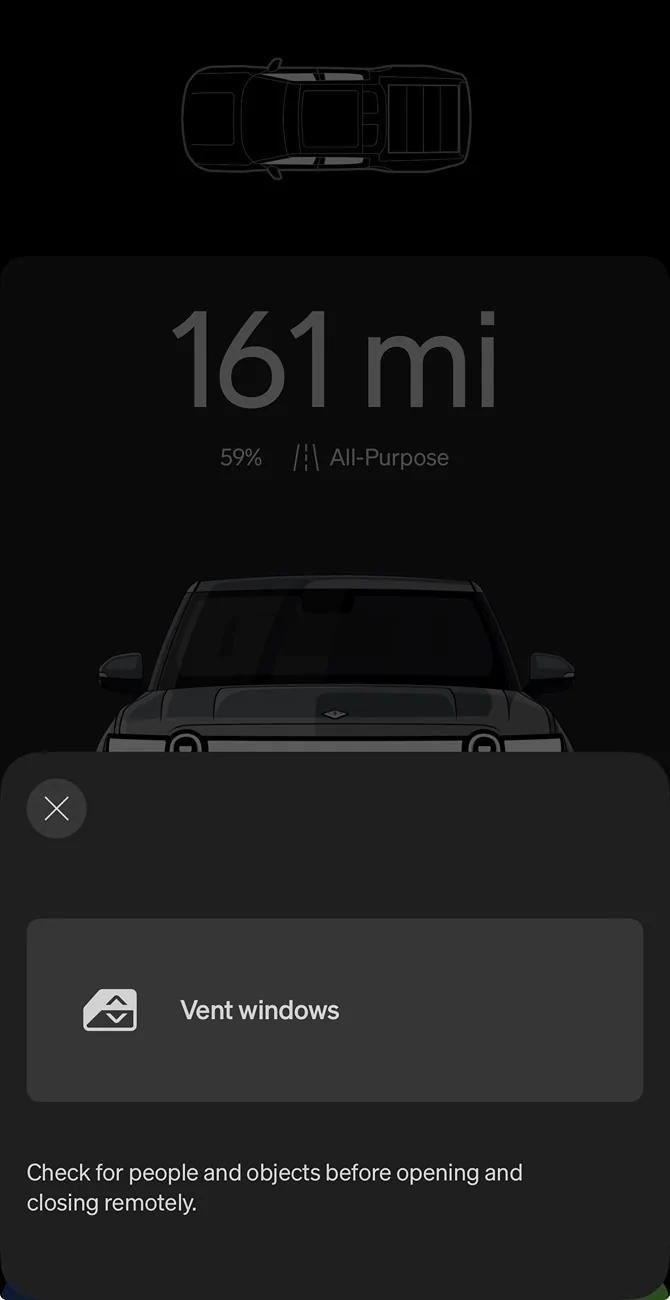
Has anyone else noticed this? If you leave a window (or more than 1) down, and you want to close them in the app, you only have the option to vent them? Before you could go into the app and “close” all windows. Even the vent windows button that shows now doesn’t work, so something is off here.

Hopefully Rivian is aware and will fix in the next OTA.

Vehicle: Gen 1 R1T

Rivian R1T R1S Can only VENT windows in Rivian app (R1T) IMG_6004
Sponsored


Dark-Fx

Well-Known Member
First Name
Brian
Joined
Jul 15, 2020
Threads
155
Messages
13,916
Reaction score
28,380
Location
Michigan
Vehicles
R1S, Livewire One, Sierra EV, R1S, R2
Occupation
Engineering, Dog Petting, Tesla Shill Spotter
Clubs
 
Are they actually down? You should be able to hit vent and then close. I've noticed the window information is sometimes stale and doesn't match reality.
 
OP
OP

Chase32

Well-Known Member
First Name
Chase
Joined
Jun 25, 2023
Threads
1
Messages
47
Reaction score
89
Location
Phoenix
Vehicles
Rivian R1T
Are they actually down? You should be able to hit vent and then close. I've noticed the window information is sometimes stale and doesn't match reality.
Yeah windows are actually down. I hit vent and nothing happens. It used to be where I could click the windows in the app (see screenshot) and then the “close windows” button would show. That is no longer the case :)
 

SwampNut

Well-Known Member
First Name
Carlos
Joined
Apr 22, 2024
Threads
55
Messages
3,847
Reaction score
4,096
Location
Peoria AZ
Vehicles
2022 R1T Launch Edition
Occupation
Geek
Clubs
 
First the most obvious question… Have you rebooted both the phone and car?

Is this a new recent issue?
 
OP
OP

Chase32

Well-Known Member
First Name
Chase
Joined
Jun 25, 2023
Threads
1
Messages
47
Reaction score
89
Location
Phoenix
Vehicles
Rivian R1T
First the most obvious question… Have you rebooted both the phone and car?

Is this a new recent issue?
Yeah, I have done every reboot imaginable. Even went into Service Mode and recalibrated all windows.

I've noticed this issue for about a week now.
 

Sponsored

SwampNut

Well-Known Member
First Name
Carlos
Joined
Apr 22, 2024
Threads
55
Messages
3,847
Reaction score
4,096
Location
Peoria AZ
Vehicles
2022 R1T Launch Edition
Occupation
Geek
Clubs
 
As someone who has worked in tech, systems, and software for decades, I find it fascinating and impressive that Rivian can introduce such user-specific bugs. A true feat.
 
OP
OP

Chase32

Well-Known Member
First Name
Chase
Joined
Jun 25, 2023
Threads
1
Messages
47
Reaction score
89
Location
Phoenix
Vehicles
Rivian R1T
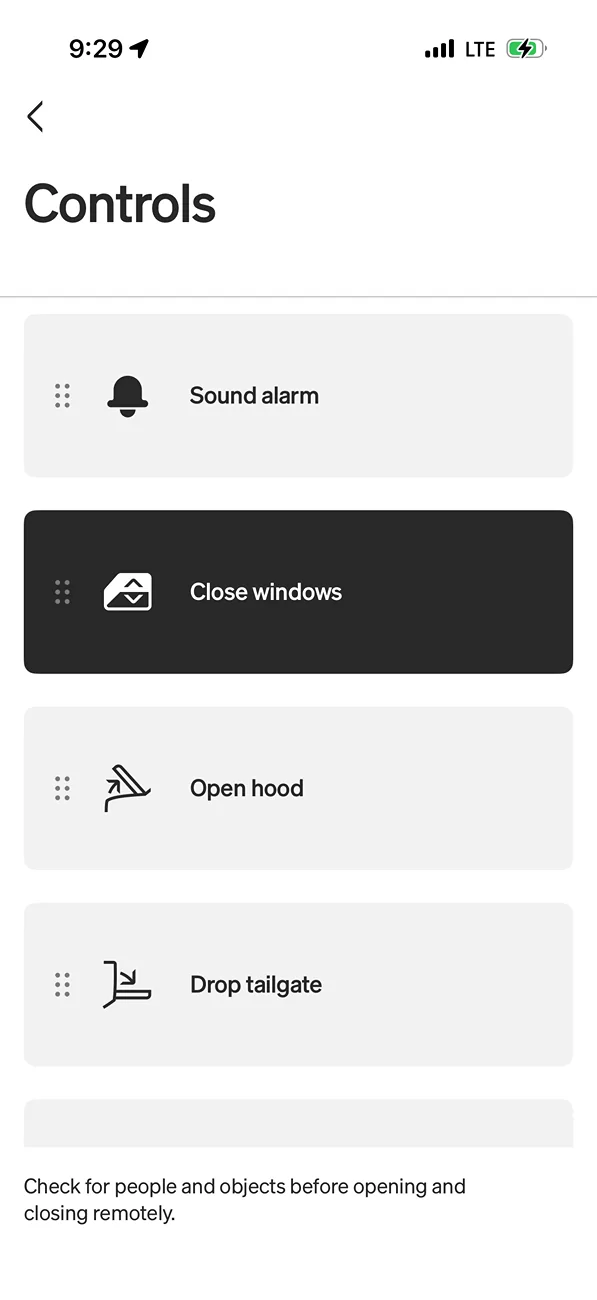
Strange. FWIW the close option still works for me. I just installed 2026.23 last night.

close windows from app.webp
This works for me as well, but if you reference the image I attached, if you have the windows down, go into your app, slide down at the top of the app so that can see the image of the vehicle with the white windows down, click on that - it used to be where you could CLOSE the windows there, and now it just says "vent", which again, also isn't working. So strange.
 

VandalSibs

Well-Known Member
First Name
Andrew
Joined
Dec 27, 2023
Threads
16
Messages
1,621
Reaction score
2,854
Location
Eastern Washington State
Website
www.sibulskymusic.com
Vehicles
R1T Dual Motor Large Pack
Occupation
Composer, IT Service Desk Analyst
Clubs
 
This works for me as well, but if you reference the image I attached, if you have the windows down, go into your app, slide down at the top of the app so that can see the image of the vehicle with the white windows down, click on that - it used to be where you could CLOSE the windows there, and now it just says "vent", which again, also isn't working. So strange.
I'm not on the most current software in the vehicle, but I am in the app. I just lowered/vented the windows & going the route you describe here, I can close the windows.

Maybe there's a bug with the newer vehicle software version, but the app seems to be okay.

As someone who has worked in tech, systems, and software for decades, I find it fascinating and impressive that Rivian can introduce such user-specific bugs. A true feat.
It would be a unique form of customer service for sure...
 

portdirect

Well-Known Member
Joined
Jun 15, 2023
Threads
17
Messages
951
Reaction score
1,406
Location
Missouri
Vehicles
R1T (2023 QM - RIP, 2025 Tri Max), R1S (2024 DM Large)
Occupation
Blinkenlight Hearder
As someone who has worked in tech, systems, and software for decades, I find it fascinating and impressive that Rivian can introduce such user-specific bugs. A true feat.
THIS! My day job for the last 10 years (at least) has involved looking after deployed fleets of critical infrastructure larger than Rivian's, both in number of units and (public facing) variation across the fleet, and it constantly amazes me how much divergence in experience Rivian manages to deliver.

When we see a bug that's specific to one node, or a small subset of nodes, that's when we wheel out the big brains. It almost certainly means there's an underlying issue that the platform as a whole is failing to detect, control, or account for.

When I went through my R1T saga, one thing that was mentioned a few times was that my truck had a rare combo of hardware revisions (eg version X of the AXM coupled with version Y of a zonal controller etc), and some speciation went on that that it was that combo that may have been an exacerbating factor.
 

Sponsored

ddujnad

Member
First Name
Dan
Joined
Feb 28, 2023
Threads
1
Messages
10
Reaction score
6
Location
San Jose, CA
Vehicles
'24 Mach-E Rally, '22 R1T
@Chase32 I didn't realize the steps you mentioned were even possible :). My app is working the same as yours - "Vent Windows" only using that method.
 

SwampNut

Well-Known Member
First Name
Carlos
Joined
Apr 22, 2024
Threads
55
Messages
3,847
Reaction score
4,096
Location
Peoria AZ
Vehicles
2022 R1T Launch Edition
Occupation
Geek
Clubs
 
When we see a bug that's specific to one node, or a small subset of nodes, that's when we wheel out the big brains. It almost certainly means there's an underlying issue that the platform as a whole is failing to detect, control, or account for.

Reminds me of one of this month's bug fixes, which is comically intricate/weird/something:

  • Fixed an issue that dropped the center audio channel if you adjusted the accent lighting theme and heard its audio while also listening to Dolby Atmos music.


Rivian R1T R1S Can only VENT windows in Rivian app (R1T) 1786557358454-pa
 

Trinculo73

Well-Known Member
First Name
Mike
Joined
Jan 14, 2024
Threads
6
Messages
92
Reaction score
97
Location
Inglewood, CA
Vehicles
Rivian R1T, Victory Magnum X1, Polestar 2 Launch Ed
Clubs
 
@Chase32 I didn't realize the steps you mentioned were even possible :). My app is working the same as yours - "Vent Windows" only using that method.
I didn't realize that was an option either until now, but I'm getting the "Close Windows" prompt from the open windows notification 🤷‍♂️
 

portdirect

Well-Known Member
Joined
Jun 15, 2023
Threads
17
Messages
951
Reaction score
1,406
Location
Missouri
Vehicles
R1T (2023 QM - RIP, 2025 Tri Max), R1S (2024 DM Large)
Occupation
Blinkenlight Hearder
Reminds me of one of this month's bug fixes, which is comically intricate/weird/something:

  • Fixed an issue that dropped the center audio channel if you adjusted the accent lighting theme and heard its audio while also listening to Dolby Atmos music.


1786557358454-pa.webp

Rivian Can only VENT windows in Rivian app (R1T) {filename}
 

Rade

Well-Known Member
First Name
Rade
Joined
Sep 19, 2024
Threads
42
Messages
682
Reaction score
860
Location
US - Rhode Island
Website
radmorningcoffee.blogspot.com
Vehicles
2025 Rivian R1T - Large. Delivered on November 23, 2024.
Occupation
Retired
I don't normally open my windows, but today the .23 update got installed, and on wrapping up an errand, I discovered both passenger side windows were in "vent" mode. I manually put them up.

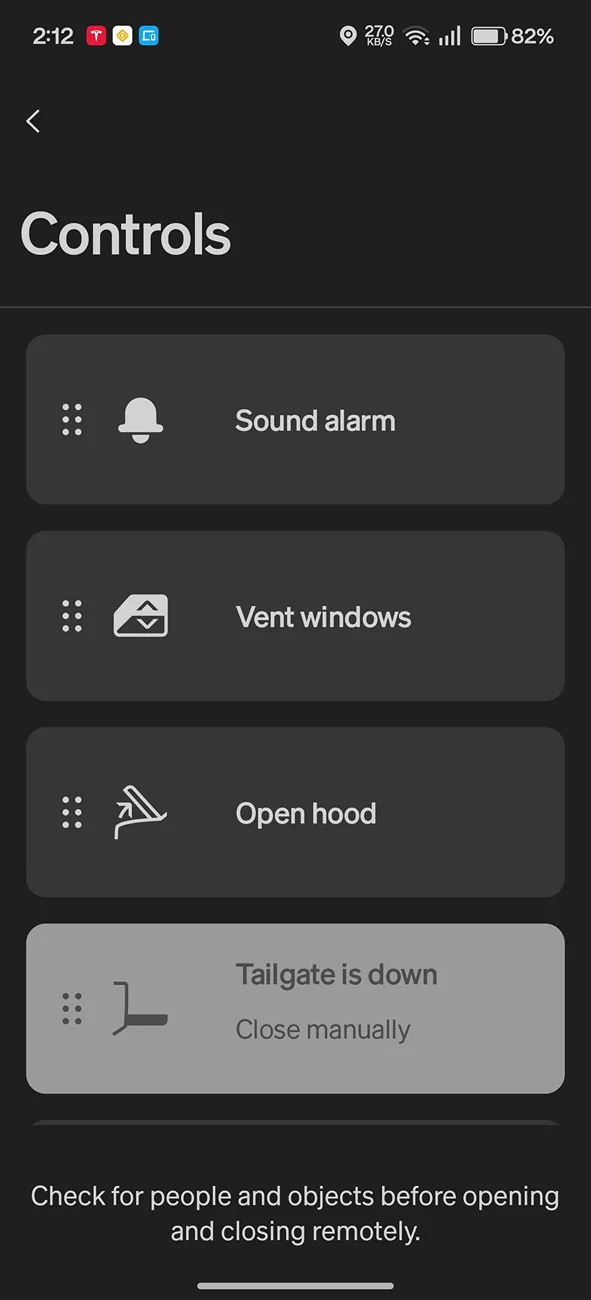
After reading your post, I went into the app. I was unable to vent the windows, and it is showing that the tailgate is down (it is not). Very strange. I do suspect it is the app; I can do everything through the R1T center screen, but on the app, it seems to be "one-way"; I can open the charge port, but not toggle to close it.

Rivian R1T R1S Can only VENT windows in Rivian app (R1T) Screenshot_2026-08-12-14-12-47-25_a60c5a82aad2e003b99b489dcdcd5d55
Sponsored

 
Last edited:


Top