Sponsored

Gen 2 Press to Unlock, general unlocking behavior question

ExNihilo

New Member
Joined
Aug 9, 2024
Threads
1
Messages
4
Reaction score
1
Location
California
Vehicles
2025 R1S
Hi, I am a new Rivian owner as we picked up our 2025 Dual Max R1S about a month ago. We have a Tesla Model 3 for almost 6 years so have had some familiarity with electric vehicles.
I have not found a great solution to unlocking/locking at home. I appreciate the way the Model 3 works but understand there are no motors in the handle so the vehicle does not have to turn on and present handles to me like the R1S has to with the PAK proximity unlock feature.
I have my phone in my pocket and go in the garage a few times a day and the R1S was unlocking to present the handles when I entered the garage, so I changed it to Lock only when at home. This has helped, though, I still hear the R1S turn on and spool something up but it does not unlock at least. However, now when I try to unlock it, we have to open our app and unlock it manually.
I was excited when the new Press to Unlock feature came out and was hoping that would be a great solution. I have tried both disabling Proximity Lock altogether and also enabling it but just turning it off at home or to lock only at home. In all instances, the Press to Unlock does not work. I communicated with Rivian and received a response the next day informing me that I had to press down on the right side of the handle since it was not a touch sensor. I have tried pressing pretty firmly and have not gotten it to unlock. I did note there is a rubber button behind the right end of the handle and am guessing that has to actuate to unlock the door.
I then tried to push the left side in to force the handle out and pressed on the rubber button on the right directly, but that did not work. However, in the process of trying, I found that maybe 1 in 4 tries, I could get the car to unlock by pushing the left side of the handle and forcing the handle out and trying to open it that way. Is this something that is a feature of all R1S vehicles (Gen1 and Gen2)? I have not heard that happening except when the car is in car wash mode.
Also, when pushing on the left and trying to force the handle open, there is alot of resistance and I don't feel comfortable using this to enter the vehicle regularly when parked at home.
I was hoping anyone with a Gen 2 R1 could say if they got Press to Unlock to work for them. Also, I am interested to hear if anyone has a better solution for getting in to the R1 while parked at home but also preventing it from unlocking every time the PAK is in the same garage.
I have really benefitted from all of the prior posts on this forum (lurking for years) and am really thankful there is a strong community out here for Rivian owners and fans. Thanks in advance!
Sponsored
 

Mumper

Member
Joined
Aug 27, 2024
Threads
2
Messages
13
Reaction score
2
Location
Orange County
Vehicles
2025 Gen2 Rivian R1S
I am also trying to use press to unlock but it seems flakey. Anyone else have experience with this?

My core question is that the patch notes say proximity unlocking must be off for Press to Unlock to work, but does that mean off for individual phones (my wife and mine) or just off for the the whole truck?

I tested setting proximity to lock only at home on my phone key and it seemed like Press to Unlock would work for me, although it was very slow. Can anyone verify this behavior?
 
Last edited:
OP
OP

ExNihilo

New Member
Joined
Aug 9, 2024
Threads
1
Messages
4
Reaction score
1
Location
California
Vehicles
2025 R1S
I'm glad it seemed to work for you. I have tried it again and it seemed to work after a few attempts but also slow. Are you having to push down fairly hard on the right side of the handle? I had to push pretty hard and it seemed uncomfortably hard (like I was worried I might break something if I did it often)?
I have tried with the Lock only behavior at home (so proximity unlock is supposed to be off) and it worked one in 4 presses or so on 3 occasions so far. I'm not using it, though, because it takes alot of pressure and is unpredictable.
I sent a message to Rivian about it, but they just copied the information from the manual back to me.
I am hoping other Gen 2 owners can post their experiences. If this feature works as intended, it would be great. Currently, we are having to get out our phones and manually unlock via the Rivian app when trying to get into the vehicle at home.
Thanks.
 

Mumper

Member
Joined
Aug 27, 2024
Threads
2
Messages
13
Reaction score
2
Location
Orange County
Vehicles
2025 Gen2 Rivian R1S
I did have to press really hard. It’s also just really inconvenient in general since it adds about 10 seconds every time I want to get into the vehicle.

I think the ultra wide band solution with Apple Watch and Apple wallet will ultimately solve this problem. UWB is much more responsive and accurate than both Bluetooth and NFC.
 

dubthedank3st

Well-Known Member
Joined
Aug 14, 2024
Threads
1
Messages
52
Reaction score
62
Location
PA
Vehicles
R1S
I had no idea this was even a feature but have also been trying to find my ideal home unlocking setup since taking delivery of my Rivian recently.

I also have my Rivian set to Lock only at home. For now I have set both the action button on my iPhone and Apple Watch Ultra to an "Unlock Rivian" shortcut. It appears the phone still needs to be unlocked to activate the shortcut so you can't really do it in your pocket but the watch has worked pretty well in the few days I have had it enabled. I don't really want to deactivate proximity unlock if that is required for the press to unlock.
 

Sponsored

nodor

Member
First Name
Nate
Joined
Sep 7, 2024
Threads
0
Messages
7
Reaction score
13
Location
US
Vehicles
R1S
Having the same issue. We picked our Gen 2 up on Saturday. Our garage is right by the kitchen and was unlocking and locking constantly throughout the day. Disabled proximity but now can’t get press to unlock to work. Did a hard reset of the Rivian, removed and re added the phones as keys. Deleted and re installed the Rivian app. Nothing has worked.
 

DaveInCA

Active Member
First Name
Dave
Joined
Sep 23, 2024
Threads
0
Messages
29
Reaction score
15
Location
Burlingame, CA
Vehicles
2025 Rivian R1S with 4 Car Seats, Off-Road Package
I am having the exact same problem. "Press to unlock" does not seem to work at all.
 

MarkoS

Member
First Name
Marko
Joined
Sep 28, 2024
Threads
2
Messages
16
Reaction score
4
Location
Seattle,WA
Vehicles
R1S Gen2
Occupation
Software Engineering
I have also never seen this working. Missing some "hidden" setting?

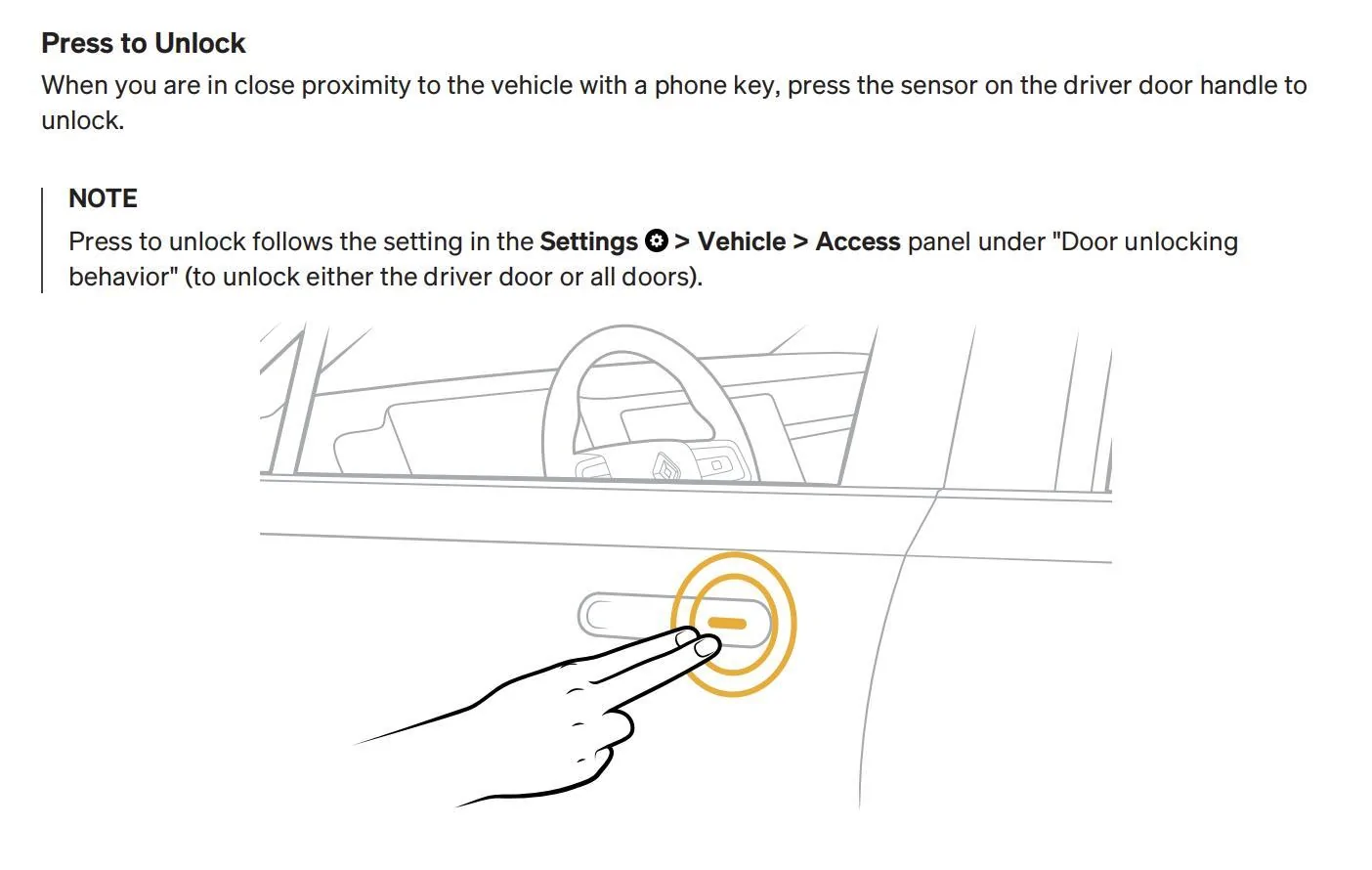
Rivian R1T R1S Gen 2 Press to Unlock, general unlocking behavior question 1730074189577-cr
 

Bobrobheimer

Well-Known Member
Joined
Aug 3, 2024
Threads
4
Messages
49
Reaction score
49
Location
Colorado
Vehicles
R1T dual gen 1
Occupation
Contractor
I have a similar issue and experience. Our other car is a model 3 and the locking/unlocking with the phone generally works well. We don’t have garage parking and the R1T when parked in the driveway will unlock when I am moving around inside the house - so even more of a problem then if it was in a garage. I have taken to turning off my Bluetooth when home but I don’t always remember. The press to unlock in the manner that the model 3 works would be so much better - especially if that function could be set to home. The Auto Unlock works fine out and about.

I also find the auto locking slightly annoying when I am doing things around the truck still - I have shut the doors but am still standing next to the truck planning to say open the gear tunnel after getting something from the bed and the truck locks. I would prefer it wait for me to get some further distance away before locking. Conversely the unlocking seems to do so when I am too far away - hence the unlocking while I am inside my house.
 

mpshizzle

Well-Known Member
Joined
Jun 16, 2024
Threads
76
Messages
1,307
Reaction score
2,179
Location
Utah
Vehicles
2025 R1S Dual Max (Baymax)
the .39 update fixed this for me and it now works GREAT

I have it set to "lock only" at home. So it just locks once and that's that. It stays quiet and asleep after that.

As of .39, the push to unlock now works at home. So I just walk out to the garage and touch the door handle and it unlocks (occasionally it will delay 5-10 seconds before unlocking)
 

Sponsored

DaveInCA

Active Member
First Name
Dave
Joined
Sep 23, 2024
Threads
0
Messages
29
Reaction score
15
Location
Burlingame, CA
Vehicles
2025 Rivian R1S with 4 Car Seats, Off-Road Package
I have also never seen this working. Missing some "hidden" setting?

1730074189577-cr.webp
Press to Unlock just started working on our Gen 2 R1S with the Halloween update. It's press to unlock only. Actually, sometimes it is hold your fingers on the sensors for 5-8 seconds to unlock. Plus, putting your fingers on the sensor again when it's open does not lock it
 
OP
OP

ExNihilo

New Member
Joined
Aug 9, 2024
Threads
1
Messages
4
Reaction score
1
Location
California
Vehicles
2025 R1S
I can confirm it now works on our Gen 2 R1S also. I tried with my Pixel and my wife's iPhone and they both work. I agree, it only requires us to touch the sensor on the handle. The customer service rep told me it needed a physical button push, but that requires alot of force and that is not correct.

Only thing is now when it unlocks with my wife's phone, the doors stay unlocked after her phone is back in the house. I have the setting to "Lock Only" at home and also the Auto-Lock after 2min enabled, but it stays unlocked for some reason. I have only driven the R1S a handful of times and not since the update, but it has never failed to lock for me at home or away with my Pixel phone.

Anyone else having trouble with the vehicle not locking with an iphone now?

Thanks everyone, glad to have this feature working now at least!
 

Boo's Rides

New Member
First Name
Phil
Joined
Feb 14, 2025
Threads
0
Messages
3
Reaction score
0
Location
Roseville, CA
Vehicles
2025 R1S Dual Max
Only thing is now when it unlocks with my wife's phone, the doors stay unlocked after her phone is back in the house. I have the setting to "Lock Only" at home and also the Auto-Lock after 2min enabled, but it stays unlocked for some reason. I have only driven the R1S a handful of times and not since the update, but it has never failed to lock for me at home or away with my Pixel phone.

Anyone else having trouble with the vehicle not locking with an iphone now?
Might the access setting need to be also set when her driving profile is enabled?
 
OP
OP

ExNihilo

New Member
Joined
Aug 9, 2024
Threads
1
Messages
4
Reaction score
1
Location
California
Vehicles
2025 R1S
Thanks for the reply. We have checked her driving profile and it is set to Lock Only at home still. I have a feeling the iPhone radio is maybe just stronger than my Pixel phone and keeps unlocking the car as we have seen that behavior outside our home, though Lock Only should mean it would not unlock when parked at home. Every so often, I catch that the doors are unlocked at home for no good reason. I have given up on figuring it out and hope it will be fixed in a future software update.
Sponsored


Top