

mkhuffman
Well-Known Member
- Thread starter
- #1
If you are experiencing PaaK issues since the last two OTA updates, maybe this will fix it for you.
For me, the PaaK failures were intermittent. It seemed like if the truck went to sleep, which it does pretty quickly now, it was worse. I discovered that using the unlock button on the app sometimes would fix it, sometimes not. At home where I rarely lock the truck, I would get in and get "no key detected". The only reliable way to get the truck to start was to place the phone on the left charging pad. Opening and closing the app did nothing. But the NFC reader worked.
Then I decided to check the phone's settings for the wallet and noticed that there were limited permissions allowed and the battery setting was on "Optimized". I changed those settings and have been using PaaK for three weeks now with ZERO issues. This has definitely fixed the problem for me.
My phone is a Samsung S25 Ultra, but I suspect Apple phones have similar settings.
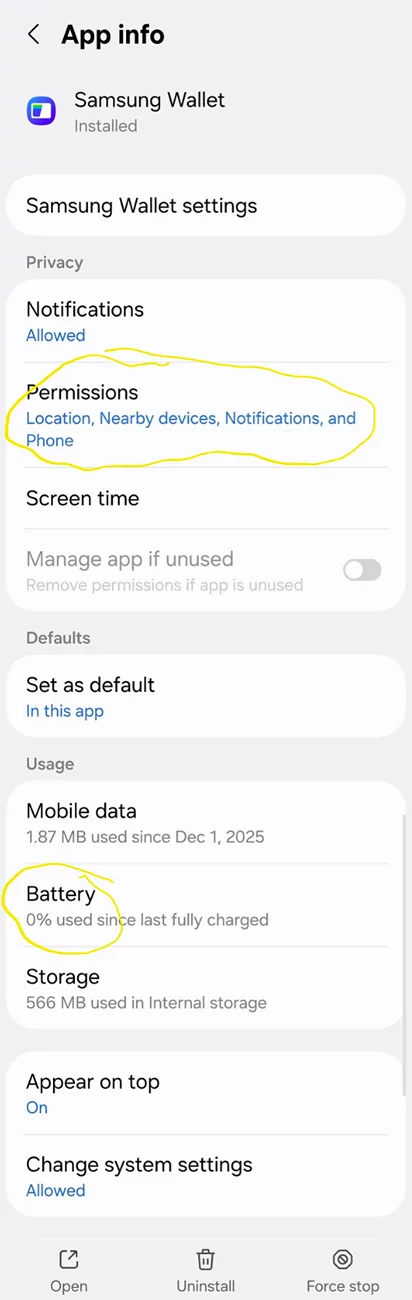
You need to check the settings on the wallet app, not the settings on the Rivian key which is saved in the app. Make sure your settings are like those shown below, and I bet your PaaK issues will be fixed.


I think the one setting that matters is setting the wallet app battery management to "Unrestricted". My wallet app was set to "Optimized", and I am pretty sure my phone was putting the wallet to sleep. As it is sleeping, it is not interacting with Bluetooth and not available for PaaK. At least that is my theory.
The other settings that I added were in the permissions. I added "Location" and "Nearby devices" to the permissions list. Did that help anything? I am not sure, but now that PaaK is working, I am not removing those permissions. It seems logical that those permissions would be needed, so I am leaving them there.
Let me know if this helps you or not. Especially iPhone users.
For me, the PaaK failures were intermittent. It seemed like if the truck went to sleep, which it does pretty quickly now, it was worse. I discovered that using the unlock button on the app sometimes would fix it, sometimes not. At home where I rarely lock the truck, I would get in and get "no key detected". The only reliable way to get the truck to start was to place the phone on the left charging pad. Opening and closing the app did nothing. But the NFC reader worked.
Then I decided to check the phone's settings for the wallet and noticed that there were limited permissions allowed and the battery setting was on "Optimized". I changed those settings and have been using PaaK for three weeks now with ZERO issues. This has definitely fixed the problem for me.
My phone is a Samsung S25 Ultra, but I suspect Apple phones have similar settings.
You need to check the settings on the wallet app, not the settings on the Rivian key which is saved in the app. Make sure your settings are like those shown below, and I bet your PaaK issues will be fixed.
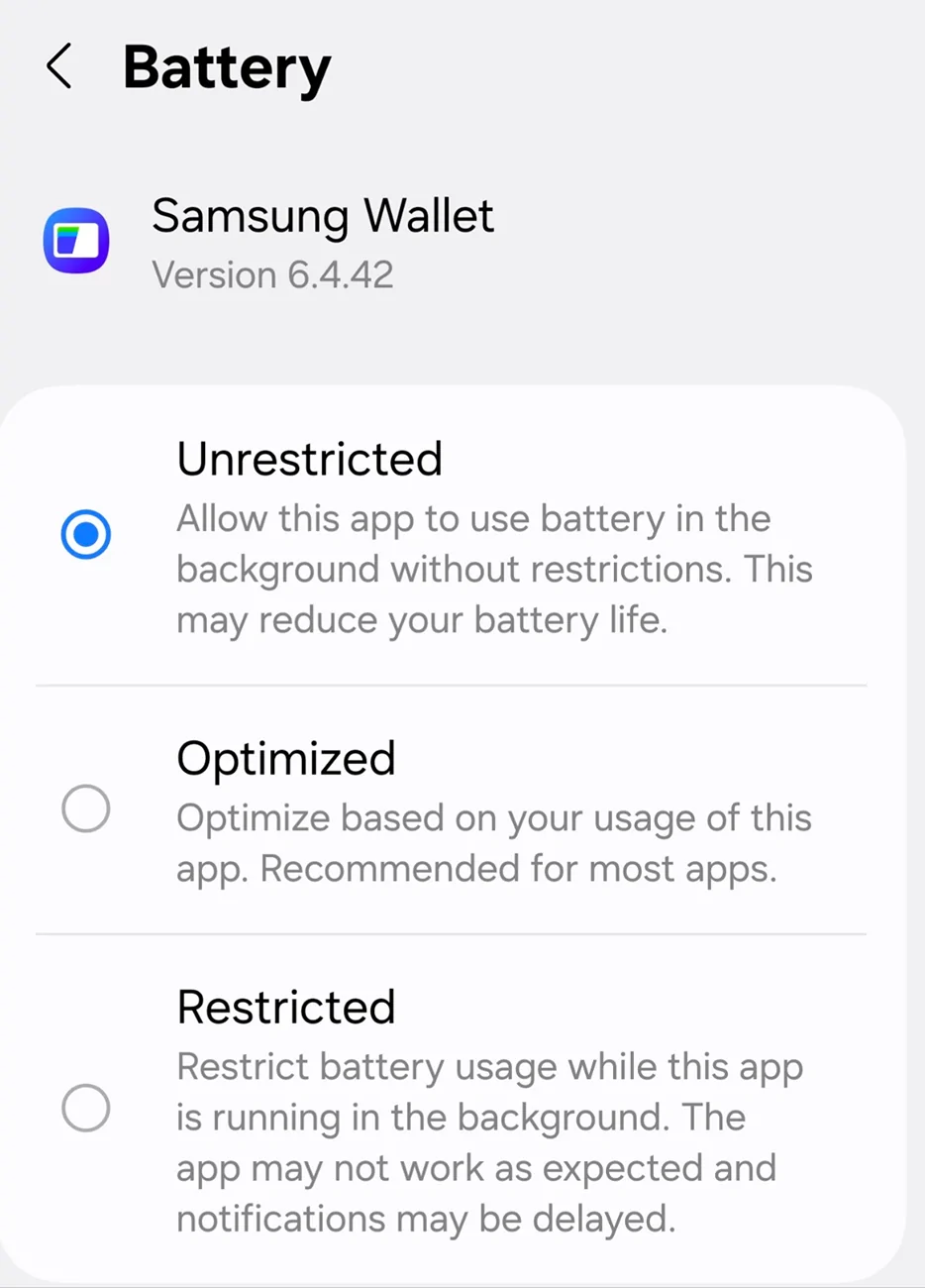
I think the one setting that matters is setting the wallet app battery management to "Unrestricted". My wallet app was set to "Optimized", and I am pretty sure my phone was putting the wallet to sleep. As it is sleeping, it is not interacting with Bluetooth and not available for PaaK. At least that is my theory.
The other settings that I added were in the permissions. I added "Location" and "Nearby devices" to the permissions list. Did that help anything? I am not sure, but now that PaaK is working, I am not removing those permissions. It seems logical that those permissions would be needed, so I am leaving them there.
Let me know if this helps you or not. Especially iPhone users.
Sponsored


 ) I could not find any power or permission settings on the wallet app on her iPhone.


