
TOM_S
New Member
All my texts with iPhones work flawlessly. But with Android I can only send, not receive. This must be a bug somewhere in the Rivian software
Sponsored

I’m not an Android user but I experienced this with my iPhone. Check the Bluetooth connection on your phone to ensure “Rivian audio” has messages enabled.Android phone, text messages show up on the phone screen but no notification when they arrive and they are not displayed when received.
Bluetooth Rivian Audio, text messages is enabled. Meessages appear if I open the Phone screen but I get no notificationa and no ability to view or respond to the nessage when received.I’m not an Android user but I experienced this with my iPhone. Check the Bluetooth connection on your phone to ensure “Rivian audio” has messages enabled.

The next time you receive a text message on your phone, or have someone send you a test, don’t read it, instead ask Rivian Assistant to read your unread messages. Have you tried this yet?Bluetooth Rivian Audio, text messages is enabled. Meessages appear if I open the Phone screen but I get no notificationa and no ability to view or respond to the nessage when received.
That worked! I heard my phone ding with an incoming message and I asked "hey Rivian" to read it to me. Sure enough, it read it and offerred to send a reply. Still don't quite understand why Rivian doesn't alert when there's an incoming text but now at least I have a way to hear the message as long as I notice the "ding" from the phone.The next time you receive a text message on your phone, or have someone send you a test, don’t read it, instead ask Rivian Assistant to read your unread messages. Have you tried this yet?
OK, great so this confirms messages are being received in the vehicle. I believe the lack of notification is due to the low volume for Rivian Assistant notifications.That worked! I heard my phone ding with an incoming message and I asked "hey Rivian" to read it to me. Sure enough, it read it and offerred to send a reply. Still don't quite understand why Rivian doesn't alert when there's an incoming text but now at least I have a way to hear the message as long as I notice the "ding" from the phone.

When you say "everything turned on as shown" does it look like the photo below when you go into the bluetooth settings for your vehicle on your phone? I have a pixel 10 and am not having any trouble with this. Additionally, there are some settings in Rivian Assistant in the car itself to turn on notification sounds, have you played with those?I have an Android and have yet to get any text message notifications. I got everything turned on as shown, yet new texts only come in on my phone. I can SEND hands-free texts via "Hey Rivian" process but not much else.
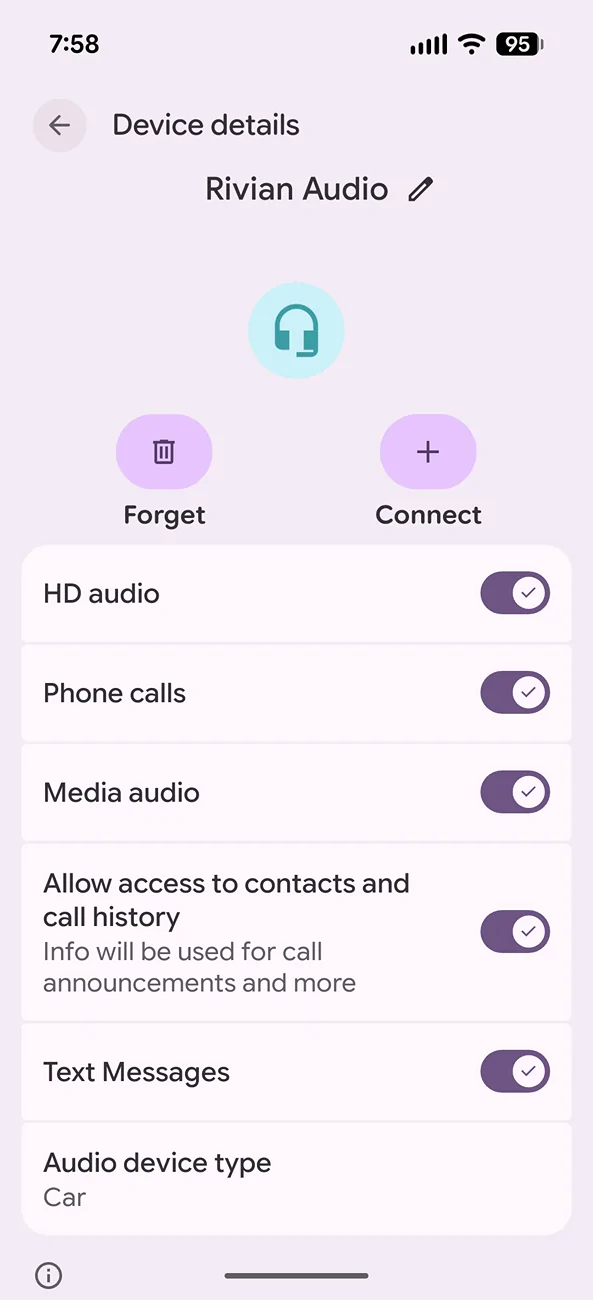
Did you try this —-I have an Android and have yet to get any text message notifications. I got everything turned on as shown, yet new texts only come in on my phone. I can SEND hands-free texts via "Hey Rivian" process but not much else.

Sat in the vehicle and sent myself text messages until I understood what was happening. The volume on Rivian assistant voice is plenty loud but the notification on receiving the text is so soft I can barely hear it. I was looking in the wrong place for the visual notification, I see it now on the bottom left of the driver screen. Disappears pretty quick. Anyway, thanks for the help.When you say "everything turned on as shown" does it look like the photo below when you go into the bluetooth settings for your vehicle on your phone? I have a pixel 10 and am not having any trouble with this. Additionally, there are some settings in Rivian Assistant in the car itself to turn on notification sounds, have you played with those?


