
Sponsored

OP
OP

Ravenron
Well-Known Member
- Thread starter
- #32
Good morning Capt...pretty much same behavior with my S23 Ultra. Best approach I've found so far (as recommended by Rivian) is to cycle the phone to "Airplane" mode on, then "Airplane" mode off. This results in the truck immediately recognizing PAAK and I can proceed normally, usually for rest of the day. Cycling Airplane mode is much quicker than a full restart and I'm still hopeful that future updates on both the phone and the truck will improve the situation further.So it's been almost a month since any updates on here about the S23 PAAK. Is it still iffy?
I have an S20 Ultra 5G running Android 13 that's be working fine for PAAK, but the USB-C port is worn and is non-functional, so wireless charging only. With a lot of international travel coming up, I figure I'll upgrade my phone to either an iPhone 14 Pro Max or an S23 Ultra very soon.
From what I've read online, Android 13 on the S23 is a problem for most vehicles that offer PAAK, not just Rivian. Also, the iPhone 14s seem to work just fine as PAAk. I'm not a "never Apple" user (2 iPads, 2 MacBooks, a Mac Pro, a Mac Studio and 4 Windows PCs....yeah, lots of hardware for the office, home and shop.) I'd like to stick with Android, but if there's still a problem with S23s and PAAK, I'll take a pass.
So what's the word? Any improvement on functionality with the S23 running Android 13?
I thought about swapping to the iPhone 14 but it's not bothering me enough now to learn another phone's "ecosystem". It's not perfect but doable for me at this time. Good luck!

CaptRat
Well-Known Member
- First Name
- James
- Joined
- Jun 12, 2022
- Threads
- 2
- Messages
- 118
- Reaction score
- 87
- Location
- Georgia, USA
- Vehicles
- Rivian R1T, Chevrolet Corvette, Cadillac CTS
- Occupation
- Retired
Thanks for the reply and the info. ?Good morning Capt...pretty much same behavior with my S23 Ultra. Best approach I've found so far (as recommended by Rivian) is to cycle the phone to "Airplane" mode on, then "Airplane" mode off. This results in the truck immediately recognizing PAAK and I can proceed normally, usually for rest of the day. Cycling Airplane mode is much quicker than a full restart and I'm still hopeful that future updates on both the phone and the truck will improve the situation further.
I thought about swapping to the iPhone 14 but it's not bothering me enough now to learn another phone's "ecosystem". It's not perfect but doable for me at this time. Good luck!
I could live with cycling to "Airplane Mode" every day. But, OTOH, the Android 14 Beta dropped in April to some Mach-E owners with Pixel phones and they're reporting the same problems that they had with Android 13. Also, they have to jump through the same hoops to get it to work for (maybe) a few hours.
Supposedly Google rolled out fixes for Pixel phones a few months ago. But if they did, they broke it again with Android 14. The release is only a Beta, but still, that's not a good omen for having the problem resolved s00nish.
I'm actually surprised that PAAK works fine on my Android 13 S20 Ultra 5G.
Deadfish
Active Member
- First Name
- Erik
- Joined
- Apr 21, 2023
- Threads
- 5
- Messages
- 34
- Reaction score
- 23
- Location
- Vancouver BC
- Vehicles
- 2023 - R1S
- Occupation
- Computer Consultant
So I upgraded my S20 FE to a S23 - PAAK works - but still not great. I think there might be Bluetooth sensor issues. I'm going to start a new thread with details on how to test the Bluetooth with an app on your phone and see if people with it working well have different values.
gregtay
Well-Known Member
- First Name
- Greg
- Joined
- May 24, 2023
- Threads
- 6
- Messages
- 212
- Reaction score
- 301
- Location
- Redmond, WA -> Scottsdale AZ
- Vehicles
- '23 R1S LS/OC, '21 Escalade, '13 RS5 Cab
Did you add the Rivian app to the "never sleeping apps" list?Good morning Capt...pretty much same behavior with my S23 Ultra. Best approach I've found so far (as recommended by Rivian) is to cycle the phone to "Airplane" mode on, then "Airplane" mode off. This results in the truck immediately recognizing PAAK and I can proceed normally, usually for rest of the day. Cycling Airplane mode is much quicker than a full restart and I'm still hopeful that future updates on both the phone and the truck will improve the situation further.
I thought about swapping to the iPhone 14 but it's not bothering me enough now to learn another phone's "ecosystem". It's not perfect but doable for me at this time. Good luck!
Sponsored

MoreTrout
Well-Known Member
So I just got a new Pixel 7A a couple of weeks ago. Not because I wanted or needed a new phone, but because Rivian/Android decided it was better for my flawless Galaxy Note 8 to make a premature visit to the ewaste pile by banning it from using the app at all. That Note 8 also worked flawlessly with the wireless charger. And now I'm stuck relying on the FOB, which I actually don't mind that much since I always take it with me anyway.
After a couple of uninstalls and reinstalls of the app and failed pairing attempts, I randomly turned the bluetooth off for a second and turned it back on, and it pretty immediately recognized it as a key again. And of course the next time I took only the phone to the truck the same failure happened again, and one bluetooth cycle fixed it again. This might be accomplishing the same thing as the airplane mode trick. Hopefully this will continue as a workaround until they figure out a definitive fix.
As for the wireless charging, I haven't put a case on the new phone yet. It will wirelessly charge, but will slide with the slightest force while driving so not that great. A case with decent grip should help that a little.
After a couple of uninstalls and reinstalls of the app and failed pairing attempts, I randomly turned the bluetooth off for a second and turned it back on, and it pretty immediately recognized it as a key again. And of course the next time I took only the phone to the truck the same failure happened again, and one bluetooth cycle fixed it again. This might be accomplishing the same thing as the airplane mode trick. Hopefully this will continue as a workaround until they figure out a definitive fix.
As for the wireless charging, I haven't put a case on the new phone yet. It will wirelessly charge, but will slide with the slightest force while driving so not that great. A case with decent grip should help that a little.
CaptRat
Well-Known Member
- First Name
- James
- Joined
- Jun 12, 2022
- Threads
- 2
- Messages
- 118
- Reaction score
- 87
- Location
- Georgia, USA
- Vehicles
- Rivian R1T, Chevrolet Corvette, Cadillac CTS
- Occupation
- Retired
I didn't want to add to the ewaste pile either, especially since PAAK works with my S20 Ultra. I've had marginal luck getting phones repaired (except for screens) but decided to get the USB charge port on my S20 repaired instead of replacing the phone and incurring PAAK problems. Found a uBreakiFix shop near me and they had the phone repaired in about 45 minutes. So far so good...and bonus.... PAAK still works!So I just got a new Pixel 7A a couple of weeks ago. Not because I wanted or needed a new phone, but because Rivian/Android decided it was better for my flawless Galaxy Note 8 to make a premature visit to the ewaste pile by banning it from using the app at all. That Note 8 also worked flawlessly with the wireless charger. And now I'm stuck relying on the FOB, which I actually don't mind that much since I always take it with me anyway.
After a couple of uninstalls and reinstalls of the app and failed pairing attempts, I randomly turned the bluetooth off for a second and turned it back on, and it pretty immediately recognized it as a key again. And of course the next time I took only the phone to the truck the same failure happened again, and one bluetooth cycle fixed it again. This might be accomplishing the same thing as the airplane mode trick. Hopefully this will continue as a workaround until they figure out a definitive fix.
As for the wireless charging, I haven't put a case on the new phone yet. It will wirelessly charge, but will slide with the slightest force while driving so not that great. A case with decent grip should help that a little.
I added my wife's iPhone 13 and it also seems to be working ok.
gregtay
Well-Known Member
- First Name
- Greg
- Joined
- May 24, 2023
- Threads
- 6
- Messages
- 212
- Reaction score
- 301
- Location
- Redmond, WA -> Scottsdale AZ
- Vehicles
- '23 R1S LS/OC, '21 Escalade, '13 RS5 Cab
Can someone either post or DM me the details on the issues people are experiencing with Galaxy phones and PAAK. I might be able pass this along to the correct team at Samsung so they can explore the issue a bit.
OP
OP
Ravenron
Well-Known Member
- Thread starter
- #39
Hey Greg, sorry the delayed post. I tried to add the app to the “never sleeping” status but that option doesn’t exist on my S23…apparently Samsung took that functionality away…or at least the ability to set it specifically.Did you add the Rivian app to the "never sleeping apps" list?
As far as functionality, my truck has been at the body shop for the last four weeks getting a minor ding repaired so I haven’t gotten to check lately. Also, my work has decided to ban all cell phones from the building so I have to leave the phone in the truck now. I suppose I’ll turn BT off in order to be able to lock the doors and use the fob to come and go so PAAK functionality will be marginalized a bit. Really glad I have the fob option now.
Regardless, I’ll update on how it’s working when I get the truck back…s00n…
gregtay
Well-Known Member
- First Name
- Greg
- Joined
- May 24, 2023
- Threads
- 6
- Messages
- 212
- Reaction score
- 301
- Location
- Redmond, WA -> Scottsdale AZ
- Vehicles
- '23 R1S LS/OC, '21 Escalade, '13 RS5 Cab
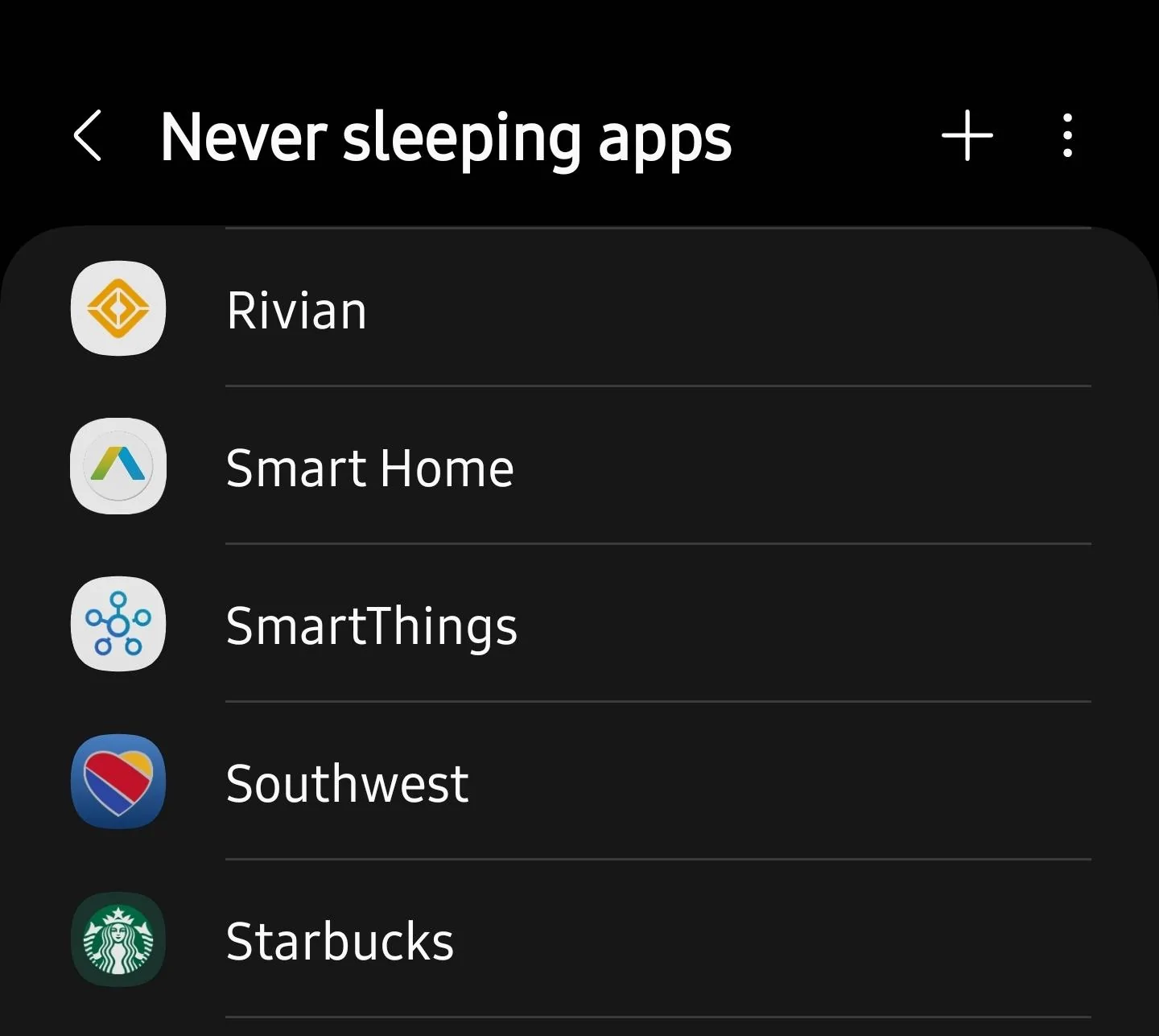
Deep sleeping apps should be in the menu of an S23 (this is from my S23 Ultra).Hey Greg, sorry the delayed post. I tried to add the app to the “never sleeping” status but that option doesn’t exist on my S23…apparently Samsung took that functionality away…or at least the ability to set it specifically.
As far as functionality, my truck has been at the body shop for the last four weeks getting a minor ding repaired so I haven’t gotten to check lately. Also, my work has decided to ban all cell phones from the building so I have to leave the phone in the truck now. I suppose I’ll turn BT off in order to be able to lock the doors and use the fob to come and go so PAAK functionality will be marginalized a bit. Really glad I have the fob option now.
Regardless, I’ll update on how it’s working when I get the truck back…s00n…
Geeeee... I wish my work would ban all cellphones! That would be awesome!!.. then no one would be able to bother me ?.
Sponsored
OP
OP
Ravenron
Well-Known Member
- Thread starter
- #41
Interesting…I searched for “Never Sleeping Apps” and found the screen you show above but when I scroll down for the “Rivian App”, it’s not there. The app is open on my phone but isn’t an option to select for “Never Sleeping”. Not sure what I’m doing wrong…Deep sleeping apps should be in the menu of an S23 (this is from my S23 Ultra).
Geeeee... I wish my work would ban all cellphones! That would be awesome!!.. then no one would be able to bother me ?.

gregtay
Well-Known Member
- First Name
- Greg
- Joined
- May 24, 2023
- Threads
- 6
- Messages
- 212
- Reaction score
- 301
- Location
- Redmond, WA -> Scottsdale AZ
- Vehicles
- '23 R1S LS/OC, '21 Escalade, '13 RS5 Cab
Hit the + symbol, then search for it and select it. That should add it to never sleeping apps.Interesting…I searched for “Never Sleeping Apps” and found the screen you show above but when I scroll down for the “Rivian App”, it’s not there. The app is open on my phone but isn’t an option to select for “Never Sleeping”. Not sure what I’m doing wrong…
Deadfish
Active Member
- First Name
- Erik
- Joined
- Apr 21, 2023
- Threads
- 5
- Messages
- 34
- Reaction score
- 23
- Location
- Vancouver BC
- Vehicles
- 2023 - R1S
- Occupation
- Computer Consultant
I can't add the app on my s23 either. I wonder if it's auto added / can't be removed so not in the list? My S23 is 1 week old - all the lastest software.
vista1984
Well-Known Member
- First Name
- Wan
- Joined
- Jul 26, 2022
- Threads
- 1
- Messages
- 124
- Reaction score
- 81
- Location
- Los Angeles
- Vehicles
- R1S
I followed the step below, then I could add the app to never sleep list.I can't add the app on my s23 either. I wonder if it's auto added / can't be removed so not in the list? My S23 is 1 week old - all the lastest software.
not sure how it helps but will give it a try.
https://forum.developer.samsung.com/t/unable-to-add-app-to-never-sleeping-apps-list/11663/16
" previously set the app to "unrestricted’ in app info > battery. I changed it back to “Optimized” and then it showed in the list again. "
Sponsored
Similar threads

- Replies
- 15
- Views
- 1,801

- Replies
- 38
- Views
- 3,725

