Sponsored

PaaK - Unable to (re)set-up

AO_Pete

Well-Known Member
Site Sponsor
First Name
Pete
Joined
Sep 28, 2019
Threads
22
Messages
412
Reaction score
578
Location
DFW, US
Vehicles
R1T, CT, Model 3 Refresh
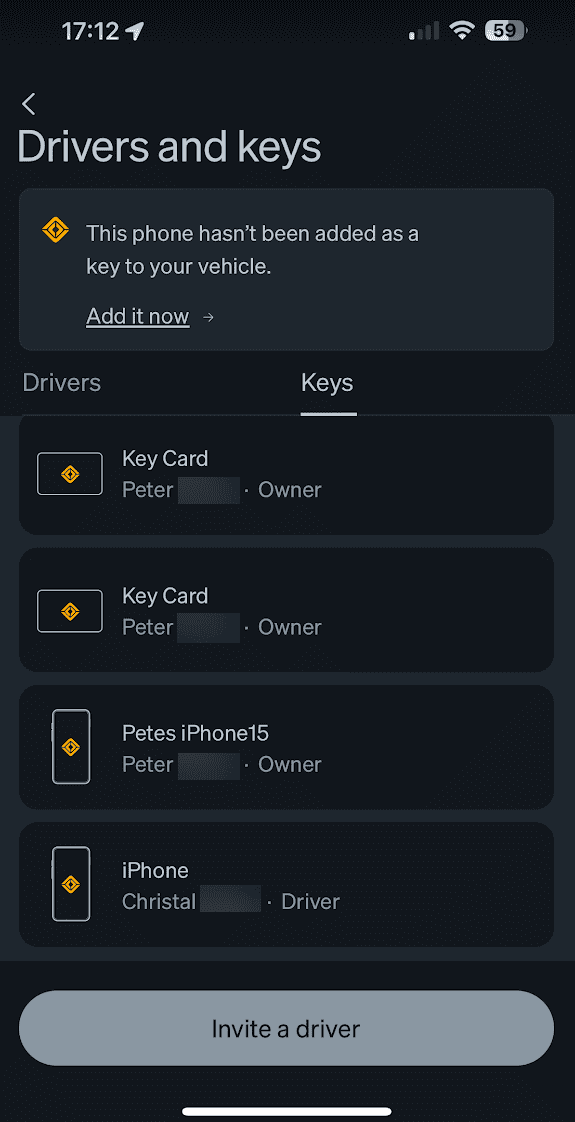
So for some reason, my Rivian app lost it's ability to act as a key. My wife's still works, we both have the same phone (15 Pro Max) and IOS version (17.2), so assume it's not a phone issue. I've tried all the usual troubleshooting (removed Rivian key from bluetooth, deleted and re-added the app, rebooted car etc etc), but no matter what I do, I cannot get the PaaK set-up process to start, either automatically, or manually by going into Settings/Drivers and Keys.

Any other ideas?
Sponsored


treyrich2001

Member
Joined
Oct 11, 2023
Threads
3
Messages
24
Reaction score
9
Location
Orange County, CA
Vehicles
R1S
I had a similar issue and realized I was only trying it while plugged in. I unplugged the vehicle from my wall charger and it setup right away. Definitely could have been a coincidence, but if you're trying while plugged in try unplugging it before setting up and see if that fixes it?
 
OP
OP
AO_Pete

AO_Pete

Well-Known Member
Site Sponsor
First Name
Pete
Joined
Sep 28, 2019
Threads
22
Messages
412
Reaction score
578
Location
DFW, US
Vehicles
R1T, CT, Model 3 Refresh
I had a similar issue and realized I was only trying it while plugged in. I unplugged the vehicle from my wall charger and it setup right away. Definitely could have been a coincidence, but if you're trying while plugged in try unplugging it before setting up and see if that fixes it?
Good theory, but no, I've tried plugged/unplugged, and on and off wifi.
 

Si.LE.R1S

Well-Known Member
First Name
Chad
Joined
Mar 31, 2023
Threads
10
Messages
156
Reaction score
243
Location
Las Vegas
Vehicles
‘23 R1S Launch Edition, ‘20 eTron Chronos Edition
Clubs
 
Sorry if this is redundant, but did you go into the app and remove the phone as a key, and then forget all Rivian Bluetooth sensors on the phone (car audio, 4 prox sensors, and camp speaker)? I had to do this a couple times when I setup my new phone (15 pro max). I think the car was still “looking” for my old phone that had the same name.
 

mkg3

Well-Known Member
Joined
Nov 19, 2021
Threads
91
Messages
2,805
Reaction score
3,734
Location
SoCal
Vehicles
R1S, Model 3, Outback, Artura
Clubs
 
When I switched from old to new iPhone, I had a problem but not once set up. Since your phone was working prior to something happening, perhaps it is the iPhone.

Have you tried hard restart on the iPhone (up volume, down volume, then hold onto the on/off button on the right until Apple logo shows up)? Sounds like you've everything else, including the hard restart on Rivaian.
 

Sponsored

OP
OP
AO_Pete

AO_Pete

Well-Known Member
Site Sponsor
First Name
Pete
Joined
Sep 28, 2019
Threads
22
Messages
412
Reaction score
578
Location
DFW, US
Vehicles
R1T, CT, Model 3 Refresh
Sorry if this is redundant, but did you go into the app and remove the phone as a key, and then forget all Rivian Bluetooth sensors on the phone (car audio, 4 prox sensors, and camp speaker)? I had to do this a couple times when I setup my new phone (15 pro max). I think the car was still “looking” for my old phone that had the same name.
I did remove the phone as a key from Bluetooth, and of course the app was asking to be paired, so it was 'gone', logically, but as it turns out, the phone was still hanging out here:

Rivian R1T R1S PaaK - Unable to (re)set-up 1702510471547


After I deleted that entry (just tap it, don't press and hold or swipe, both of which I tried first), you can delete it from the app. Then I hit the Add it now at the top of the same screen. This resulted in a pairing error on the center screen, but the second time it worked.

So if anyone makes it to this post from a Google search, be sure to delete the PaaK from Bluetooth, and the app.
 
  • Like
Reactions: VSG

Sean4510

Member
First Name
Sean
Joined
May 14, 2023
Threads
0
Messages
7
Reaction score
0
Location
Boston
Vehicles
R1T
So for some reason, my Rivian app lost it's ability to act as a key. My wife's still works, we both have the same phone (15 Pro Max) and IOS version (17.2), so assume it's not a phone issue. I've tried all the usual troubleshooting (removed Rivian key from bluetooth, deleted and re-added the app, rebooted car etc etc), but no matter what I do, I cannot get the PaaK set-up process to start, either automatically, or manually by going into Settings/Drivers and Keys.

Any other ideas?
Having the same issue now and I have the iPhone 15 Pro. After the latest update (2024.27.30) my PAAK was very spotty and I frequently saw the "no cloud connection" message in the app. It was a pain in the ass to get the vehicle to unlock and sometimes it just wouldnt recognize the key so I couldnt drive without the fob. I tried everything you mentioned after contacting service and the truck & phone just dont seem to want to pair. The bizarre thing is the truck DOES seem to recognize my phone as a key now because I can drive with just my phone, but the app still says "Set up your phone as a key - Get started" and my R1T never successfully went through the PAAK set up process either. On the Rivian screen it just said "waiting for Sean's iPhone 15 Pro" in a continuous loop (never got a prompt on my phone any time I tried) so I just aborted that process..

I'm assuming it has something to do with the latest software update..
 

Sgamer

Member
First Name
Steve
Joined
Apr 15, 2024
Threads
7
Messages
18
Reaction score
14
Location
Los Angeles
Vehicles
R1S
Occupation
Development
I have the same issue with the key not being found - even though I can see it listed. Software is crummy on several fronts
Sponsored


Top