Sponsored

Wall Charger Wiring

justinalanbuckley

New Member
First Name
Justin
Joined
Sep 16, 2024
Threads
2
Messages
4
Reaction score
0
Location
Asheville, NC
Vehicles
R1T
Occupation
IT
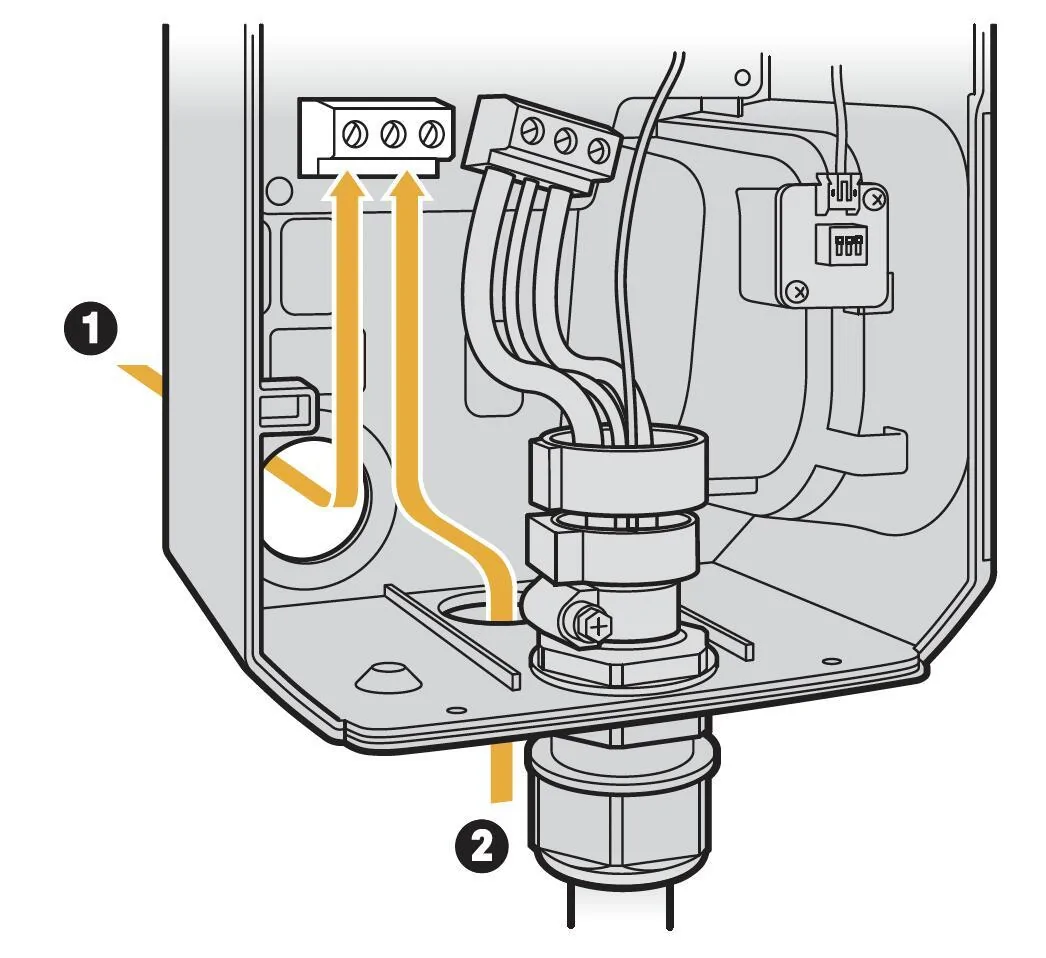
Hello all. First post here - recently picked up a 2022 R1T Launch Edition that came with the Rivian Wall Charger. However, the charging cable was disconnected from the box and I'm trying to verify how it would have been originally wired. The instructions show all the conductors from the charging cable passing through the 2 black circular devices that I assume measure the current being drawn when charging (see image below). However they are far too small for that. Also when looking around online at other tutorials, it appears that maybe only the red and black pass through these?

Can anyone confirm for me exactly which conductors are suppose to be fed through these loops? Note that one of them has mounting tabs and the other does not (however I don't any place to mount the one with tabs).

Thanks in advance!
Rivian R1T R1S Wall Charger Wiring Screenshot 2024-09-16 at 5.07.59 PM
Sponsored


redantpile

Well-Known Member
First Name
Chris
Joined
May 10, 2020
Threads
8
Messages
173
Reaction score
200
Location
allen, tx
Vehicles
2018 EDGE, 2023 R1S red adventure 20"
Occupation
Retired telephone engineer
Clubs
 
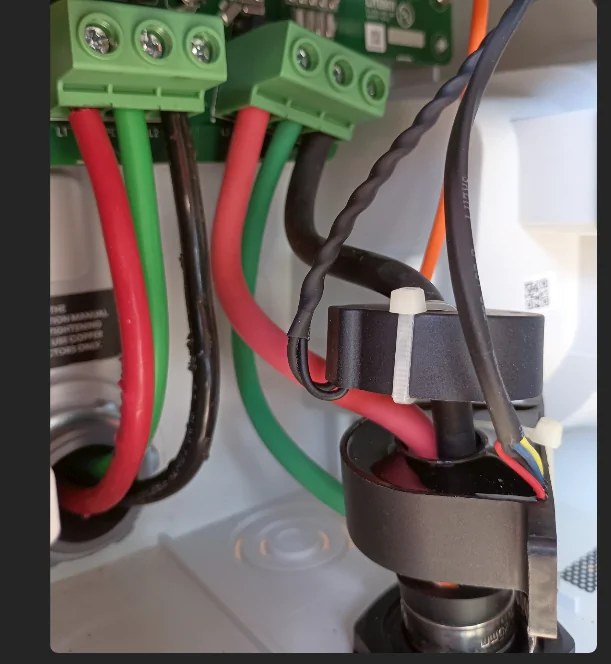
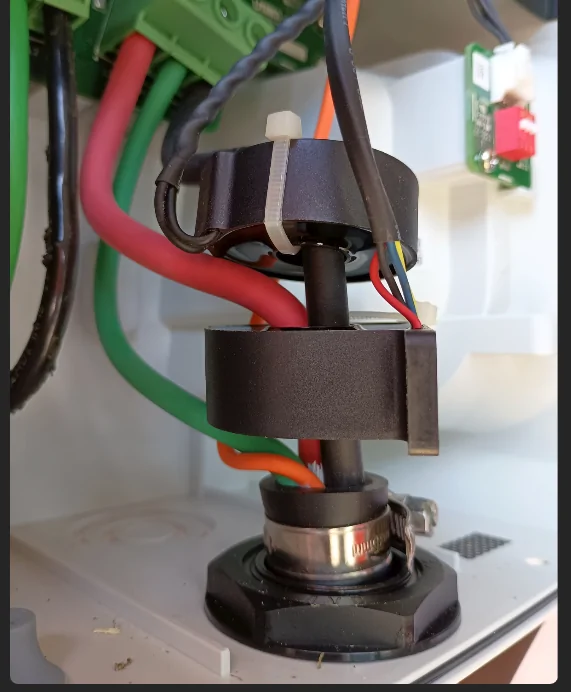
Here is how mine was set up.


Rivian R1T R1S Wall Charger Wiring 1726523020771-f8

Rivian R1T R1S Wall Charger Wiring 1726523067647-r3
 
OP
OP

justinalanbuckley

New Member
First Name
Justin
Joined
Sep 16, 2024
Threads
2
Messages
4
Reaction score
0
Location
Asheville, NC
Vehicles
R1T
Occupation
IT
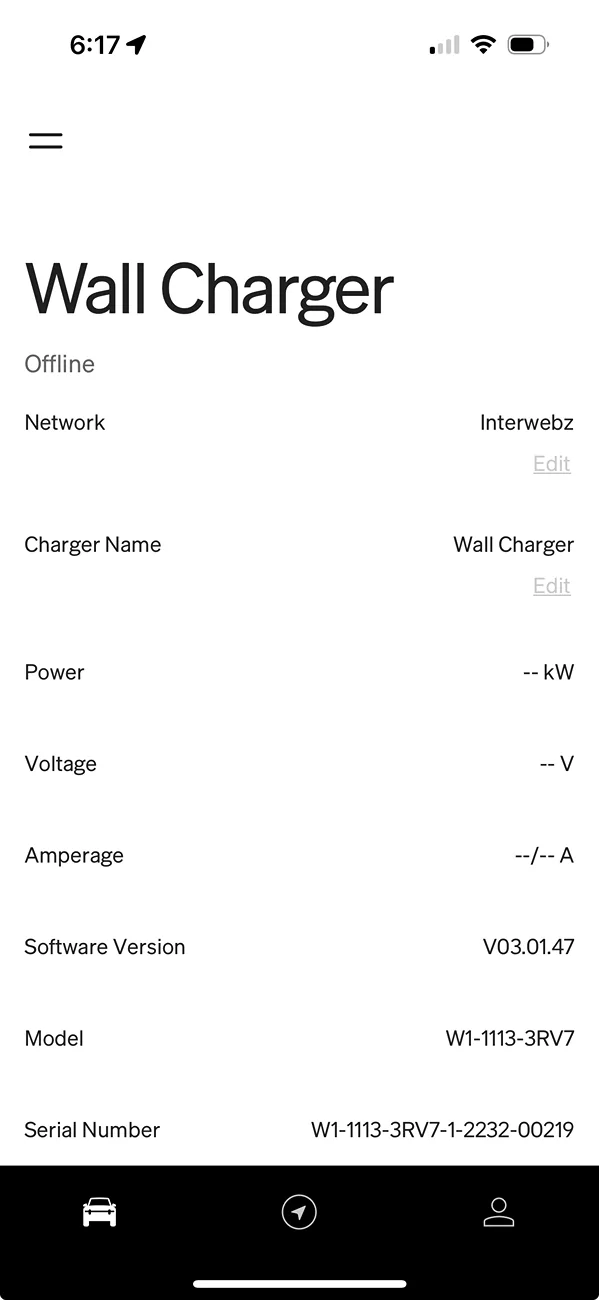
Perfect - thank you! Looks like I got it right. Out of curiosity, when you pull up the charger in your phone app, does it show the Power/Voltage/Amperage readings? Mine doesn't seem to:
Rivian R1T R1S Wall Charger Wiring 1726525075795-gq
 

redantpile

Well-Known Member
First Name
Chris
Joined
May 10, 2020
Threads
8
Messages
173
Reaction score
200
Location
allen, tx
Vehicles
2018 EDGE, 2023 R1S red adventure 20"
Occupation
Retired telephone engineer
Clubs
 
Yes mine is showing that info. I'm using Android and the firmware for the charger is v03.04.12. Same model as yours. Seems like it took a while (weeks/month) for my firmware to update compared to others on the forum.
 

DeafPug

Well-Known Member
Joined
Oct 20, 2021
Threads
6
Messages
566
Reaction score
843
Location
Kansas
Vehicles
'18 Model 3, '22 R1T
That's too bad the drawing isn't accurate. The key thing they are trying to show is how to route the power input wires, but the other items should be accurate to avoid confusion.

Passing one of the large conductors through the top CT (Current Transformer) in the pictures above let the wall connector sense how much current is flowing to the vehicle. It does this to be able to read the instantaneous power (needs both voltage and amperage to calculate that) and also possibly track per-session and lifetime kWh that flowed through the wall connector.

The larger CT that has both conductors running through it is for implementing a GFCI (Ground Fault Circuit Interruptor). This will stop all electricity flow if the electricity flow to/from the vehicle is not perfectly balanced. This will shutdown charging if there is current leaking from the vehicle to ground, which protects you from becoming a conductor and having electricity pass through your body.

The extra wires leading to the lower CT in the pictures are there for the EVSE to do a test of the GFCI CT and verify it's functioning properly. This has a wire wrapped through the CT which it can send a small current through and then attempt to detect that current with the CT. If this isn't detected, it knows this critical safety feature isn't working properly.

The build guides for the OpenEVSE hardware show a similar setup for the CTs. The orange wire wrapped around the lower CT is the same GFCI test wire as described above. https://openevse.dozuki.com/Guide/Current+-+v5.5-v5.6+OpenEVSE+Advanced/26?lang=en#s161
 

Sponsored

godfodder0901

Well-Known Member
First Name
Jared
Joined
Mar 12, 2019
Threads
27
Messages
5,756
Reaction score
10,140
Location
Washington
Vehicles
2022 Rivian R1T LE
Perfect - thank you! Looks like I got it right. Out of curiosity, when you pull up the charger in your phone app, does it show the Power/Voltage/Amperage readings? Mine doesn't seem to:
1726525075795-gq.png
Mine only shows this when actively charging.
 

Gman

Well-Known Member
First Name
Garth
Joined
Jan 20, 2023
Threads
2
Messages
172
Reaction score
92
Location
Hanalei
Vehicles
Porsche Cayenne, Toyota Landcruiser, Toyota Tacoma
Occupation
Open Ocean Swimmer
Hello all. First post here - recently picked up a 2022 R1T Launch Edition that came with the Rivian Wall Charger. However, the charging cable was disconnected from the box and I'm trying to verify how it would have been originally wired. The instructions show all the conductors from the charging cable passing through the 2 black circular devices that I assume measure the current being drawn when charging (see image below). However they are far too small for that. Also when looking around online at other tutorials, it appears that maybe only the red and black pass through these?

Can anyone confirm for me exactly which conductors are suppose to be fed through these loops? Note that one of them has mounting tabs and the other does not (however I don't any place to mount the one with tabs).

Thanks in advance!
Screenshot 2024-09-16 at 5.07.59 PM.jpg
I think it is good practice and suggest you use torque screw driver for proper installation of screw/wire.
 

R1Thor

Well-Known Member
First Name
Joe
Joined
Aug 9, 2023
Threads
8
Messages
1,536
Reaction score
2,421
Location
Lancaster, PA
Vehicles
23QM R1T, Limestone + Ocean Coast, 21" & UBS
Occupation
Mechanical Engineering Lead
Clubs
 

godfodder0901

Well-Known Member
First Name
Jared
Joined
Mar 12, 2019
Threads
27
Messages
5,756
Reaction score
10,140
Location
Washington
Vehicles
2022 Rivian R1T LE
That's correct.
You cannot measure amperage when current isn't flowing.
But you can measure voltage, which isn't displayed either.
 
OP
OP

justinalanbuckley

New Member
First Name
Justin
Joined
Sep 16, 2024
Threads
2
Messages
4
Reaction score
0
Location
Asheville, NC
Vehicles
R1T
Occupation
IT
That's too bad the drawing isn't accurate. The key thing they are trying to show is how to route the power input wires, but the other items should be accurate to avoid confusion.

Passing one of the large conductors through the top CT (Current Transformer) in the pictures above let the wall connector sense how much current is flowing to the vehicle. It does this to be able to read the instantaneous power (needs both voltage and amperage to calculate that) and also possibly track per-session and lifetime kWh that flowed through the wall connector.

The larger CT that has both conductors running through it is for implementing a GFCI (Ground Fault Circuit Interruptor). This will stop all electricity flow if the electricity flow to/from the vehicle is not perfectly balanced. This will shutdown charging if there is current leaking from the vehicle to ground, which protects you from becoming a conductor and having electricity pass through your body.

The extra wires leading to the lower CT in the pictures are there for the EVSE to do a test of the GFCI CT and verify it's functioning properly. This has a wire wrapped through the CT which it can send a small current through and then attempt to detect that current with the CT. If this isn't detected, it knows this critical safety feature isn't working properly.

The build guides for the OpenEVSE hardware show a similar setup for the CTs. The orange wire wrapped around the lower CT is the same GFCI test wire as described above. https://openevse.dozuki.com/Guide/Current+-+v5.5-v5.6+OpenEVSE+Advanced/26?lang=en#s161
Thanks for this information! So, from the pictures I've found online and those posted by redantpile, it doesn't appear that the orange wire is wrapped around either CT, but runs straight to the board. Is that ok? Also, what are the zip ties for? Do I need to add those back?
 

DeafPug

Well-Known Member
Joined
Oct 20, 2021
Threads
6
Messages
566
Reaction score
843
Location
Kansas
Vehicles
'18 Model 3, '22 R1T
In post 2 in this thread, the orange wire is a signal that is running from the control board to the charging plug that gets connected to the vehicle. This is likely the pilot signal that lets the EVSE inform the vehicle of the available amperage. If you routed this through the lower CT, you would not be able to charge because it would believe there was an electrical fault.

In the same picture, the red, black, blue, and yellow wires are for the lower CT. Two of those wires are the sense signal from the CT and two wires are likely wrapped through the CT to as the signal to test the GFCI. While the OpenEVSE pictures I linked to showed a wire wrapped around the CT, in the case of the Rivian unit, the CT is made with this behind the plastic cover. Different parts = Different designs; but same functionality.

I’m not certain what the zip tie is for. It could be something as simple as they temporarily use it during assembly, but don’t remove it to save a few seconds on assembly per unit. I wouldn’t worry about it.
Sponsored


Top