Sponsored

kizamybute'

Well-Known Member
Joined
Oct 17, 2021
Threads
84
Messages
1,195
Reaction score
2,034
Location
Los Angeles
Vehicles
This one, that one and the other one.
Clubs
 
Saw a couple of posts that it was released, but none that I found showed the release notes. Here they are.

Version 2022.31.5
New Camping App Available, Range Now Viewable as % of State of Charge, Units of Measurement Now Available in Metric, New Vehicle Controls in Rivian Mobile App, Additional Improvements
New Camping App Available
For your convenience, you can do the following:
  • Energy use: To optimize your camping experience inside or outside the vehicle, choose your vehicle’s energy use: Stay Off, Normal, or Stay On.
  • Outlets: 120 V, 12 V, USB-C, and the wireless charging pad stay on. The outlets can stay on for a maximum of 24 hours, with the option to choose a shorter duration.
  • Camp courtesy: You can turn off exterior lights, vehicle sounds, proximity locking or unlocking, and the Gear Guard alarm sound. This also enables quiet cooling or heating.
  • Displays: You can turn off the driver, center, and rear displays.
  • Flood lights: You can turn on the flood lights, which are located near the side mirrors.
  • Vehicle leveling: You can level the vehicle when parked on uneven terrain.
Camping controls, except for the outlets, are available only when the vehicle is in Park. Choose Camping from the menu on the center display.
Range Now Viewable as Percentage of State of Charge
For the range estimate on the driver display, you can set the state of charge to show distance, percentage, or both. Choose Settings from the menu on the center display, and then choose Vehicle. Choose Units. Under Range in Driver Display, choose the distance, % (percentage), or Both.
Units of Measurement Now Available in Metric
You can choose metric units of measurement for speed, distance, temperature, and air pressure. Choose Settings from the menu on the center display, and then choose Vehicle. Choose Units.
New Vehicle Controls on the Rivian Mobile App
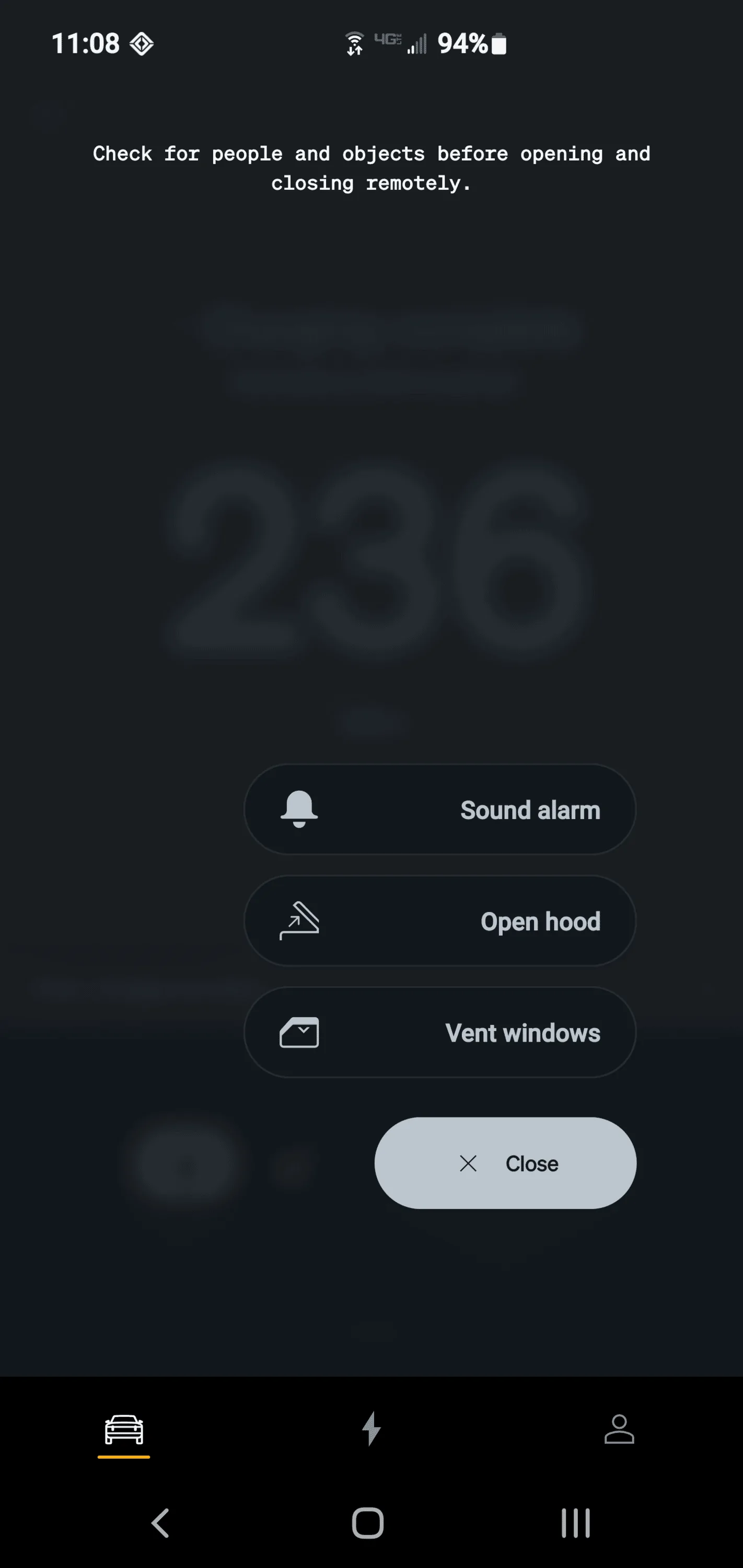
The Rivian mobile app version 1.5.0 or later enables new vehicle commands that allow you to remotely control the hood, vent the windows, and activate or stop the panic alarm. (If the new controls don’t automatically appear in the Rivian mobile app, we recommend that you restart the app.)
Additional Improvements
  • Reduced noise from cabin climate upon vehicle startup.
  • Reduced the offset of the speedometer display. It now displays no more than 1-2 mph over the actual vehicle speed.
  • Introduced new algorithms for improved locking or unlocking speed.
  • Improved user profile detection in case there are multiple users. Also fixed occasional issue: Side mirrors don’t move into the profile position when the vehicle unlocks via proximity unlocking.
  • Addressed issues when opening the front trunk may require pressing the button twice if the vehicle is asleep.
  • Displays now can’t be accessed if the Gear Guard alarm is triggered.
  • Reduced battery drain while the vehicle is parked by an average of 10%.
  • Improvements to vehicle sleep behavior:
    • Rear occupancy detection: Heavy objects left in the rear seats won’t prevent vehicle sleep.
    • Outlets that are turned on in the Energy app automatically turn off after 24 hours; then the vehicle can sleep.
  • Fixed garage door opener interoperability issues with LiftMaster 8500/8500W, CSW24UL, and Jackshaft openers.
  • Addressed issues when the FM Radio would freeze or restart.
  • Fixed an occasional issue: Alexa doesn’t wake up or respond to voice commands.
  • Fixed an occasional issue: The audio volume changes when the vehicle wakes.
  • Fixed an occasional issue in the Navigation app: The vehicle retains the satellite view while it sleeps.
  • Fixed a rare issue: The trip planner within the Navigation app is offline even though the network status indicates it is connected.
  • Fixed an occasional issue: The charge session summary indicates 0 kWh added after a charge session.
  • Fixed an occasional issue: A partial keyboard is shown for a phone address or media search.
  • Made various improvements to Adaptive Cruise Control and lane centering for Highway Assist.
  • Improved notifications in case Highway Assist is unavailable.
Visit our FAQ to see how you can update your Rivian R1T and R1S.
Sponsored

 
OP
OP
kizamybute'

kizamybute'

Well-Known Member
Joined
Oct 17, 2021
Threads
84
Messages
1,195
Reaction score
2,034
Location
Los Angeles
Vehicles
This one, that one and the other one.
Clubs
 
LOVE that we can turn off the dang BIRD. Cute feature, but started to wear a little thin and was annoying for those around it in quiet settings. Especially when it kept doing it randomly because I was at the edge of the proximity range with my phone.

In other threads, many said the % of battery is useless. I think it's nice to have the option for those used to looking at gas gauges. Certainly doesn't hurt to have it.

Looking forward to more accurate speedometer readings.

Looking forward to more control from the phone app. Still a long way to go, but we're getting there.

Always appreciate less phantom battery drain.

Being able to open the hood or windows from the app is great.

I assume the leveling feature will be nice for those using the tents and probably for other things too.

Seems to be a lot of good, useful stuff with this update. Always so cool to get new features and capabilities on a vehicle you already own.
 

p3ck

Well-Known Member
First Name
Bill
Joined
May 3, 2021
Threads
6
Messages
211
Reaction score
294
Location
Massachusettes, USA
Vehicles
Rivian R1T
Occupation
Software Engineer
Clubs
 
Is it safe to upgrade to android 13 now? (if I have the latest release here)
 
OP
OP
kizamybute'

kizamybute'

Well-Known Member
Joined
Oct 17, 2021
Threads
84
Messages
1,195
Reaction score
2,034
Location
Los Angeles
Vehicles
This one, that one and the other one.
Clubs
 
App automatically updated immediately to show the new control capabilities. Phone screenshot below

Rivian R1T R1S Release Notes for Software Update Version 2022.31.5 1662401400995
 

duessell

Well-Known Member
Joined
Nov 24, 2020
Threads
19
Messages
240
Reaction score
272
Location
Syracuse, NY
Vehicles
R1T and Chrysler Pacifica PHEV
Is it safe to upgrade to android 13 now? (if I have the latest release here)
I'm running Android 13 on my Pixel 6 Pro and have updated software and app. Everything seems to be running fine.

I'm a little surprised that we cannot change the charge limit or turn Gear Guard on/off from the app still.
 

Sponsored

OP
OP
kizamybute'

kizamybute'

Well-Known Member
Joined
Oct 17, 2021
Threads
84
Messages
1,195
Reaction score
2,034
Location
Los Angeles
Vehicles
This one, that one and the other one.
Clubs
 
I'm running Android 13 on my Pixel 6 Pro and have updated software and app. Everything seems to be running fine.

I'm a little surprised that we cannot change the charge limit or turn Gear Guard on/off from the app still.
Send tweets to RJ. He seems to read them. I sent him one. The more he receives, the more he'll listen to customers. He said such features are coming. Hoping for the charge limit one ASAP. It's really annoying have to manually watch it and go shut it off in the truck to charge to 90-92%, which works best for my use.
 

tcsm

Active Member
First Name
Chris
Joined
May 25, 2022
Threads
6
Messages
38
Reaction score
37
Location
Portland, OR
Vehicles
Tesla Model S, Hyundai Kona Electric
Alarm issues also fixed, along with displays not be available when an alarm is t


moosehead

Well-Known Member
Joined
Sep 16, 2021
Threads
64
Messages
2,092
Reaction score
4,594
Location
Denver, CO
Vehicles
‘22 Ioniq 5, ‘78 Jeep Wagoneer
Please excuse my noob excitement.

Sitting 10 miles away from my truck chilling over a cold brew coffee and fumbling around with my Rivian app, just started this recent OTA update from my phone. By the time I get home, she’ll be done.

I am really easily amused.

Rivian R1T R1S Release Notes for Software Update Version 2022.31.5 CEC3E790-DCB3-45B6-91E5-B023A164C6E0
 

BillArnett

Well-Known Member
First Name
Bill
Joined
Nov 23, 2019
Threads
11
Messages
186
Reaction score
352
Location
Emerald Hills CA
Vehicles
Rivian R1S Quad Max, 20" AT
Occupation
Retired
  • Reduced the offset of the speedometer display. It now displays no more than 1-2 mph over the actual vehicle speed.
How lame is that? They changed it but still deliberately show the wrong value?? The offset should be ZERO and the accuracy +/- 0.5
 

CommodoreAmiga

Well-Known Member
Joined
Dec 30, 2020
Threads
39
Messages
4,104
Reaction score
7,729
Location
INACTIVE
Vehicles
INACTIVE
How lame is that? They changed it but still deliberately show the wrong value?? The offset should be ZERO and the accuracy +/- 0.5
Some people have claimed there are legal issues if they show slower than you're actually traveling, so they pretty much have to build in a little buffer to ensure it's never off in the wrong direction.

1-2 mph is margin-of-error. Why does that bother you?
 

Sponsored

OP
OP
kizamybute'

kizamybute'

Well-Known Member
Joined
Oct 17, 2021
Threads
84
Messages
1,195
Reaction score
2,034
Location
Los Angeles
Vehicles
This one, that one and the other one.
Clubs
 
Some people have claimed there are legal issues if they show slower than you're actually traveling, so they pretty much have to build in a little buffer to ensure it's never off in the wrong direction.

1-2 mph is margin-of-error. Why does that bother you?
Agreed, 1-2 MPH variance is pretty normal for most cars.
 

BillArnett

Well-Known Member
First Name
Bill
Joined
Nov 23, 2019
Threads
11
Messages
186
Reaction score
352
Location
Emerald Hills CA
Vehicles
Rivian R1S Quad Max, 20" AT
Occupation
Retired
Some people have claimed there are legal issues if they show slower than you're actually traveling, so they pretty much have to build in a little buffer to ensure it's never off in the wrong direction.

1-2 mph is margin-of-error. Why does that bother you?
I actually looked up the regulation. The requirement is +/- 5 mph at 50 mph; ie 10% either way.

Rivian's 1-2 mph is within the regulation. But it's not a margin-of-error. It's a deliberate offset from the real speed. The margin of error on top of that is probably pretty small.

It bothers me because it's deliberately wrong. It's part of the nanny culture that's trying to protect me from myself by tricking me to drive slower. Grrr!
 

CommodoreAmiga

Well-Known Member
Joined
Dec 30, 2020
Threads
39
Messages
4,104
Reaction score
7,729
Location
INACTIVE
Vehicles
INACTIVE
It bothers me because it's deliberately wrong. It's part of the nanny culture that's trying to protect me from myself by tricking me to drive slower. Grrr!
AFAIK, every manufacturer is deliberately wrong in the speedo-department. The only difference is that Rivian has come out and quantified exactly how much they're choosing to be wrong. Most other manufacturers will not share this information with the public.
 

BillArnett

Well-Known Member
First Name
Bill
Joined
Nov 23, 2019
Threads
11
Messages
186
Reaction score
352
Location
Emerald Hills CA
Vehicles
Rivian R1S Quad Max, 20" AT
Occupation
Retired
AFAIK, every manufacturer is deliberately wrong in the speedo-department. The only difference is that Rivian has come out and quantified exactly how much they're choosing to be wrong. Most other manufacturers will not share this information with the public.
When I changed the tires on my Jeep I had a third-party device that let me adjust the speedo software to compensate for the larger circumference. That let me get it within +/- 1 mph. I wonder if there's a way to do that with Rivian? Of course, there's not much room under the fenders for larger tires.
 

Gabe1aron

Well-Known Member
First Name
Gabriel
Joined
Dec 23, 2021
Threads
8
Messages
124
Reaction score
90
Location
Portland, OR
Vehicles
Rivian R1T, Tesla Model Y
Occupation
Nurse Anesthetist
Saw a couple of posts that it was released, but none that I found showed the release notes. Here they are.

Version 2022.31.5
New Camping App Available, Range Now Viewable as % of State of Charge, Units of Measurement Now Available in Metric, New Vehicle Controls in Rivian Mobile App, Additional Improvements
New Camping App Available
For your convenience, you can do the following:
  • Energy use: To optimize your camping experience inside or outside the vehicle, choose your vehicle’s energy use: Stay Off, Normal, or Stay On.
  • Outlets: 120 V, 12 V, USB-C, and the wireless charging pad stay on. The outlets can stay on for a maximum of 24 hours, with the option to choose a shorter duration.
  • Camp courtesy: You can turn off exterior lights, vehicle sounds, proximity locking or unlocking, and the Gear Guard alarm sound. This also enables quiet cooling or heating.
  • Displays: You can turn off the driver, center, and rear displays.
  • Flood lights: You can turn on the flood lights, which are located near the side mirrors.
  • Vehicle leveling: You can level the vehicle when parked on uneven terrain.
Camping controls, except for the outlets, are available only when the vehicle is in Park. Choose Camping from the menu on the center display.
Range Now Viewable as Percentage of State of Charge
For the range estimate on the driver display, you can set the state of charge to show distance, percentage, or both. Choose Settings from the menu on the center display, and then choose Vehicle. Choose Units. Under Range in Driver Display, choose the distance, % (percentage), or Both.
Units of Measurement Now Available in Metric
You can choose metric units of measurement for speed, distance, temperature, and air pressure. Choose Settings from the menu on the center display, and then choose Vehicle. Choose Units.
New Vehicle Controls on the Rivian Mobile App
The Rivian mobile app version 1.5.0 or later enables new vehicle commands that allow you to remotely control the hood, vent the windows, and activate or stop the panic alarm. (If the new controls don’t automatically appear in the Rivian mobile app, we recommend that you restart the app.)
Additional Improvements
  • Reduced noise from cabin climate upon vehicle startup.
  • Reduced the offset of the speedometer display. It now displays no more than 1-2 mph over the actual vehicle speed.
  • Introduced new algorithms for improved locking or unlocking speed.
  • Improved user profile detection in case there are multiple users. Also fixed occasional issue: Side mirrors don’t move into the profile position when the vehicle unlocks via proximity unlocking.
  • Addressed issues when opening the front trunk may require pressing the button twice if the vehicle is asleep.
  • Displays now can’t be accessed if the Gear Guard alarm is triggered.
  • Reduced battery drain while the vehicle is parked by an average of 10%.
  • Improvements to vehicle sleep behavior:
    • Rear occupancy detection: Heavy objects left in the rear seats won’t prevent vehicle sleep.
    • Outlets that are turned on in the Energy app automatically turn off after 24 hours; then the vehicle can sleep.
  • Fixed garage door opener interoperability issues with LiftMaster 8500/8500W, CSW24UL, and Jackshaft openers.
  • Addressed issues when the FM Radio would freeze or restart.
  • Fixed an occasional issue: Alexa doesn’t wake up or respond to voice commands.
  • Fixed an occasional issue: The audio volume changes when the vehicle wakes.
  • Fixed an occasional issue in the Navigation app: The vehicle retains the satellite view while it sleeps.
  • Fixed a rare issue: The trip planner within the Navigation app is offline even though the network status indicates it is connected.
  • Fixed an occasional issue: The charge session summary indicates 0 kWh added after a charge session.
  • Fixed an occasional issue: A partial keyboard is shown for a phone address or media search.
  • Made various improvements to Adaptive Cruise Control and lane centering for Highway Assist.
  • Improved notifications in case Highway Assist is unavailable.
Visit our FAQ to see how you can update your Rivian R1T and R1S.
Alexa seems to work now after the update ??
Sponsored


Top