Sponsored

Another CarPlay Add-on Screen Option

Spaceball1

Well-Known Member
First Name
Danny
Joined
Feb 1, 2023
Threads
12
Messages
368
Reaction score
371
Location
Colorado Springs, CO
Vehicles
22 R1T, 23 Kia EV6, 15 Mustang GT Vert
Occupation
Mechanical Engineer
Preface: if you don’t like CarPlay or feel the need for it, feel free to move along to other threads. No need to call these “tacky” or “useless” or “idiotic”. It amazes me how many fanboys still think Rivian or Tesla will figure out the shortcomings their UI has over CarPlay. ?

Finally pulled the trigger on one of these after failing to get an Android tablet to work correctly as a CarPlay host (can be done but not worth the effort/cost, in case you’re wondering).

I had a few saved in my Amazon wish list but then this one caught my eye. It’s a perfect size IMO and doesn’t look as out of place as the normal more square shaped ones available, especially when placed on top of the dash. Took a flier on it since it is new to Amazon and doesn’t have a ton of reviews, but so far they’re positive.

One nice feature, though I didn’t need, is the built in dash cam and even comes with a second camera for the rear (though I didn’t hook it up). omes with a 64GB Micro SD for it too. Funny because I now have 3 dash cams going since I left my Blackvue one up that I had before the Rivian dashcam update came out. ?

Install was super easy. Taped to the top of dash as seen for now. I’m thinking of making a 3D printed bracket for it to connect to back of current screen so it’s more solid and looks more clean. Plugged into the 12V under dash since I’m lucky enough to have that, but the cord does go to usb-C at the device side so you could direct wire it to usb-C in console or use an OBD adapter if you don’t have the 12V. I’ll hardwire this and clean up the wiring eventually after some good amount of testing.

So far I’ve only used it for a day, but it seems pretty good. Did have one glitch where it went back to the main menu but then immediately brought CarPlay back up. What is odd is that audio still connects from your phone to the truck, not from the device to the truck. Seems to work well that way though.

Touch screen isn’t the greatest, but works okay (have to more solidly hit the buttons than I’d like). It is slightly laggy, but not too far off the wireless CarPlay I have in my Mustang and Kia EV6 (both using aftermarket wireless CarPlay adapters).

Haven’t played with other features yet too much, but will report back more info as I do!

Amazon link: Dogfuel Wireless Portable Apple CarPlay

Rivian R1T R1S Another CarPlay Add-on Screen Option IMG_9220
Sponsored


sacramentoelectric

Well-Known Member
Joined
Sep 4, 2021
Threads
14
Messages
538
Reaction score
1,138
Location
sacramento
Vehicles
BMW iX, BMW i3
Clubs
 
I think I’d be hesitant to put permanent tape on my dash if I changed my mind and wanted to get rid of it. I was thinking of one of the smaller ones mounted to the left with a windshield mount. Unfortunately, you’re still stuck with Bluetooth audio. After hearing the native Tidal app, it would be hard to go back to music over Bluetooth. Shame how awful the Tidal app is though.
 
OP
OP
Spaceball1

Spaceball1

Well-Known Member
First Name
Danny
Joined
Feb 1, 2023
Threads
12
Messages
368
Reaction score
371
Location
Colorado Springs, CO
Vehicles
22 R1T, 23 Kia EV6, 15 Mustang GT Vert
Occupation
Mechanical Engineer
I think I’d be hesitant to put permanent tape on my dash if I changed my mind and wanted to get rid of it. I was thinking of one of the smaller ones mounted to the left with a windshield mount. Unfortunately, you’re still stuck with Bluetooth audio. After hearing the native Tidal app, it would be hard to go back to music over Bluetooth. Shame how awful the Tidal app is though.
yeah they said the tape wasn’t meant for soft dashboards, and it doesn’t feel all that solid, so hopefully it’ll come off okay once I figure out a more permanent mounting solution.

I didn’t even realize we have Tidal lol. May have to try it out. I’ve only been using Spotify and it sounds the same to me over Bluetooth, though I’m no audiophile by any means ?

The good news is that since the CarPlay goes over Bluetooth, if you just want to use it for maps and texting, Siri should still automatically switch over audio when talking to her. Though not sure about audio alerts from Waze and maps (I don’t usually use those anyway) I’ll play around with it more and report back but that’s my theory.
 

PhatDaddy

Well-Known Member
First Name
Jim
Joined
Apr 11, 2023
Threads
8
Messages
410
Reaction score
401
Location
Coastal Central Florida
Vehicles
2025 G2 R1T El Cap PDM; (RIP: 2024 G1 R1T RC PDM)
Occupation
Retired IT
Preface: if you don’t like CarPlay or feel the need for it, feel free to move along to other threads. No need to call these “tacky” or “useless” or “idiotic”. It amazes me how many fanboys still think Rivian or Tesla will figure out the shortcomings their UI has over CarPlay. ?

Finally pulled the trigger on one of these after failing to get an Android tablet to work correctly as a CarPlay host (can be done but not worth the effort/cost, in case you’re wondering).

I had a few saved in my Amazon wish list but then this one caught my eye. It’s a perfect size IMO and doesn’t look as out of place as the normal more square shaped ones available, especially when placed on top of the dash. Took a flier on it since it is new to Amazon and doesn’t have a ton of reviews, but so far they’re positive.

One nice feature, though I didn’t need, is the built in dash cam and even comes with a second camera for the rear (though I didn’t hook it up). omes with a 64GB Micro SD for it too. Funny because I now have 3 dash cams going since I left my Blackvue one up that I had before the Rivian dashcam update came out. ?

Install was super easy. Taped to the top of dash as seen for now. I’m thinking of making a 3D printed bracket for it to connect to back of current screen so it’s more solid and looks more clean. Plugged into the 12V under dash since I’m lucky enough to have that, but the cord does go to usb-C at the device side so you could direct wire it to usb-C in console or use an OBD adapter if you don’t have the 12V. I’ll hardwire this and clean up the wiring eventually after some good amount of testing.

So far I’ve only used it for a day, but it seems pretty good. Did have one glitch where it went back to the main menu but then immediately brought CarPlay back up. What is odd is that audio still connects from your phone to the truck, not from the device to the truck. Seems to work well that way though.

Touch screen isn’t the greatest, but works okay (have to more solidly hit the buttons than I’d like). It is slightly laggy, but not too far off the wireless CarPlay I have in my Mustang and Kia EV6 (both using aftermarket wireless CarPlay adapters).

Haven’t played with other features yet too much, but will report back more info as I do!

Amazon link: Dogfuel Wireless Portable Apple CarPlay
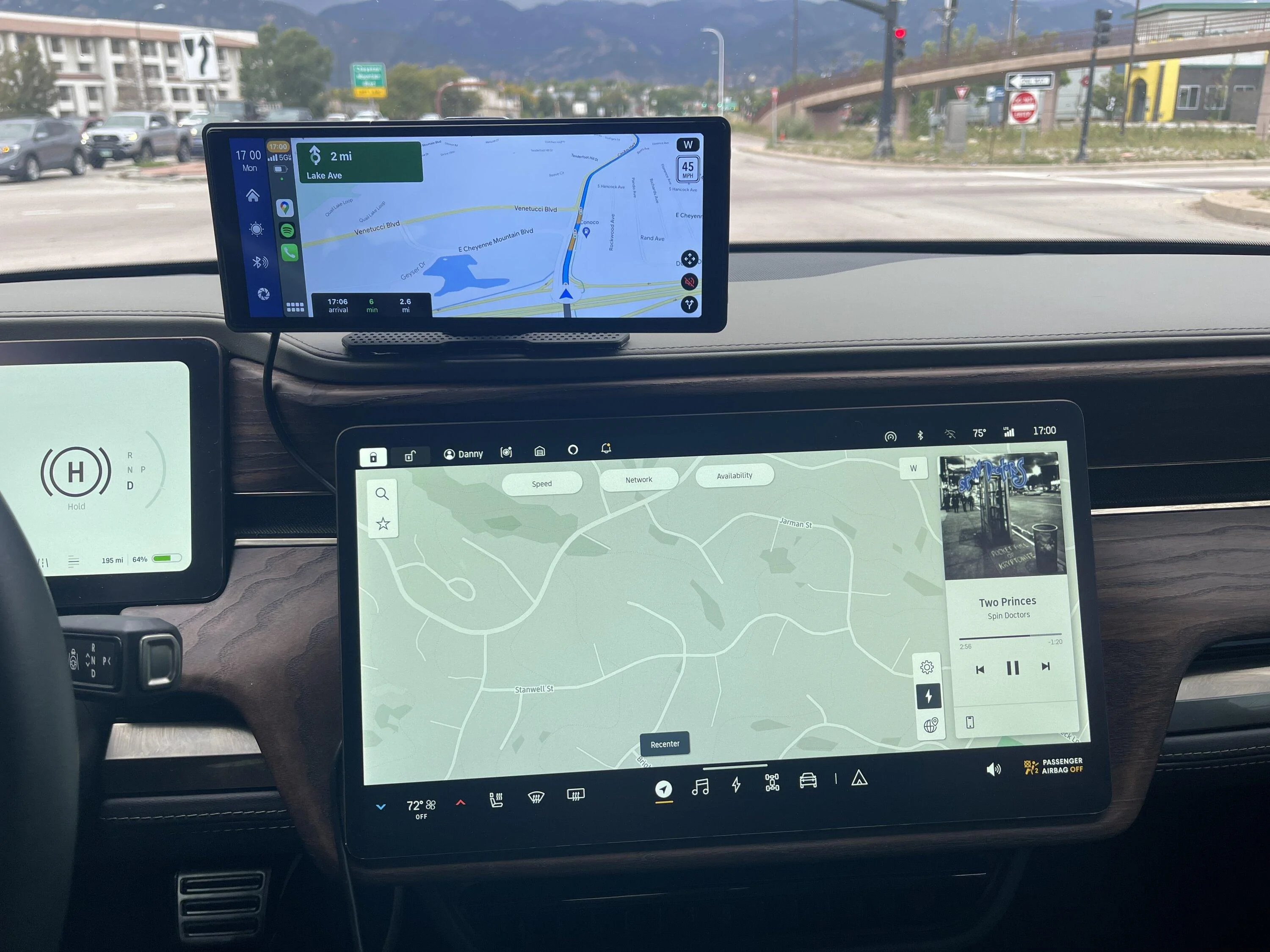
IMG_9220.jpeg
Thanks for the info. So far no ideal aftermarket solutions, and there may never be. But I’m with you… Apple centric and don’t plan to change… so will have to find some kind of solution with which I can get happy enough. Appreciate the details and the experimentation as I await my Max R1T…
 
OP
OP
Spaceball1

Spaceball1

Well-Known Member
First Name
Danny
Joined
Feb 1, 2023
Threads
12
Messages
368
Reaction score
371
Location
Colorado Springs, CO
Vehicles
22 R1T, 23 Kia EV6, 15 Mustang GT Vert
Occupation
Mechanical Engineer
Thanks for the info. So far no ideal aftermarket solutions, and there may never be. But I’m with you… Apple centric and don’t plan to change… so will have to find some kind of solution with which I can get happy enough. Appreciate the details and the experimentation as I await my Max R1T…
I’m thinking the ideal solution, aside from Rivian adding CarPlay which I don’t see ever happening, is if Rivian gives us an internet browser. There are solutions out there for Teslas that put CarPlay on the internal browser, which seems very slick (though I never tried it before selling my Tesla). If we ever get a browser for Rivian, those companies making that solution should be able to easily port that idea to our trucks!
 

Sponsored

frogblast

Member
Joined
Aug 3, 2023
Threads
1
Messages
10
Reaction score
3
Location
California
Vehicles
Niro EV
Does that unit also support wired carplay? Does that perhaps help with some of the responsiveness issues?

When connecting to the vehicle with Bluetooth, how well do phone calls work? I read in many reviews a bad echo issue when using dual bluetooth links (iPhone to Head unit, and Head unit to vehicle).
 
OP
OP
Spaceball1

Spaceball1

Well-Known Member
First Name
Danny
Joined
Feb 1, 2023
Threads
12
Messages
368
Reaction score
371
Location
Colorado Springs, CO
Vehicles
22 R1T, 23 Kia EV6, 15 Mustang GT Vert
Occupation
Mechanical Engineer
Does that unit also support wired carplay? Does that perhaps help with some of the responsiveness issues?

When connecting to the vehicle with Bluetooth, how well do phone calls work? I read in many reviews a bad echo issue when using dual bluetooth links (iPhone to Head unit, and Head unit to vehicle).
Unfortunately it doesn’t have a wired CarPlay option. That would be nice to have as a backup, though.

One of the recent iOS updates made the connection reliability worse (auto connects about 60% of the time), but seems to have gotten better the last few weeks. I’ll need to drive more to test it out.

I can usually get it to connect by turning the unit off and back on (by unplugging and plugging it back into the 12V). Not the most convenient but gets the job done for now. Perhaps there are firmware updates for this unit that I need to check into.

I haven’t seen any issues with phone calls over Bluetooth, since that should be going directly from the phone to the Rivian. Although I don’t do a ton of phone calls these days, mostly Teams calls.
 
OP
OP
Spaceball1

Spaceball1

Well-Known Member
First Name
Danny
Joined
Feb 1, 2023
Threads
12
Messages
368
Reaction score
371
Location
Colorado Springs, CO
Vehicles
22 R1T, 23 Kia EV6, 15 Mustang GT Vert
Occupation
Mechanical Engineer

logan

Well-Known Member
First Name
logan
Joined
May 29, 2023
Threads
2
Messages
148
Reaction score
154
Location
Northern California
Vehicles
Rivian R1T
<snip>

The good news is that since the CarPlay goes over Bluetooth, if you just want to use it for maps and texting, Siri should still automatically switch over audio when talking to her. Though not sure about audio alerts from Waze and maps (I don’t usually use those anyway) I’ll play around with it more and report back but that’s my theory.
On mine the waze alerts come through rivian speakers. Everything seems to work fine in that respect. When Siri or any app (e.g. whatsapp) wants the microphone you can tell because it shows the same call display on the left display as when on a call while it is listening on the mic.
 
Last edited:

Sponsored

logan

Well-Known Member
First Name
logan
Joined
May 29, 2023
Threads
2
Messages
148
Reaction score
154
Location
Northern California
Vehicles
Rivian R1T
Unfortunately it doesn’t have a wired CarPlay option. That would be nice to have as a backup, though.

One of the recent iOS updates made the connection reliability worse (auto connects about 60% of the time), but seems to have gotten better the last few weeks. I’ll need to drive more to test it out.

I can usually get it to connect by turning the unit off and back on (by unplugging and plugging it back into the 12V). Not the most convenient but gets the job done for now. Perhaps there are firmware updates for this unit that I need to check into.

I haven’t seen any issues with phone calls over Bluetooth, since that should be going directly from the phone to the Rivian. Although I don’t do a ton of phone calls these days, mostly Teams calls.
FWIW, I found it useful to switch to OBD adapter with a toggle switch that another forum member posted:

https://www.amazon.com/gp/product/B0B2ZPNX6Z/

I prefer to have it off when I'm not in the truck so my phone does not connect to it if I'm near the truck. So, it has become habit to flip the toggle as I get into or out of the truck.

You might also consider these little wire clips:

https://www.amazon.com/gp/product/B08ZJF9W33/

I originally had the wire going down by the main display as you have there but I felt it was too visible so ended up routing it closer to the glass then off to the left down by the OBD access. The clips keep it a little more orderly.
 
OP
OP
Spaceball1

Spaceball1

Well-Known Member
First Name
Danny
Joined
Feb 1, 2023
Threads
12
Messages
368
Reaction score
371
Location
Colorado Springs, CO
Vehicles
22 R1T, 23 Kia EV6, 15 Mustang GT Vert
Occupation
Mechanical Engineer
FWIW, I found it useful to switch to OBD adapter with a toggle switch that another forum member posted:

https://www.amazon.com/gp/product/B0B2ZPNX6Z/

I prefer to have it off when I'm not in the truck so my phone does not connect to it if I'm near the truck. So, it has become habit to flip the toggle as I get into or out of the truck.

You might also consider these little wire clips:

https://www.amazon.com/gp/product/B08ZJF9W33/

I originally had the wire going down by the main display as you have there but I felt it was too visible so ended up routing it closer to the glass then off to the left down by the OBD access. The clips keep it a little more orderly.
Oh nice, I like that solution. I was going to hardwire mine to the 12V like I did my radar and dash cam but I like the idea of a switch like that. Might just do that OBD connector to make it easy. Thanks for sharing!
 

RayzorBEV

Well-Known Member
Joined
Dec 8, 2019
Threads
2
Messages
528
Reaction score
656
Location
Texas
Vehicles
R1T QM, R1S QM, M3 P, Zero SZF, Cyberbeast
Occupation
Electric bum
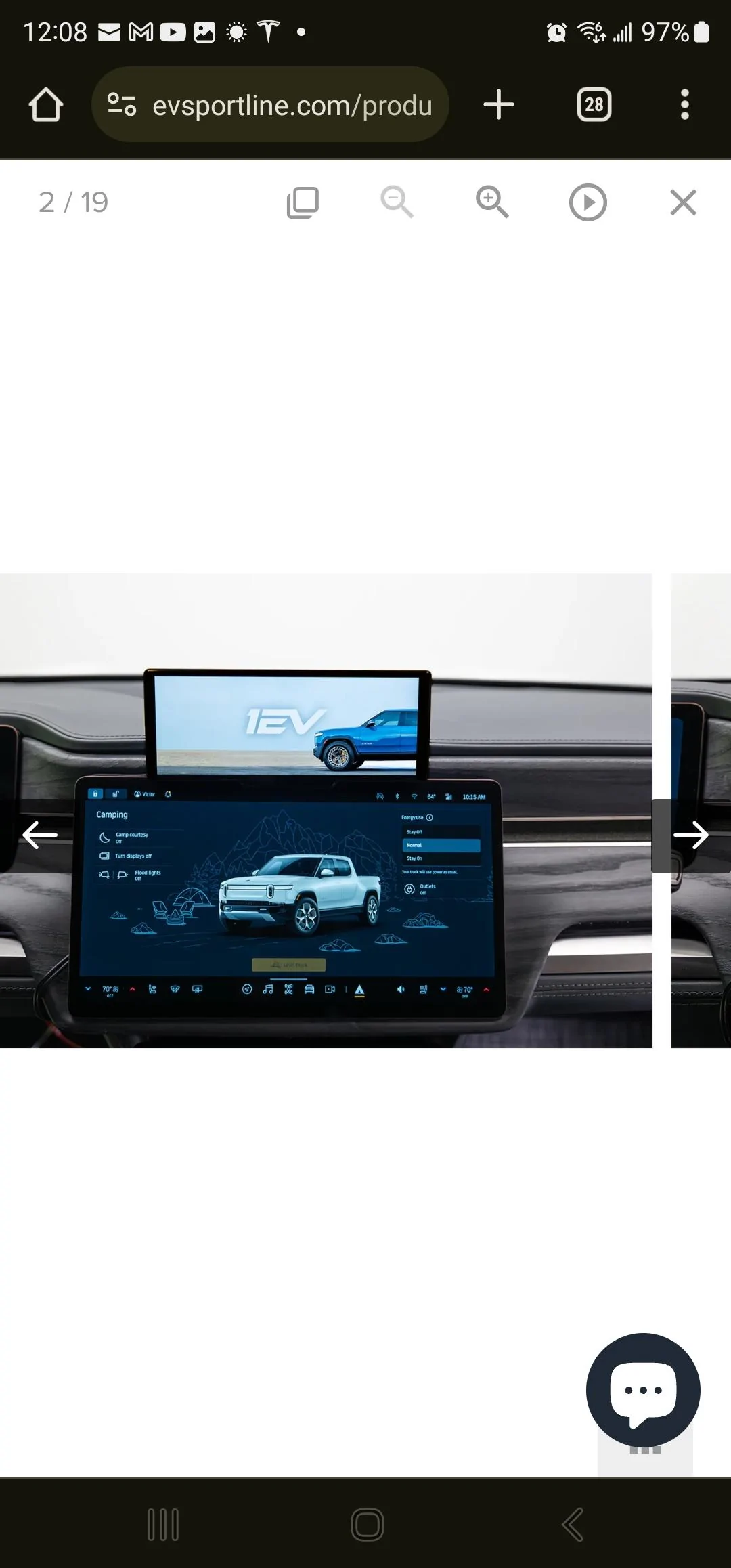
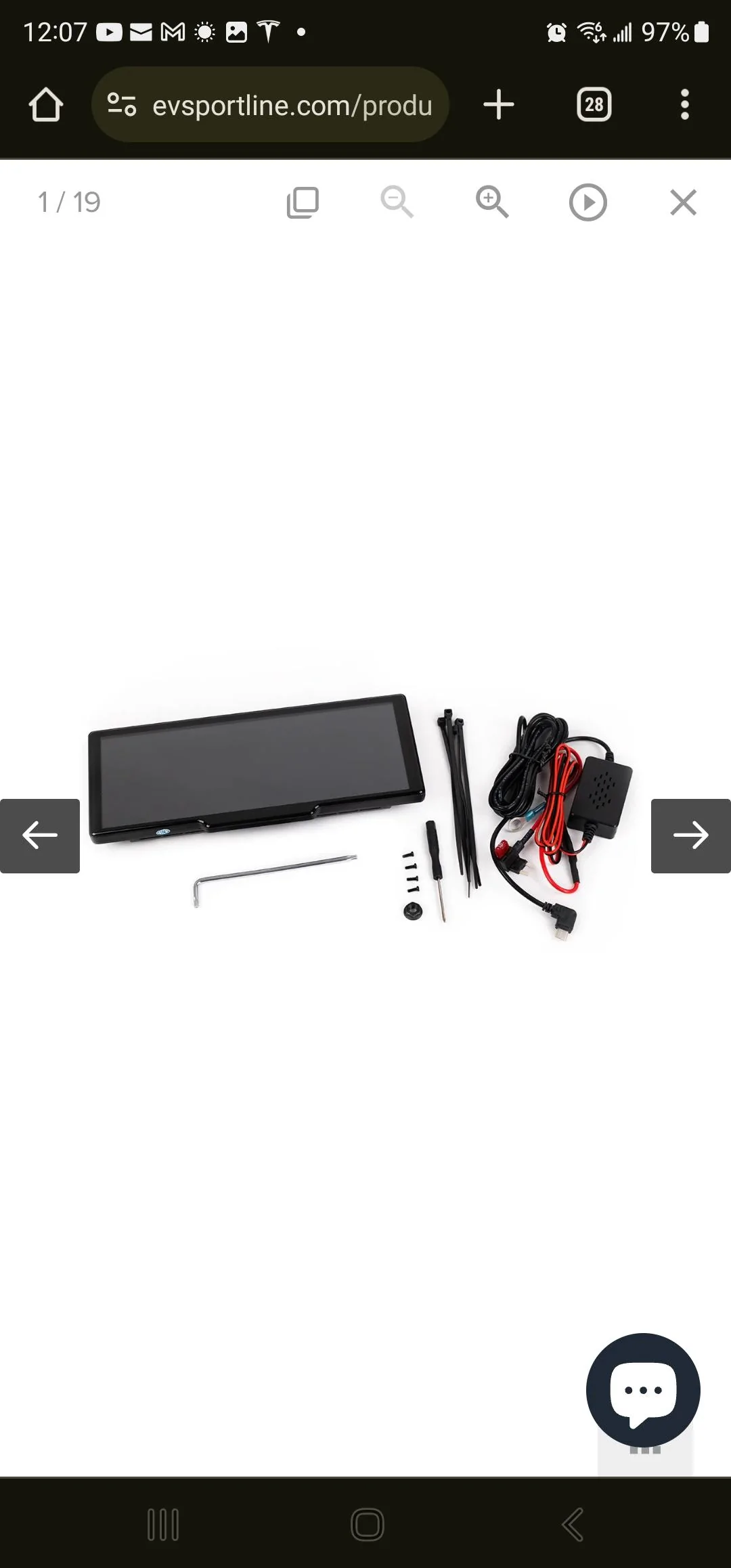
I just purchased two EVsportline's direct plug-in Android Auto screen units for my R1T and R1S. They seemed to be better integrated with the Rivian and plugs directly into the fusebox under the dash. Hopefully, they'll have a DIY video on how that's accomplished.

Rivian R1T R1S Another CarPlay Add-on Screen Option Screenshot_20231124_120832_Chrom


Rivian R1T R1S Another CarPlay Add-on Screen Option Screenshot_20231124_120759_Chrom
 

EV Sportline

Well-Known Member
Site Sponsor
Joined
May 31, 2022
Threads
114
Messages
1,874
Reaction score
3,828
Location
Los Angeles
Website
evsportline.com
Vehicles
Rivian R1T, R2 res, Tesla S, 3, X, Y, Cybertruck
Occupation
Upgrading Electric Vehicles
Clubs
 
Looks like this same base unit is what is being used for this kit from EVSportline. Pretty big price markup, though they seem to make it a bit more custom for the Rivian.

I’m curious to see what their mounting bracket looks like, since I’m working on prototypes for my own design right now!

https://evsportline.com/products/apple-carplay-smart-dash-screen-for-rivian-r1t-r1s
Not the same. We have our own firmware, made for Rivian usage. Our unit includes a Rivian specific mount and plug in power cord (for Rivian).
 
OP
OP
Spaceball1

Spaceball1

Well-Known Member
First Name
Danny
Joined
Feb 1, 2023
Threads
12
Messages
368
Reaction score
371
Location
Colorado Springs, CO
Vehicles
22 R1T, 23 Kia EV6, 15 Mustang GT Vert
Occupation
Mechanical Engineer
Not the same. We have our own firmware, made for Rivian usage. Our unit includes a Rivian specific mount and plug in power cord (for Rivian).
How is the firmware different? Definitely understand the bracket and wiring is unique. Curious to see what the firmware offers that’s unique to the Rivian.

I would have been interested if I didn’t already buy the Dogfish one.
Sponsored


Top