Sponsored
OP
OP
EV Sportline

EV Sportline

Well-Known Member
Site Sponsor
Joined
May 31, 2022
Threads
114
Messages
1,875
Reaction score
3,828
Location
Los Angeles
Website
evsportline.com
Vehicles
Rivian R1T, R2 res, Tesla S, 3, X, Y, Cybertruck
Occupation
Upgrading Electric Vehicles
Clubs
 
That is not a solution as then my truck wont actually turn on when I get into it when I actually want it to turn on. The unit should shut off when the truck shuts off.
The unit does turn off when the truck shuts off. And it turns on when the truck turns on. Maybe your truck is / has been doing a lot of this on/off, unbeknownst to you?
Sponsored


jebinc

Well-Known Member
First Name
John
Joined
Oct 5, 2022
Threads
49
Messages
2,310
Reaction score
2,134
Location
Seattle, WA
Vehicles
2021+ Tesla MS Plaid, R1T Adventure
Occupation
Retired
FYI - there is a power button on top of the Smart Screen, you can power off the screen (or unplug it, as you mentioned). But...if your Rivian is constantly' turning on' whenever your phone is near (but you're still in the house or something), we can't stop that - it's functioning properly. BTW, you're burning range having the Rivian turn 'on' all the time like that (when you're not actually in the garage getting ready to go somewhere) - you might want to alter your Rivian phone key settings to stop that?
Exactly (why I suggested turning the Rivian app off on the phone). This is a Rivian "activation" issue, not a display issue. The display just shows you how much an issue this (Rivian constantly waking due to phone proximity) really is.

As they say, "to each"... ?
 

SunDevil2213

Well-Known Member
First Name
Ryan
Joined
Apr 25, 2022
Threads
4
Messages
133
Reaction score
276
Location
Mesa, AZ
Vehicles
2022 Rivian R1T
Occupation
Construction Cost Consultant
I have proximity locking/unlocking turned off while at home - which does not wake the truck when I'm home until I interact with it (open the app, open a door, etc...). It's been working as intended since Rivian implemented this feature/option in the vehicle settings.
 
OP
OP
EV Sportline

EV Sportline

Well-Known Member
Site Sponsor
Joined
May 31, 2022
Threads
114
Messages
1,875
Reaction score
3,828
Location
Los Angeles
Website
evsportline.com
Vehicles
Rivian R1T, R2 res, Tesla S, 3, X, Y, Cybertruck
Occupation
Upgrading Electric Vehicles
Clubs
 
Hmm - good observation. I need to know this before I install. @EV Sportline can you chime in? I have precious the precious StowNCharge and absolutely need that to continue working.
No, if the Smart screen is working, there is no reason another circuit would be down.
 

jebinc

Well-Known Member
First Name
John
Joined
Oct 5, 2022
Threads
49
Messages
2,310
Reaction score
2,134
Location
Seattle, WA
Vehicles
2021+ Tesla MS Plaid, R1T Adventure
Occupation
Retired
I have proximity locking/unlocking turned off while at home - which does not wake the truck when I'm home until I interact with it (open the app, open a door, etc...). It's been working as intended since Rivian implemented this feature/option in the vehicle settings.
Maybe you connected the display to the wrong fuse and the display is always on. Try turning your phone off and go out to the truck when it's asleep. See if the display is still powered?
 

Sponsored

SunDevil2213

Well-Known Member
First Name
Ryan
Joined
Apr 25, 2022
Threads
4
Messages
133
Reaction score
276
Location
Mesa, AZ
Vehicles
2022 Rivian R1T
Occupation
Construction Cost Consultant
FYI - there is a power button on top of the Smart Screen, you can power off the screen (or unplug it, as you mentioned). But...if your Rivian is constantly' turning on' whenever your phone is near (but you're still in the house or something), we can't stop that - it's functioning properly. BTW, you're burning range having the Rivian turn 'on' all the time like that (when you're not actually in the garage getting ready to go somewhere) - you might want to alter your Rivian phone key settings to stop that?
Turning the power off with the power button upon exiting the vehicle at home does not correct this problem. It still reconnects.
 

SunDevil2213

Well-Known Member
First Name
Ryan
Joined
Apr 25, 2022
Threads
4
Messages
133
Reaction score
276
Location
Mesa, AZ
Vehicles
2022 Rivian R1T
Occupation
Construction Cost Consultant
Maybe you connected the display to the wrong fuse and the display is always on. Try turning your phone off and go out to the truck when it's asleep. See if the display is still powered?
The display was connected to the exact fuse shown in EV Sportline's install video. ¯\ _(ツ)_/¯
 

shrink

Well-Known Member
Joined
Feb 16, 2021
Threads
102
Messages
1,388
Reaction score
2,711
Location
Phoenix, AZ and Kailua-Kona, HI
Vehicles
'23 R1S Quad x 2; '26 Gen 2 R1T Quad Launch; '25 Ioniq 5; '24 Jeep Cherokee
Clubs
 
Hardwire went fine and I prefer it at this time. It's growing on me more and more each day. One question...does the charging pad work thru the same fuse? Mine quit working after install.
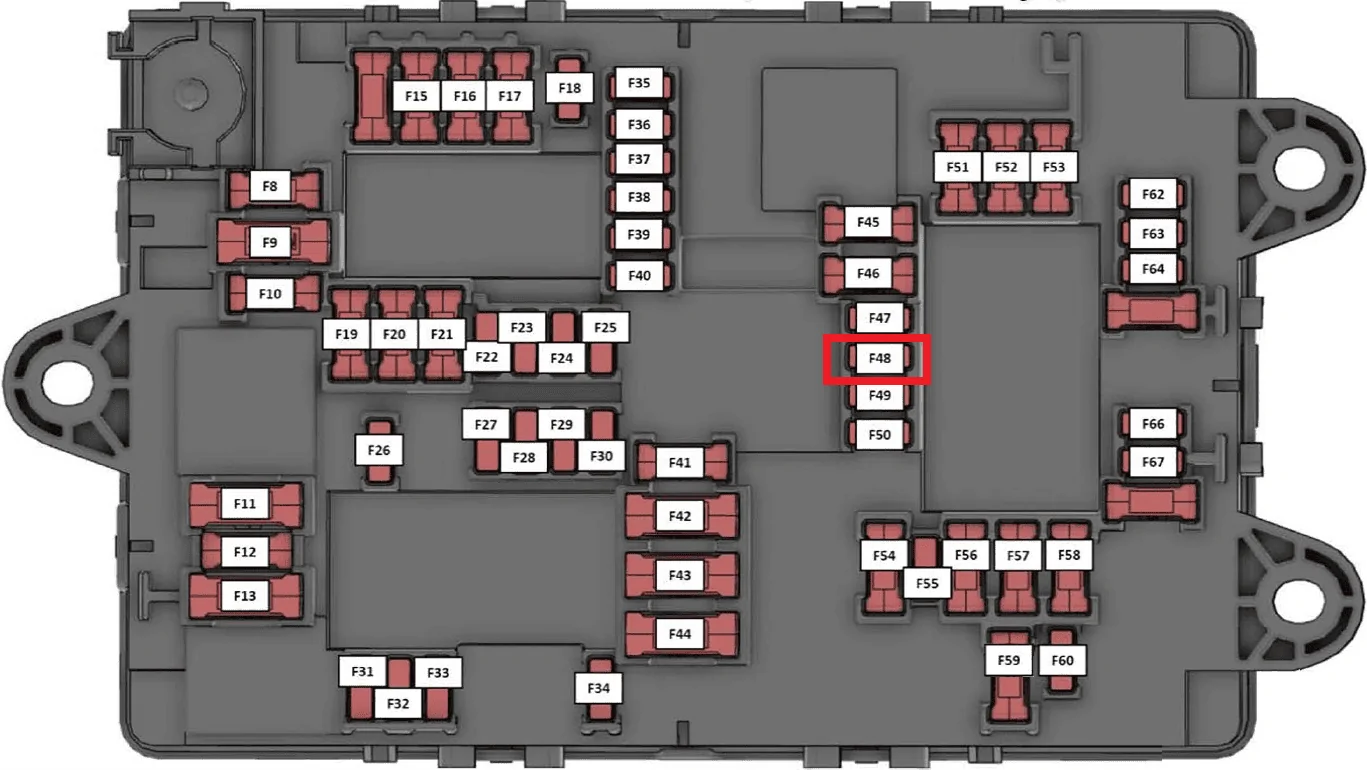
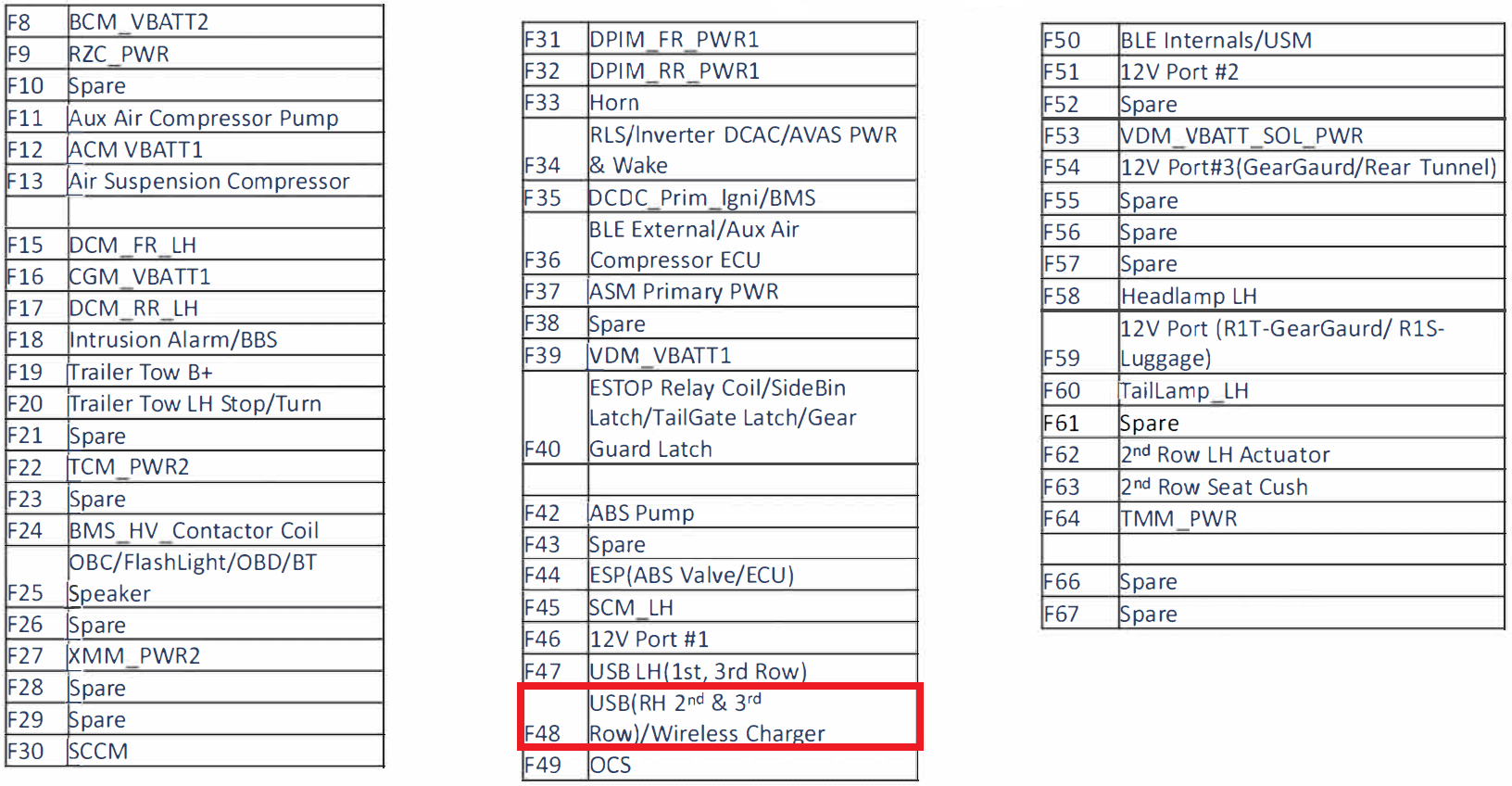
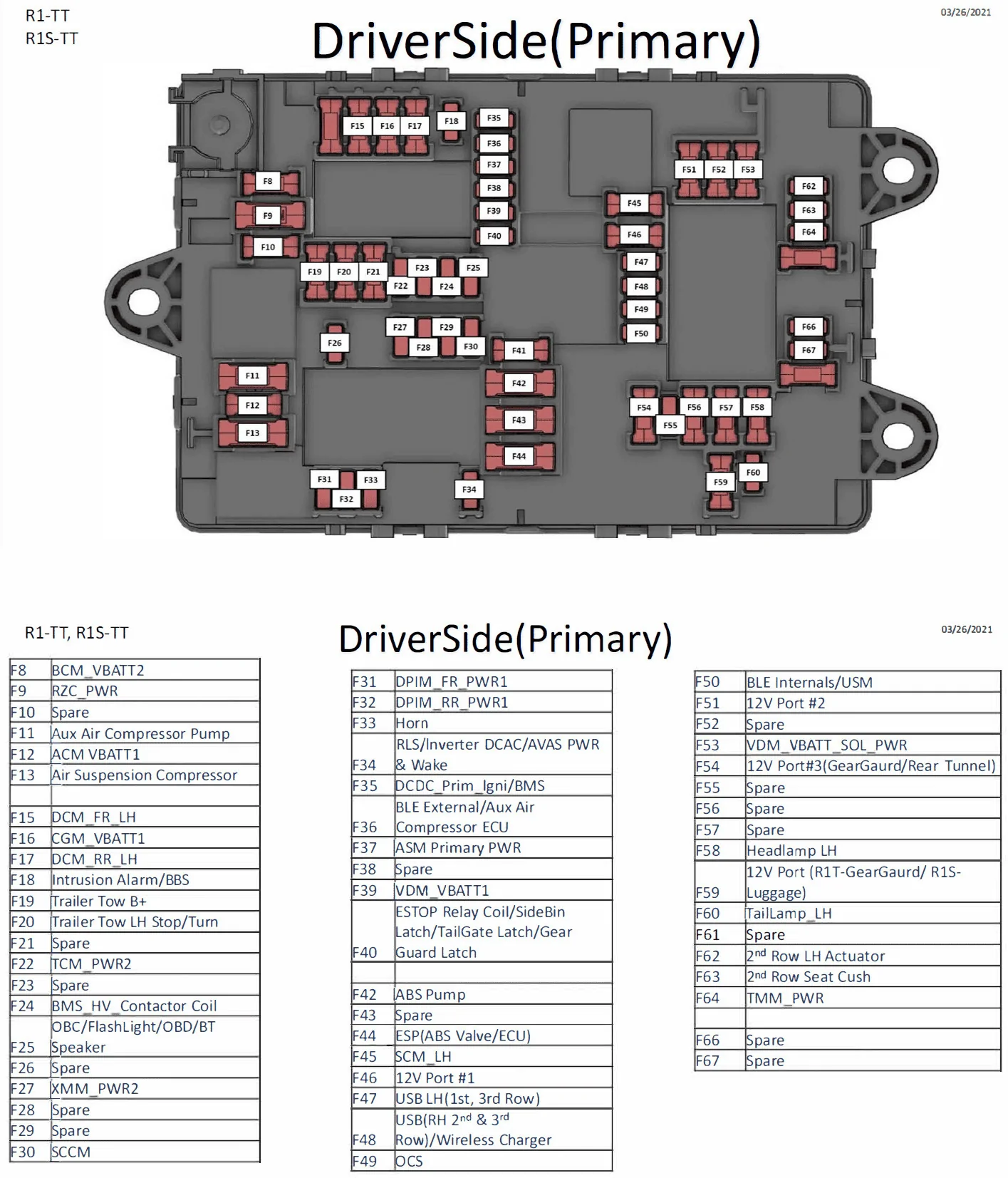
The fuse EV Sportline taps is "F48".. see below for description...

As an alternate you could tap "F47".

1704318831018.webp


1704319076837.png
NY_Rob thanks for the info. So my guess is it does affect the wireless charger. Guess I will see what EV sportline says.
No, if the Smart screen is working, there is no reason another circuit would be down.
@EV Sportline @jebinc @Mcdubjr

Even though I have a 12V in the center stack in my R1T, I hate seeing wires and decided to hardwire this last night Into the recommended F48 fuse. I ran and hid the wiring pretty easily. I was very surprised at how easily and conveniently the dash pad comes up. I went straight across the dash to the driver's side door as others have done. The display mount is rather brilliant in my opinion. Very well done @EV Sportline.

The EVSportline CarPlay/AA display powered up but also IMMEDIATELY cut off charging on my precious StowNCharge, which is just a pair of Apple OEM MagSafe pucks hardwired into the OEM charging pad plug (and mounted in the best tray and storage solution ever).

When I unplugged the EVSportline CarPlay/AA fuse tap and re-inserted the OEM 10 amp fuse, my iPhone 15 Pro immediately started charging again on both MagSafe pucks mounted in the StowNCharge.

The display then would NOT power up via my 12V, but thankfully @jebinc researched that and I know I need to get a QC adapter. The one I have has USB-C PD ports. I'll try it again when whatever I ordered arrives and see if I can live with the visible wires.

Is there another possible fuse that can be tapped safely while maintaining full functionality? Is there a workaround to using the same F48 fuse? As @NY_Rob pointed out in that fuse chart, the display and OEM charging pad are on the same circuit and apparently, for a handful of us at least, do not play well together.
 

beyond

Well-Known Member
First Name
Brad
Joined
Apr 3, 2023
Threads
3
Messages
156
Reaction score
221
Location
NOVA
Vehicles
R1T, Model Y
Occupation
The Cloud
A bit irked seeing people with order numbers way higher than mine already receiving theirs...

Is there some reason for this?
 

NY_Rob

Well-Known Member
First Name
Rob
Joined
Feb 9, 2022
Threads
23
Messages
5,411
Reaction score
7,991
Location
long island
Vehicles
Model 3 LR AWD, BMW i3 REX, 2024 Rubicon 4xe
Occupation
IT
@shrink as an alternate try fuse F47 "USB LH (1st & 3rd Row).

That fuse only powers existing USB ports where fuse F48 powers USB ports and the built-in phone charging pad.

Rivian R1T R1S CarPlay & Android Auto Smart Dash Screen has arrived!  New from EVSportline.com 1704469980507
 

Sponsored

shrink

Well-Known Member
Joined
Feb 16, 2021
Threads
102
Messages
1,388
Reaction score
2,711
Location
Phoenix, AZ and Kailua-Kona, HI
Vehicles
'23 R1S Quad x 2; '26 Gen 2 R1T Quad Launch; '25 Ioniq 5; '24 Jeep Cherokee
Clubs
 
@shrink as an alternate try fuse F47 "USB LH (1st & 3rd Row).

That fuse only powers existing USB ports where fuse F48 powers USB ports and the built-in phone charging pad.

1704469980507.png
Appreciate the tip.

So for testing purposes, F47 would power the 2 USB-C’s in the center console and what else?

It’s an R1T so there is no 3rd row and it looks like F48 powers the USB-C’s on 2nd row displays and back of the seats, and OEM charging pad?

Am I reading that right?

If I stick with a hardwire solution, I’d want to test everything relevant while the display is on rather than being surprised and annoyed later when trying to use a port.
 

NY_Rob

Well-Known Member
First Name
Rob
Joined
Feb 9, 2022
Threads
23
Messages
5,411
Reaction score
7,991
Location
long island
Vehicles
Model 3 LR AWD, BMW i3 REX, 2024 Rubicon 4xe
Occupation
IT
@shrink, according to the description.. F47 only powers the left side 1st and 3rd row USB ports and since you have an R1T.. looks like it's only the front center console USB ports? I'm guessing the front seatback and rear console USB ports are covered by F48 "2nd row USB"?

You could always pull F47 and see which USB ports no longer work.
 

Inhisname

Well-Known Member
First Name
Craig
Joined
Mar 2, 2023
Threads
3
Messages
57
Reaction score
49
Location
75071
Vehicles
R1T
Occupation
RSM
I seems like the EV Sportline offering is much more than the referenced unheard of company in China, with a total review count of 20 ?. But sure, most link to a phone (as you show in that example) and run CarPlay via that method. I have something similar to the one referenced, but a different form factor - unheard of Chinese brand priced right around $100. Looking forward to this @EV Sportline replacement to that and having direct BT audio fed to the Rivian system and NOT via an FM transmitter, like my current junker. I recall there were several posts a while back that described how this offering is different than the never heard of company name stuff you see on Amazon.

Looking forward to trying it out soon!
I received mine from EV Sportsline as I ordered it 1 hour after their original post and I will tell you I love it. Works extremely well, It's easy to connect. Their bracket to attach it to the R1T is spot on. The only thing I have found it that I need to answer any calls on the Rivian 16" screen not on the EV Sportsline Screen. It silenced repeating any text message I sent to verify or change before sending. Well worth the money if you have an iPhone and want to do handsfree texting and I use waze for GPS. Too bad that Rivian could not have just added this on to the large screen so we wouldn't need a THIRD screen in the truck!
 
OP
OP
EV Sportline

EV Sportline

Well-Known Member
Site Sponsor
Joined
May 31, 2022
Threads
114
Messages
1,875
Reaction score
3,828
Location
Los Angeles
Website
evsportline.com
Vehicles
Rivian R1T, R2 res, Tesla S, 3, X, Y, Cybertruck
Occupation
Upgrading Electric Vehicles
Clubs
 
A bit irked seeing people with order numbers way higher than mine already receiving theirs...

Is there some reason for this?
Send me your order number please, let me check. We ship out of two locations (west and east, so an order gets allocated to whichever address is closer...maybe a slight gap, but it's not usually a big difference.
Sponsored


Top