Sponsored

Phone-as-key PAAK issues

Supratachophobia

Well-Known Member
Joined
Apr 8, 2023
Threads
9
Messages
1,780
Reaction score
2,121
Location
Ohio
Vehicles
S
Clubs
 
Just wondering if I am unlucky or if it is somewhat common that your R1 doesn't wake up, unlock etc, even when standing directly next to the vehicle with the phone out? I have to open the app and tell it to unlock (which takes at least 30 secs or more) and when I get in, it almost always tells me that no "key" is detected and it won't let me drive. At this point, I usually have to restart my phone and then wait a few minutes. It used to be somewhat intermittent, but now it happens whenever the vehicle has gone to sleep. FWIW, I have a Pixel 8 Pro, which has the same upgraded "ulta-low-wide-band" (whatever the name) Bluetooth as current iPhones, and I'm running the latest app version I am aware of... 2.12.0. I have also recently rebooted the car with the outside paddles. I'm a very tech-savvy guy, but possibly I have some settings that need to be tweaked? Also, I've tried turning Bluetooth off and on again, but that still doesn't enable the key...it usually requires a full reboot of the phone. So, I don't know if it is the app, my phone or the vehicle. I DO KNOW that it is very frustrating and even embarrassing!
I have a Zenfone10 and I'm batting about 95% with PAAK. Make sure the pixel isn't doing any voodoo with the power save settings. That's what took me to 75% to 95% success.
Sponsored


dduffey

Well-Known Member
First Name
David
Joined
Apr 1, 2022
Threads
18
Messages
399
Reaction score
368
Location
Texas
Vehicles
R1T, Tesla M3, Tesla MY
It may be spurious info, but a Google search came up with lots of threads and videos detailing Pixel Bluetooth issues. It seems reasonable to say iOS works best, Android less so, and Pixel phones may be the worst of the lot. That said, considering that my Pixel does not have these issues with my Tesla S, I am hopeful that Rivian can make some tweaks to improve the experience.
Yes, both our Teslas work on both Pixels as PaaK.
 

dduffey

Well-Known Member
First Name
David
Joined
Apr 1, 2022
Threads
18
Messages
399
Reaction score
368
Location
Texas
Vehicles
R1T, Tesla M3, Tesla MY
Make sure the Rivian app has unrestricted battery and background access. Looks like the app is being put to sleep. Android sometimes revokes permissions after some time. Also make sure you haven't denied notification, BT and location access as that helps keep the BT process running.
I have checked all those things, even with the app full screen and not in the background it more often than not requires a Bluetooth toggle to work. (Manually pushing unlock works, but that's because that does not require Bluetooth).
 

moosetags

Well-Known Member
First Name
SuEllyn & Brian
Joined
Dec 25, 2021
Threads
110
Messages
1,940
Reaction score
3,219
Location
Santa Rosa Beach, Florida
Vehicles
2023 R1T; 2020 Chevy Duramax; 1956 Ford Tbird
Occupation
Retired
Clubs
 
Our dear Opal (our R1T) has always had a fickle relationship with our phones. Sometimes we walk toward Opal, and she responds and opens up when we are 100' away. Other times we get all the way to her and nothing happens. I have had to back up to Opal with my phone in my back pocket, and tap my butt against her door to get her to respond.

We have had Opal for almost a year and a half. She has performed this way from the first day one. We have both had the same Samsung phones the entire time. We love Opal dearly and will continue to deal with her fickle ways.

Brian
 

Ilovejunebugs

Well-Known Member
First Name
Emily
Joined
Jan 15, 2024
Threads
4
Messages
194
Reaction score
227
Location
Wisconsin
Vehicles
2026 R1T Quad Max
Occupation
business owner, retired RN
Clubs
 
I have a pixel 7. Sometimes paak works perfectly and other times I have to reboot my phone, even in the exact same location (Monday-wednesday last week at work no issues, Thursday and Friday- reboot required). No idea why.
 

Sponsored

jime_r1t

Well-Known Member
First Name
Jim
Joined
Mar 16, 2023
Threads
5
Messages
49
Reaction score
15
Location
Mid-Atlantic
Vehicles
R1T
It does. That's why you get this message:

Screenshot_20240810_093700_Rivian.jpg


If not in Bluetooth range, it will default to a network connection.
That's not the behavior I've ever seen. The truck responds instantly to the Key Fob's unlock press, but always takes 1 min+ for the app to unlock the vehicle, if it even unlocks on the first attempt. About 50% of the time that an unlock command will just fail. Proximity lock/unlock generally works fine, but when I'm at home, I need to manually unlock it, and this is where the app fails.

This is behavior on both my Pixel and Samsung phones.
 

dduffey

Well-Known Member
First Name
David
Joined
Apr 1, 2022
Threads
18
Messages
399
Reaction score
368
Location
Texas
Vehicles
R1T, Tesla M3, Tesla MY
Funny related story. Our R1T is named "Chomp-E" because a few times the R1T detected PaaK as we were walking up, presented the handles, and right when you reach for the handles would decide it can't see the PaaK anymore and "chomp" your hand.

I personally don't think it is a signal issue, but rather the Bluetooth stack (firmware or android OS) on the Pixel devices somehow losing (or refusing) connection.

I hope someone that has had this issue with Android before (specifically Pixel 6a/7a) and resolved it can share their solution.
 

trmaier

Well-Known Member
First Name
Tom
Joined
Dec 31, 2019
Threads
7
Messages
66
Reaction score
134
Location
Iowa
Vehicles
Kia Niro Hybrid, R1T El Cap, BM
Clubs
 
Okay, I was about to post on this exact topic in a new thread, when I stumbled onto this. I *think* I may have an answer (after almost a year of looking and almost two years of ownership). I had the same finicky response with my R1T as to the lock/unlock as you approach and the dreaded 'no key detected' message that would show up at what seemed random intervals, only to have to restart my Pixel 6 Pro and have it magically detected by my R1T.

What clued me into my potential answer was for the very same "no key detected" problem to occur on my wife's new Mach-e. Thus set me to the internet, looking through multiple forums, until I stumbled onto a post in a Polestar forum. This person was describing the same PAAK problem happening to them, their Polestar 2 and their Pixel 7. They were lead to believe it was a Bluetooth LE problem, as some have metioned, but they fould the following Google Pixel forum post:

support.google.com/pixelphone/thread/203735099/bluetooth-devices-keep-disappearing-on-pixel-7-pro?hl=en

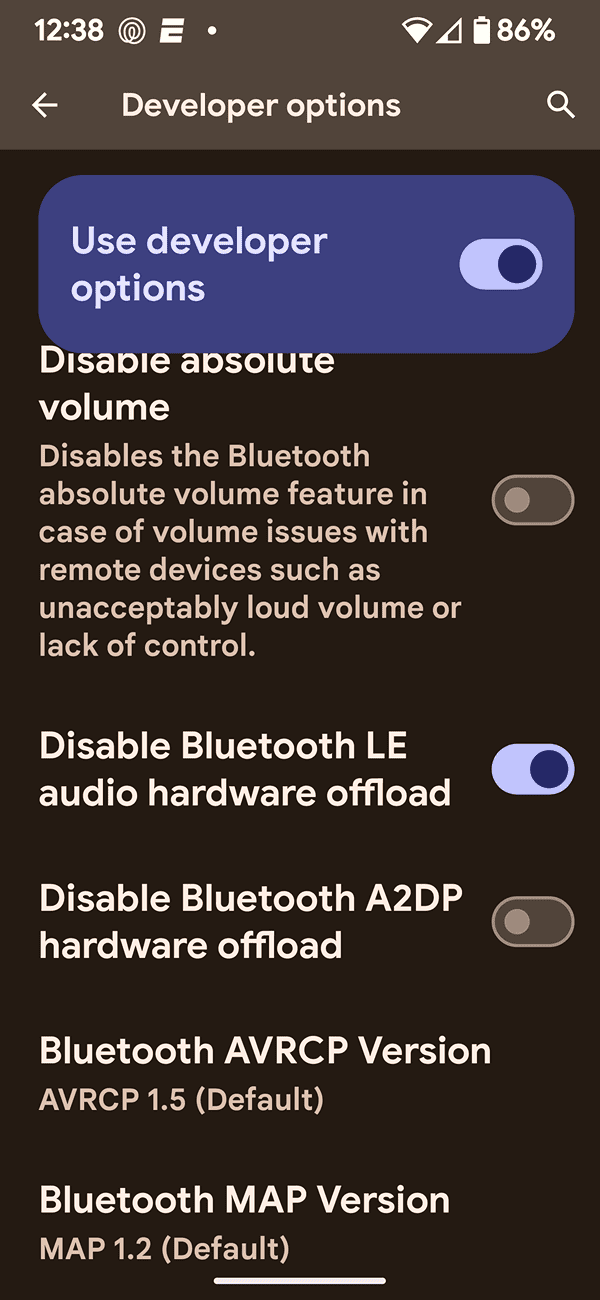
The problem in this post was solved by disabling Bluetooth LE Audio hardware offload in developer options in Bluetooth settings.

Not daring to hope, I held me breath as I went into my own Pixel 6 Pro and turned on Developer Options. For your own device, you may need to google how to turn on Developer mode, but for me it was this:

Enable Developer Options
  • First go to Settings/About Phone
  • At the bottom you will find Build Number, tap it 7 times and a message will appear telling you that you have become a developer (!)

Access Developer Options
  • Now go to the new Settings item in Settings/System/Developer Options;
  • You will find a large number of options, I repeat: DO NOT TOUCH ANYTHING YOU DO NOT KNOW.
What I turned on was the following (also see screenshot):

Disable Bluetooth LE Audio hardware offload

Again, turn ON the Disable function, kind of weird way to put it...

I then had to restart my phone to enable changes.

I know I am daring all sorts of fates by actually posting this, but it has been almost a month and I have had absolutely NO problems with PAAK. (Ducks and crosses self)

If anything changes, I will let everyone know, but for now, so far, so good!

Apparently, the problem seems to lay in the Bluetooth Low Energy mode, which I'm guessing puts the necessary hand-shake to sleep so that the R1T does not see it. Open to other interpretations.

I hope this helps others out there!

Please share if it does.

Rivian R1T R1S Phone-as-key PAAK issues Screenshot (Aug 15, 2024 12_38_07 PM)
 
OP
OP
XLR8R

XLR8R

Active Member
First Name
Michael
Joined
Apr 7, 2022
Threads
2
Messages
36
Reaction score
26
Location
Kansas City
Vehicles
R1S, Tesla MS LR, Audi Q7 S-Line
Occupation
Realtor
Clubs
 
Okay, I was about to post on this exact topic in a new thread, when I stumbled onto this. I *think* I may have an answer (after almost a year of looking and almost two years of ownership). I had the same finicky response with my R1T as to the lock/unlock as you approach and the dreaded 'no key detected' message that would show up at what seemed random intervals, only to have to restart my Pixel 6 Pro and have it magically detected by my R1T.

What clued me into my potential answer was for the very same "no key detected" problem to occur on my wife's new Mach-e. Thus set me to the internet, looking through multiple forums, until I stumbled onto a post in a Polestar forum. This person was describing the same PAAK problem happening to them, their Polestar 2 and their Pixel 7. They were lead to believe it was a Bluetooth LE problem, as some have metioned, but they fould the following Google Pixel forum post:

support.google.com/pixelphone/thread/203735099/bluetooth-devices-keep-disappearing-on-pixel-7-pro?hl=en

The problem in this post was solved by disabling Bluetooth LE Audio hardware offload in developer options in Bluetooth settings.

Not daring to hope, I held me breath as I went into my own Pixel 6 Pro and turned on Developer Options. For your own device, you may need to google how to turn on Developer mode, but for me it was this:

Enable Developer Options
  • First go to Settings/About Phone
  • At the bottom you will find Build Number, tap it 7 times and a message will appear telling you that you have become a developer (!)

Access Developer Options
  • Now go to the new Settings item in Settings/System/Developer Options;
  • You will find a large number of options, I repeat: DO NOT TOUCH ANYTHING YOU DO NOT KNOW.
What I turned on was the following (also see screenshot):

Disable Bluetooth LE Audio hardware offload

Again, turn ON the Disable function, kind of weird way to put it...

I then had to restart my phone to enable changes.

I know I am daring all sorts of fates by actually posting this, but it has been almost a month and I have had absolutely NO problems with PAAK. (Ducks and crosses self)

If anything changes, I will let everyone know, but for now, so far, so good!

Apparently, the problem seems to lay in the Bluetooth Low Energy mode, which I'm guessing puts the necessary hand-shake to sleep so that the R1T does not see it. Open to other interpretations.

I hope this helps others out there!

Please share if it does.

Screenshot (Aug 15, 2024 12_38_07 PM).png
If this works, I will eternally grateful to you! :muscle:

Are you aware of any side effects of disabling that function? Does it change or affect any other applications, music playback, etc?
 

trmaier

Well-Known Member
First Name
Tom
Joined
Dec 31, 2019
Threads
7
Messages
66
Reaction score
134
Location
Iowa
Vehicles
Kia Niro Hybrid, R1T El Cap, BM
Clubs
 
If this works, I will eternally grateful to you! :muscle:

Are you aware of any side effects of disabling that function? Does it change or affect any other applications, music playback, etc?
Nothing that I have noticed in the past month. I had wondered if battery life may be affected, as maybe something would be more active in the background, but I have not noticed any major differences in battery life, granted my battery is getting OLD and I charge more frequently anyway ;-). I hope this will work for you too. Keep me posted if so!
 

Sponsored

dduffey

Well-Known Member
First Name
David
Joined
Apr 1, 2022
Threads
18
Messages
399
Reaction score
368
Location
Texas
Vehicles
R1T, Tesla M3, Tesla MY
Nothing that I have noticed in the past month. I had wondered if battery life may be affected, as maybe something would be more active in the background, but I have not noticed any major differences in battery life, granted my battery is getting OLD and I charge more frequently anyway ;-). I hope this will work for you too. Keep me posted if so!
I tried that and unfortunately still have PaaK issues. I also tried disabling LE Audio completely.

Rivian phone key status says "Not connected. Get closer to vehicle" ... But Bluetooth toggle fixes it.

Thanks for being brave and sharing, let me know if you recall making any other changes.
 

BrianB

Well-Known Member
First Name
Brian
Joined
Jun 9, 2024
Threads
14
Messages
189
Reaction score
294
Location
Conroe, TX
Vehicles
2025 R1S
Clubs
 
iPhone 15 and Gen 2 R1S… I spend too much time standing by the door as the vehicle whirrs to life and decides to present a door handle. I miss the touch to unlock keyless entry door handle on my 8 year old F-150.
 

trmaier

Well-Known Member
First Name
Tom
Joined
Dec 31, 2019
Threads
7
Messages
66
Reaction score
134
Location
Iowa
Vehicles
Kia Niro Hybrid, R1T El Cap, BM
Clubs
 
I tried that and unfortunately still have PaaK issues. I also tried disabling LE Audio completely.

Rivian phone key status says "Not connected. Get closer to vehicle" ... But Bluetooth toggle fixes it.

Thanks for being brave and sharing, let me know if you recall making any other changes.
Bummer! I had really hoped to find the "magic bullet!"But maybe there is no such thing when it comes to troubleshooting. Bluetooth issues. Which phone do you happen to have?
 
First Name
Chris
Joined
Jul 2, 2024
Threads
2
Messages
23
Reaction score
38
Location
Chicago
Vehicles
R1S DM Gen 2
FWIW I am having the same issues on my Gen 2 and it’s really frustrating. SC has no solve. Basically I had to plead with them to get me a key fob. They said they’ll have them available in Oct and I am “first in line”. Not being able to unlock the vehicle reliably with 2 kids under 4 will really test your patience and make you despise an otherwise pretty great vehicle…
 

dduffey

Well-Known Member
First Name
David
Joined
Apr 1, 2022
Threads
18
Messages
399
Reaction score
368
Location
Texas
Vehicles
R1T, Tesla M3, Tesla MY
Bummer! I had really hoped to find the "magic bullet!"But maybe there is no such thing when it comes to troubleshooting. Bluetooth issues. Which phone do you happen to have?
Currently Pixel 7a. Also had the same issue on the Pixel 6a.

I have tried all of the tricks I googled from clearing caches, resetting networks (ie removing all Bluetooth devices), various developer options, including some adb commands related to Bluetooth. I may have also done a full factory reset (but don't recall for sure).

I do suspect it is a Bluetooth stack issue rather than a "Rivian" issue. I like the Pixel phones, but my next phone will probably be a different android brand. I am just afraid the issue is just me though, given I don't see a lot of people complaining about it and whatever phone I pick (iPhone is not an option) will exhibit the same behavior.
Sponsored


Top