Sponsored

Apple iOS 26 - Apple Maps send to Rivian Issue

vordo

Well-Known Member
First Name
Mark
Joined
May 4, 2023
Threads
1
Messages
129
Reaction score
85
Location
Topanga, CA
Vehicles
Tesla S, Rav4 EV
Occupation
Film Music Editor
I mostly send to the rivian via the rivian app so there is that…
Sponsored

 

TexasBob

Well-Known Member
First Name
Bob
Joined
Jan 15, 2022
Threads
49
Messages
1,227
Reaction score
2,720
Location
Houston
Vehicles
2024 R1T DM LRG, 2025 R1S Dune
I haven't been able to get past how butt-ugly it is and WTH did they do to the swipe-up gesture?!?
 

iowa_don

Well-Known Member
First Name
Don
Joined
Mar 31, 2025
Threads
2
Messages
80
Reaction score
40
Location
Arizona
Vehicles
R1S Gen 2
Occupation
Retired
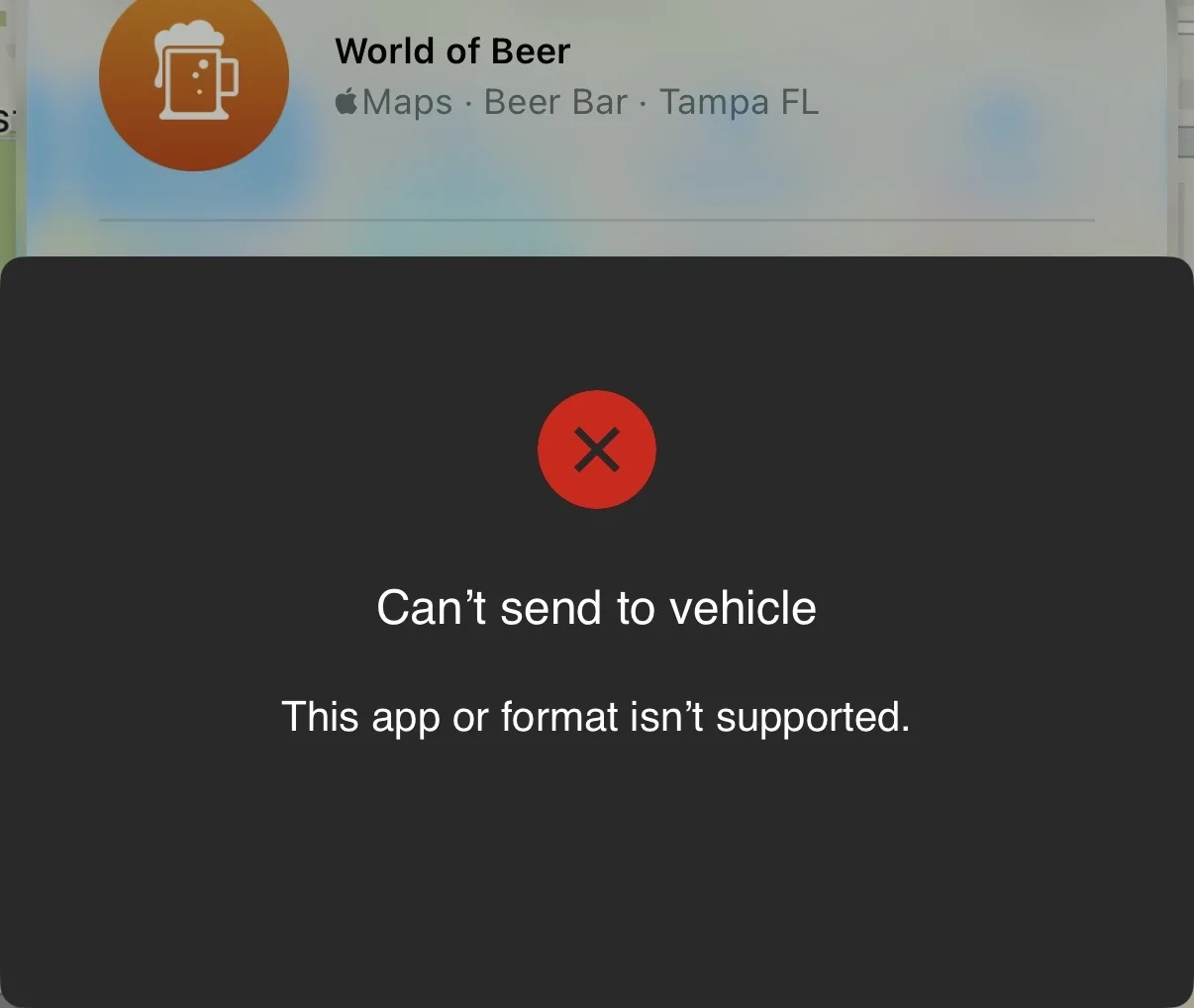
I updated my iPhone 16 Pro to iOS 26 yesterday and use the apple maps to send the location to Rivian so the destination is up for me to press the go button and drive on. Since the iOS 26 update, when I send the location from Apple Maps, I get an error message saying “Can't send to vehicle
This app or format isn't supported.”

I reached out to Apple support logging this as a potential bug in Apple Maps but I was told the app is working as designed as Rivian does not integrate with Apple CarPlay. I find this suspect as this worked with iOS 18. This functionality also works with Google Maps on this latest update as for this morning.

Anyone else finding this an issue?

IMG_0329.webp
Same here, iPhone running iOS 26 can't send destination to my R1S. No problem from Google Maps.
 

CANCERDOC

Well-Known Member
First Name
Eric
Joined
Oct 26, 2023
Threads
14
Messages
742
Reaction score
1,152
Location
Southern California
Vehicles
2024 R1S PDM
Occupation
Healthcare
Google maps for me for iOS 26 (16 pro max). Haven't tried apple maps - its one of those apps I move into a folder and forget it ever existed.
 

Sponsored

SANZC02

Well-Known Member
First Name
Bob
Joined
Feb 11, 2021
Threads
50
Messages
7,449
Reaction score
12,754
Location
California
Vehicles
Tesla Model S, LE - R1S
Occupation
Retired
I updated my iPhone 16 Pro to iOS 26 yesterday and use the apple maps to send the location to Rivian so the destination is up for me to press the go button and drive on. Since the iOS 26 update, when I send the location from Apple Maps, I get an error message saying “Can't send to vehicle
This app or format isn't supported.”

I reached out to Apple support logging this as a potential bug in Apple Maps but I was told the app is working as designed as Rivian does not integrate with Apple CarPlay. I find this suspect as this worked with iOS 18. This functionality also works with Google Maps on this latest update as for this morning.

Anyone else finding this an issue?

IMG_0329.webp
Try closing the Rivian and Apple Maps apps, power cycle your phone and try again.

It is working on my iPhone 14 Pro Max running IOS 26 and Rivian App 3.5.0
 

tkauftheil

Well-Known Member
First Name
todd
Joined
Jan 9, 2025
Threads
0
Messages
96
Reaction score
191
Location
Missouri Valley
Vehicles
2025 R1S Dual Standard
Occupation
network/security engineer
Works for me. Funny thing is this thread is the first I ever heard of this feature. Spend 10 min just trying to find the way to even send a location. Is it only for new search locations tho? I don’t see a share option for saved locations.
 

SANZC02

Well-Known Member
First Name
Bob
Joined
Feb 11, 2021
Threads
50
Messages
7,449
Reaction score
12,754
Location
California
Vehicles
Tesla Model S, LE - R1S
Occupation
Retired
Works for me. Funny thing is this thread is the first I ever heard of this feature. Spend 10 min just trying to find the way to even send a location. Is it only for new search locations tho? I don’t see a share option for saved locations.
Should work, click on saved location, top left corner there should be an arrow to forward
 

webfootdawg

Well-Known Member
First Name
Paul
Joined
May 31, 2022
Threads
15
Messages
293
Reaction score
398
Location
Portland, OR
Vehicles
Q5, A4
Clubs
 
Bummer. I use this a lot. I prefer apple maps. but guess I'll be using google for car stuff if this isn't sorted by the time I upgrade 2.
 

Beanejar

Well-Known Member
Joined
Mar 14, 2019
Threads
0
Messages
66
Reaction score
126
Location
Michigan
Vehicles
R1S - CY/OC
Hopefully it gets fixed, it’s a very useful feature. I find that it does not work on Apple Maps, but does work on Google maps.

iPhone 15 Pro on iOS26. Did forced kill of apps and restarted phone with no impact.
 

Sponsored

mrose

Well-Known Member
First Name
Michael
Joined
Sep 22, 2024
Threads
0
Messages
58
Reaction score
36
Location
san jose, ca
Vehicles
2024 R1S quad motor
Since ios26 is Beta and not fleshed out, I am not surprised this doesn’t work
 
OP
OP

hoje00

Member
Joined
Oct 5, 2021
Threads
1
Messages
6
Reaction score
0
Location
central florida
Vehicles
2025 rivian r1s
I tried everything I could think of to get this to work. I have been unsuccessful. I guess I will just have to wait until Apple releases a new iOS 26 update.

Thanks everyone for the suggestions and discussion.
 

nealopp

Member
Joined
Apr 8, 2024
Threads
0
Messages
9
Reaction score
9
Location
US
Vehicles
Model 3, Model Y. Gen 2 R1T on order
Clubs
 
Works fine for me, but I have seen this happen before.

It’s been as simple a fix as quitting maps and Rivian apps and reopening them. Give that a shot!
 

SANZC02

Well-Known Member
First Name
Bob
Joined
Feb 11, 2021
Threads
50
Messages
7,449
Reaction score
12,754
Location
California
Vehicles
Tesla Model S, LE - R1S
Occupation
Retired
Since ios26 is Beta and not fleshed out, I am not surprised this doesn’t work
No longer beta, was released on 9/15
Sponsored


Top