Sponsored

App Shows Window Open, It's Not.

Jeep Addict

Well-Known Member
Joined
Apr 1, 2024
Threads
12
Messages
92
Reaction score
129
Location
NE Ohio
Vehicles
R1S
I noticed an issue I haven't been able to solve. Weather is still sultry here and I've used the app to vent the windows prior to cooling the interior of the R1S. Sometimes the feature doesn't work, sometimes it does, same for turning on the temp control remotely. I live with it. I noticed recently the vent windows option "disappeared" and the app showed the "door open icon" on my beloved Samsung Galaxy app. I pull down the "shade" and it shows the rear passenger window open.

I thought I had inadvertently tapped the window switch or something and hit the "Close windows" button in the app, it doesn't give a response, and the window still shows open. I then thought it was just typically flakiness and went out to check and discovered the window was indeed closed. I thought I'd lower the window and check for obstructions etc., there were none, and I manually opened and closed the window, a few times, with the switch; the app still shows the window open.

What I've tried:

Reset the R1S, both types of reset, a couple of times each.
Force stopped the app.
Ignored it.
Watched some football.

Any ideas?
Sponsored

 

COdogman

Well-Known Member
First Name
Brian
Joined
Jan 21, 2022
Threads
33
Messages
11,641
Reaction score
34,494
Location
CO
Vehicles
2023 R1T
Occupation
Cyber defender
Clubs
 
By chance are you tapping the window or HVAC button in the app multiple times in a short amount of time? I’ve noticed there is a delay when I tap the HVAC on or vent windows before it actually shows it’s working. It’s a long enough delay that anyone could think it didn’t work and tap it again, which might be turning it off again (Or closing the window).

Just an idea??‍♂
 

SoCal Rob

Well-Known Member
First Name
Rob
Joined
Apr 19, 2021
Threads
39
Messages
2,808
Reaction score
5,964
Location
Laguna Niguel / Palm Springs / Pioneertown
Vehicles
2025 Rivian R1S & 2021 VW ID.4 (2023 R1S sold)
Occupation
Information Technology
Clubs
 

rjcrowder

Well-Known Member
First Name
Randy
Joined
Jun 30, 2023
Threads
2
Messages
45
Reaction score
61
Location
Anderson, IN
Vehicles
Rivian R1T
Clubs
 
I noticed an issue I haven't been able to solve. Weather is still sultry here and I've used the app to vent the windows prior to cooling the interior of the R1S. Sometimes the feature doesn't work, sometimes it does, same for turning on the temp control remotely. I live with it. I noticed recently the vent windows option "disappeared" and the app showed the "door open icon" on my beloved Samsung Galaxy app. I pull down the "shade" and it shows the rear passenger window open.

I thought I had inadvertently tapped the window switch or something and hit the "Close windows" button in the app, it doesn't give a response, and the window still shows open. I then thought it was just typically flakiness and went out to check and discovered the window was indeed closed. I thought I'd lower the window and check for obstructions etc., there were none, and I manually opened and closed the window, a few times, with the switch; the app still shows the window open.

What I've tried:

Reset the R1S, both types of reset, a couple of times each.
Force stopped the app.
Ignored it.
Watched some football.

Any ideas?
I had the same issue once. The fix was to go into the RiDE menu (see https://www.rivianforums.com/forum/threads/latest-ride-menu-code.21755/page-9#post-479317) and run a "recalibrate". Don't remember where it was but there's an option to do it... You also might find some info on it searching the forums.
 

Sponsored

MountainBikeDude

Well-Known Member
First Name
Adam
Joined
Jun 20, 2019
Threads
54
Messages
3,334
Reaction score
7,086
Location
Vancouver
Vehicles
2023 El Cap Quad Motor R1T (Selling the Xterra)
Clubs
 

ebarke

Well-Known Member
First Name
Eric
Joined
Sep 10, 2022
Threads
3
Messages
152
Reaction score
127
Location
MN
Vehicles
why does this matter?
Occupation
software engineer
Clubs
 

R1Thor

Well-Known Member
First Name
Joe
Joined
Aug 9, 2023
Threads
8
Messages
1,533
Reaction score
2,415
Location
Lancaster, PA
Vehicles
23QM R1T, Limestone + Ocean Coast, 21" & UBS
Occupation
Mechanical Engineering Lead
Clubs
 
I *have* seen this behavior once or twice in the past (nothing in recent history, however). I simply put the window all the way down and back up again and it seemed to resolve it.

If that doesn't fix it, I'd schedule service.

EDIT: Do what the others said regarding calibration :)
 

jnc007

Well-Known Member
First Name
Josh
Joined
Jun 9, 2022
Threads
13
Messages
100
Reaction score
137
Location
South Portland maine
Vehicles
‘13 tacoma
Occupation
Firefighter/ paramedic
Ive been having all kinds of issues with the app and closing the windows. Its always telling me it obstructed. When / if i get it to work, the app says it’s still opened. Not worth effort of just walking out and closing it myself
 

eRacer

Well-Known Member
First Name
Eric
Joined
Mar 20, 2023
Threads
4
Messages
197
Reaction score
227
Location
Napa, CA
Vehicles
Rivian R1T
That's odd. I've been trying to troubleshoot a similar issue where I'm finding the passenger window rolled down as if it was in "vent" mode. It happens randomly when I return to the car. I have a ticket open for it and it's been in once already and they did a log check on the vehicle inputs and saw nothing odd.

I'm going to try and recalibrate the window to see if that's the culprit.
 

Sponsored

OP
OP
Jeep Addict

Jeep Addict

Well-Known Member
Joined
Apr 1, 2024
Threads
12
Messages
92
Reaction score
129
Location
NE Ohio
Vehicles
R1S
I noticed an issue I haven't been able to solve. Weather is still sultry here and I've used the app to vent the windows prior to cooling the interior of the R1S. Sometimes the feature doesn't work, sometimes it does, same for turning on the temp control remotely. I live with it. I noticed recently the vent windows option "disappeared" and the app showed the "door open icon" on my beloved Samsung Galaxy app. I pull down the "shade" and it shows the rear passenger window open.

I thought I had inadvertently tapped the window switch or something and hit the "Close windows" button in the app, it doesn't give a response, and the window still shows open. I then thought it was just typically flakiness and went out to check and discovered the window was indeed closed. I thought I'd lower the window and check for obstructions etc., there were none, and I manually opened and closed the window, a few times, with the switch; the app still shows the window open.

What I've tried:

Reset the R1S, both types of reset, a couple of times each.
Force stopped the app.
Ignored it.
Watched some football.

Any ideas?
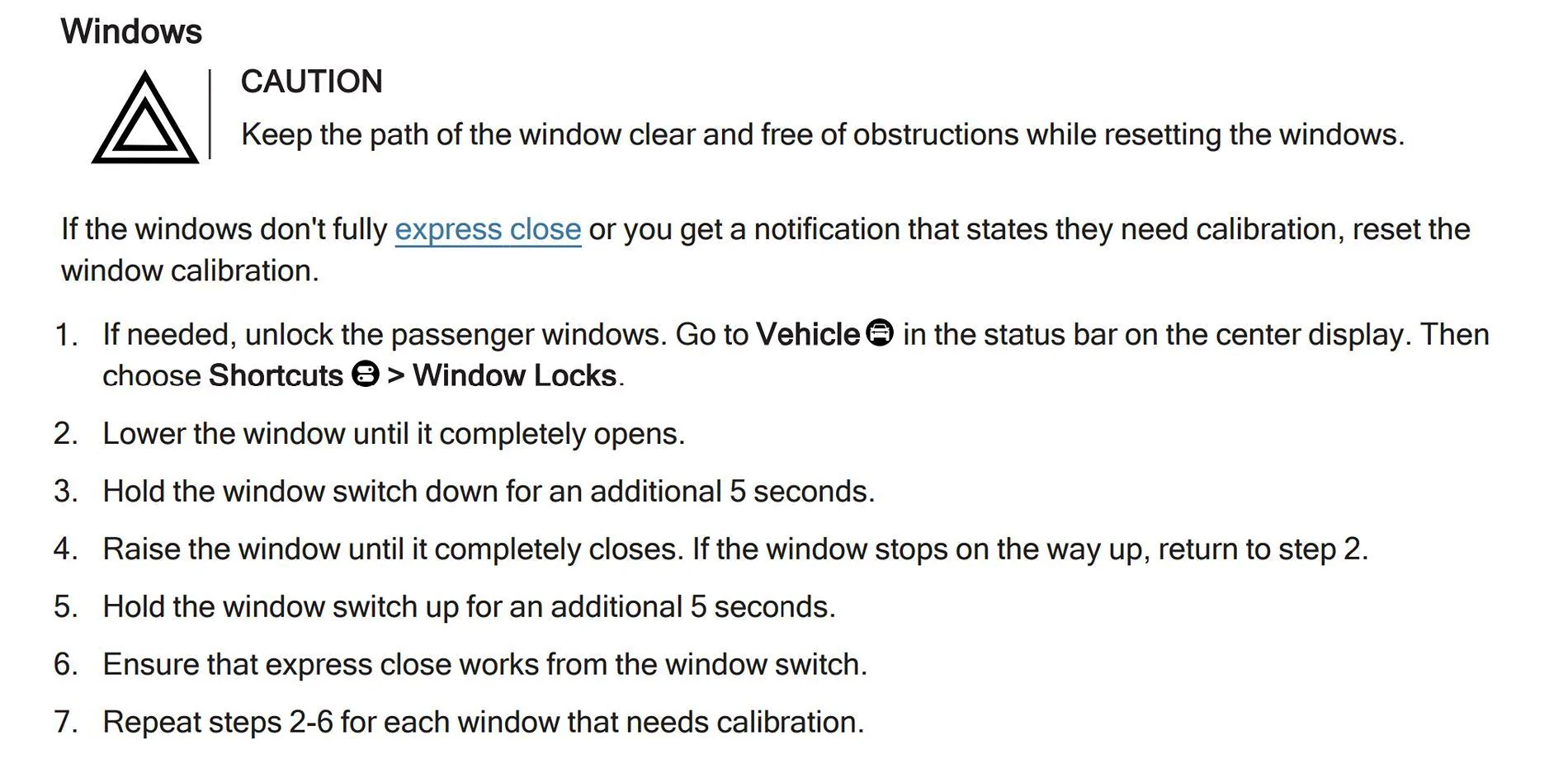
Okay, it's fixed, thanks those who offered help! I tried the calibration procedure below, it didn't work.

Rivian R1T R1S App Shows Window Open, It's Not. Screenshot 2024-09-16 185208


The link shared by @rjcrowder for calibration in the service "RiDE" menu worked, eventually. I had to calibrate it three times; the first two completed with "failure", third time was the charm!
 
Last edited:

kevinhanff

Active Member
First Name
Kevin
Joined
Jun 4, 2024
Threads
0
Messages
30
Reaction score
32
Location
Pensacola, FL
Vehicles
2024 Rivian R1T, 2021 Toyota Rav4 Prime
Occupation
Retired federal agent
I noticed an issue I haven't been able to solve. Weather is still sultry here and I've used the app to vent the windows prior to cooling the interior of the R1S. Sometimes the feature doesn't work, sometimes it does, same for turning on the temp control remotely. I live with it. I noticed recently the vent windows option "disappeared" and the app showed the "door open icon" on my beloved Samsung Galaxy app. I pull down the "shade" and it shows the rear passenger window open.

I thought I had inadvertently tapped the window switch or something and hit the "Close windows" button in the app, it doesn't give a response, and the window still shows open. I then thought it was just typically flakiness and went out to check and discovered the window was indeed closed. I thought I'd lower the window and check for obstructions etc., there were none, and I manually opened and closed the window, a few times, with the switch; the app still shows the window open.

What I've tried:

Reset the R1S, both types of reset, a couple of times each.
Force stopped the app.
Ignored it.
Watched some football.

Any ideas?
I had the same issue. I was ready to give up (I even “recalibrated” each window; hold button to open and keep holding for 5 seconds; hold button to close window, keep holding for 5 seconds). What finally cleared it was using the window button to OPEN the window and use the APP to close that window (my “phantom” open window was passenger, rear). After that, it stopped showing open. Good luck.
 

MATTELSEWHERE

Active Member
First Name
Matt
Joined
May 26, 2024
Threads
2
Messages
30
Reaction score
25
Location
Atlanta
Vehicles
2023 Rivian R1T
Occupation
Learning Director
Clubs
 
I noticed an issue I haven't been able to solve. Weather is still sultry here and I've used the app to vent the windows prior to cooling the interior of the R1S. Sometimes the feature doesn't work, sometimes it does, same for turning on the temp control remotely. I live with it. I noticed recently the vent windows option "disappeared" and the app showed the "door open icon" on my beloved Samsung Galaxy app. I pull down the "shade" and it shows the rear passenger window open.

I thought I had inadvertently tapped the window switch or something and hit the "Close windows" button in the app, it doesn't give a response, and the window still shows open. I then thought it was just typically flakiness and went out to check and discovered the window was indeed closed. I thought I'd lower the window and check for obstructions etc., there were none, and I manually opened and closed the window, a few times, with the switch; the app still shows the window open.

What I've tried:

Reset the R1S, both types of reset, a couple of times each.
Force stopped the app.
Ignored it.
Watched some football.

Any ideas?
I had this problem after the big update a couple months ago - same thing, one window showed open on the app. Service walked me through a reprogramming process but couldn’t resolve over the phone. Service center had to reflash an ECU. Works fine now.
 
Joined
Dec 8, 2023
Threads
6
Messages
19
Reaction score
19
Location
NJ
Vehicles
e-tron
I had the same issue. I was ready to give up (I even “recalibrated” each window; hold button to open and keep holding for 5 seconds; hold button to close window, keep holding for 5 seconds). What finally cleared it was using the window button to OPEN the window and use the APP to close that window (my “phantom” open window was passenger, rear). After that, it stopped showing open. Good luck.
Wow. That was simple. Had this issue for months and this made it go away. Thanks!
Sponsored


Top