
CommodoreAmiga
Well-Known Member
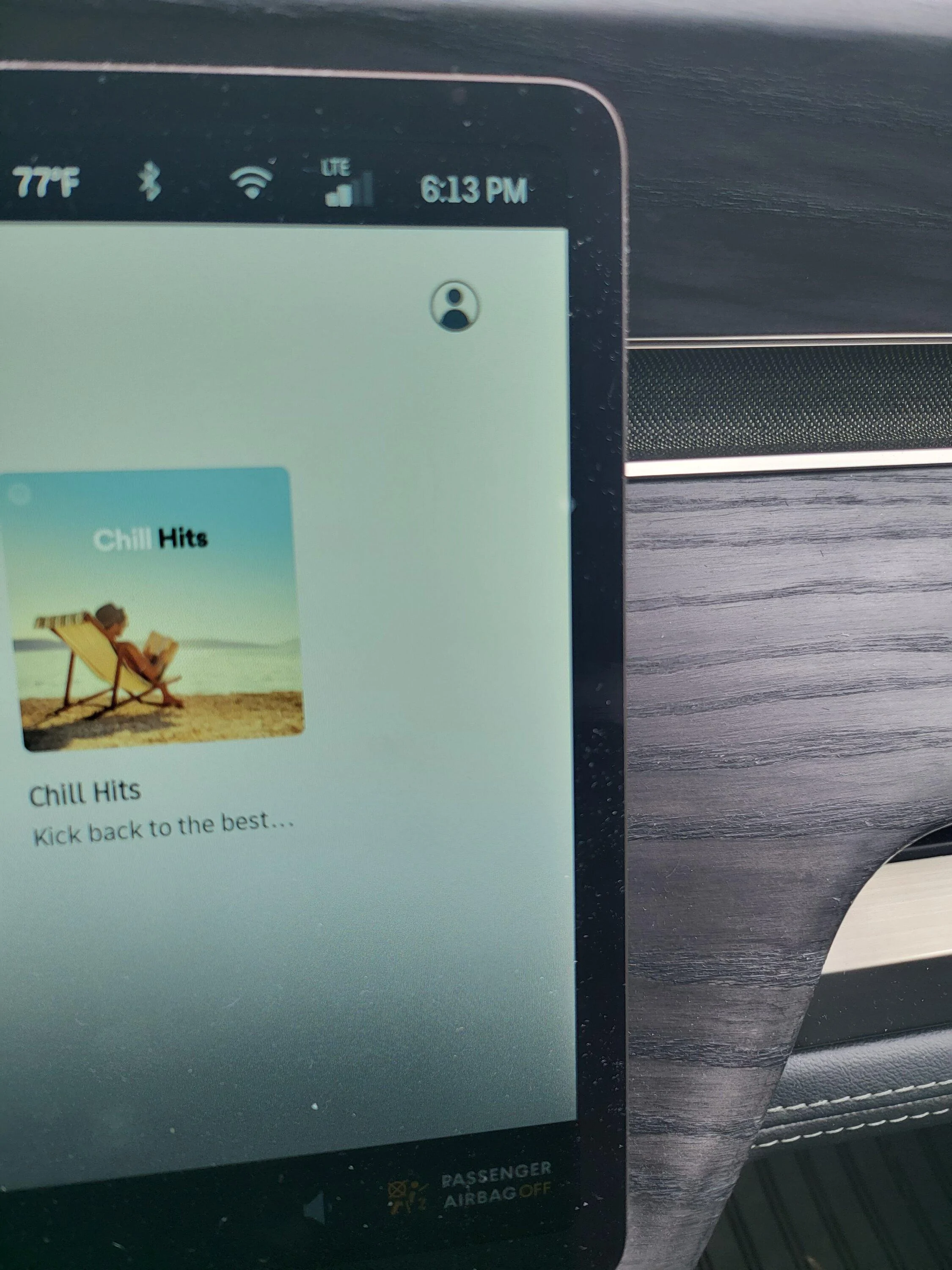
how do I do this?Have you adjusted your spotify streaming quality to high?
Sponsored
how do I do this?Have you adjusted your spotify streaming quality to high?

Change it from normal to high...how do I do this?
Hit the user icon. Music streaming quality is the lower half of the next page.how do I do this?

This is a great writeup and after almost 2 weeks with my truck, I wholeheartedly agree. Though I am an Android/Google person and I use YouTube Music and that's the app missing for me.I’m trying very hard to embrace the “Rivian” way and immerse myself.
The nav looks nice, visually; functionally, it’s definitely a “minimum-viable product”.
I can’t find many addresses/businesses I search for. The route often takes me to within a block of the location, but rarely to the correct driveway or parking lot. Perhaps when Rivian described the R1T as an “adventure” vehicle they were talking about the adventure of finding your destination? It will get you to the general area — but you have to play detective to find it from there.
You can save “favorite” addresses, but you can’t give them a name. Wtf?
The nav does show your estimated SoC% when calculating a route (nice) but it doesn’t show you the info while on a route. I wish it would leave it up as a continuously-updating estimate.
The nav offers multiple routes when first searching for an address…. But doesn’t seem to let you see alternate routes when navigating. I want a button to view alternate routes, at any time.
I miss the “share ETA“ feature from both Apple Maps and Google Maps. It was nice being able to set a route and share the route and timing with my wife or friend when coordinating meeting somewhere.
I haven’t played with this too much, but when I needed a DCFC prior to installing my home EVSE, I didn’t see a good/easy way to pick a charger and navigate to it in the Rivian nav. If you route to a far away destination the nav will plan charging stops, but tapping on a charger in the map didn't seem to let me pick one to navigate to. I ended up looking one up in PlugShare and entering the address into the nav, manually. Rivian needs to enhance their smartphone app to let me push addresses to the truck.
Alexa is frustrating. it randomly starts listening and softens the music, even though no one summoned it. Disabling the wake word helps. The vocabulary is quite limited. “Take me home” in my Volvo would load my home address into nav, but Alexa doesn’t understand. I find the quality/fidelity of the Alexa voice to be poor, as well. Siri sounds “HD” by comparison And Alexa sounds like a static-filled landline telephone call.
I had a ton of issues with getting Alexa to control music. It kept wanting to use Amazon Music and kept asking me to pay for a subscription. The fix was not obvious, but TL;DR you must have a paid Spotify Premium subscription to use Alexa, even though the subscription isn’t needed to use the touch interface. It’s annoying to be forced to pay for a second music subscription. Beyond the extra cost, I also lose my playlists and integration with other devices. Sound quality of Spotify seems low, too. It’s better than XM, but it definitely falls short of Apple Music and even Spotify through my Volvo (which also offers native Spotify app, but doesn’t FORCE it on you)
The phone voice call interface is good. Simple, but functional. Visually pleasing. Sound quality is good.
The complete absence of text messaging integration is annoying. This needs to be addressed OTA, soon!
My honest opinion of the nav/infotainment is that it needs a lot of work. Visually it looks good. Performance-wise it is reasonably snappy. It has potential. Rivian just needs to put the dev hours into building out the feature set.
I do miss CarPlay. I don’t think I will always need it; I am willing to do things the ”Rivian Way(tm)”. But currently, there is no ”way” to do a lot of things with Rivian. So what is the conclusion? Well, it’s complicated, and people can easily twist my words to fit their own bias. The gist is:
Is CarPlay required? No.
Is Rivian better than CarPlay? Not even close, right now.
If Rivian puts forth the effort, can they make me okay with not having CarPlay? Yes.
Most of my concerns CAN be addressed with OTA updates. Time will tell if Rivian chooses to do so. I hope they do. I hope it doesn’t take long.
What I think Rivian needs to do, soon:
- Update map data so it’s “current” and accurate.
- Allow naming favorites.
- Ability to “send to truck” address from Rivian app.
- Ability to navigate to a charger as a destination.
- Ability to add “waypoints” on route and search for POI along a route (bonus for ability to do this from Rivian app)
- Improve Alexa voice quality.
- Improve Alexa vocabulary (open garage, navigate to named favorite, more natural language)
- Enable Apple Music Alexa skill.
- Native Apple Music app in infotainment.
- Text message integration (show text message on display, read aloud, dictate reply, send new message by voice)
- Auto-tilt-down side mirrors on shift-to-reverse (seriously, how was this missed?)
What part isn't present in the map? Yelp reviews, or Yelp POI?Another interesting thing I've noticed is that the legal/recognition screen in the settings mentions Yelp reviews (and some other interesting data providers). This is a feature of Telenav but is not currently present in the Rivian map experience that I've seen.
Yelp is already in the nav. I added my gym as a “favorite” and it shows a star rating and yelp logo.This is a great writeup and after almost 2 weeks with my truck, I wholeheartedly agree. Though I am an Android/Google person and I use YouTube Music and that's the app missing for me.
You can pan around in the map and tap a charger and it will let you navigate to it (and activate battery preconditioning as necessary). Though I think this only works if you aren't already navigating to something.
Another interesting thing I've noticed is that the legal/recognition screen in the settings mentions Yelp reviews (and some other interesting data providers). This is a feature of Telenav but is not currently present in the Rivian map experience that I've seen.
Yelp is already in the nav. I added my gym as a “favorite” and it shows a star rating and yelp logo.
I must be blind then. I've never noticed the Yelp review popup.What part isn't present in the map? Yelp reviews, or Yelp POI?
They can be a bit slow to load. I haven't figured out how to have Alexa use the yelp POI over the map ones, but if you type in where you're looking they should show up.I must be blind then. I've never noticed the Yelp review popup.
I made a contribution to Mapbox on July 5 and received an email notification today letting me know that "Your change has been reviewed and approved. You will be able to see your changes on the Map within 14 days."It's 100% mapbox so I think https://www.mapbox.com/contribute/ might be the best way to get fixes in though I haven't tested it. Mapbox does say they use OSM so theoretically that should work as well.
Thanks. I changed it to "Very High" and it does seem to be better.Hit the user icon. Music streaming quality is the lower half of the next page.
Pretty sure you have to be in park to change it.

Agreed. But even with Spotify on 'Very High' it's only 320kbps. Amazon Music through Alexa sounds much better, though I don't have control/visibility into bitrate.Thanks. I changed it to "Very High" and it does seem to be better.
For how much Rivian talked up the Meridian Elevation audio system, I would have thought they'd default to a decent bitrate.
Higher bitrate sounds better as long as you have a signal that can maintain it. Otherwise you start running into buffering issues and choppy playback. As a factory default, I can see why they would opt for stability over sound quality.For how much Rivian talked up the Meridian Elevation audio system, I would have thought they'd default to a decent bitrate.
you'd think that it would default to high and then responsively drop based on bandwidth.Higher bitrate sounds better as long as you have a signal that can maintain it. Otherwise you start running into buffering issues and choppy playback. As a factory default, I can see why they would opt for stability over sound quality.

Do you pay for the extra HD Amazon music? I have that service for my home Denon receiver on my B&W speakers, and I have been happy with the HD bitrate through Amazon. (I don't have my Riv yet and I don't know how that HD Amazon music applies through Alexa.)Agreed. But even with Spotify on 'Very High' it's only 320kbps. Amazon Music through Alexa sounds much better, though I don't have control/visibility into bitrate.
I would qualify that as a nice to have but not required to have in the initial release. Rivian barely seemed to be able to complete a minimal viable product offering so not surprising we didn't get many bells and whistles at launch. Plus, would you rather they work on improving their Spotify client or add support for additional services?you'd think that it would default to high and then responsively drop based on bandwidth.


