Sponsored

Gear Guard / Drive Cam questions

Yossarian

Well-Known Member
Joined
Oct 20, 2020
Threads
45
Messages
934
Reaction score
922
Location
SE Pennsylvania
Vehicles
R1T,Telluride, Wee-Strom, Lynskey Cooper
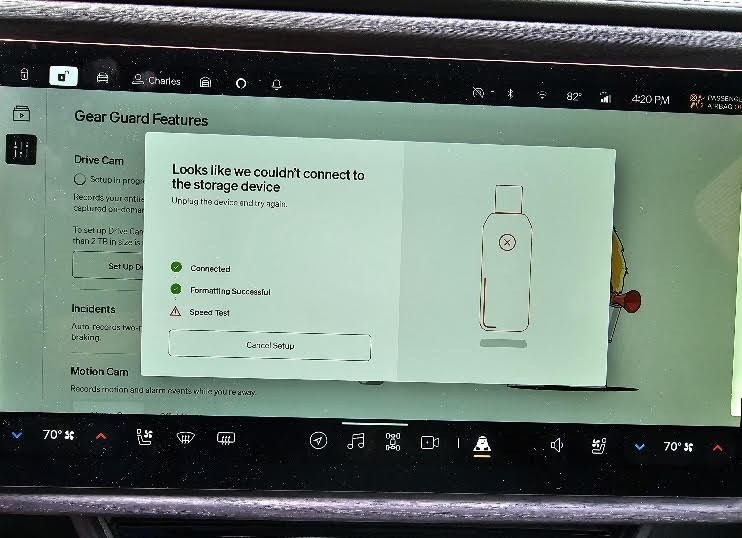
I finally got around to getting a flash drive for the Gear Guard. Based on the recommendations of several forum members, I bought a Samsung 256 Mb drive with 400 MB/s transfer speed. While the Rivian recognized the drive and formatted it, the drive fails to pass the speed test, so can't connect:

Rivian R1T R1S Gear Guard / Drive Cam questions Screenshot GG


Is there anything I can do to get this flash drive to work, or is 400MB/s simply too slow and I need to get something faster?
Sponsored


 

Electrified Outdoors

Well-Known Member
First Name
Ken
Joined
Jan 30, 2023
Threads
63
Messages
3,683
Reaction score
3,980
Location
Mount Airy, Maryland
Website
EVoutdoors.org
Vehicles
2024 Rivian R1S Quad, 2024 Silverado EV RST First Edition
Occupation
Real Estate
Clubs
 
I finally got around to getting a flash drive for the Gear Guard. Based on the recommendations of several forum members, I bought a Samsung 256 Mb drive with 400 MB/s transfer speed. While the Rivian recognized the drive and formatted it, the drive fails to pass the speed test, so can't connect:

Screenshot GG.jpg


Is there anything I can do to get this flash drive to work, or is 400MB/s simply too slow and I need to get something faster?
Try formatting in a Windows PC as exFAT. Then put in Rivian and try again. I highly recommend an SSD for DriveCam though. Its constantly recording a a video stream and member sticks/flash memory don't do as well with a lot of writes.

I use the crucial X6 SSD. https://amzn.to/47VZdHv
 

Harvey Mushman

Active Member
Joined
Jul 23, 2024
Threads
1
Messages
37
Reaction score
35
Location
Bloomfield Hills, Michigan
Vehicles
2024 R1T
Occupation
Bottle Washer
I just ran into this as well with a Samsung T7 drive. Got through formatting but consistently failed the speed test. Do a soft reset of the infotainment system with the drive connected, then do the setup process. Worked for me first time.
 

SwampNut

Well-Known Member
First Name
Carlos
Joined
Apr 22, 2024
Threads
51
Messages
3,465
Reaction score
3,678
Location
Peoria AZ
Vehicles
2022 R1T Launch Edition
Occupation
Geek
Clubs
 
Unfortunately, many sellers are shipping fake drives, not from Samsung and which are really just Chinese garbage. What is your source? And if it's Amazon, was it sold and shipped by Amazon? That's not 100% perfect either because of Amazon's comingling policy, but better than "Sold by ChinaFraudInc" or any other random seller.

I'm using the same drive, I think, based on your description.

https://www.amazon.com/gp/product/B09WB2NL8W/ref=ppx_yo_dt_b_search_asin_title?ie=UTF8&psc=1

This is fine, it's not rewriting enough to be a problem.
 
OP
OP
Yossarian

Yossarian

Well-Known Member
Joined
Oct 20, 2020
Threads
45
Messages
934
Reaction score
922
Location
SE Pennsylvania
Vehicles
R1T,Telluride, Wee-Strom, Lynskey Cooper
Thanks for the responses. The drive is the same one as @SwampNut references and I'm pretty sure is genuine Samsung. I will try a soft reset and see what happens.
 

Sponsored

SwampNut

Well-Known Member
First Name
Carlos
Joined
Apr 22, 2024
Threads
51
Messages
3,465
Reaction score
3,678
Location
Peoria AZ
Vehicles
2022 R1T Launch Edition
Occupation
Geek
Clubs
 
Test it on a PC, by copying at least a few GB of files to it, then try to view/open them.
 
OP
OP
Yossarian

Yossarian

Well-Known Member
Joined
Oct 20, 2020
Threads
45
Messages
934
Reaction score
922
Location
SE Pennsylvania
Vehicles
R1T,Telluride, Wee-Strom, Lynskey Cooper
Test it on a PC, by copying at least a few GB of files to it, then try to view/open them.
Wish I could, but neither my desktop nor laptop have USB C ports, and the only adapters I have are USB C (male) to USB OTG (female.) Yes, I know I'm a dinosaur.

It's possible that the drive may be faulty, but all indications are it's genuine Samsung. Bought through Amazon on exactly the same page you reference @SwampNut, and the packaging has all the expected Samsung markings, to include copyrights, and a "Made in Taiwan" statement of origin.
 

SwampNut

Well-Known Member
First Name
Carlos
Joined
Apr 22, 2024
Threads
51
Messages
3,465
Reaction score
3,678
Location
Peoria AZ
Vehicles
2022 R1T Launch Edition
Occupation
Geek
Clubs
 
How do you plan to ever get data off the drive if you need to, without an adapter? Which is cheap.
 

R1Thor

Well-Known Member
First Name
Joe
Joined
Aug 9, 2023
Threads
8
Messages
1,536
Reaction score
2,423
Location
Lancaster, PA
Vehicles
23QM R1T, Limestone + Ocean Coast, 21" & UBS
Occupation
Mechanical Engineering Lead
Clubs
 
I had that same exact Samsung USBC flash drive work up until last update. I was hoping THIS update would correct it. I also tried a SanDisk rated USB-C 3.2 with even higher transfer speeds.
Mobile service came out and verified all of my hardware was working, updated to (at the time, latest software--there was a .6 update he pushed even though we weren't too hopeful--and it didn't help), and ran benchmarks on the 2 flash drives I was using using his laptop, which he said were testing fine.

A forum member, @TollKeeper recommended this SSD drive to me in this thread: https://a.co/d/05g9yHy as he was using it successfully. I had to use a different USBC cable than what it came with, but it's working perfectly since I installed it.
 

GrnFrg13

Member
First Name
Shami
Joined
Oct 20, 2023
Threads
1
Messages
14
Reaction score
6
Location
90025
Vehicles
ris
Try formatting in a Windows PC as exFAT. Then put in Rivian and try again. I highly recommend an SSD for DriveCam though. Its constantly recording a a video stream and member sticks/flash memory don't do as well with a lot of writes.

I use the crucial X6 SSD. https://amzn.to/47VZdHv
I got the crucial X9 and ran into the same issue with not passing the speed test. I also tried another SD card with the same issue. Have people tried a different wire?

Thanks!
 

Sponsored

Electrified Outdoors

Well-Known Member
First Name
Ken
Joined
Jan 30, 2023
Threads
63
Messages
3,683
Reaction score
3,980
Location
Mount Airy, Maryland
Website
EVoutdoors.org
Vehicles
2024 Rivian R1S Quad, 2024 Silverado EV RST First Edition
Occupation
Real Estate
Clubs
 
I got the crucial X9 and ran into the same issue with not passing the speed test. I also tried another SD card with the same issue. Have people tried a different wire?

Thanks!
Not sure about the x9 I use the X6. Format it first in my Windows PC with exFAT file system. Then I put it in the Rivian and go through the motions.

Maybe try infotainment reboot if that doesn't work. Far left and far right steering wheel button at the same time until it reboots.
 

Trayner22

Member
First Name
Terrance
Joined
Jun 15, 2024
Threads
0
Messages
5
Reaction score
5
Location
Holly Springs, NC
Vehicles
2022 Rivian R1T QM Adventure w/ 22” Sport Dark
Occupation
IT
Clubs
 
Thank you for the info in this thread. This just worked for me with the 2024.35.0 software + Samsung Flash drive mentioned above on my 22 R1T. After formatting on my PC, I inserted the drive in the center console, rebooted the infotainment and then proceeded to set up drive successfully (again). It was baffling because it has been working fine for the last 3 months and then I took it out to view the contents.
Sponsored


Top