Sponsored

Help! Need basic charging station guidance!

COdogman

Well-Known Member
First Name
Brian
Joined
Jan 21, 2022
Threads
33
Messages
11,641
Reaction score
34,494
Location
CO
Vehicles
2023 R1T
Occupation
Cyber defender
Clubs
 
True, but it sounds so complicated and confusing. But I will admit, I've done all my road trips for the las 6 plus years using nothing but Tesla Superchargers (and a Level 2 charger, if my hotel offered it).

If I could distill this thread down to one simple rule it would be only buy a Tesla for road trips.
Of course that is what you would recommend:rolleyes:

I think what you said was true for a long time, but road tripping in non-Tesla EVs is rapidly getting easier. Part of that is due to having access to some of those superchargers now, but the additions of other charging networks along major travel routes is the other factor. In some parts of the country folks can use RAN exclusively.
Sponsored
 

Akubra91

Member
Joined
Feb 8, 2023
Threads
2
Messages
15
Reaction score
7
Location
Boulder
Vehicles
Audi Q5
Occupation
Retired
Clubs
 
Rivian does a very good job navigating you to chargers, so you don't need anything else other than Rivian navigation to plan your route. If you want to get nerdy with route optimization, you can also run your trip through A Better Route Planner (an App). It can sometimes get you to your destination quicker, but if you're just getting started, the Rivian navigation has worked well for me—as long as you set your filters properly. Play with the phone app route planner before your next big trip, it can get you familiar with the options on the way, and you can even plan the whole trip before you leave (and send said route to your truck when you are ready to leave).

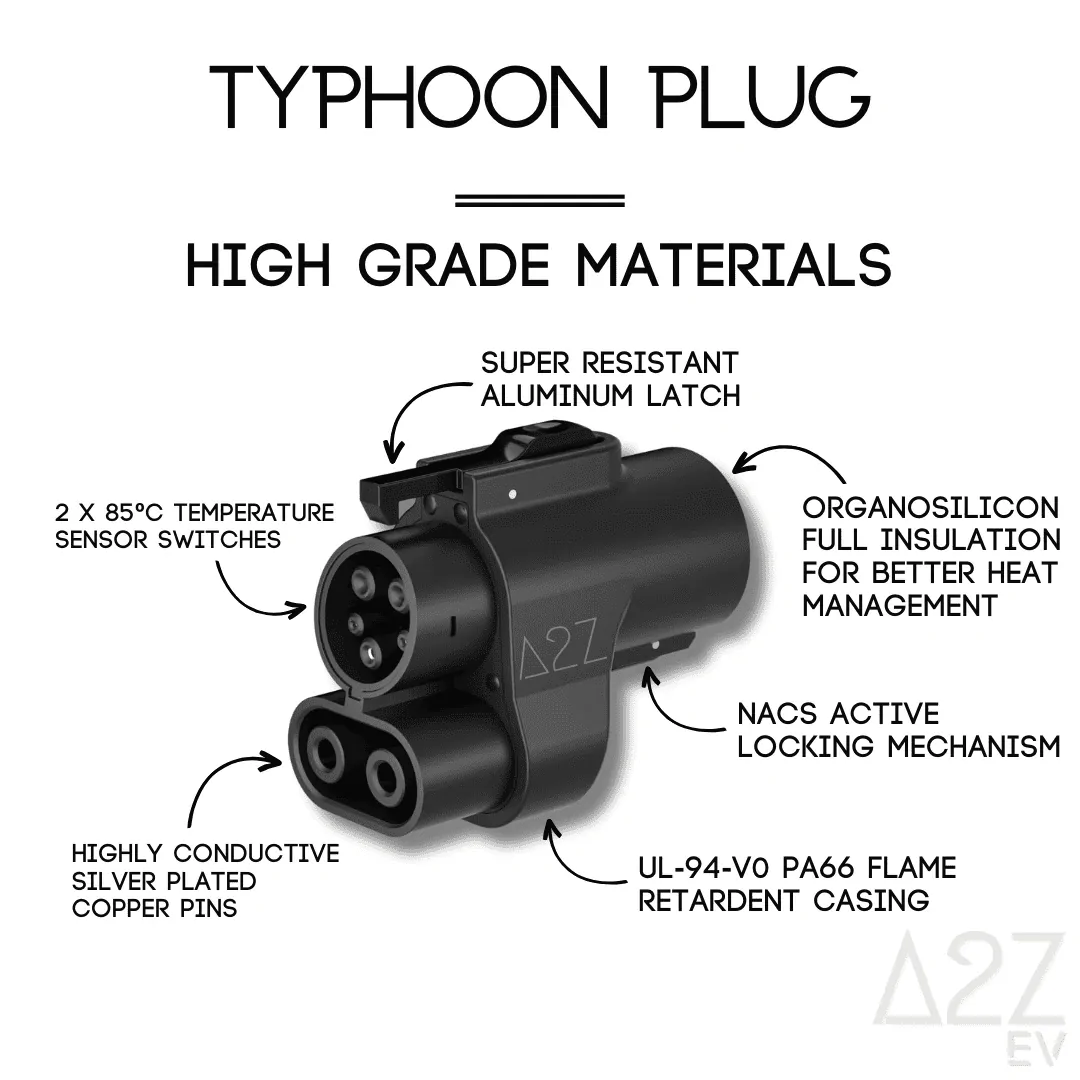
The first major thing I would recommend is getting an A2Z Typhoon CCS>NACS adapter: https://a2zevshop.com/collections/charging-adapters/products/nacs-ccs1?variant=43186507612360 Get the kit that also comes with the L2 Tesla adapter, since there are still some Tesla-only L2 chargers around, and you want the ability to charge anywhere you can, fast and slow.

If you just got your vehicle, chances are it will take a long time before your free Rivian-provided adapter shows up. You can do a whole lot of worry-free traveling these days just between RAN (Rivian Adventure Network) and Tesla SCs—both of which are plug and charge, billing to your Rivian app. If you initiate with the Tesla App, and pay their monthly membership fee, you will get cheaper rates, but it won't be quite as simple as just plugging in and initiating a charge automatically.

I have had good luck with my A2Z, and as long as you use your Rivian navigation to get you to the correct Tesla chargers, you should find Superchargers to be about as easy as RAN locations—as long as you have an up-to-date form of payment tied to your Rivian app, it's as simple as plugging in and charging (watch an A2Z Typhoon adapter review to see how that's done with their adapter). Also, know that not all Tesla charge stations are supported—feel free to do some research on this forum about which ones do/don't work (Version 3 SCs are the only ones that do, but not all are available), but without getting too into those details, just follow your Rivian nav, and make sure to select the correct filters so you include "Adapter Required" stations.

In my opinion, you should download the following charge network apps at a minimum and create accounts with payment methods added so that you have your best shot at being able to charge on these networks when needed without the added stress/delay of downloading an app, creating an account, etc. Network penetration varies depending on where you're traveling in the country—so I hit the big three first, with less prevalent networks following those:
  • Electrify America. Hopefully, you won't have the poor luck I have with EA. I usually exclude EA chargers from my route planning if at all possible (easier now that Tesla SCs are an option—more on that later). That being said, EA is essential to travel certain corridors, so it's a necessary evil at this point.
  • EVgo. In my experience in/around New England, these are usually slower "fast" chargers, but nice to have the option when needed.
  • Chargepoint. I haven't personally experienced many chargepoint fast chargers (or any above 100kW anyway, but there are a lot of Chargepoint L2 chargers, and it's nice to have this option when visiting places for a couple hours or more. I think they do have 500A+ "full speed" chargers in some parts of the country.
  • There are some other, less widely available ones that I have apps for, and have used at times in a pinch:
    • Flo (always seems reliable, but not usually very fast).
    • Shell Recharge (I've only come across these in New York State, but I'm sure they are cropping up in other places—they usually seem to work pretty well in my experience).
    • I have others in my EV app folder, but so rarely use them that I don't feel the need to recommend them.
You may also want to download Plugshare, an app that crowd-sources ratings and reviews for chargers of all sorts (L2, L3, most/all networks) allowing you to find ones that might not show up on other maps and to check up/down status, speeds being seen, etc. It's not perfectly reliable, but it can help you find juice when you most need it or help you not make the wrong call and end up at a charger that "should" be working properly but isn't for whatever reason.

I used to use this app a lot more with other non-Tesla EVs that had poor/nonexistent route planning, but I now trust my Rivian about as much as I trusted my Tesla—and you have the added perk of a more accurate range estimating algorithm, which is nice.

tl/dr;
Prepare yourself with L2/L3 NACS to J1772/CCS adapters and included mobile charger, trust your Rivian Nav, and don't stress—you've jumped into EV ownership at the right time with the right vehicle to get most places worry-free!
Check out this thread.

Tesla Road Trip Charging Level 3 and Level 2

just make sure you have a credit card payment set up in your Rivian app and you can use the plug and charge feature.

You can use the Tesla app to take advantage of membership pricing and enable your charging session there.

You can purchase the A2Z typhoon level 3 DCFC Supercharger adapter For fast charging on the go using the Tesla network.

You can bundle that with the level two Tesla A2Z Stellar destination adapter so you can charge at hotels using Tesla Destination chargers.

Download Tesla app, ABRP, PlugShare and Rivian App.


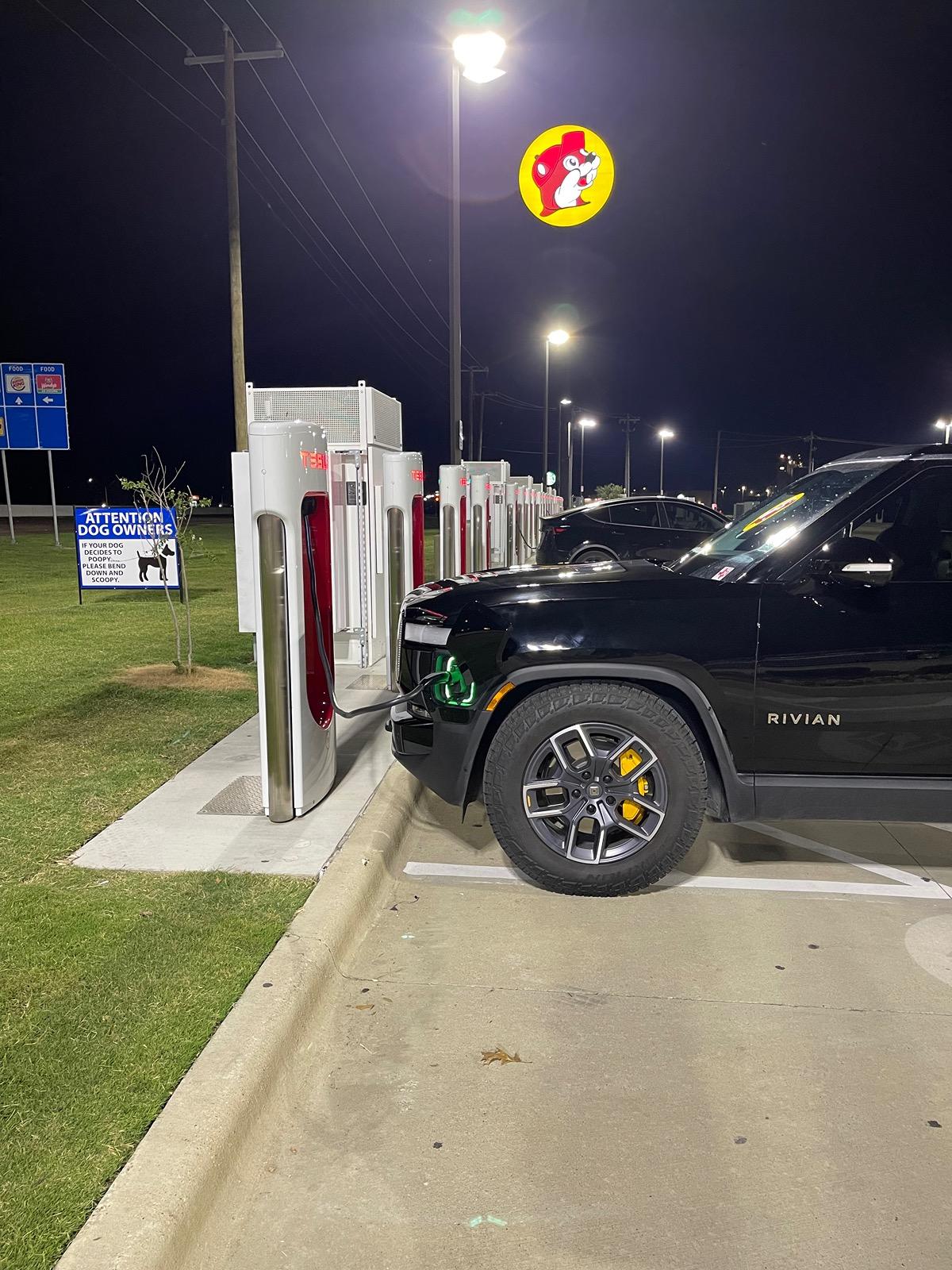
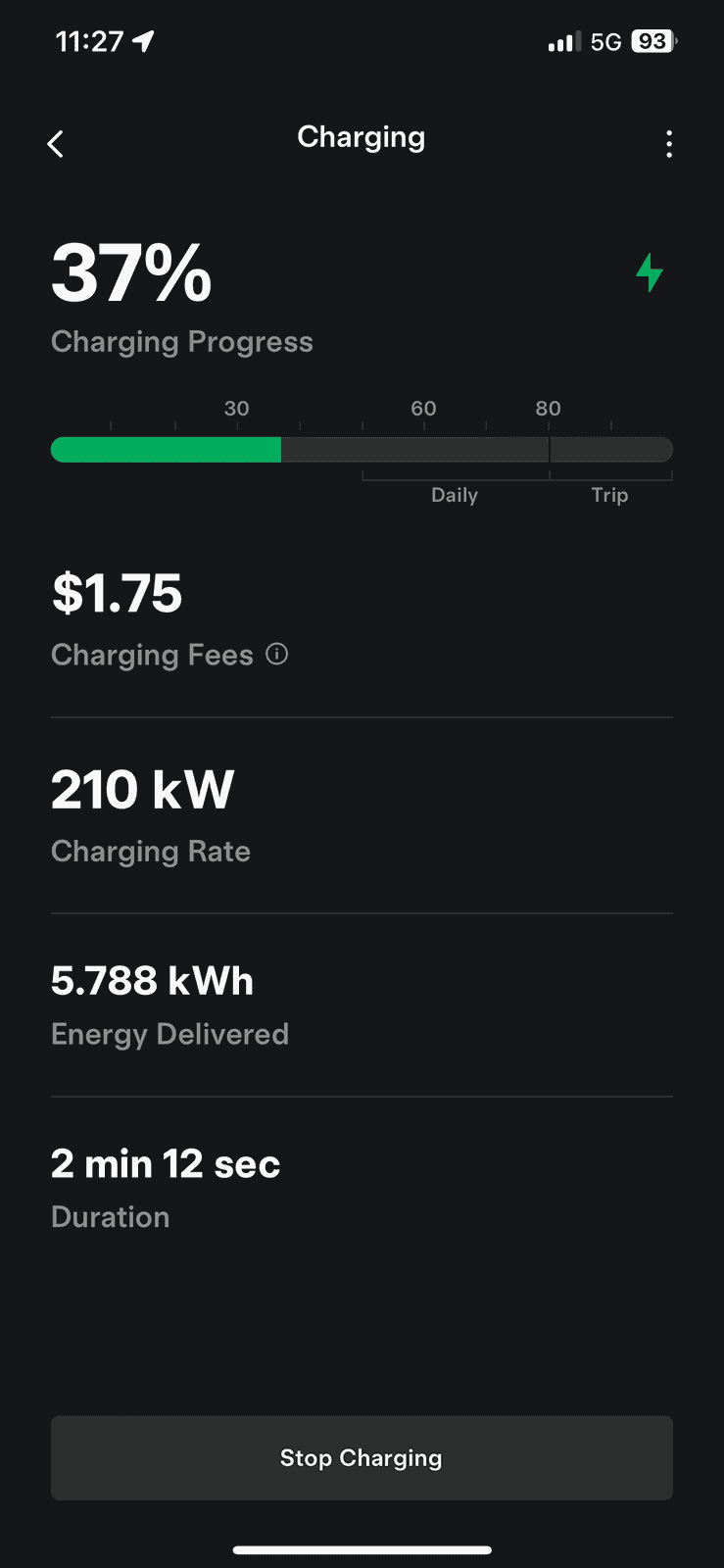
A2Z adapter working at full speed as designed.

Works great at Buc-ee’s

Saves me time and money when paired with Tesla membership pricing.

Feel free to use the forum discount code “RIV” to save $$$.


A2Z EV Tesla Supercharger Adapter for Rivian - Save 10% + FREE shipping with discount code "RIV". 12 Months Warranty


img_2925-jpeg.jpg

IMG_2929.png

IMG_3413.webp
Early on someone at an EA charger told me a very wise piece of advice, always initiate a pay for charge from the corresponding app, it works 99% of the time. A much higher rate than if you try to initiate and pay at the station/charger, etc.

I still live by this. I also figured out, download and setup your app with payment before you need to be charging! Public charging can be very time sensitive.

Download, get an account and payment method setup for the following apps to cover your bases: Blink, ChargePoint, Electrify America, EVgo, Rivian, Shell Recharge and Tesla.
CAUTION: LONG POST.

I generally agree with the advice above, @EMchef, but with these qualifiers and elaborators.

Below, I use "kW" to stand for "kilowatts" (a unit of charger speed) and I might use "kWh" to stand for "kilowatt hours" (a measure of the amount of charge delivered or needed).

*** Tesla Supercharger Adapters ***

For Tesla Superchargers, which can expand your fast-charging options and often lower costs, you need a Tesla (NACS) to CCS adapter.

Rivian approves the one they will eventually send us. Nothing else. It will likely be US-made. The few participants who have gotten the official chargers all seem to report good experiences from the beginning. I'm waiting for that.

Most Forum participants who choose road trips this summer are buying Chinese-made aftermarket adapters. They report good experiences, after the first few uses which can require force to connect and disconnect, with A2Z Typhoon adapters (https://a2zevshop.com/products/nacs...enuehunt&utm_medium=quiz&utm_campaign=jyHv4w; use discount code "RIV" for best price on A2Z products).

Forum participants generally report poor experiences with Lectron adapters. They report dangerous experiences with no-name adapters from Amazon. Remember a DC adapter transmits very high amounts of electricity -- high voltage and high amperage -- so any malfunction can be especially dangerous!

Rivian doesn't assume any responsibility whatever for damage caused by an aftermarket NACS adapter. Not for damage to your vehicle. Not for damage to the charger. Not for damage to third parties or property. It's all on you. I haven't heard any reports of such damage from A2Z, which has sold a lot of DC adapters. I haven't heard any reports of lasting damage from Lectron, but forum participants tell credible stories of Lectron adapters that wouldn't connect to the chargers, Lectron adapters that wouldn't latch, Lectron adapters that wouldn't unlatch, and Lectron adapters that wouldn't disconnect from the chargers. (Search forum threads for Lectron details if you want more than this brief summary. I'm just summarizing what I've read here and elsewhere.) I have heard reports of damage from no-name DC adapters -- if someone gave me a no-name, I would discard it right away.

No Tesla Supercharger (DC) adapter will work on any Tesla Destination (AC) charger! The Tesla-side plugs will fit, but the vehicle-side pins will go to the wrong places. Best case: Nothing works. Worst case: You can damage your car or start a fire. You must know which product you have, and where not to use it. You can't substitute the other way, either -- see below.

*** Tesla Destination Adapters ***

For Tesla Destination chargers, which are often your best overnight charging options at hotels, you need a Tesla (NACS) to J-1772 (AC) adapter. Two products stand out -- each with superb engineering and excellent customer service. For safety with Rivians, which can take an AC charge up to 48 amps, get at least a 60-amp adapter -- preferably from one of these two vendors:.

TeslaTap (http://www.umc-j1772.com/) is made in USA, is much more expensive, is currently available, and cannot be bundled with a Tesla Supercharger (DC) adapter. Everyone who has a TeslaTap seems happy. I'm also VERY happy with TeslaTap products and customer service. Their most economical 60+ amp product is actually an 80-amp cabled adapter: http://www.umc-j1772.com/index.php?route=product/product&product_id=100.

A2Z (a2zevshop.com) makes the A2Z Stellar NACS-to-J1772 adapter in China. The Stellar is much less expensive, is currently unavailable, and (when available) can be bundled with their Tesla Supercharger (DC) adapter for a better discount. Everyone who has an A2Z AC adapter also seems happy -- and, as a bonus, A2Z participates actively in this Forum and lets us all watch them handle customer feedback publicly. Nobody seems to go wrong with either company's customer service! A2Z's 60+ amp product is also actually rated for 80 amps: https://a2zevshop.com/products/a2z-...venuehunt&utm_medium=quiz&utm_campaign=jyHv4w

No Tesla Destination (AC) adapter will work on any Tesla Supercharger (DC) charger! The Tesla-side plugs will fit, but the vehicle-side pins will go to the wrong places. Best case: Nothing works. Worst case: You can damage your car or start a fire. You must know which product you have, and where not to use it. You can't substitute the other way, either -- see above.

*** ABRP/Nav and PlugShare ***

In my experience, ABRP's Web planner and the in-vehicle Navigation usually, but not always, send you by a decent route and usually (but not always) send you to DCFC chargers with a good reputation. But the choices offered by ABRP and Rivian Navigation are biased toward large and well-known charging networks with the fastest charging speeds, even when these chargers are much more expensive than nearby competitors. That's not always what I want, especially at mealtimes. Also, sometimes Rivian Navigation insists on navigating me to chargers that PlugShare has ranked as low reliability. That's almost never what I want!

My best friend for accuracy is the PlugShare app and www.plugshare.com, which show user-supplied descriptions of successes and failures (with a summary score of reliability) for every public EV charger in the free world.

***

As a relative EV veteran (first plug-in hybrid 2018, first Bolt 2019, recent coast-to-coast R1T road trip, this is what I do to make sure I'm ready for anything on a road trip.

Some of my steps are the ones you'd take on any road trip, but some are specific to EV travel. The last leg of our recent trip, from Chicago to the West Coast, is fresh in my mind, from the first planning steps to the actual driving. My wife is usually ready to choose an adventure, but she doesn't want me imposing adventures on her without her consent. So here's what I do to give both of us an enjoyable experience.

Please note that your preferences will absolutely vary. These steps make my wife and me very confident that we can handle anything an EV trip might throw at us. But if the complexity threatens to scare you away from EV travel, then ignore the parts that won't give you a more confident trip and take the EV anyway.

Here are my steps. Some you would do anyway, some you might not have thought of, and some you might not need. Adapt and simplify to make them the best for you.

My Step 1: Figure out my optimal day's travel. For my wife and me with an R1T, trying for a brisk but minimally stressed trip, it was in the range of 550-600 miles. Your preferences will differ from ours, and everyone's preferences will differ from one trip to the next depending on the trip's purpose.

My Step 2: Use Apple Maps or Google Maps to find the most direct highway route from beginning to end of the trip, with any intermediate destinations that are important to you. In our case, it was from Midway Airport to our home in southwest Washington, with a Saturday night stop at our favorite EV-friendly hotel in the Seattle area to see Seattle family. Apple Maps preferred I-90 almost all the way, but with a cutoff using US-212 through Wyoming. I didn't think that cutoff would have fast chargers, and I didn't want to risk a hotel Level 2 without having a DC Fast Charger backup.

My Step 3: Use PlugShare, filtered on "Lodging," to find hotels with reliable Level 2 chargers, about the correct distance apart, and also PlugShare filtered on "CCS Plug" to make sure the hotel chargers aren't so far from a fast charger that we would lack options if they failed. PlugShare confirmed my suspicions that the US-212 cutoff is a problem for EVs, so we'd better stay on I-90 where there are DC Fast chargers in Gillette and Sheridan, Wyoming.

My Step 4: A good Level 2 charger overnight can save you an hour of fast charging time, so use your favorite hotel broker site (mine is www.aaa.com, with AAA-member savings unlocked) to make sure the candidate hotels are available and reasonably priced for the night(s) needed. Filtering on "EV Charging Station" may give additional hotel ideas; as more of us search on that variable, the brokering sites will display charging information more prominently for everybody.

If you don't like the hotels that looked good on PlugShare, find other good hotel options. We wound up with Austin MN; Deadwood SD; and Butte MT. Austin and Deadwood had Tesla Destination chargers where we could use our TeslaTap adapters. Butte had the Rocker Inn, next to the Flying J Town Pump (with Electrify America chargers). It also had Hotel Finlen, which had a PlugShare listing but no actual charger for guests. So we chose the Rocker Inn.

My Step 5: Use www.abetterrouteplanner.com (ABRP web site) to plan each day's travel, noting ABRP's suggested route and suggested chargers. I set mine with a preference for RAN chargers, which will never slow us down compared to other options. I don't set mine to "avoid" or disfavor any charger network -- ABRP turns that into a prohibition, and that can give weird results. The only RAN charger on this leg of our route is in Spokane Valley WA. We made sure we included that one.

My Step 6: Compare ABRP's suggested route against the Apple/Google Maps route, because sometimes ABRP's results look irrational -- as if a three-year-old in Sweden had chosen them! Don't use any information from ABRP or the Rivian Nav if they don't make sense to you. If the ABRP results make sense, though, they will confirm that your route and time estimates are at least reasonable. If ABRP rules out Apple/Google's preferred route, that doesn't mean Apple/Google are wrong -- but it means you need to do a PlugShare analysis of your charger options before you commit to a route.

My Step 7: If you're confident that your hotel-to-hotel plans are realistic, consult your travel partner and reserve your chosen hotels now or soon. If you're confident that you can find a good hotel option later, you can delay this step. Do whatever makes you the least anxious about time, money, and good sleep.

My Step 8: This can be done the night before each day's travel: I check PlugShare again, filtering for reasonably fast chargers within a few miles of the highway. I used 50 kW or greater, but if there had been too many to list I would have used a higher cutoff number. List a reasonably generous number of chargers, arranging them from nearest to farthest from your origin site. (Road distance from your location may suffice -- you mainly need to know the distance between each.)

I write down in columns this information, most of which (except cost) is consistently available in PlugShare: (1) Miles from start; (2) Probable maximum charging speed in kW; (3) PlugScore, as an estimate of reliability; (4) Probable charging cost, which may be per minute (good for Rivians) or per kWh (bad for Rivians); and (5) comments about amenities and things to do while charging. If PlugShare is missing charging cost, I prefer to go to the relevant app and finish filling in the "cost" column. But you only need complete information about the variables YOU really care about! If you think I'm overthinking this, you can skip any step you want!

Higher driving speeds increase your vehicle's power consumption per mile. If you know you have 50-kW or faster chargers throughout your route, you can usually get an earlier arrival (if not pulled over) when you drive at higher speed. If you're limited anywhere to charging rates slower than 50 kW, sometimes you get an earlier arrival at your final destination by driving more slowly. I tried to distill this into a simple formula, but it was difficult. (I've seen a suggestion to drive in MPH no faster than your charging speed in kW. I think that is arithmetically valid only in a very narrow range near the middle; it becomes wildly misleading at each end of the theoretical speed range.)

My Step 9: My wife and I talk, either at night or in the morning, about how we THINK the next day will go, what we're each hoping for the day, and whether we'll start the day spending money to save time, or spending time to save money. The important thing isn't whether we have that balance "right" or "wrong" -- there's no such thing! The important thing is to agree on the basic FRAMEWORK for the day's improvisation. She usually manages the emotional tone of our family, I usually manage the tech for the team. It works for us.... I am so fortunate....

Here's something important, though: To avoid being stranded, never plan to arrive at any charger (no matter how reliable) without enough remaining charge to get to the next reliable charger. This is the most important rule. Try never to violate it. To preserve charge and range, lower your speed if you must -- or charge to a higher level at the preceding charger.

The next three variables are a "balancing act" -- a puzzle with many right answers. Feeling good about your trip, and making sure all your traveling companions have good memories too, are usually the most important goals. It's worth making sure you and other adult participants are reasonably "on the same page" about charging TIME, charging ANXIETY, and charging COST. These are just frameworks to guide your choices -- not rigid principles. Here are some potentially helpful explanations:

(1) Your charging speed will be greatest at lower states of charge. Therefore, to minimize charging time, it's best to arrive at each charger with 15-40 miles of charge left, try to stop charging around 60%, and try to get to the next charger with about 15-40 miles left. However, try not to violate the "to avoid being stranded" rule above, and don't spend money you can't afford in order to save time that you can afford. (2) Even a perfect PlugScore of 10 is no guarantee that the charger will work for you at an adequate speed at a particular time. To minimize charging anxiety, it's best to know where your backup chargers are -- that's one way that Step 8 pays off. If there's a potentially serious gap in your plans -- especially if one charger's failure could leave you without viable DC Fast charger options -- make sure you and your partner are BOTH comfortable with how you'll minimize the impact if it happens. Neither of you is going to have a good trip if one of you is anxious! Sometimes you have to charge to a higher level than time or cost would suggest, in order to minimize anxiety about "what if the next one doesn't work?" (3) To minimize charging cost, consider spending more time at less expensive chargers, perhaps filling higher than time efficiency suggests and enjoying a nice meal or some shopping or a walk while you do it. Don't spend time you can't afford in order to save money that you can afford.

My Step 10: No matter how well or poorly you did all the other steps, it's show time! Start your trip, put the next hotel in the Rivian Navigation, and see if the Navigation's output makes sense for YOUR priorities. Now you can start driving.

If you agree with Navigation's plan, let Navigation guide you. If Navigation wants you to charge at someplace that's close to the place you like, remember Navigation will precondition your battery for fast charging at the charger it chose. [Preconditioning is especially important for charging in cold weather (where the battery will charge more slowly until it warms up) or in very hot weather (where the battery will charge more slowly if it overheats).]

You can take Navigation's suggestions if you want, but you don't have to -- you supervise Rivian Navigation, it doesn't supervise you. If you drive to a different a little farther than the Navigation says, the battery will probably stay conditioned. If you stop sooner than the Navigation says, the battery will be partially conditioned.

If you want to add a stop to the Navigator, do it! If you want to blow past a stop, do it -- as long as you have enough information to be confident about your range. If you want to spend more time at a stop than Navigator suggests, spend the time -- it's YOUR trip! Any planning steps you completed above will help you handle anything unexpected. So enjoy the trip!
Wow!
Thanks for all the advice. I'm taking delivery of an R1S later this month. I was told one voids the Rivian warranty if something goes wrong with a non-Rivian NACS adapter. The one recommended here is much cheaper. Advice? Thoughts?

Akubra91
 

MidnightRivian

Well-Known Member
Joined
Jun 21, 2021
Threads
98
Messages
2,295
Reaction score
3,671
Location
USA
Vehicles
Rivian R1S
Clubs
 
Wow!
Thanks for all the advice. I'm taking delivery of an R1S later this month. I was told one voids the Rivian warranty if something goes wrong with a non-Rivian NACS adapter. The one recommended here is much cheaper. Advice? Thoughts?

Akubra91

You can buy the original Rivian / Tesla OEM adapter from Rivian for $250 with free shipping BUT NO RETURNS ALLOWED.

https://rivian.com/gear-shop/p/nacs-dc-adapter

I personally keep both the OEM Tesla adapter and A2Z Stellar AC / Typhoon Pro DCFC adapter to have myself covered at all times.

This ensures I have a backup always and I can charge at Tesla Destination chargers commonly found at hotels / shopping center / parking lots.

The level 2 Stellar adapter will pay for it self overtime by avoiding an expensive fast charge on the road every night while you sleep at the hotel with Tesla destination charging.

You can use the same Tesla Find Us link to locate Tesla Level 2 destination chargers.

Tesla Find Us Superchargers available with adapter / Magicdock location Chargers

New orders: Current estimate for A2Z is shipping will take 1 - 2 weeks for the new Typhoon Pro adapter. Still in time for Spring Break travel plans.

Discount promo code “FORD” is still working and free shipping is also available.

DCFC - L3 Fast Charging

A2Z EV NACS to CCS1 Adapter for Ford - Save 5% / Free Shipping + bundle the A2Z Stellar AC NACS to J-1772 adapter for $88 additional after discount code "FORD".

Stellar AC L2 adapter

A2ZEV NACS To J1772 adapter (Hotel Destination Charger for Hotels / Shopping centers) | Up to 80A | 20kW | 12 Months Warranty

Rivian R1T R1S Help! Need basic charging station guidance! Rivian NACS
Rivian R1T R1S Help! Need basic charging station guidance! OEM and Typhoon Pro
 
Last edited:

Dave Cundiff

Well-Known Member
First Name
Dave
Joined
Feb 28, 2024
Threads
4
Messages
1,170
Reaction score
1,582
Location
Pacific County, Washington
Vehicles
'23 R1S (DM,Max); '23 R1T (QM,Lg); '23 Chevy Bolt
Wow!
Thanks for all the advice. I'm taking delivery of an R1S later this month. I was told one voids the Rivian warranty if something goes wrong with a non-Rivian NACS adapter. The one recommended here is much cheaper. Advice? Thoughts?

Akubra91
My understanding is that you don't void the whole warranty by using a non-approved NACS adapter -- but, if anything goes wrong at a fast charger while you're using a non-approved adapter, both Rivian and Tesla reserve the right to go after you for any claimed damages that they think the adapter caused.

I don't know if that has ever happened or not, @Akubra91 -- but for me it was worth it to wait for the approved adapter. There's a LOT of energy going through these adapters. If an adapter heats up and fails to shut off, it can cause a lot of damage to vehicle and charger.

I certainly wouldn't go with the cheapest adapter. Reputation matters. You can make your own informed choices about how much risk and responsibility to assume.

I hope this helps!
 

Akubra91

Member
Joined
Feb 8, 2023
Threads
2
Messages
15
Reaction score
7
Location
Boulder
Vehicles
Audi Q5
Occupation
Retired
Clubs
 
I don't know if I am using the appropriate thread. I must be an idiot as I don't see a way to start a new topic. Anyway, I taking a road trip(new R1S as of 5/17/25) from Boulder, Colorado to Bend, Oregon. I can't seem to get clear information about the chargers in the Burns/Hines, Oregon area. Has anyone used the Tesla Superchargers in Hines?

Thank you,
Akubra91
 

Sponsored

Dave Cundiff

Well-Known Member
First Name
Dave
Joined
Feb 28, 2024
Threads
4
Messages
1,170
Reaction score
1,582
Location
Pacific County, Washington
Vehicles
'23 R1S (DM,Max); '23 R1T (QM,Lg); '23 Chevy Bolt
Information from PlugShare, which is a crowdsourced database of pretty much every public EV charger in the free world:

The Tesla supercharger at Grocery Outlet, 629 N. US 20, Hines, Oregon is software-enabled for most non-Tesla EVs, including all Rivians. It requires an "NACS to CCS-1" adapter.

Plugshare's reliability rating for the Hines supercharger bank is 10/10, the highest possible rating. It's still wise to have a backup plan, but reliability doesn't get much better than that.

Best wishes!
 

theonetruestripes

Well-Known Member
First Name
Josh
Joined
Mar 19, 2025
Threads
7
Messages
167
Reaction score
169
Location
VT - North Eastern Kingdom
Vehicles
Tesla Model Y, for a few days before I “swap” it for an R1S
Occupation
Programmer
Clubs
 
True, but it sounds so complicated and confusing. But I will admit, I've done all my road trips for the las 6 plus years using nothing but Tesla Superchargers (and a Level 2 charger, if my hotel offered it).

If I could distill this thread down to one simple rule it would be only buy a Tesla for road trips
That is one solution.

Another is get a NACS adaptor for the R1 and just tell the R1’s nav system “stop at Rivian Adventure Network Chargers and Tesla only, plus yeah I have the adaptor”.

At that point it’ll route you using most (but not quite all) of the Tesla network, which is no more or less reliable for the R1 then for the Tesla. Plus the handful of RAN chargers (which are within a whisker of the reliability of Tesla’s chargers, plus more frequently is trailer friendly).

Nothing super special about that answer, except since this is a Rivian forum most people have, or want a Rivian, so useful to them.
Sponsored


Top