Sponsored

Hey Alexa, are you listening?

Ramble On Rivian

Well-Known Member
First Name
Paul
Joined
Oct 30, 2023
Threads
10
Messages
54
Reaction score
87
Location
Glendale
Vehicles
R1T
Occupation
Photographer
Clubs
 
When I hop into my truck and say, “Hey Alexa, take me home,” she enthusiastically plots a course…to my old home, a cozy 1,400 miles away. Yep, I recently moved to a new state, updated my address with Amazon, Alexa, Rivian, Apple—pretty much everyone. The correct address shows up just fine in my Rivian’s navigation system. But without fail, Alexa insists that “home” is still in sunny LA.

The other night, running on fumes and a bit of autopilot myself, I let her guide me home—until I realized I’d been driving 40 minutes the wrong way.

When I called Rivian support, their grand fix was to schedule me a service appointment… in four months. Any ideas on a quicker solution? Yes, I’ve tried rebooting the entertainment system, rebooting the truck itself, and logging in and out of Alexa like I’m trying to throw her off my digital trail. Help!
Sponsored

 

Killer95Stang

Well-Known Member
First Name
Dan
Joined
Dec 7, 2021
Threads
68
Messages
1,539
Reaction score
3,048
Location
Sunny Socal
Vehicles
Mustang, Falcon, F150, Flex and Explorer
Occupation
Engineer
This is most likely an Alexa/ Amazon issue, not a Rivian issue. I would just bookmark (favorites) your address in the navigation and use it a few times and see if fixes itself. I mean, everything was peachy, until you moved...

When you log onto the Rivian website, does it still show LA address?
 

ryunited

Well-Known Member
Joined
Dec 21, 2023
Threads
9
Messages
165
Reaction score
146
Location
New Jersey
Vehicles
R1S
Clubs
 
Alexa insists on mis pronouncing my and my wife's names in the Rivian despite pronouncing them correctly in the app on our phones...

She also patiently refuses to play music from Apple music from voice command even though it's linked in the app too.

So aggravating...
 

raylepper

Well-Known Member
Joined
Sep 20, 2023
Threads
8
Messages
173
Reaction score
255
Location
Midlothian, VA
Vehicles
2024 R1S, 2013 Grand Cherokee
Occupation
Random Maker
Clubs
 
Have you tried deleting the Alexa app in the Rivian then re-installing it?
 

mudito

Well-Known Member
First Name
Aldo
Joined
Jul 30, 2024
Threads
18
Messages
1,011
Reaction score
1,414
Location
Texas
Vehicles
Rivian R1T
Try this: Download the Amazon Alexa app on your phone, once installed and logged in, go into the PROFILE & FAMILY menu and you'll have all your information there.

Maybe you still have your old address listed there :)
 

Sponsored

mudito

Well-Known Member
First Name
Aldo
Joined
Jul 30, 2024
Threads
18
Messages
1,011
Reaction score
1,414
Location
Texas
Vehicles
Rivian R1T
More info:
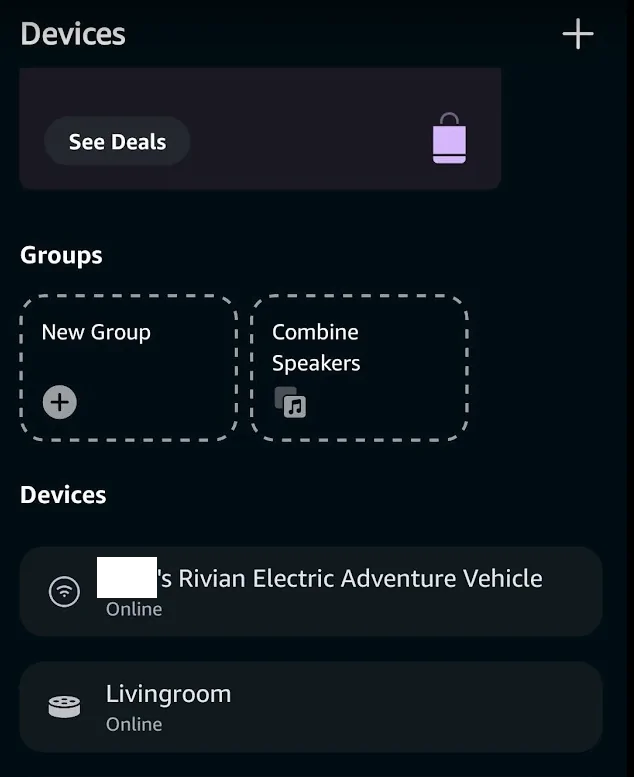
If the address is not listed (or correctly listed) at your profile and family, then click the LightBulb (Devices menu) at the bottom of the home screen and you should see all Alexa devices, one of those being your Rivian like this:

Rivian R1T R1S Hey Alexa, are you listening? 1730124274805-ko


You click your Rivian device and you should see information there such as "DEVICE LOCATION", change that device location to your new address.

That might do the trick also.
 

raylepper

Well-Known Member
Joined
Sep 20, 2023
Threads
8
Messages
173
Reaction score
255
Location
Midlothian, VA
Vehicles
2024 R1S, 2013 Grand Cherokee
Occupation
Random Maker
Clubs
 
OK, correct. Sign out of Alexa, then sign in again.
Sponsored


Top