Sponsored

How to Stop Navigation Map from Zooming In?

MS Seal Beach

Active Member
First Name
Mark
Joined
Apr 21, 2024
Threads
5
Messages
28
Reaction score
37
Location
Seal Beach
Vehicles
R1S
Occupation
retired
Clubs
 
2014 R1S. We're currently on a long road trip in WA, OR, and CA and are tired and annoyed at having to Zoom out on the map to see chargers or cities up ahead. The Zoom level of about 1 mile is worthless when you're touring. We were able to get a Zoom Out position once when on Satellite View and Zoomed way out (too far out).

Does anyone have a fix?
Sponsored


iforbes

Well-Known Member
First Name
Ian
Joined
Oct 24, 2022
Threads
9
Messages
515
Reaction score
883
Location
Connecticut
Vehicles
R1T
Occupation
APRN
Clubs
 
I think you can double tap or maybe double tap with two fingers. Something like that.

Edit: found it on Reddit

Tap with two fingers to zoom out
Double tap one finger to zoom in
 
Last edited:
OP
OP

MS Seal Beach

Active Member
First Name
Mark
Joined
Apr 21, 2024
Threads
5
Messages
28
Reaction score
37
Location
Seal Beach
Vehicles
R1S
Occupation
retired
Clubs
 
Finger tapping works for about 30 seconds and then the screen zooms back in. There's got to be a way to lock the screen at a zoom level you set...?
 

Olsonsolar

Well-Known Member
Joined
Mar 25, 2022
Threads
8
Messages
312
Reaction score
286
Location
Illinois
Vehicles
Chevy Volt - Limestone R1T delivered Nov. 2023
Occupation
enjoying life
Finger tapping works for about 30 seconds and then the screen zooms back in. There's got to be a way to lock the screen at a zoom level you set...?
That is one thing that bugs the heck out of me. I would love to be able zoom it in and out and have it stay.
 

HaveBlue

Well-Known Member
Joined
Nov 22, 2022
Threads
41
Messages
2,928
Reaction score
2,237
Location
91107
Vehicles
R1S DMP Max, Lifted GX470, APR Audi A7, BMW 325Ci
Clubs
 
I think if you are navigating it will zoom back in. I don't recall it doing that when not navigating but maybe.
When I tap with two fingers, I find I have to do it below the car arrow symbol where it shows the street name or I'll get the "recenter" prompt and it won't follow as I drive.
 

Sponsored

BrianNakata

Well-Known Member
First Name
Brian
Joined
May 2, 2022
Threads
6
Messages
94
Reaction score
154
Location
Sunriver, OR
Vehicles
2022 Rivian R1T, 2016 Shelby GT350
Occupation
Retired Software Engineering Manager
Yes, the auto zoom behavior is awful, particularly when you’re close to a turn and it’s zooming in and changing the “scale” of the map. I’ve missed turns several times because I thought it was further ahead judging by the map and then it zooms in and I’m right on top of the turn.
 

dleepnw

Well-Known Member
Joined
May 13, 2021
Threads
148
Messages
3,021
Reaction score
3,423
Location
WA
Vehicles
Rivian, Toyota, Lexus
Clubs
 
double tap on the map. it will reveal the +/- option. then you can select how much you want to zoom in/out. that should hold the zoom level, until you get close to a turn, then it zooms back in. maybe not ideal but i think that'll help.

if you simply pinch to zoom it won't hold
 

usulio

Well-Known Member
Joined
Jun 2, 2023
Threads
8
Messages
1,036
Reaction score
1,256
Location
CO
Vehicles
R1S
Clubs
 
double tap on the map. it will reveal the +/- option. then you can select how much you want to zoom in/out. that should hold the zoom level, until you get close to a turn, then it zooms back in. maybe not ideal but i think that'll help.

if you simply pinch to zoom it won't hold
No freaking way

I've been driving around complaining about the zoomed in map for over a year with no idea you could zoom out

the invisible UI element is certainly an ... innovative ... choice
 
OP
OP

MS Seal Beach

Active Member
First Name
Mark
Joined
Apr 21, 2024
Threads
5
Messages
28
Reaction score
37
Location
Seal Beach
Vehicles
R1S
Occupation
retired
Clubs
 
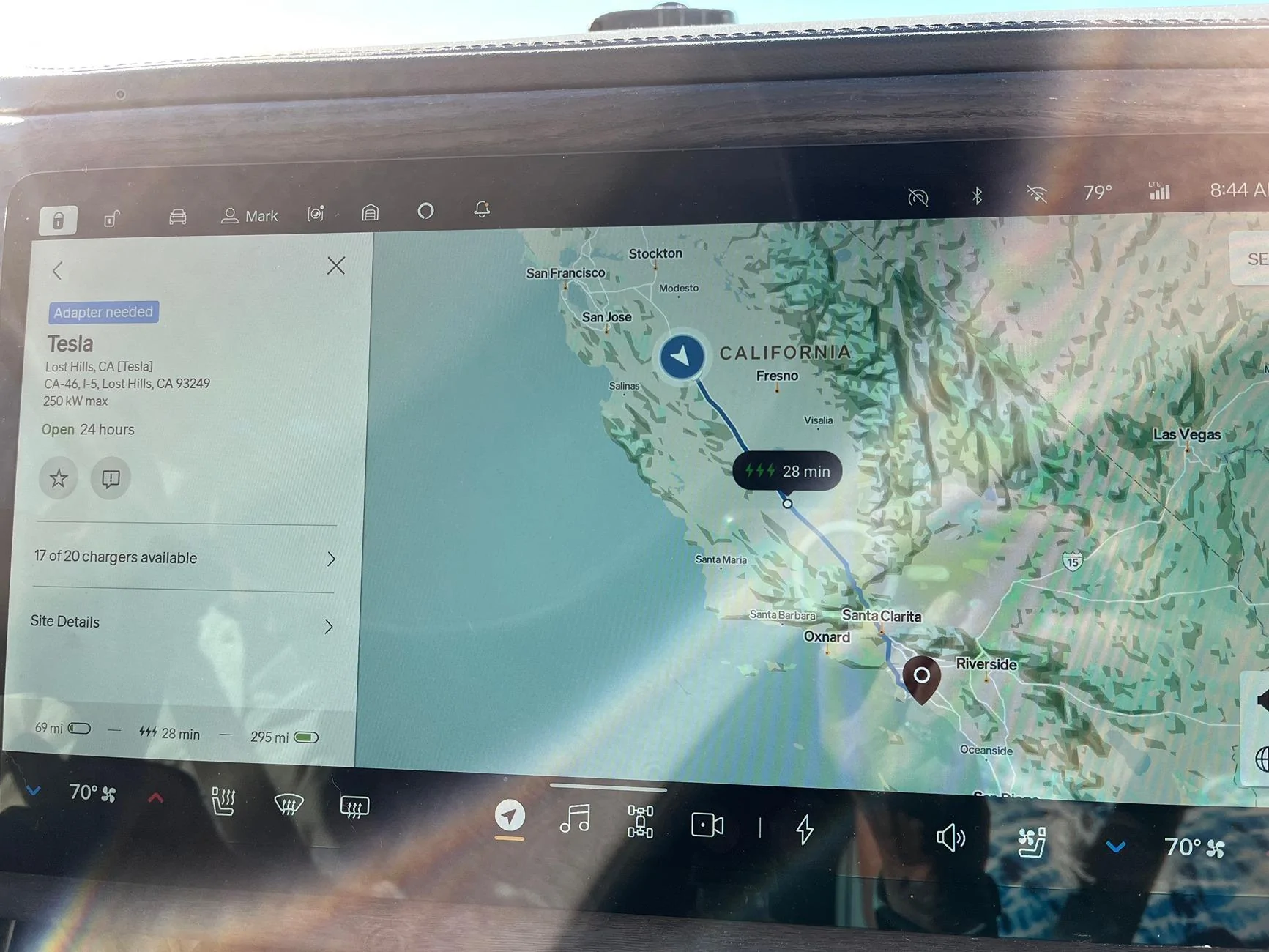
We found out on this trip that if you zoom out and then click on a desired charging location some distance away, the zoom-out will hold...most of the time. I don't believe that you even have to add the charging station. This gives you the ability to see upcoming charging stations and make a decision on where to stop without having to zoom out...again and again.
Rivian R1T R1S How to Stop Navigation Map from Zooming In? IMG_3139
Sponsored


Top