Sponsored

Key Fob Set Up after 2023.6.2 update

danen1973

Well-Known Member
First Name
Nenad
Joined
Jan 17, 2023
Threads
10
Messages
63
Reaction score
46
Location
Lakeland, TN
Vehicles
R1T
Clubs
 
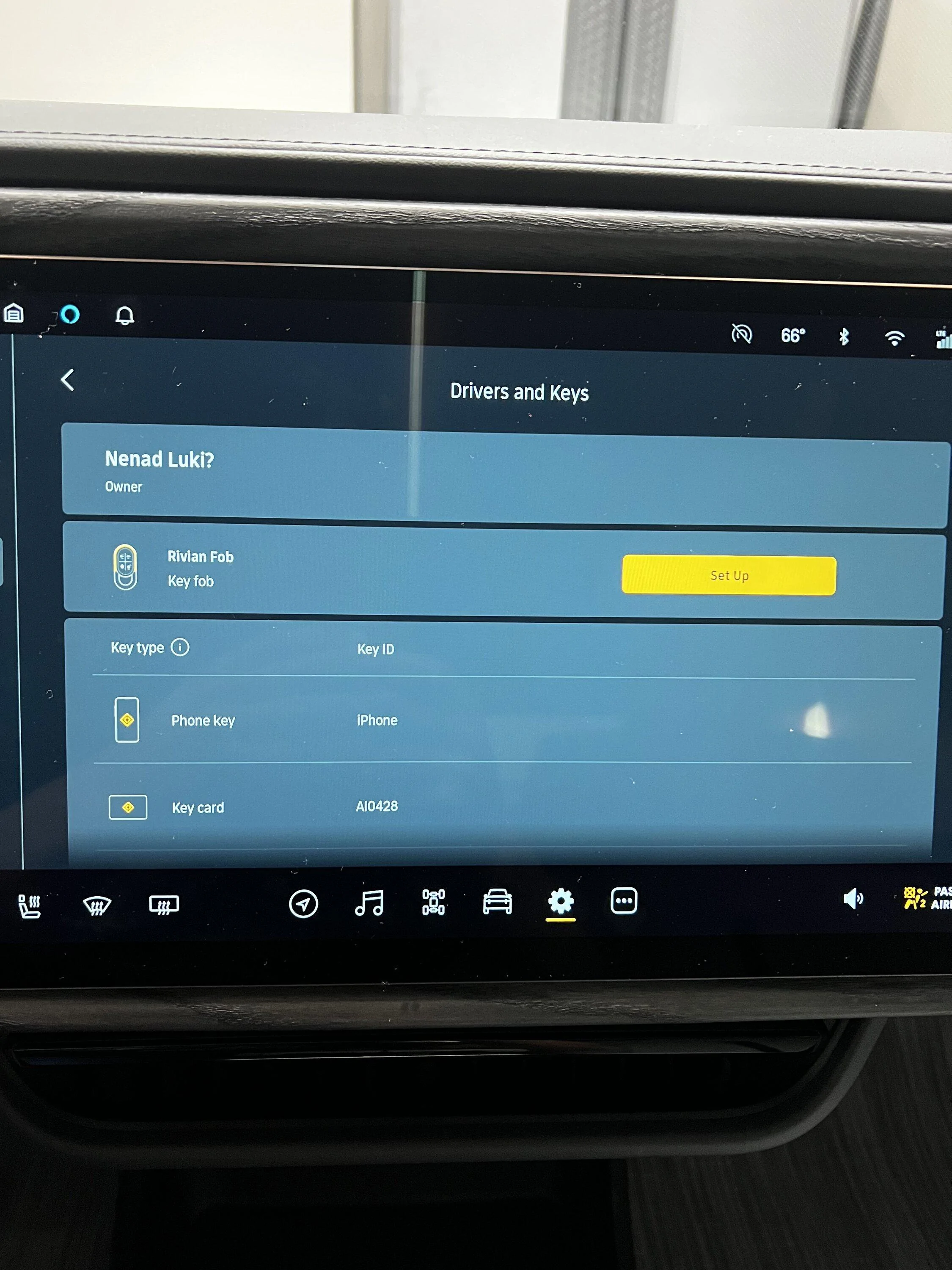
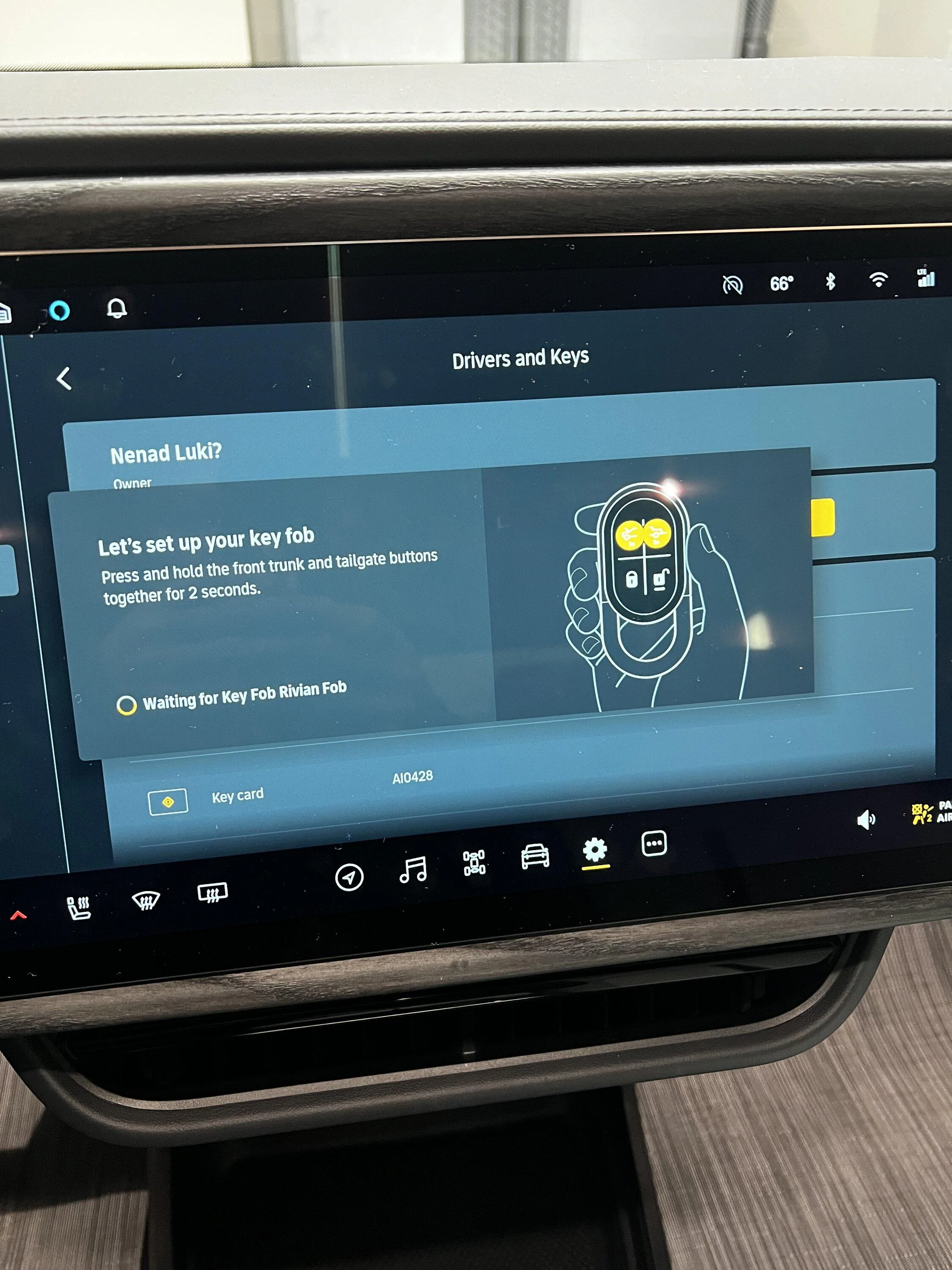
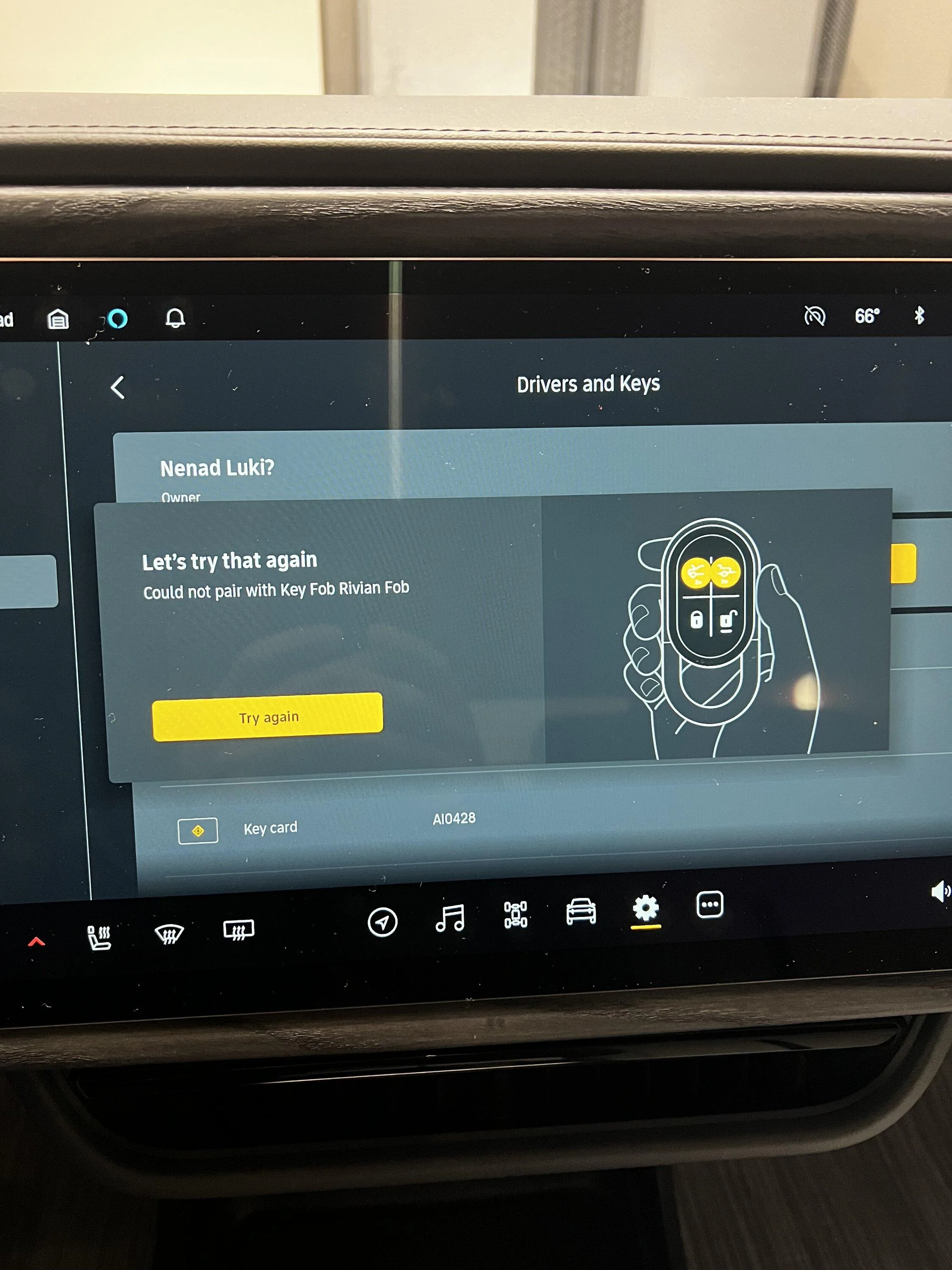
I recently updated my truck to version 2023.6.2. Everything went smoothly. I went to check out the proximity unlocking/locking using the Rivian Key Fob. It did not work. I made sure the setting in the infotainment is turned on and it is. The key works fine if I use the buttons to lock and unlock but it does not work when I approach/leave the vehicle. I looked under keys and noticed that key fob has "set up" next to it. See attached picture. I went through the process of setting it up, but I get an error at the end. I think the key fob need to be updated but I never received that notification, and I don't know if I can force the update. I called Rivian and they had me reset the truck. That did not help. They asked to be let the truck go to sleep (take out all the keys, shut down the app on my phone and turn off Gear Guard) and that they would call me back after an hour. I did not get a call back. Any ideas?
Rivian R1T R1S Key Fob Set Up after 2023.6.2 update IMG_0788
Rivian R1T R1S Key Fob Set Up after 2023.6.2 update IMG_0789
Rivian R1T R1S Key Fob Set Up after 2023.6.2 update IMG_0790
Sponsored

 
OP
OP
danen1973

danen1973

Well-Known Member
First Name
Nenad
Joined
Jan 17, 2023
Threads
10
Messages
63
Reaction score
46
Location
Lakeland, TN
Vehicles
R1T
Clubs
 
I’m having the same issue…
It magically started working. The "Set Up" under keys went away and the key fob now works. I'm not sure what was done. It's possible that Rivian did something remotely since I called them yesterday.
 

NY_Rob

Well-Known Member
First Name
Rob
Joined
Feb 9, 2022
Threads
23
Messages
5,460
Reaction score
8,065
Location
long island
Vehicles
Model 3 LR AWD, BMW i3 REX, 2024 Rubicon 4xe
Occupation
IT
I had the same issue... I kept moving the fob around the cab pressing the two buttons in each new location. I finally found a sweet spot that let the remote pair with the truck... I held the fob just a bit behind my head right up to the glass roof.. and boom! it finally paired.
 
OP
OP
danen1973

danen1973

Well-Known Member
First Name
Nenad
Joined
Jan 17, 2023
Threads
10
Messages
63
Reaction score
46
Location
Lakeland, TN
Vehicles
R1T
Clubs
 
I had the same issue... I kept moving the fob around the cab pressing the two buttons in each new location. I finally found a sweet spot that let the remote pair with the truck... I held the fob just a bit behind my head right up to the glass roof.. and boom! it finally paired.
Very nice. I tried that also but I don't think I tried that exact spot.
I think Rivian must have done something remotely because there use to be a special character ("?") in my last name. That looks to be fixed too. Not sure if that is what was causing the problem.
 

Sponsored

LeoH

Well-Known Member
First Name
Leo
Joined
Jun 12, 2020
Threads
4
Messages
371
Reaction score
441
Location
Illinois
Vehicles
RIVIAN R1S, Tesla S, MAzda CX-30, Toyota Sienna
Occupation
Software Engineering Director
If you have the phone proximity enabled, the FOB never works. I had to remove my phone, lock the car, then go out of the FOB proximity range, wait for the car to sleep, then walk to it and it will work.
 
OP
OP
danen1973

danen1973

Well-Known Member
First Name
Nenad
Joined
Jan 17, 2023
Threads
10
Messages
63
Reaction score
46
Location
Lakeland, TN
Vehicles
R1T
Clubs
 
If you have the phone proximity enabled, the FOB never works. I had to remove my phone, lock the car, then go out of the FOB proximity range, wait for the car to sleep, then walk to it and it will work.
I have both phone and FOB proximity enabled now. Key fob and phone seem to work ok now.
 

LeoH

Well-Known Member
First Name
Leo
Joined
Jun 12, 2020
Threads
4
Messages
371
Reaction score
441
Location
Illinois
Vehicles
RIVIAN R1S, Tesla S, MAzda CX-30, Toyota Sienna
Occupation
Software Engineering Director
I have both phone and FOB proximity enabled now. Key fob and phone seem to work ok now.
Yeah I enabled mine too afterwards. The phone has longer range, at least on mine, so essentially, if you just go out of the phone range, it will work. Either way, I disabled the phone unlock, it was annoying :)
 

NauticalSpiR1T

Active Member
First Name
Gerald
Joined
Jan 22, 2024
Threads
5
Messages
42
Reaction score
41
Location
Tampa, FL
Vehicles
2023 R1T DMP Max Pack
Occupation
Sales Engineer
I had to delete the keys from the app on the phone and then reset them up and it worked.
Sponsored


Top