Sponsored

Navigate to GPS coordinate?

StormyKnight

Member
First Name
Stormy
Joined
Feb 24, 2019
Threads
3
Messages
24
Reaction score
12
Location
Michigan
Vehicles
Volt / Silverado Hybrid
My youngest son, nephew and I are getting ready to participate in a 206mile mountain bike race in Michigan's Upper Peninsula. It is extremely rural and there is no race sponsored aid along the way. My wife is going to meet us a couple of times along the route in the Riv for resupply (and potentially rescue). She can't navigate to a specific store or address (there is nothing) so we were going to meet at GPS coordinates.

I tried entering some of the them in different formats yesterday into the Rivian nav and on the app and always just get the "Whoops" icon. The best work around I was able to find was to enter them into Google maps and then push them to the Rivian navigation. This would get her close but it is not the exact same location. It seems to want to end where it thinks the road ends.

What am I missing?

Thanks!
Sponsored
 

SteveInBend

Well-Known Member
First Name
Steve
Joined
Oct 21, 2020
Threads
26
Messages
570
Reaction score
996
Location
Bend, Oregon
Vehicles
2022 El Cap R1T
Occupation
Retired
Have you tried zooming in to the location on the center screen, locating where you want to meet, and doing a long press to that site? The Rivian should give you an option to route to that point.
 
OP
OP

StormyKnight

Member
First Name
Stormy
Joined
Feb 24, 2019
Threads
3
Messages
24
Reaction score
12
Location
Michigan
Vehicles
Volt / Silverado Hybrid
Thanks Steve. It might work. I had no idea I could even do that :)
 

SANZC02

Well-Known Member
First Name
Bob
Joined
Feb 11, 2021
Threads
50
Messages
7,427
Reaction score
12,719
Location
California
Vehicles
Tesla Model S, LE - R1S
Occupation
Retired
My youngest son, nephew and I are getting ready to participate in a 206mile mountain bike race in Michigan's Upper Peninsula. It is extremely rural and there is no race sponsored aid along the way. My wife is going to meet us a couple of times along the route in the Riv for resupply (and potentially rescue). She can't navigate to a specific store or address (there is nothing) so we were going to meet at GPS coordinates.

I tried entering some of the them in different formats yesterday into the Rivian nav and on the app and always just get the "Whoops" icon. The best work around I was able to find was to enter them into Google maps and then push them to the Rivian navigation. This would get her close but it is not the exact same location. It seems to want to end where it thinks the road ends.

What am I missing?

Thanks!
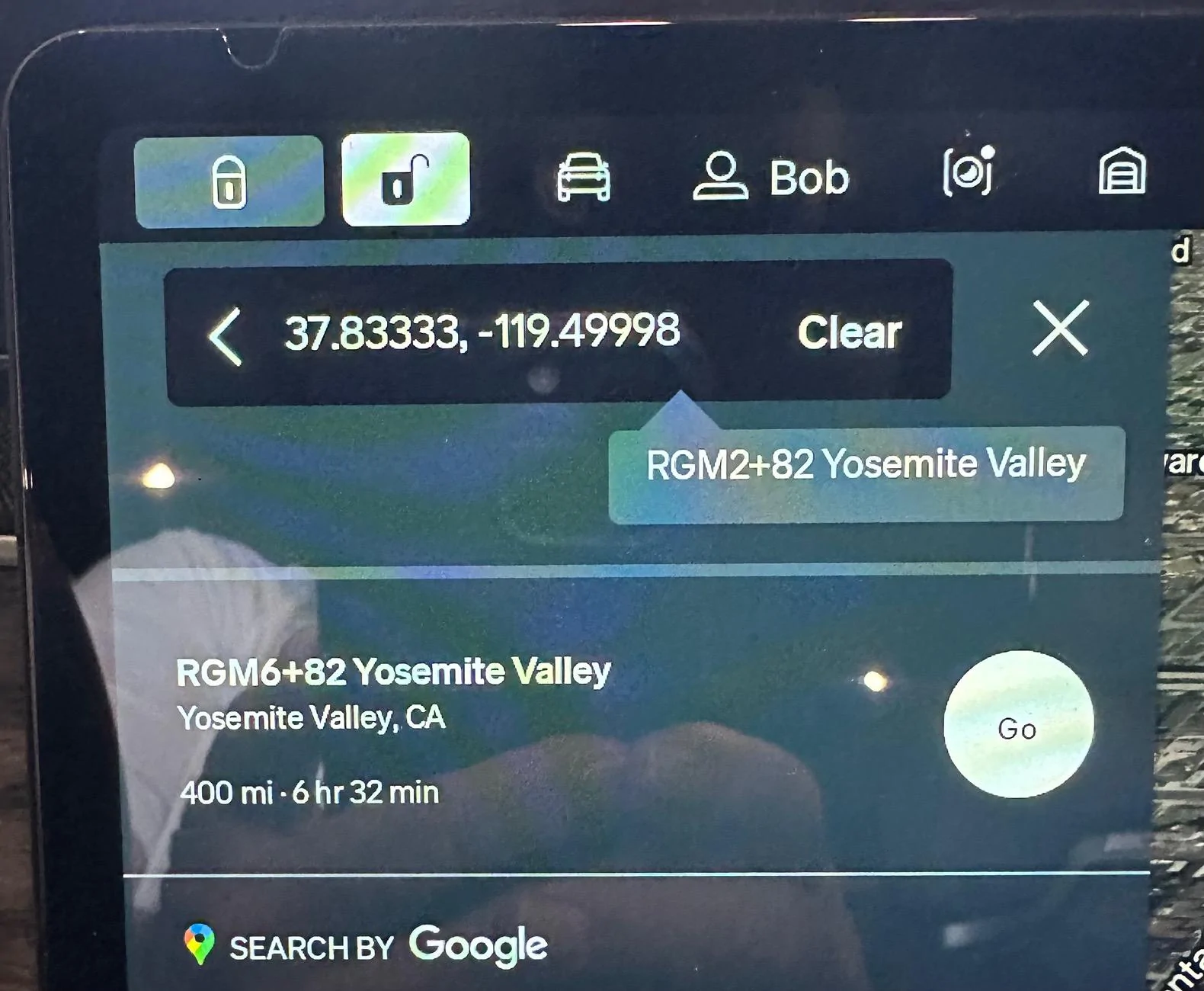
If you know the decimal representation you can just enter it in the search bar of the Rivian Navigation.

Here is an example:

Rivian R1T R1S Navigate to GPS coordinate? IMG_0861
 

SteveInBend

Well-Known Member
First Name
Steve
Joined
Oct 21, 2020
Threads
26
Messages
570
Reaction score
996
Location
Bend, Oregon
Vehicles
2022 El Cap R1T
Occupation
Retired
If you know the decimal representation you can just enter it in the search bar of the Rivian Navigation.

Here is an example:

IMG_0861.jpeg
What I find strange is that Rivian shows the Plus Code for the lat/long, but it doesn't let you enter a Plus Code when searching for a destination.
 
OP
OP

StormyKnight

Member
First Name
Stormy
Joined
Feb 24, 2019
Threads
3
Messages
24
Reaction score
12
Location
Michigan
Vehicles
Volt / Silverado Hybrid
Thanks Bob. I was using Degrees Decimal Minutes because that's how the race and my two Garmins are now formatted. I converted everything to Decimal Degrees and it works perfectly. Crazy to think how easy life could be with uniform standards :rolleyes:. I appreciate the help.
Sponsored


Top